By Owen Palmer
Updated November 2026
A usb c hub with dp alt mode lets a single USB-C port carry a DisplayPort video signal alongside data and, often, power. That matters because a laptop with only one or two USB-C ports can suddenly drive external monitors, connect a keyboard and storage, and charge at the same time. The catch is that DP Alt Mode support varies a lot between hubs, and the marketing does not always say how many displays, what resolution or what refresh rate you actually get. This guide narrows the field to four picks and explains the criteria behind them: DisplayPort Alt Mode support, video resolution and refresh rate, power delivery wattage, port mix, and build quality.
Our top picks at a glance
- 1
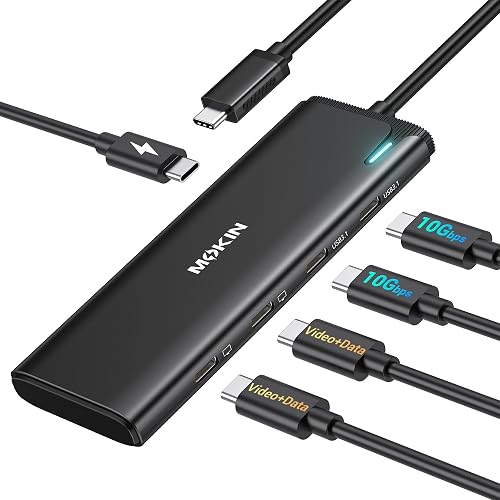 TOP CHOICEBest overallMOKiN USB C Hub Multiport Adapter Video OutputView on Amazon
- 2
 Best for dual 4K monitorsSelore 10Gbps USB C Hub with 4K@60Hz Video DisplayView on Amazon
- 3
 Best for USB4 laptopsMOKiN Type C Hub with 100W PD ChargingView on Amazon
- 4
 Best for dual-monitor desk docksAnker USB C Hub Smart Display HubView on Amazon
Our Top Picks
Quick Comparison
| Product | Best for | Key feature |
|---|---|---|
| MOKiN USB C Hub Multiport Adapter Video Output | Balanced everyday use with a portable monitor | DP Alt Mode video output with 100W PD pass-through |
| Selore 10Gbps USB C Hub with 4K@60Hz Video Display | Single 4K display plus accessories | 4K@60Hz video output over DP Alt Mode |
| MOKiN Type C Hub with 100W PD Charging | USB4 laptops and Thunderbolt-class ports | USB4 DisplayPort multiport design |
| Anker USB C Hub Smart Display Hub | Dual-monitor desk setups | Dual display output with HDMI and DP |
MOKiN USB C Hub Multiport Adapter Video Output
USB C Hub Multiport Adapter Video Output,10Gbps USB3.1 Data Transfer, 100W PD for Portable Monitor and More Type-C Devices MOKiN USB C Splitter for Dual Monitors 4K@60Hz DP Alt Mode (Black)
Best for: Balanced everyday use with a portable monitor
This hub suits someone who wants a compact dock that handles video, data and charging from a single laptop port. Its name points to dual-monitor splitting and DP Alt Mode, so it is a reasonable fit for users running a portable display alongside their main screen.
Key specs
- DisplayPort Alt Mode video output
- USB 3.1 data transfer
- 100W Power Delivery pass-through charging
Pros
- Combines video, data and charging in one compact body
- Useful for portable monitor setups
- Covers the common USB-C-to-HDMI and USB-A needs of a desk
Cons
- Multi-monitor performance depends heavily on the source laptop’s DP Alt Mode implementation
- Owners often report that resolution and refresh rate ceilings are lower than the headline numbers suggest
Bottom line: A sensible first hub for a single external display and basic accessories, especially with a portable monitor.
Selore 10Gbps USB C Hub with 4K@60Hz Video Display
10Gbps USB C Hub with 4K@60Hz Video Display, Selore 5 Ports USB-C Splitter, C Port Data Transfer, 100W PD-in Charging, Dongle Multiport Adapter for MacBook Pro, iPad, Dell, HP, and More
Best for: Single 4K display plus accessories
This model targets people who want a clean 4K picture from one port and still need USB-A ports and fast data for drives or a card reader. It fits a laptop desk where one good monitor is the main priority.
Key specs
- 4K at 60Hz video output
- 10Gbps USB data transfer
- 100W PD-in charging
Pros
- 4K@60Hz is the target resolution for most desk monitors
- 10Gbps data speeds suit external SSDs
- Pass-through charging keeps the laptop powered
Cons
- 4K@60Hz generally requires a laptop port that supports DP Alt Mode at HBR3 speeds
- Owners often report needing to verify cable quality to reach full bandwidth
Bottom line: The right pick for one 4K monitor and a daily mix of accessories, provided your laptop port supports the full DP Alt Mode.
MOKiN Type C Hub with 100W PD Charging
Type C Hub with 100W PD Charging,3*10Gbps Data Transfer,USB4 DisplayPort Multiport Dongle for MacBook Pro and Type-C Devices USB C Hub 10Gbps,MOKiN USB C Splitter with 4K@60Hz Video Output for MacBook
Best for: USB4 laptops and Thunderbolt-class ports
This hub is aimed at users with a USB4 or Thunderbolt-class laptop who want DisplayPort output, several 10Gbps data ports and 100W charging in one dongle. It suits a travel setup or a compact desk that has to handle a lot of connections.
Key specs
- USB4 DisplayPort multiport design
- Three 10Gbps data transfer ports
- 4K@60Hz video output
- 100W PD charging
Pros
- Three 10Gbps ports cover several peripherals at once
- USB4 DisplayPort compatibility suits modern laptops
- Charging and video share one connection
Cons
- Full USB4 performance only applies when the host laptop is also USB4 or Thunderbolt
- Owners often report the body runs warm under sustained 100W charging
Bottom line: The best fit for a USB4 laptop owner who wants several 10Gbps ports and 4K video from a single dongle.
Anker USB C Hub Smart Display Hub
Desktop USBC Hub,Dual displays for Windows/Single display for Mac, Dual 2K@240Hz, HDMI+DP,Ethernet,2.3ft Built-in Cable,Grey Anker USB C Hub, Smart Display Hub, Docking Station Dual Monitor,No Charger
Best for: Dual-monitor desk setups
This dock is built for a permanent desk with two external screens. It combines HDMI and DisplayPort outputs, Ethernet and a built-in cable, so it works well as a docking station rather than a travel dongle. Note that it ships without a charger.
Key specs
- Dual display output (HDMI and DP)
- Ethernet port
- Built-in 2.3 ft cable
- No charger included
Pros
- Supports dual-monitor output for desk use
- Built-in Ethernet suits wired networking
- Built-in cable reduces clutter on the desk
Cons
- No charger is included, so a separate power adapter is required
- Dual-display behavior differs between Windows and Mac, as the listing name indicates
Bottom line: The strongest choice for a stationary desk with two monitors and wired networking, as long as you supply your own charger.
Buying Guide
DisplayPort Alt Mode Support
DP Alt Mode lets a USB-C port carry a native DisplayPort signal. Not every USB-C port supports it, so check your laptop’s specifications before buying. A hub cannot add DP Alt Mode to a port that lacks it.
Good picks for this: MOKiN USB C Hub Multiport Adapter Video Output, Selore 10Gbps USB C Hub with 4K@60Hz Video Display
Maximum Resolution and Refresh Rate
Look for the exact video specification, such as 4K at 60Hz. Lower refresh rates or resolutions often reflect limits in the DP lane count or the source port. Owners often report that headline numbers depend on the laptop’s output as well as the hub.
Good picks for this: Selore 10Gbps USB C Hub with 4K@60Hz Video Display, MOKiN Type C Hub with 100W PD Charging
Power Delivery Wattage
Pass-through charging is usually rated in watts. Check that the hub’s rating matches or exceeds your laptop’s charger wattage. A lower-rated hub may charge slowly or not at all under load.
Good picks for this: MOKiN USB C Hub Multiport Adapter Video Output, MOKiN Type C Hub with 100W PD Charging
USB4 and Thunderbolt Compatibility
USB4 and Thunderbolt ports support higher bandwidth than standard USB-C. Check whether your laptop port is USB4 or Thunderbolt-class before paying for those features, since a standard port will limit the hub’s speeds.
Good picks for this: MOKiN Type C Hub with 100W PD Charging, Anker USB C Hub Smart Display Hub
Port Mix and Accessory Needs
Count the devices you use daily: external drives, keyboard, card reader, Ethernet, and displays. Match the hub’s USB-A, USB-C, HDMI, DP and Ethernet ports to that list rather than buying extra ports you will never use.
Good picks for this: Anker USB C Hub Smart Display Hub, Selore 10Gbps USB C Hub with 4K@60Hz Video Display
Build Quality and Heat
Aluminum or metal housings dissipate heat better than thin plastic. Hubs that run 100W charging often get warm, so give them airflow and avoid stacking them under other devices.
Good picks for this: MOKiN Type C Hub with 100W PD Charging, Anker USB C Hub Smart Display Hub
Cable Quality
The cable between hub and laptop affects bandwidth. A cable that is not rated for the required speed can cap a 4K signal at a lower refresh rate. Use the cable supplied with the hub when possible, and keep your cable choices consistent.
Good picks for this: Selore 10Gbps USB C Hub with 4K@60Hz Video Display, Anker USB C Hub Smart Display Hub
FAQ
What does DP Alt Mode mean on a USB-C hub?
DP Alt Mode, short for DisplayPort Alternate Mode, lets a USB-C connector carry a native DisplayPort video signal. A hub with DP Alt Mode can drive external monitors directly from a single USB-C port on your laptop.
How do I know if my laptop supports DP Alt Mode?
Check the laptop manufacturer’s port specifications. Ports that are labeled Thunderbolt or USB4 generally support DP Alt Mode. Some standard USB-C ports support it too, but not all do, so verify before buying.
Will a hub with DP Alt Mode charge my laptop?
Many do, through Power Delivery pass-through. Confirm the wattage rating on the hub and make sure it matches or exceeds your laptop charger’s output.
Can one USB-C hub drive two monitors?
Some can, depending on the laptop’s port and the hub’s design. Dual-display hubs such as the Anker USB C Hub Smart Display Hub are built for this, but results vary by operating system and port capability.
Why is my 4K monitor stuck at 30Hz?
This often happens when the cable, port or hub cannot provide enough DisplayPort bandwidth for 4K at 60Hz. Replace the cable, try another port on the laptop, and confirm the hub’s output rating.
Is USB4 required for DP Alt Mode?
No. DP Alt Mode works over standard USB-C on many devices. USB4 and Thunderbolt provide higher bandwidth, which matters for multiple displays or high resolutions.
Conclusion
For a single external display and everyday accessories, the MOKiN USB C Hub Multiport Adapter Video Output is a sensible starting point. For a single 4K monitor with fast data ports, the Selore 10Gbps USB C Hub with 4K@60Hz Video Display fits well. For a USB4 laptop that needs several 10Gbps ports and 100W charging, the MOKiN Type C Hub with 100W PD Charging is the strongest match. For a permanent desk with two monitors and wired networking, the Anker USB C Hub Smart Display Hub suits that layout best. Always verify your laptop’s DP Alt Mode support before you buy.
If you are still unsure which hub fits your setup, our guides on choosing a USB-C hub for Mac and USB-C hub vs docking station explain the trade-offs in more depth. Our article on Why a USB-C Cable or Port Doesn’t Work: Charge-Only Cables, Alt Mode and E-Marked Cables is also worth reading if your display does not appear as expected.
Sources
- Official USB specifications, including USB-C, USB4 and Power Delivery standards
- DisplayPort standard information and the DisplayPort Alt Mode specification
- Guidance on electronics and power efficiency for home and office use (energy.gov)
Related reading
- Wirecutter USB C Hub: 5 Best Picks Compared (2026)
- Usb-c Hub for Steam Deck: What to Buy, What to Avoid, and Why
- Usb C Hub for Chromecast: Does It Work and Which Setup to Use?
- Ugreen USB C Hub: How to Choose, Connect and Fix Common Problems (2026)
- USB-C Hub with Ethernet Port: How to Choose and Set One Up
- USB-C Hub vs Docking Station (2026): Which Is Better for Your Setup?
- USB-C Hub for Mac: How to Choose and Connect One (Step-by-Step)
About Owen Palmer
Owen Palmer is part of our editorial team and reviews and edits our consumer tech how-to & troubleshooting guides, checking product details against manufacturer specifications and owner feedback.