

Menu

We research products independently. Some links on Gadget Sleuth are affiliate links. If you buy through them, we may earn a commission at no extra cost to you. As an Amazon Associate I earn from qualifying purchases. Learn more ›

Troubleshooting

Fixing Bluetooth, Wi-Fi, charging and USB-C problems.

11 articles
8 Best Mesh Wi-Fi Systems

8 Best Mesh Wi-Fi Systems

We compared eight mesh Wi-Fi systems using Amazon listings and manufacturer specs, with no hands-on testing. See which suits multi-gig internet, guided setup or parental controls.

Gadget Sleuth Editors Nov 1, 2026
13 Best Power Conditioners

13 Best Power Conditioners

We compared manufacturer specs for 13 power conditioners to find the best options for protecting and cleaning power for audio, video, and studio equipment.

Gadget Sleuth Editors Oct 31, 2026
Best Bluetooth Transmitters

Best Bluetooth Transmitters

We selected Bluetooth transmitters based on manufacturer specs for features like dual pairing, battery life, and whether they work as transmitters or receivers.

Gadget Sleuth Editors Oct 31, 2026
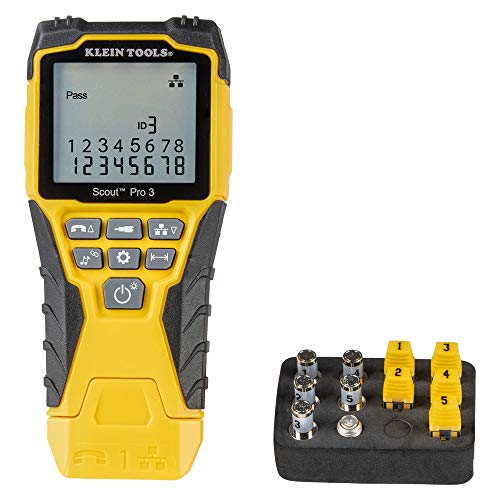
17 Best Cable Testers

17 Best Cable Testers

We compared manufacturer listings for 17 cable testers to find the best options for troubleshooting network, fiber, and audio/video cables, from basic continuity to professional multi-function tools.

Gadget Sleuth Editors Oct 31, 2026

Technology is supposed to make life easier, but when a device won't connect, charge, or talk to another gadget, it can feel like anything but. This troubleshooting section is your first stop for solving those common, everyday tech frustrations. We cut through the jargon to provide clear, step-by-step guidance for getting your gadgets working again.

Whether you're trying to pair headphones, fix a spotty Wi-Fi signal, figure out why a cable won't charge, or understand why two USB-C ports aren't compatible, we've got you covered. Our advice is based on widely accepted standards and practical fixes that work for most people.

What you'll find here

  • Step-by-step guides for restarting connections and resetting devices.
  • Explanations of why common problems happen, from interference to outdated software.
  • Clear breakdowns of technical standards so you know what to look for.
  • Links to our main Tech Guides hub for broader context.
  • A comprehensive walkthrough in our article, How to Fix Bluetooth, Wi-Fi, Charging and USB-C Problems.
  • Tips on when a problem might need professional help or a hardware replacement.