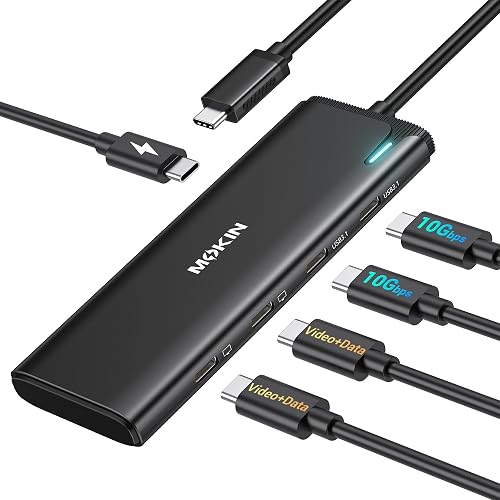
By Owen Palmer
Updated November 2026
Shopping for a usb hub type c 3.0 usually means balancing a handful of things at once: how many ports you need, whether a hub has to charge your laptop, how fast the data side runs, and whether your desk has room for a brick-sized dongle. The five picks below were chosen by comparing manufacturer specifications, brand reputation and the kinds of feedback owners commonly post about port reliability, heat and charging behavior. It is a research-based shortlist meant to help you match a hub to your setup.
Our top picks at a glance
- 1
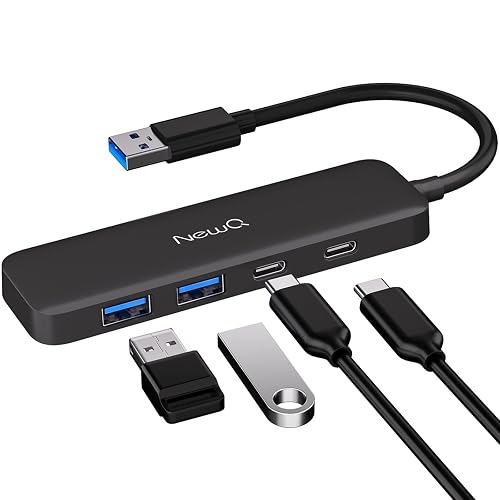 TOP CHOICEBest overallDual USB C USB A 3.0 HubView on Amazon
- 2
 TOP CHOICEBest for high-speed desksBelkin 100W 10Gbps Multiport USB-C Hub AdapterView on Amazon
- 3
 TOP CHOICEBest for large peripheral setupsRSHTECH 10-Port Powered USB 3.2/USB C Data Hub SplitterView on Amazon
- 4
 Best for external displaysAcer USB C Hub 4K HDMI SplitterView on Amazon
- 5
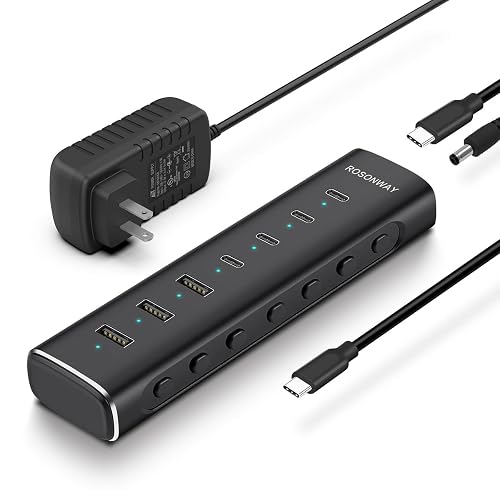 Best budget pickRSHTECH 7 Port Powered USB 3.2/USB C HubView on Amazon
Our Top Picks
Quick Comparison
| Product | Best for | Key feature |
|---|---|---|
| Dual USB C USB A 3.0 Hub | Everyday laptop ports | Two USB-C and two USB-A 3.0 ports in a slim body |
| Belkin 100W 10Gbps Multiport USB-C Hub Adapter | Laptops that need charging while connected | 100W power delivery passthrough with 10Gbps data |
| RSHTECH 10-Port Powered USB 3.2/USB C Data Hub Splitter | Large desks with many peripherals | 10 ports with external power and touch switches |
| Acer USB C Hub 4K HDMI Splitter | Laptop users driving an external monitor | 4K HDMI output with SD/TF card reader |
| RSHTECH 7 Port Powered USB 3.2/USB C Hub | Compact powered setups | Seven ports with 36W power adapter included |
Dual USB C USB A 3.0 Hub
Dual USB C USB A 3.0 Hub: USB Hub 4 Ports with 2* USB-C 3.0 and 2* USB-A 3.0, Ultra Slim Portable USB Splitter Adapter for Laptop, PS4, Flash Drive, HDD, Xbox, Printer, Mouse, Keyboard, Computer
Best for: Everyday laptop ports
This is a good fit for someone who wants a usb hub type c 3.0 that covers the basics without a bulky footprint. It suits students, remote workers and anyone adding a flash drive, mouse, keyboard and printer to a single laptop.
Key specs
- 4 ports total: 2 × USB-C 3.0 and 2 × USB-A 3.0
- Ultra slim, portable form factor
- Bus-powered, no external adapter required
Pros
- Compact enough to travel with
- Covers common peripheral types in one device
- No separate power brick to manage
Cons
- Bus power limits how much current external drives can draw
- Not a charging hub, so it will not power your laptop
Bottom line: A strong default if you want simple, portable expansion and do not need power passthrough.
Belkin 100W 10Gbps Multiport USB-C Hub Adapter
USB-C 3.2 Gen 2, 4 USB-C Ports, MacBook, USB-C Splitter, Dongle, 100W Power Delivery, High-speed Data Transfer Belkin 100W 10Gbps Multiport USB-C Hub Adapter for Laptop, iPad, PC, & More
Best for: Laptops that need charging while connected
This suits users who want one cable to deliver power, display and data. It is aimed at laptop and iPad users who keep a desk setup and want to avoid juggling separate chargers.
Key specs
- USB-C 3.2 Gen 2 data up to 10Gbps
- 100W Power Delivery passthrough
- Four USB-C ports for connection
Pros
- Power passthrough keeps the laptop charged while in use
- Fast data rate suits external SSDs
- Single-cable desk setup
Cons
- Delivered wattage depends on the charger and laptop supporting the same profile
- Can run warm under sustained heavy load, which owners often mention
Bottom line: Best for users who want charging and fast data through one connection.
RSHTECH 10-Port Powered USB 3.2/USB C Data Hub Splitter
USB Extender Hub with 3 x 10Gbps USB 3.2 (2C+1A), 7 x USB 3.0 Ports (4C+3A), 3.3ft USB-A/C Cable, Touch Switches for Laptop RSHTECH 10-Port Powered USB 3.2/USB C Data Hub Splitter 60W, RSH-ST10C-6
Best for: Large desks with many peripherals
This is for people running a full workstation with multiple drives, keyboards, cameras and accessories. The external power supply matters here, because a 10-port hub drawing everything from the laptop would quickly run into limits.
Key specs
- 10 ports total, including 3 × 10Gbps USB 3.2 and 7 × USB 3.0 ports
- 60W external power input
- 3.3 ft cable with touch switches
Pros
- Wide port count for crowded desks
- External power supports bus-hungry devices
- Mix of USB-A and USB-C connections
Cons
- Larger footprint than travel hubs
- Needs an outlet nearby
Bottom line: The right choice when port count matters more than portability.
Acer USB C Hub 4K HDMI Splitter
4K USB C to HDMI Splitter Hub, 100W Max PD Port, 2 USB 3.0 & 1 USB C Data Ports 5Gbps, SD/TF Card Reader Acer USB C Hub, 7 in 1 Multi-Port Adapter for Laptop/Mac Type C Devices
Best for: Laptop users driving an external monitor
This suits a laptop user who wants video output, USB data and a card reader in one unit. It fits a home office where the laptop connects to a monitor each day.
Key specs
- 4K HDMI output
- 100W maximum PD input port
- 2 × USB 3.0 and 1 × USB-C data ports at 5Gbps, plus SD/TF card reader
Pros
- HDMI and card reader cover common desk needs
- Power delivery port keeps the laptop topped up
- Seven functions in one compact unit
Cons
- Data ports top out at 5Gbps, slower than 10Gbps hubs
- Actual 4K refresh depends on the monitor and cable
Bottom line: A practical pick for display-focused setups where 4K output matters more than top data speed.
RSHTECH 7 Port Powered USB 3.2/USB C Hub
7 Ports Powered USB 3.2/USB C Hub 10Gbps with 4 USB-C 3.2, 3 USB-A 3.2 Ports, 3.3ft Cable and 36W(12V/3A) Power Adapter, Aluminum USB Splitter for Laptop, RSH-H7C4
Best for: Compact powered setups
This is a middle-ground option for users who want external power and a healthy port count without the full 10-port footprint. It suits a home desk with a few drives and peripherals.
Key specs
- 7 ports including 4 × USB-C 3.2 and 3 × USB-A 3.2
- 10Gbps data rate
- 36W (12V/3A) power adapter and 3.3 ft cable included
Pros
- External power supply for reliable peripheral charging
- Aluminum body helps with heat dissipation
- Smaller than 10-port designs
Cons
- Requires a wall outlet
- 36W power budget is modest for multiple high-draw devices
Bottom line: A sensible choice for a fixed desk that needs more ports than a basic hub without the bulk of a 10-port unit.
Buying Guide
Port Types and Count
Count every device you plug in daily, then add one or two spare ports. Note whether each device needs USB-A or USB-C. A usb hub type c 3.0 with both types avoids adapters, which can add failure points.
Good picks for this: Dual USB C USB A 3.0 Hub, RSHTECH 7 Port Powered USB 3.2/USB C Hub
Data Speed: 5Gbps vs 10Gbps
USB 3.0 (also called USB 3.2 Gen 1) is rated at 5Gbps. USB 3.2 Gen 2 is rated at 10Gbps. For external SSDs and large file transfers, the 10Gbps rating makes a noticeable difference. For keyboards, mice and flash drives, 5Gbps is usually plenty.
Good picks for this: Belkin 100W 10Gbps Multiport USB-C Hub Adapter, RSHTECH 10-Port Powered USB 3.2/USB C Data Hub Splitter
Power Delivery and Charging Passthrough
If your hub has a PD port, check the wattage in the listing. Laptops commonly need 60W to 100W, and the charger must support the same profile. Confirm the hub’s maximum input before assuming your laptop will charge at full speed.
Good picks for this: Belkin 100W 10Gbps Multiport USB-C Hub Adapter, Acer USB C Hub 4K HDMI Splitter
External Power vs Bus Power
Bus-powered hubs draw everything from the laptop, which limits how much current external drives and cameras can use. Powered hubs with their own adapter handle heavier loads more reliably. If you connect spinning hard drives, a powered hub is the safer choice.
Good picks for this: RSHTECH 10-Port Powered USB 3.2/USB C Data Hub Splitter, RSHTECH 7 Port Powered USB 3.2/USB C Hub
Video Output
If you need a monitor connection, look for HDMI and confirm the maximum resolution and refresh rate. Remember that the monitor, cable and laptop graphics support all affect the final result, not the hub alone.
Good picks for this: Acer USB C Hub 4K HDMI Splitter
Size and Portability
Measure your desk space and think about where the hub will live. Slim hubs suit bags and travel. Larger powered units need a fixed spot near an outlet and room for the cable.
Good picks for this: Dual USB C USB A 3.0 Hub, RSHTECH 7 Port Powered USB 3.2/USB C Hub
Build Quality and Heat
Aluminum housings generally dissipate heat better than plastic. Hubs running at high data rates or delivering power can get warm, which is normal, but unusually hot units deserve attention. Owners often note that cable quality also affects stability.
Good picks for this: RSHTECH 7 Port Powered USB 3.2/USB C Hub, Belkin 100W 10Gbps Multiport USB-C Hub Adapter
FAQ
What does usb hub type c 3.0 actually mean?
It refers to a hub with USB-C connectors that supports USB 3.0 or higher data transfer. The USB-C shape is the plug; the 3.0 label refers to the data standard, which is rated at 5Gbps for USB 3.0 and faster for later versions.
Will a usb hub type c 3.0 charge my laptop?
Only if it has a Power Delivery port and the wattage matches your laptop’s charger requirements. Many hubs do not pass power through at all, so check the specifications before buying.
Can I use a USB-A device on a USB-C hub?
Yes. Most multiport hubs include USB-A ports for older devices. Check that the hub lists USB-A ports if you need them.
Do I need a powered hub?
If you connect external hard drives, webcams or several high-draw devices, a powered hub is generally more reliable. For keyboards, mice and flash drives, bus power is usually enough.
Why is my hub slower than advertised?
Common causes include the device being plugged into a USB 2.0 port, a low-quality cable, or the host computer’s port limiting speed. Test each device directly on the computer to isolate the cause.
Is a 10Gbps hub worth it over a 5Gbps hub?
If you regularly move large files to external SSDs, yes. For mostly input devices and light storage, a 5Gbps hub is typically sufficient.
Conclusion
For most people, the Dual USB C USB A 3.0 Hub covers everyday needs in a slim package. If you need charging through the hub, the Belkin 100W 10Gbps Multiport USB-C Hub Adapter is the most direct option. Large desks with many devices suit the RSHTECH 10-Port Powered USB 3.2/USB C Data Hub Splitter, while the Acer USB C Hub 4K HDMI Splitter fits display-focused setups. The RSHTECH 7 Port Powered USB 3.2/USB C Hub is a practical middle ground for a fixed desk. Match the port count, power and data speed to what you actually connect, and the right usb hub type c 3.0 becomes easy to pick.
Sources
- Official USB specifications, including data rates and connector standards for USB 3.x and USB-C
- General guidance on electronics power use and efficient equipment choices (energy.gov)
Related reading
- USB Type C Hub with HDMI: How to Choose and Connect One (Step-by-Step)
- USB Hub USB Type C: USB-A Hub vs USB-C Hub (2026): Which Should You Choose?
- 5 Best Usb Type C Hub Baseus Models for Multi-Device Setups (2026)
- 5 Best USB Type C OTG Hubs Compared (2026)
- 5 Best Powered USB Hub Type-C Picks for Multi-Device Desks (2026)
- 4 Best Macbook USB Type C Hub Picks for Every Setup (2026)
- Wirecutter USB C Hub: 5 Best Picks Compared (2026)
About Owen Palmer
Owen Palmer is part of our editorial team and reviews and edits our consumer tech how-to & troubleshooting guides, checking product details against manufacturer specifications and owner feedback.