By Owen Palmer
Updated November 2026
If you are looking at an anker powerexpand 8-in-1 usb-c hub, you probably want one hub that handles your monitor, storage, wired internet and charging without forcing you to juggle adapters. This guide narrows the field to four strong 8-port USB-C hubs. Selection criteria: video output (number and resolution of displays), power delivery wattage for charging a laptop, port mix (USB-A, USB-C, HDMI, Ethernet, card readers), compatibility with macOS and Windows, and owner feedback patterns about heat and reliability.
Our top picks at a glance
- 1
 TOP CHOICEBest overallDesktop USBC Hub,Dual displays for Windows/Single display for Mac, DuaView on Amazon
- 2
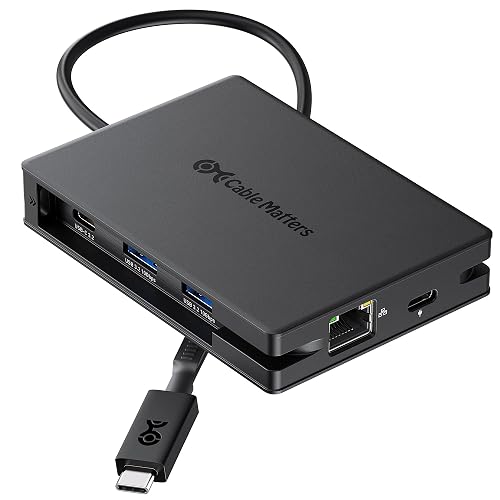 Best for dual monitorsCable Matters2x 4K@60Hz HDMI, 10Gbps Data, 2x USB-C and USB-A 3.2, OneView on Amazon
- 3
 Best for laptop chargingUSB hub, 100W Charging, USB 4, USB 3.2 Gen 2, SD/Micro Card Reader, foView on Amazon
- 4
 Best budget pick4K USB C to HDMI Splitter Hub, 100W Max PD Port, 2 USB 3.0 & 1 USB C DView on Amazon
Our Top Picks
Quick Comparison
| Product | Best for | Key feature |
|---|---|---|
| AnkerDesktop USBC Hub | Dual displays on Windows, single display on Mac | Dual 2K@240Hz output with HDMI and DisplayPort |
| Acer 4K USB C to HDMI Splitter Hub | Shoppers who want a capable hub at a budget-friendly tier | 100W max PD pass-through and SD/TF card reader |
| Cable Matters 8-in-1 USB C Hub | Mac users needing two HDMI outputs | Dual 4K@60Hz HDMI with 140W charging |
| Satechi 7-in-1 USB-C Hub Pro Slim | Compact laptop setups needing strong charging | 100W charging with USB4 and 4K HDMI |
AnkerDesktop USBC Hub,Dual displays for Windows/Single display for Mac, Dual 2K@240Hz, HDMI+DP,Ethernet,2.3ft Built-in Cable,Grey USB C Hub, Smart Display Hub, Docking Station Dual Monitor,No Charger
Desktop USBC Hub,Dual displays for Windows/Single display for Mac, Dual 2K@240Hz, HDMI+DP,Ethernet,2.3ft Built-in Cable,Grey Anker USB C Hub, Smart Display Hub, Docking Station Dual Monitor,No Charger
Best for: Dual displays on Windows and a clean single-monitor setup on Mac
This is the hub most likely to suit someone building a desk around an external monitor or two, especially on Windows. It is the closest match to the anker powerexpand 8-in-1 usb-c hub idea of a single cable that brings a full workstation together.
Key specs (per the listing name):
- Dual 2K display output at up to 240Hz
- HDMI and DisplayPort outputs
- Ethernet port
- 2.3 ft built-in cable
- Does not include a power adapter
Pros
- Strong dual-display support on Windows
- Wired Ethernet for stable network connections
- Built-in cable keeps the desk tidy
Cons
- No charger included, so you need a suitable power source
- Mac users get single-display output only
Bottom line: Pick this if you run two monitors on Windows and want Ethernet in the same hub.
Acer4K USB C to HDMI Splitter Hub, 100W Max PD Port, 2 USB 3.0 & 1 USB C Data Ports 5Gbps, SD/TF Card Reader USB C Hub, 7 in 1 Multi-Port Adapter for Laptop/Mac Type C Devices
4K USB C to HDMI Splitter Hub, 100W Max PD Port, 2 USB 3.0 & 1 USB C Data Ports 5Gbps, SD/TF Card Reader Acer USB C Hub, 7 in 1 Multi-Port Adapter for Laptop/Mac Type C Devices
Best for: Budget-minded users who want HDMI, USB and card reading in one hub
Owners who need a straightforward hub for presentations, photo imports and everyday peripherals often reach for this model. It covers a similar daily-use role to the anker powerexpand 8-in-1 usb-c hub without requiring a premium spend.
Key specs (per the listing name):
- 4K HDMI output
- 100W maximum power delivery pass-through
- 2 USB 3.0 ports and 1 USB-C data port at 5Gbps
- SD and TF card reader
Pros
- Covers HDMI, USB, and card reading in one unit
- Works for Mac and other USB-C laptops
- Sensible choice for basic desk expansion
Cons
- Lower data throughput than USB4-class hubs
- Limited for multi-monitor setups
Bottom line: A good fit if you want solid core ports and a card reader without extras you do not need.
Cable Matters2x 4K@60Hz HDMI, 10Gbps Data, 2x USB-C and USB-A 3.2, One External Display on macOS 8-in-1 USB C Hub Dual HDMI, 140W Charging, Gigabit Ethernet
Cable Matters2x 4K@60Hz HDMI, 10Gbps Data, 2x USB-C and USB-A 3.2, One External Display on macOS 8-in-1 USB C Hub Dual HDMI, 140W Charging, Gigabit Ethernet
Best for: Mac users who want two HDMI outputs and high-wattage charging
This hub suits Mac users who want more display connections than a typical single-HDMI dongle. It is a strong match for anyone who wants the most ports from the anker powerexpand 8-in-1 usb-c hub category at a single desk location.
Key specs (per the listing name):
- Two 4K at 60Hz HDMI outputs
- 10Gbps data transfer
- 2 USB-C and 2 USB-A 3.2 ports
- 140W charging
- Gigabit Ethernet
Pros
- Strong charging capacity for larger laptops
- Gigabit Ethernet for stable wired internet
- Good port density in one unit
Cons
- On macOS, the listing states only one external display is supported
- Larger footprint than slim hubs
Bottom line: Choose this if you want maximum ports and fast charging, and you are fine with one external display on macOS.
Satechi USB hub, 100W Charging, USB 4, USB 3.2 Gen 2, SD/Micro Card Reader, for Mac, MacBook Air/Pro 7-in-1 USB-C Hub Pro Slim, 100W Charging, 4K HDMI, USB4, Midnight
USB hub, 100W Charging, USB 4, USB 3.2 Gen 2, SD/Micro Card Reader, for Mac, MacBook Air/Pro Satechi 7-in-1 USB-C Hub Pro Slim, 100W Charging, 4K HDMI, USB4, Midnight
Best for: Compact laptop setups that need strong charging and USB4 speed
This hub is aimed at MacBook users who carry a laptop between locations and want a slim hub that still handles charging and displays. It is a practical choice for travel-minded users looking at the anker powerexpand 8-in-1 usb-c hub style of port coverage in a smaller form.
Key specs (per the listing name):
- 100W charging pass-through
- USB4 and USB 3.2 Gen 2 support
- 4K HDMI output
- SD and micro SD card reader
Pros
- Slim profile suits desk and bag use
- USB4 connectivity for fast data
- Strong 100W charging
Cons
- Seven ports rather than eight
- Designed mainly for Mac, so Windows buyers should check compatibility
Bottom line: Pick this if you use a MacBook, travel often, and want fast charging in a slim body.
Buying Guide
Video output and display count
Check how many displays the hub supports and on which operating system. Many hubs handle two monitors on Windows but only one on macOS, due to how the system manages display output.
Good picks for this: AnkerDesktop USBC Hub, Cable Matters 8-in-1 USB C Hub
Power delivery wattage
If you charge through the hub, match its pass-through wattage to your laptop’s charger. Manufacturers list maximum power delivery values, and a lower-wattage hub may charge slowly under load.
Good picks for this: Satechi 7-in-1 USB-C Hub Pro Slim, Cable Matters 8-in-1 USB C Hub
Port mix and ports you actually use
List the devices you plug in daily: flash drives, cameras, a card reader, a keyboard. Make sure the hub has the right mix of USB-A and USB-C, plus HDMI or DisplayPort if needed.
Good picks for this: Acer 4K USB C to HDMI Splitter Hub, Satechi 7-in-1 USB-C Hub Pro Slim
Wired networking
If you need a stable connection for video calls or large file transfers, look for a built-in Gigabit Ethernet port. Wireless alternatives are convenient but can drop under interference.
Good picks for this: AnkerDesktop USBC Hub, Cable Matters 8-in-1 USB C Hub
Data speed
Look for USB 3.2 or USB4 labels for faster transfers. A USB 2.0 port works for keyboards and mice but is slow for external drives.
Good picks for this: Satechi 7-in-1 USB-C Hub Pro Slim, Cable Matters 8-in-1 USB C Hub
Size, cable length and portability
A built-in cable of around 2 feet suits a desk; a compact body suits bags. Measure the space between your laptop and monitor before buying.
Good picks for this: AnkerDesktop USBC Hub, Satechi 7-in-1 USB-C Hub Pro Slim
Heat and durability
Hubs that carry high power and high-resolution video can get warm. Keep them ventilated, avoid stacking heavy items on top, and unplug them when not in use. If a hub gets too hot to touch during normal use, stop using it and contact the manufacturer.
Good picks for this: Cable Matters 8-in-1 USB C Hub, Satechi 7-in-1 USB-C Hub Pro Slim
FAQ
Is an anker powerexpand 8-in-1 usb-c hub worth it for a single monitor?
Yes, if you also need extra ports such as USB-A, card readers or Ethernet. For a single monitor and few peripherals, a simpler hub may be enough.
Do all 8-in-1 USB-C hubs charge laptops?
No. Only hubs with a power delivery pass-through port can charge a laptop, and the maximum wattage varies by model. Check the listed wattage against your charger.
Why does my hub show only one display on a Mac?
Many Mac models have limits on how many external displays they can drive through a USB-C hub. Check your Mac’s display specifications and the hub listing before buying.
Can I use a hub with a Windows laptop?
Most USB-C hubs work with Windows, but display and charging behavior can differ. Confirm the listed operating system support.
Do I need a separate power adapter for the hub?
Some hubs are bus-powered and draw power from the laptop, while others have their own adapter for charging or high-power devices. Check whether your model includes one.
How do I fix a hub that stops working?
Unplug the hub, restart the laptop, and reconnect. Try a different USB-C port and confirm the cable is data-capable. If problems persist, update your laptop’s drivers and check the manufacturer’s support pages.
Conclusion
For most desks, the anker powerexpand 8-in-1 usb-c hub category offers a balance of ports and convenience. Choose the AnkerDesktop USBC Hub for dual displays on Windows, the Cable Matters 8-in-1 USB C Hub for Mac users needing two HDMI outputs and fast charging, the Satechi 7-in-1 USB-C Hub Pro Slim for a compact MacBook setup, and the Acer 4K USB C to HDMI Splitter Hub for a budget-minded core-port hub.
Sources
- Official USB specifications, including USB-C, USB 3.2 and USB4 speed and power definitions
- Guidance on electronics energy use and charging efficiency (energy.gov)
- Information on electronic device compliance and interference rules (fcc.gov)
Related reading
- Anker Nano USB-C Hub: Setup, Ports and Troubleshooting Guide (2026)
- 5 Best Anker USB C Hub 10 in 1 Monitor Stand Picks (2026)
- Wirecutter USB C Hub: 5 Best Picks Compared (2026)
- Usb-c Hub for Steam Deck: What to Buy, What to Avoid, and Why
- Usb C Hub for Chromecast: Does It Work and Which Setup to Use?
About Owen Palmer
Owen Palmer is part of our editorial team and reviews and edits our consumer tech how-to & troubleshooting guides, checking product details against manufacturer specifications and owner feedback.