By Owen Palmer
Updated November 2026
A portable monitor stand for laptop use solves a simple problem: your laptop screen sits too low, too close, or at the wrong angle, and an external display sits on the desk with nothing holding it at eye level. The right stand lifts and angles a second screen or your laptop itself, folds small enough for a bag, and holds the weight without wobbling. The picks below were chosen by comparing manufacturer specifications, brand reputation, and the patterns owners commonly report about fit, stability and portability. None of these products were tested by us.
Our top picks at a glance
- 1
 TOP CHOICEBest overallPortable Desktop Book Stands, Foldable Ventilated Cooling Computer NotView on Amazon
- 2
 TOP CHOICEBest for dual-screen travel360° Rotating Dual Stand, Detachable & 5-in-1 Modes & Vesa 75×75 SmartView on Amazon
- 3
 TOP CHOICEBest for small desksPortable Monitor Stand Foldable Expandable Holder for phones, tablet aView on Amazon
- 4
 Best for cafés and tight bagsLightweight Tablet Stand for 4.7-15.6" Devices, Height Adjustable ErgoView on Amazon
- 5
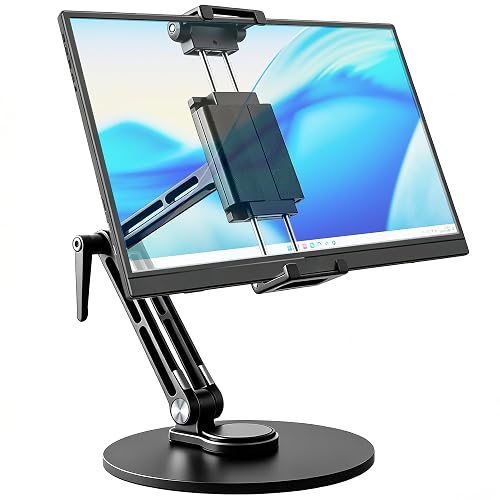 Best budget pickExternal Monitor Stand Support Up to 15.6" 17.3" 18.5", Aluminium FoldView on Amazon
Our Top Picks
Before the comparison, a note on how these were ordered. Each product was judged on the criteria most relevant to a portable monitor stand for laptop use: the size range it claims to support, how it adjusts, whether it works with a laptop or only with a tablet or external screen, how much it weighs, and how it folds. Products that match a broader set of common laptop and monitor sizes rank higher than narrow-use designs.
Quick Comparison
| Product | Best for | Key feature |
|---|---|---|
| Portable Desktop Book Stands (B0C7BKZ883) | Laptop riser at home or office | Ventilated metal laptop riser that folds flat |
| 360° Rotating Dual Stand Laptop Screen Extender (B0H5HXQMP3) | Dual-screen work on the road | Rotating dual stands with VESA 75×75 mounting |
| Portable Monitor Stand Foldable Expandable Holder (B0DC5WB99Z) | Small desks | Expandable holder for screens from 6 to 17.3 inches |
| Lightweight Tablet Stand Ultra Compact (B0HG46LPYZ) | Cafés and tight bags | Ultra-compact aluminum stand with magnetic holder |
| External Monitor Stand Support Aluminium (B0H1RTVYLF) | Budget-minded users | Aluminum foldable desk mount with a larger base |
Portable Desktop Book Stands, Foldable Ventilated Cooling Computer Notebook Stand Compatible with 10-15.6” Laptops, Tablets Adjustable Laptop Stand for Desk, Metal Laptop Riser Holder
Portable Desktop Book Stands, Foldable Ventilated Cooling Computer Notebook Stand Compatible with 10-15.6” Laptops, Tablets Adjustable Laptop Stand for Desk, Metal Laptop Riser Holder
Best for: Laptop riser at home or office
This suits someone who works mostly on their laptop at a desk and wants the screen at eye level to reduce neck strain, without adding a second display.
Key specs
- Listed compatibility: laptops from 10 to 15.6 inches and tablets
- Metal construction with ventilated design
- Foldable for storage
Pros
- Raises the laptop to a more ergonomic height
- Ventilation helps airflow under the laptop
- Folds flat for transport
Cons
- Does not hold an external monitor on its own
- Less stable on soft or uneven surfaces
Bottom line: A strong choice if your main goal is a higher, cooler laptop screen at a fixed desk, with the option to fold it away when you travel.
360° Rotating Dual Stand Laptop Screen Extender, Detachable 5-in-1 Modes, VESA 75×75, 15.6″ Portable Monitor With Dual Stands
360° Rotating Dual Stand, Detachable & 5-in-1 Modes & Vesa 75×75 Smart Display For 12-17.3" Laptops, Remote Work &Travel Laptop Screen Extender, 15.6" Fhd Portable Monitor With Dual Stands
Best for: Dual-screen travel
This is aimed at remote workers and frequent travelers who want a second screen that folds into a bag and can be placed in several orientations.
Key specs
- Listed for 12 to 17.3 inch laptops
- VESA 75×75 mounting pattern
- Rotating dual stands with multiple setup modes
Pros
- Covers a wide range of laptop sizes
- Rotation allows portrait or landscape use
- Works as a full extender for a laptop
Cons
- More parts to assemble than a single riser
- Heavier than minimalist stands
Bottom line: Best for people who need a true second display and want flexibility in how it is positioned.
Portable Monitor Stand Foldable Expandable Holder for Phones, Tablet and Portable Monitors, 6-17.3 inch Screen Desktop Monitor Tablet Stand
Portable Monitor Stand Foldable Expandable Holder for phones, tablet and Portable Monitors Portable Monitor Holder for 6-17.3 inch Screen Desktop Monitor Tablet Stand
Best for: Small desks
This fits users with limited desk space who want one holder that handles phones, tablets and portable screens of different sizes.
Key specs
- Listed range: screens from 6 to 17.3 inches
- Foldable and expandable design
Pros
- Wide size range across devices
- Compact footprint on crowded desks
- Works with phones and tablets as well
Cons
- Expanded holder can feel less rigid under heavy screens
- Angle options are more limited than dedicated risers
Bottom line: A practical pick for small workspaces that need one holder for several device types.
Lightweight Tablet Stand for 4.7-15.6″ Devices, Height Adjustable Ergonomic Aluminum, Ultra Compact Portable Monitor Stand Travel, Magnetic iPad Tripod Holder
Lightweight Tablet Stand for 4.7-15.6" Devices, Height Adjustable Ergonomic Aluminum, for Business Travel, Library, Cafés [Ultra Compact] Portable Monitor Stand Travel, Magnetic iPad Tripod Holder
Best for: Cafés and tight bags
This suits people who work in cafés, libraries or on trains and need the smallest, lightest option that still raises a screen.
Key specs
- Listed range: devices from 4.7 to 15.6 inches
- Height-adjustable aluminum construction
- Ultra-compact travel design
Pros
- Very light and easy to pack
- Adjustable height for better ergonomics
- Suitable for both tablets and small portable screens
Cons
- Limited weight capacity compared with larger stands
- Smaller base may feel less stable with heavier monitors
Bottom line: Ideal for mobile workers who prioritize weight and packability over maximum stability.
External Monitor Stand Support Up to 15.6″ 17.3″ 18.5″, Aluminium Foldable Desk Mount for iPad/Tablet/laptop Extender Screen, Larger Base
External Monitor Stand Support Up to 15.6" 17.3" 18.5", Aluminium Foldable Desk Mount for iPad/Tablet/laptop Extender Screen Portable Monitor Stand Holder for 4.7-18.5 inch Screen, Larger Base
Best for: Budget-minded users
This is for buyers who want a dependable foldable aluminum stand with a larger base, without paying for premium travel features they may not need.
Key specs
- Listed support up to 18.5 inches
- Aluminum foldable construction
- Larger base for added stability
Pros
- Larger base improves stability
- Covers a wide range of screen sizes
- Foldable for transport
Cons
- Heavier than ultra-compact travel stands
- Fewer adjustment modes than dual-stand designs
Bottom line: A sensible choice for home or office use where stability matters more than the lightest possible weight.
Buying Guide
Size and Weight Support
Check the maximum screen size and weight the stand lists. Listings often give a range, such as 10 to 15.6 inches or up to 18.5 inches. Going slightly above your screen size gives a margin of safety for the stand’s base and hinge.
Good picks for this: 360° Rotating Dual Stand Laptop Screen Extender, External Monitor Stand Support Aluminium Foldable Desk Mount
Adjustability and Viewing Angles
Height and tilt adjustment determine whether a stand improves your posture. Look for stands that raise the screen to roughly eye level when you sit upright, with at least a few angle options. Rotation to portrait orientation is useful for reading long documents.
Good picks for this: Portable Desktop Book Stands Foldable Ventilated Laptop Stand, Lightweight Tablet Stand Ultra Compact
Folded Size and Portability
If you carry the stand, measure the folded dimensions against your bag or laptop sleeve. Ultra-compact designs fit inside a laptop compartment, while larger bases need their own space. Weight matters more than most people expect after a full day of carrying.
Good picks for this: Lightweight Tablet Stand Ultra Compact, Portable Monitor Stand Foldable Expandable Holder
Stability and Base Design
A wider base and a lower center of gravity reduce wobble, especially when typing. Owners frequently report that small-footprint stands feel unsteady with heavier monitors, so match the base size to the weight you plan to place on it.
Good picks for this: External Monitor Stand Support Aluminium Foldable Desk Mount, 360° Rotating Dual Stand Laptop Screen Extender
Mounting Standards and Compatibility
VESA is the standard mounting pattern for displays, commonly 75×75 or 100×100 millimeters. Confirm your monitor supports the pattern before buying a stand that relies on it. Phones and tablets often need a different clamp or magnetic holder.
Good picks for this: 360° Rotating Dual Stand Laptop Screen Extender, Portable Monitor Stand Foldable Expandable Holder
Material and Heat
Aluminum and metal designs tend to dissipate heat better than plastic, and ventilated bases can help a laptop run cooler under load. Plastic stands are lighter but may flex under heavier loads over time.
Good picks for this: Portable Desktop Book Stands Foldable Ventilated Laptop Stand, External Monitor Stand Support Aluminium Foldable Desk Mount
Use Case and Setup Time
Decide whether you need a laptop riser, a second screen, or a holder for mixed devices. Riser-only stands are simple and fast to set up. Dual-screen setups take more time and cable management, which is worth it only if you use the extra display daily. For a deeper look at multi-screen layouts, see Portable Dual Monitor Setup: A Step-by-Step Guide for Laptop Users.
Good picks for this: 360° Rotating Dual Stand Laptop Screen Extender, Lightweight Tablet Stand Ultra Compact
FAQ
What is a portable monitor stand for laptop use?
It is a lightweight stand that raises a laptop or a portable external screen to a more comfortable viewing height and angle. Many fold flat for travel.
Can a portable monitor stand hold a laptop and an external monitor at the same time?
Some do, particularly dual-stand designs. Check the stated weight limit and whether the stand is built for one device or two before relying on it for both.
Do I need VESA compatibility?
Only if you plan to mount a monitor directly. Many portable screens come with a 75×75 pattern, but some do not, so check your display’s specifications.
Will a laptop stand overheat my laptop?
Raising the laptop usually improves airflow under it, and ventilated metal designs can help. Avoid covering vents with the stand itself and keep the laptop on a hard, stable surface.
How do I know what size stand I need?
Match the stand’s listed size range to your screen diagonal, then add a small margin. A stand listed up to 17.3 inches will generally handle a 15.6-inch screen comfortably.
Are foldable stands as sturdy as fixed ones?
Foldable stands are usually a little less rigid because of their hinges. Aluminum designs with wider bases tend to feel steadier, but a fixed stand will generally be more stable for heavy monitors.
Where can I learn more about safe use of electronics at a desk?
For guidance on ergonomic workstations and equipment safety, consult your employer’s safety office or a qualified occupational health professional.
Conclusion
For most people, the best portable monitor stand for laptop use depends on whether you need only a riser or a true second screen. The Portable Desktop Book Stands model suits a fixed desk where height and airflow matter most. The 360° Rotating Dual Stand fits anyone who wants flexible dual-screen work away from the office. The compact picks, including the Lightweight Tablet Stand and the Portable Monitor Stand Foldable Expandable Holder, work best for café and small-desk setups. The External Monitor Stand with its larger base is a sensible pick when stability matters most. Compare the size range and weight limit against your own devices before you buy.
Sources
- Workplace ergonomics guidance on screen height, posture and workstation setup (osha.gov)
- Consumer product safety information on stands, mounts and electronic device hazards (cpsc.gov)
- Information on electronics energy use and how display settings affect power consumption (energy.gov)
Related reading
- 7 Best Portable Touch Screen Monitors with Stand for Laptop Users (2026)
- Triple Portable Monitor for Laptop 15.6-Inch: 5 Best Picks Compared (2026)
- Top 5 Portable 2nd Monitors for Laptop Picks Compared for 2026
- Portable Triple Monitor Setup: A Step-by-Step Guide for Laptop Users
- Portable Monitor Stand Magnetic: How to Choose and Use One (2026)
About Owen Palmer
Owen Palmer is part of our editorial team and reviews and edits our consumer tech how-to & troubleshooting guides, checking product details against manufacturer specifications and owner feedback.