By Owen Palmer
Updated November 2026
A USB-C hub vs docking station comparison usually comes down to one question: how many things do you need to plug in, and do you ever need to move the laptop? A USB-C hub is the better choice for travelers and people who need a few extra ports on the go. A docking station is the better choice for a desk setup where one cable should restore a full workstation with multiple monitors, wired networking and a powered charger.
Quick Comparison: USB-C Hub vs Docking Station
| Criterion | USB-C Hub | Docking Station |
|---|---|---|
| Typical port count | 4 to 12 ports | 8 to 15+ ports |
| Size and weight | Small, often pocket-sized | Desktop unit, usually needs a power adapter |
| Connection to laptop | One USB-C cable, often a short tail | One USB-C or Thunderbolt cable, or a proprietary connector |
| Power delivery to laptop | Pass-through, often 60W to 100W depending on model | Often 90W to 135W or more |
| External monitor support | Usually one or two displays, often at 4K/60Hz on one output | Often two or more displays, depending on the laptop and chipset |
| Wired Ethernet | Available on many models | Standard on most business-class docks |
| Best fit | Travel, occasional expansion, light desk use | Permanent desk setup with multiple peripherals |
Port Count and Connectivity: Hub Wins for Simplicity, Dock Wins for Capacity
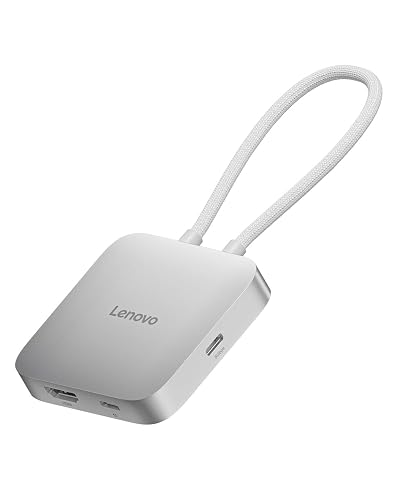
A USB-C hub is built to add a handful of ports to a laptop that has too few. Most models give you a mix of USB-A ports, one or two USB-C data ports, an HDMI or DisplayPort output, a microSD or SD card slot, and sometimes an Ethernet jack. That covers a presentation, a flash drive and a mouse without much fuss.
A docking station is built to replace a whole desk’s worth of cables. It typically offers more USB-A and USB-C ports, multiple video outputs, a headphone jack, an audio line, and a gigabit Ethernet port. Many docks also let you connect a keyboard and mouse so they stay wired in place while the laptop is closed.
Winner for port count: docking station. If you regularly use more than four or five peripherals, the dock keeps the desk tidy and removes the repeated plug-and-unplug routine. For occasional expansion, a hub is enough.
Portability: USB-C Hub Wins Clearly
A USB-C hub weighs little and fits in a laptop sleeve or a jacket pocket. You can keep one in a backpack and use it in a hotel room, a coffee shop or a client office without carrying extra power bricks in most cases, since the hub draws its power from the laptop.
A docking station is a fixed object. Even compact docks usually need their own AC adapter, and the total package is bulkier. Some travel-oriented docks exist, but they still take more space than a hub and are not as convenient to carry daily.
Winner for portability: USB-C hub. If the laptop leaves your desk more often than it stays put, the hub is the practical choice.
Power Delivery: Docking Station Usually Wins
Power delivery matters because a laptop drawing power through a hub or dock can drain its battery under heavy load. Many USB-C hubs pass through 60W to 100W, which is enough for most ultrabooks and many everyday workloads. Higher-wattage laptops, especially those with discrete graphics or powerful processors, may charge slowly or not at all on a low-wattage hub.
Docking stations generally provide higher power budgets, commonly in the 90W to 135W range or above, and some are designed around a specific laptop brand’s charging requirements. When a dock is paired with a laptop that needs substantial power, the difference is noticeable during intensive tasks.
Check the laptop manufacturer’s power requirement before buying. The wattage on the charger the laptop ships with is the most useful reference point. For a deeper explanation, see Understanding USB-C Charger Wattage and Power Delivery and Laptop USB C Charging: How to Fix Slow or No Charging (Step-by-Step).
Winner for power delivery: docking station, particularly for high-wattage laptops.
Display Support: Docking Station Wins for Multiple Monitors
Display support is where the two categories diverge most. A USB-C hub can often drive one external display at 4K and 60Hz, and some models support two displays through DisplayPort Alt Mode or Multi-Stream Transport. The result depends on the laptop’s graphics hardware and the hub’s chipset, so the spec sheet alone does not tell the full story.
Docking stations are more likely to support two or three external monitors, and business-oriented models often list specific resolution and refresh rate combinations. Some docks use Thunderbolt, which offers more bandwidth for multiple high-resolution outputs. For background on how these standards differ, see USB 3.2, USB4 and Thunderbolt Over USB-C: Naming and Speeds Explained.
Before buying either, confirm the laptop supports the display configuration you need. Many laptops cap external output regardless of what the hub or dock allows.
Winner for display support: docking station, especially for dual-monitor desks.
Wired Networking and Storage: Dock Usually Has the Edge
Wired Ethernet is more common on docks, particularly those designed for business use. A gigabit Ethernet port gives steadier connections for video calls, large file transfers and shared network drives than Wi-Fi often does. Some hubs include Ethernet too, but it is not universal, and the speed of the port varies by model.
If wired internet is your main concern, compare the two options carefully. USB C Ethernet Hub vs Wi-Fi Dongle (2026): Which Is Better for Wired Internet? covers that decision in more depth.
For storage, both categories can host external drives. Solid-state drives transfer data faster than traditional hard drives, and the connection speed of the hub or dock port determines the ceiling. External SSD Speed: USB-C, Thunderbolt, and NVMe Explained explains what to expect.
Winner for networking: docking station, with a note that some premium hubs now match docks on Ethernet.
Compatibility and Setup: Hub Is Easier to Get Right
A USB-C hub works with any laptop that has a USB-C port supporting data and, for video, the right Alt Mode. Setup is usually plug and play, with drivers either unnecessary or handled by the operating system.
Docking stations are more sensitive to compatibility. Some use proprietary connectors, some need specific Thunderbolt generations, and some need driver software to enable all features. Check the manufacturer’s compatibility list for your exact laptop model before buying.
If your USB-C port does not seem to do anything at all, the cable may be the problem. Why a USB-C Cable or Port Doesn’t Work: Charge-Only Cables, Alt Mode and E-Marked Cables walks through the common causes.
Winner for simplicity: USB-C hub.
Cost of Ownership and Longevity: Depends on Your Use
A hub is a smaller purchase and is easy to replace if your needs change. A docking station is a larger commitment, but it can replace several separate accessories, such as a standalone charger, a monitor adapter and a network dongle. Over time, a well-matched dock can reduce cable clutter and the number of devices you need to manage.
For many people, the right answer is a hub for travel and a dock for the desk. Those who only need the desk should not pay for travel features they will not use, and those who only travel should not force a dock into a bag.
Winner: depends on how many roles the device must fill.
Which Should You Choose?
- Choose a USB-C hub if you travel with your laptop and need a few extra ports for presentations, storage and peripherals.
- Choose a USB-C hub if your laptop has few ports and you only connect one external display.
- Choose a docking station if you use two or more external monitors every day.
- Choose a docking station if you need a dependable wired Ethernet connection at your desk.
- Choose a docking station if your laptop needs high wattage to charge while under load.
- Choose a docking station if you want one cable to connect a full workstation each morning.
- Choose a USB-C hub if you want the simplest setup with the fewest compatibility concerns.
Some popular options in each category include the StarTech 4 Port USB C Hub, the Lenovo USB-C to 4 Port USB-A Hub, and the HP USB-C Travel Hub G3. For desk-based setups, the Dell Pro 32 Plus 4k Usb-c Hub Monitor P3225qe and the Dell UltraSharp 38 Curved USB-C Hub Monitor are worth reviewing. The USB Hub vs Docking Station, Plus Keyboards, Mice and Monitor Arms article covers accessories that often pair well with either option.
FAQ
Is a docking station just a bigger USB-C hub?
Not exactly. A hub mainly adds ports to a laptop, while a docking station is designed to act as a full desk connection point. Docks usually offer higher power delivery, more display outputs, and more reliable wired networking. Some hubs are robust enough to do similar work, but docks are built for that role.
Can a USB-C hub charge my laptop as well as a dock?
Possibly, but only if the hub’s power delivery rating matches or exceeds your laptop’s requirement. Many hubs pass through 60W to 100W, which suits many ultrabooks. Laptops with higher power demands often charge more reliably on a dock with a larger power budget. Check the charger wattage that came with your laptop as a reference.
Do I need a docking station to run two external monitors?
Not always. Some USB-C hubs support two displays, depending on the laptop’s graphics output and the hub’s chipset. However, docking stations are more consistently designed for multi-monitor setups. Confirm your laptop’s supported display configuration before buying either option.
Will either option slow down my external SSD?
It can, if the port’s bandwidth is lower than the drive’s potential speed. A USB 3.2 or Thunderbolt port will generally offer more headroom than a basic USB 2.0 port. Check the connection standard of both the hub or dock and the drive. The article on external SSD speeds explains the details.
Is a USB-C hub or docking station worth it if I rarely use extra ports?
Probably not. If you only occasionally need an extra USB-A port or a display output, a small hub may be enough. A docking station makes the most sense when you connect several devices every day and want to avoid repeated setup. For light use, the simpler option usually makes more sense.
Conclusion
The USB-C hub vs docking station decision is less about which product is better and more about where your laptop spends its time. A hub is the portable, low-complexity choice for travelers and light users. A docking station is the stronger foundation for a permanent desk with multiple monitors, wired networking and high-wattage charging. Match the device to your daily routine, check your laptop’s specifications, and you will avoid most of the common frustrations these products cause.
Related reading
- USB Hub USB Type C: USB-A Hub vs USB-C Hub (2026): Which Should You Choose?
- USB C Ethernet Hub vs Wi-Fi Dongle (2026): Which Is Better for Wired Internet?
- Usb-c Hub for Steam Deck: What to Buy, What to Avoid, and Why
- StarTech 4 Port USB C Hub Review (2026): Features, Pros and Cons
- Lenovo USB-C to 4 Port USB-A Hub Review (2026)
About Owen Palmer
Owen Palmer is part of our editorial team and reviews and edits our consumer tech how-to & troubleshooting guides, checking product details against manufacturer specifications and owner feedback.