By Owen Palmer
Updated November 2026
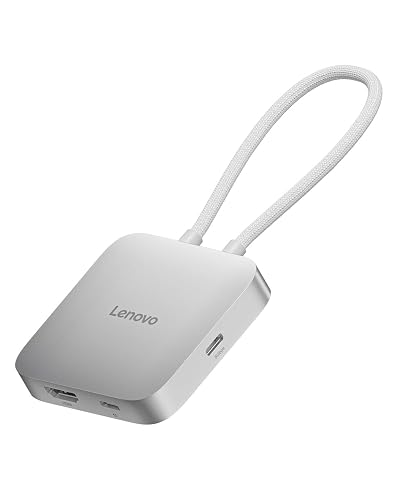
The startech 4 port usb c hub, listed on Amazon as the StarTech 4-Port USB-C Hub 10Gbps with 100W PD Charging (model 309B-USBC-HUB), is aimed at people who want more ports on a laptop without giving up fast data transfer or pass-through charging. It offers three dedicated 10Gbps USB-C data ports and one shared port that can handle either data or Power Delivery input. Buyers who need a tidy, driverless way to add storage, peripherals and a charger to a single USB-C port will likely find it a good fit. People who mainly need HDMI or DisplayPort video output, or who only want a basic two-port adapter for occasional flash drive use, should look at other options. Those who run a dual-monitor setup or need Ethernet should also check the alternatives covered below before committing.

3 dedicated 10Gbps USB-C data ports plus 1 shared data or PD port, Overcurrent protection, Driverless StarTech 4-Port USB-C Hub 10Gbps with 100W PD Charging (309B-USBC-HUB)
Product Overview
StarTech is a long-established maker of computer connectivity hardware, and this hub sits in the company’s USB-C lineup as a compact, bus-powered-plus-PD design. It is built to sit on a desk or travel in a bag, and it targets laptops and tablets with USB-C ports that have run short on connections. The main pitch is simple: one cable from the computer, several devices plugged in on the other end, and a charger that can pass power through to the host.
Because it is positioned as a data hub first, the emphasis is on transfer speed and port count rather than video. If you are weighing it against a full docking station, the distinction matters. A hub adds ports to a single host connection, while a dock usually adds monitor outputs, Ethernet and more power. For a broader explanation of that difference, see USB Hub vs Docking Station, Plus Keyboards, Mice and Monitor Arms. A related read: Best USB-C Hubs for Laptops: 6 Hubs Compared.
Key Features & Specifications
The table below lists only the specifications stated in the product name and the widely published model details. Confirm the remaining details on the product page before buying, since connector layout and cable length can vary between revisions.
| Feature | Details |
|---|---|
| Model | 309B-USBC-HUB |
| Brand | StarTech |
| Dedicated data ports | 3 x USB-C, 10Gbps each |
| Shared port | 1 x port that handles data or Power Delivery input |
| Data rate | Up to 10Gbps (USB 3.2 Gen 2 class) |
| Power Delivery | Up to 100W pass-through charging for the host |
| Protection | Overcurrent protection |
| Drivers | Driverless (plug and play) |
| Host connection | USB-C |
The 10Gbps rating matters for external SSDs and fast flash drives. Speeds in practice depend on the host port, the cable and the device, and you can read more about how these labels map to real throughput in USB 3.2, USB4 and Thunderbolt Over USB-C: Naming and Speeds Explained and External SSD Speed: USB-C, Thunderbolt, and NVMe Explained.
Pros & Cons
Pros
- Three dedicated 10Gbps data ports give each connected device its own lane rather than forcing them to share one.
- Up to 100W pass-through Power Delivery lets you keep the laptop charged while using the hub, provided your charger meets the wattage.
- Driverless operation means no software install on most current Windows, macOS and Linux systems.
- Overcurrent protection helps guard connected devices and the host against electrical faults.
- Compact footprint suits a laptop bag or a crowded desk.
Cons
- The shared port means you must choose between a data device and the power input in certain setups, which can be limiting.
- No video output is listed, so it does not replace a monitor dock.
- Pass-through charging depends on a capable charger; underpowered chargers will not deliver the full 100W.
- Owners who need HDMI, DisplayPort or built-in Ethernet will need a different product.
Performance Analysis
On paper, the hub’s architecture is sound. Dedicated 10Gbps ports mean that a fast external SSD on one port and a webcam or card reader on another are not competing for a single shared bandwidth budget. That is the main reason to choose a multi-port data hub over a basic adapter with several slower ports.
Owner feedback patterns for hubs in this class tend to fall into a few groups. Users generally report stable operation with storage devices and common peripherals. Complaints that appear in discussions of similar hubs usually involve the host laptop’s own USB-C implementation: some older laptops offer USB-C ports that run at USB 2.0 speeds or lack full Power Delivery support, which caps what the hub can deliver. Heat is another point that comes up in reviews of compact hubs under sustained load, so placing the hub on a hard surface with airflow is a sensible habit.
In practical terms, expect the best results when the laptop has a USB 3.2 Gen 2 or Thunderbolt-capable port and a charger rated at or above the wattage your laptop needs. Expect slower behavior on older hardware. When a single host port has to feed both power and data, bottlenecks can appear, which is where the choice of cable and charger becomes important. For a deeper look at why ports and cables sometimes fail to behave as expected, read Why a USB-C Cable or Port Doesn’t Work: Charge-Only Cables, Alt Mode and E-Marked Cables.
Charging performance is the other variable. Power Delivery negotiation happens between the charger, the hub and the laptop, and a mismatch can cause slow or no charging. If you run into that, the troubleshooting steps in Laptop USB C Charging: How to Fix Slow or No Charging (Step-by-Step) are a good starting point. Background on how wattage is negotiated is in Understanding USB-C Charger Wattage and Power Delivery.
Who Should Buy This Product?
This hub makes the most sense for people who regularly connect several data devices to a USB-C laptop. Photographers and video editors who move large files to external drives will benefit from the 10Gbps ports. Students and remote workers who want one cable to reconnect a keyboard, mouse, drive and charger each morning will appreciate the single-cable setup. Travelers who want a small hub that also passes through charging have a practical option here.
You should skip this product if your main need is external monitors. A hub without video output will not drive a second screen, and a dedicated docking station is a better choice. Skip it also if you need wired internet at your desk; a USB-C Ethernet solution will serve you better, and USB C Ethernet Hub vs Wi-Fi Dongle (2026): Which Is Better for Wired Internet? explains the trade-offs. If your devices are mostly low-speed (keyboards, mice, a few flash drives), a cheaper basic hub will do the job.
Buying Guide
Before buying any USB-C hub, check four things. First, confirm your laptop’s USB-C ports support data at the speed you need. Second, check whether your laptop uses USB-C for charging, and if so, what wattage it requires. Third, decide whether you need video output, since many hubs omit it. Fourth, count how many devices you plan to connect at once, and whether they need full speed or can share bandwidth.
Cable quality also matters. A USB-C cable rated for 10Gbps and sufficient power is important for both data speed and charging. Browse the options in Best USB-C Cables if you need a replacement. For a broader comparison of hub categories, see Best USB-C Hubs.
Several well-known alternatives are worth comparing:
- StarTech 4-Port USB-C Hub 5Gbps with 4x USB-A, USB Powered (HB30C4AB) – A budget-minded option with four USB-A ports and a 5Gbps data rate, suited to keyboards, mice and older drives where full 10Gbps speed is not required. It does not provide the same dedicated 10Gbps lanes.

Portable USB 3.0 port expander, Built-in USB-C cable, Thunderbolt 3 data compatible, Driverless, No external power StarTech 4-Port USB-C Hub 5Gbps with 4x USB-A, USB Powered (HB30C4AB)
- StarTech 4-Port USB-C Hub, 10Gbps, DP Alt Mode 4K 60Hz, 100W PD, Driverless – The closest sibling if you want display output. Its DisplayPort Alt Mode support at 4K 60Hz makes it a better match for users who need a monitor connected alongside their peripherals.

4K 60Hz USB-C video out, Attached 1ft 30cm TPE cable, USB event monitoring for IT admins StarTech 4-Port USB-C Hub, 10Gbps, DP Alt Mode 4K 60Hz, 100W PD, Driverless
If video output is a priority, the second option above is the more relevant comparison, since the 309B-USBC-HUB does not list display support.
FAQ
Does the StarTech 4 port USB C hub work without drivers?
The product is listed as driverless, which means most current operating systems will recognize it and its connected devices automatically. Keep your system updated to avoid compatibility gaps with older USB stacks.
Can I charge my laptop through this hub?
Yes, the hub supports up to 100W Power Delivery pass-through. You will need a USB-C charger that can supply enough wattage for your laptop, and your laptop must support USB-C charging.
Which port should I use for charging?
The shared port is the one that handles Power Delivery input. Check the port labels on the hub and the product page, since using the shared port for charging can limit how many dedicated data ports you can use for high-speed devices at once.
Does this hub output video to a monitor?
The model name and listing do not describe display output. If you need a monitor connection, consider a hub or dock with DisplayPort or HDMI support, such as the alternative described above.
Will it support an external SSD at full speed?
The dedicated ports are rated at 10Gbps, so an SSD that supports that standard can perform well. Actual speed depends on the SSD, cable and host port. See External SSD Speed: USB-C, Thunderbolt, and NVMe Explained for details.
Why is my laptop charging slowly when connected to the hub?
The most common causes are an underpowered charger, a cable that does not support Power Delivery, or a laptop port with limited wattage. Test with a higher-wattage charger and a known-good cable before assuming a hub fault.
Is this hub a good match for a Steam Deck or tablet?
Compatibility depends on the device’s USB-C implementation and charging requirements. Check the guidance in Usb-c Hub for Steam Deck: What to Buy, What to Avoid, and Why before buying for a handheld or tablet.
Can I use it with a Thunderbolt laptop?
USB-C hubs generally work with Thunderbolt-capable ports, but the hub’s own specifications set the speed ceiling. Check your laptop’s documentation and the hub’s listing to confirm expected behavior.
Final Verdict
The StarTech 4-port USB-C hub with 10Gbps data ports and 100W Power Delivery pass-through is a solid choice for laptop users who need several fast data connections and a single cable for charging. Its driverless design and dedicated ports make it practical for storage-heavy workflows. It is not the right pick if you need video output or Ethernet, and the shared port means you should plan your setup before buying. For most users who want a clean, no-fuss data hub, it earns a place on the shortlist.
Check the current listing here: View on Amazon
About Owen Palmer
Owen Palmer is part of our editorial team and reviews and edits our consumer tech how-to & troubleshooting guides, checking product details against manufacturer specifications and owner feedback.