By Owen Palmer
Updated November 2026
A usb-c hub for samsung tablet turns a single USB-C port into a working desk setup, adding HDMI output, USB-A ports for keyboards and drives, an SD card slot, and passthrough charging. Samsung Galaxy Tab models with USB-C ports, including the S-series and many A-series tablets, accept most multi-port hubs, but port counts, power limits and DeX-style display behavior vary. The picks below were chosen by comparing published specifications, brand track record and common owner feedback about compatibility, heat and charging. We did not test these units ourselves, so check the specs against your tablet model before buying.
Our top picks at a glance
- 1
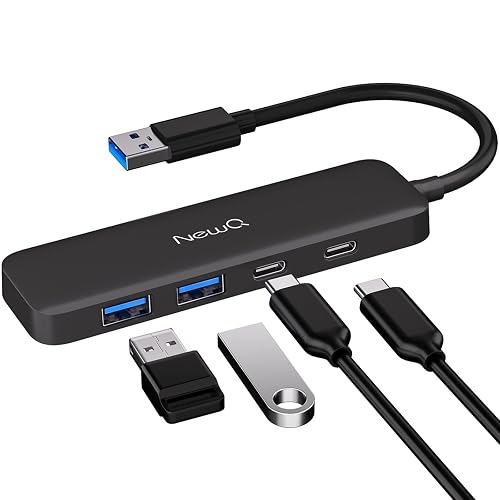
 TOP CHOICEBest overall4K USB C to HDMI Splitter Hub, 100W Max PD Port, 2 USB 3.0 & 1 USB C DView on Amazon
- 2
 Best for small desksBENFEI USB C Hub 5-in-1 with 4K HDMI(Certified), 100W Power Delivery, 3 USB-AView on Amazon
- 3
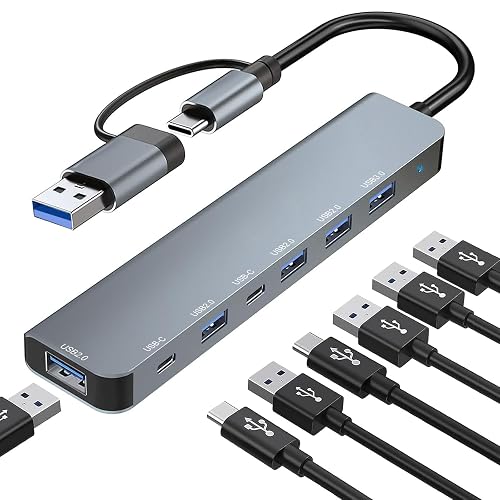 Best for media storageUSB C Hub, USB Hub 3.0, Upgrade 7 in 2 USB Splitter with 1xUSB 3.0, 4xUSB2.0, 2xUSB CView on Amazon
- 4
 Best budget pickUSB C to HDMI Multiport Adapter for Laptop, PC, Tablet, MacBook Neo/Pro/Air, iPad Pro/AirView on Amazon
Our Top Picks
Quick Comparison
| Product | Best for | Key feature |
|---|---|---|
| 4K USB C to HDMI Splitter Hub | Full desk setups with external displays | 4K HDMI plus 100W pass-through charging |
| BENFEI USB C Hub 5-in-1 | Compact everyday use | Five ports in a small aluminum body |
| USB C Hub 7-in-1 Multiport Adapter | Connecting many USB accessories | Seven ports including USB 3.0 and SD/TF readers |
| Acer 5 in 1 USB C Hub | Light budget-conscious use | 4K HDMI with 100W Power Delivery |
4K USB C to HDMI Splitter Hub, 100W Max PD Port, 2 USB 3.0 & 1 USB C Data Ports 5Gbps, SD/TF Card Reader Acer USB C Hub, 7 in 1 Multi-Port Adapter
4K USB C to HDMI Splitter Hub, 100W Max PD Port, 2 USB 3.0 & 1 USB C Data Ports 5Gbps, SD/TF Card Reader Acer USB C Hub, 7 in 1 Multi-Port Adapter for Laptop/Mac Type C Devices
Best for: Desk setups that need an external display and charging at the same time.
This hub suits someone who uses a Galaxy tablet as a primary workstation, plugging in a monitor over HDMI while keeping the tablet charged and connected to a keyboard, mouse and storage.
Key specs
- 4K HDMI video output
- 100W maximum Power Delivery pass-through port
- 2 USB 3.0 ports and 1 USB-C data port at up to 5Gbps
- SD and TF card reader
Pros
- Pass-through charging at high wattage supports larger tablet batteries
- Multiple USB 3.0 ports handle drives and peripherals at useful speeds
- Card readers add convenience for photographers and creators
Cons
- Seven-port hubs can run warm under sustained load, according to owner reports
- Actual 4K refresh rate depends on the tablet’s DisplayPort Alt Mode support
Bottom line: Best for users who want display output and high-wattage charging in one device.
BENFEI USB C Hub 5-in-1 with 4K HDMI(Certified), 100W Power Delivery, 3 USB-A
BENFEI USB C Hub 5-in-1 with 4K HDMI(Certified), 100W Power Delivery, 3 USB-A, Silicone Cable, Aluminum Case Compatible with MacBook Pro/Air, iPad Pro, iMac, iPhone 15 Pro/Pro Max, XPS, Thinkpad
Best for: Compact everyday use with a single monitor and a few accessories.
This model fits someone who wants the essentials, HDMI, USB-A and charging, without a bulky dongle that sticks out of a tablet case or bag.
Key specs
- 4K HDMI output
- 100W Power Delivery pass-through
- 3 USB-A ports
- Aluminum housing
Pros
- Small footprint fits easily in a tablet sleeve
- Aluminum case helps with heat dissipation, according to brand specifications
- Covers the most common desk needs with few ports
Cons
- No SD card reader for photographers
- Only three USB-A ports, which can be limiting with many accessories
Bottom line: A strong choice for portable, minimal setups where display and charging matter most.
USB C Hub, USB Hub 3.0, Upgrade 7 in 2 USB Splitter with 1xUSB 3.0, 4xUSB2.0, 2xUSB C
USB C Hub, USB Hub 3.0, Upgrade 7 in 2 USB Splitter with 1xUSB 3.0, 4xUSB2.0, 2xUSB C, USB C & USB Hub Multiport Adapter, USBC USB Dongle for PC/Laptop/Tablet/Mac/MacBook/iPad and More Devices
Best for: Connecting many USB accessories and storage devices at once.
This hub is aimed at users who have several USB devices, like flash drives, a keyboard, a mouse and a card reader, and need more ports than a basic dongle offers.
Key specs
- 1 USB 3.0 port and 4 USB 2.0 ports
- 2 USB-C ports
- Card reader support
Pros
- Seven ports cover most peripheral needs
- Mixed USB 2.0 and 3.0 ports allow flexible device placement
- Works with a broad range of USB-C devices
Cons
- Most ports are USB 2.0, which limits transfer speeds for large files
- No HDMI output, so it is not ideal for external displays
Bottom line: Best for users who prioritize port count over video output or fast file transfers.
USB C to HDMI Multiport Adapter for Laptop, PC, Tablet, MacBook Neo/Pro/Air, iPad Pro/Air
USB C to HDMI Multiport Adapter for Laptop, PC, Tablet, MacBook Neo/Pro/Air, iPad Pro/Air, iMac, iPhone 17/16/15 Acer 5 in 1 USB C Hub with 4K HDMI, 100W Power Delivery, 3 USB A Data Ports
Best for: Budget-conscious users who want HDMI and charging without premium extras.
This adapter suits someone who needs a basic display connection and pass-through charging for occasional use at a desk or during presentations.
Key specs
- 4K HDMI video output
- 100W Power Delivery pass-through
- 3 USB-A data ports
Pros
- Covers HDMI, USB-A and charging in one compact unit
- Wide device compatibility listed in the product name
- Straightforward plug-and-play setup for most users
Cons
- Fewer features than higher-port hubs, such as card readers
- Owner reports vary on long-term durability of the cable connection
Bottom line: A practical option for light, occasional use when you want core functions without extra ports.
Buying Guide
Check your tablet’s USB-C capabilities
Not every USB-C port on a Samsung tablet supports video output. Look for DisplayPort Alt Mode in the tablet’s specifications before buying a hub with HDMI. Samsung’s official spec sheets list the port type and supported features for each model.
Good picks for this: 4K USB C to HDMI Splitter Hub, BENFEI USB C Hub 5-in-1
Power Delivery wattage
Pass-through charging is limited by both the hub and the tablet’s charging circuit. A 100W rating on the hub does not mean your tablet will draw 100W. Check the tablet’s rated charging input, which is typically far lower.
Good picks for this: 4K USB C to HDMI Splitter Hub, Acer 5 in 1 USB C Hub
Port count and mix
Count the devices you plug in at once, including keyboard, mouse, drives and cards. Choose a hub with enough USB-A ports and check whether they are USB 2.0 or 3.0, since this affects file transfer speed.
Good picks for this: USB C Hub 7 in 2 USB Splitter, 4K USB C to HDMI Splitter Hub If you want more background, see 6 Best USB-C Hubs for Car Options for Road Trips and Daily Driving.
Size and portability
A compact hub is easier to carry in a tablet case or bag, but more ports often mean a larger body. Measure the space between the tablet and any case before buying.
Good picks for this: BENFEI USB C Hub 5-in-1, Acer 5 in 1 USB C Hub
Display resolution and refresh rate
HDMI output is often rated at 4K, but the actual resolution and refresh rate depend on the tablet’s supported display mode. Confirm this in the tablet’s display settings after connecting.
Good picks for this: 4K USB C to HDMI Splitter Hub, Acer 5 in 1 USB C Hub
Build quality and heat
Aluminum housings tend to dissipate heat better than plastic, according to common owner feedback. Avoid leaving a hub in a closed bag while it is charging or driving a monitor.
Good picks for this: BENFEI USB C Hub 5-in-1, 4K USB C to HDMI Splitter Hub
Cable and connector care
Plug and unplug the hub gently, and support the cable when the tablet is in a case. Repeated strain on the USB-C connector is a common cause of intermittent connection problems.
Good picks for this: USB C Hub 7 in 2 USB Splitter, Acer 5 in 1 USB C Hub
FAQ
Will any USB-C hub work with a Samsung tablet?
Most USB-C hubs work for data and charging, but HDMI output requires DisplayPort Alt Mode support on the tablet. Check the tablet’s specifications before buying a hub for external displays.
Can a USB-C hub charge my Samsung tablet while in use?
Many hubs offer pass-through charging. The tablet’s charging speed depends on its own input limit, not just the hub’s rated wattage.
Why does my external monitor show a lower resolution?
The tablet and the hub may negotiate a lower resolution or refresh rate. Check the display settings on the tablet and confirm the monitor’s supported input modes.
Do USB 3.0 ports on a hub make file transfers faster?
USB 3.0 ports offer higher theoretical speeds than USB 2.0, but actual performance depends on the drive, the cable and the tablet’s port capabilities.
Should I use a powered hub with my tablet?
Powered hubs can help when connected devices draw more power than the tablet can supply. Confirm the hub’s power requirements against your accessories.
Can I use a hub with a tablet case on?
Many cases are compatible, but thick cases may block the port or put strain on the connector. Remove the case or choose a hub with a flexible cable if fit is a concern.
Conclusion
For most Samsung tablet users, the best choice depends on the main job. The 4K USB C to HDMI Splitter Hub suits full desk setups that need display output and high-wattage charging. The BENFEI USB C Hub 5-in-1 fits compact, everyday use. The USB C Hub 7-in-1 covers users with many USB accessories, and the Acer 5 in 1 USB C Hub suits light budget-conscious use. Confirm your tablet’s port features before buying, especially for HDMI output.
Sources
- USB specifications, including USB-C, Power Delivery and data transfer standards
- Guidance on battery charging and device energy use (energy.gov)
- Technical standards and research related to electronic connectivity
Related reading
- 6 Best J5create USB-C Multi Port Hub Picks for Laptops and Tablets (2026)
- Wirecutter USB C Hub: 5 Best Picks Compared (2026)
- Usb-c Hub for Steam Deck: What to Buy, What to Avoid, and Why
- Usb C Hub for Chromecast: Does It Work and Which Setup to Use?
- Ugreen USB C Hub: How to Choose, Connect and Fix Common Problems (2026)
- USB-C Hub with Ethernet Port: How to Choose and Set One Up
- USB-C Hub vs Docking Station (2026): Which Is Better for Your Setup?
About Owen Palmer
Owen Palmer is part of our editorial team and reviews and edits our consumer tech how-to & troubleshooting guides, checking product details against manufacturer specifications and owner feedback.