By Owen Palmer
Updated November 2026
Looking for a usb-c hub for car use? Most vehicles still have a 12V socket and a couple of USB-A ports, but few give you the USB-C power delivery, multiple data ports, and 12V output that a modern phone, tablet, or laptop needs. A good car hub fills that gap. In this guide, we compare six products on the criteria that matter most in a vehicle: charging wattage, port mix, data speed, cable and plug design, and how well each model suits small cabins with limited space. Every pick below is based on manufacturer specifications and owner feedback patterns, not on hands-on testing.
Our top picks at a glance
- 1
 TOP CHOICEBest overallLenovo USB-C 5-in-1 Travel HubView on Amazon
- 2
 TOP CHOICEBest for multi-device chargingBESTEK Multi Ports USB Car ChargerView on Amazon
- 3
 TOP CHOICEBest for a 12V socket setupBelkin BoostCharge 30W USB-C Car Charger with 4-Port ExtenderView on Amazon
- 4
 Best for video and storage4K USB C to HDMI Splitter HubView on Amazon
- 5
 Best budget pickUSB C Splitter Cable 3 Port 1 Male to 3 FemaleView on Amazon
- 6
 Best for rear-seat or flexible mountingVIENON 4-Port USB 3.0 HubView on Amazon
Our Top Picks
The table below summarizes the six products. Each entry follows with the details you need to decide.
Quick Comparison
| Product | Best for | Key feature |
|---|---|---|
| Lenovo USB-C 5-in-1 Travel Hub | Overall versatility | 90W Power Delivery passthrough and 4K 60Hz HDMI |
| BESTEK Multi Ports USB Car Charger | Multi-device charging | 125W total output with USB-C PD and Quick Charge 3.0 |
| Belkin BoostCharge 30W USB-C Car Charger with 4-Port Extender | Plug-in 12V setups | 30W USB-C Power Delivery with a 4-port extender |
| 4K USB C to HDMI Splitter Hub | Video output and storage | 4K HDMI plus SD/TF card reader and 100W PD port |
| USB C Splitter Cable 3 Port | Budget single-cable splitting | One USB-C input splits into three female ports |
| VIENON 4-Port USB 3.0 Hub | Flexible mounting | 90°/180° rotatable body with PD-in USB-C port |
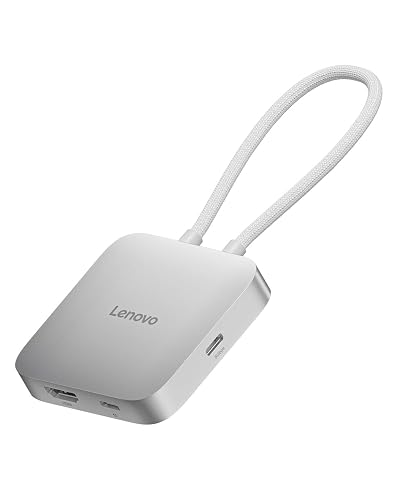
Lenovo USB-C 5-in-1 Travel Hub
Lenovo USB-C 5-in-1 Travel Hub, 90W Power Delivery, 4K 60Hz HDMI, Dual USB-C and USB-A Ports, Plug and Play, Compact, Silver Grey
Best for: Overall versatility
This hub suits drivers who want one compact device to handle charging, an external display, and wired peripherals. It is also a practical pick for people who work from the passenger seat or in a parked vehicle.
Key specs
- 90W Power Delivery input for charging a connected laptop
- 4K at 60Hz HDMI output
- Dual USB-C and USB-A data ports
- Plug-and-play, no driver installation
- Compact silver-grey housing
Pros
- Power Delivery passthrough makes it useful for laptops
- Covers display, data, and charging in one unit
- Small enough to stay in a bag or door pocket
Cons
- Requires a separate power source for the full 90W charging path
- Not a 12V-socket device, so it needs to be wired to a USB-C source in the car
Bottom line: Pick this if you want the most complete single hub and already have a USB-C power source in or near your vehicle.
BESTEK Multi Ports USB Car Charger
BESTEK Multi Ports USB Car Charger, Fast Charge 125W 14A Quick Charge 3.0 & USB-C PD Car Charger Adapter with Smart Identification for Cell Phones, Tablets and Other USB Devices
Best for: Multi-device charging
This is the right choice for families or rideshare drivers who need to charge several phones, tablets, or cameras at once from the 12V socket.
Key specs
- 125W total output across all ports
- USB-C Power Delivery and Quick Charge 3.0 support
- Smart identification to adjust current per device
- Designed for the standard 12V cigarette-lighter socket
Pros
- Several ports allow simultaneous charging
- Smart identification helps protect connected devices
- Fits a standard 12V socket without extra mounting
Cons
- Bulkier than a single-port charger, which can block an adjacent socket
- Total output is shared, so maximum speed drops when every port is in use
Bottom line: A strong choice for anyone who needs to power several devices from the cigarette-lighter socket on a regular basis.
Belkin BoostCharge 30W USB-C Car Charger with 4-Port Extender
USB-C Power Delivery, universal compatibility, for iPhone 16, Galaxy S25, Note series, Nintendo Switch 2 Belkin BoostCharge 30W USB-C Car Charger with 4-Port Extender
Best for: Plug-in 12V setups
This model fits drivers who want a brand-name charger with a 30W USB-C Power Delivery output and an extender to reach multiple seats or mounts.
Key specs
- 30W USB-C Power Delivery output
- Universal compatibility listed for recent iPhone, Galaxy, and Nintendo Switch 2 models
- 4-port extender for expanding one 12V socket
Pros
- Established brand with a focus on charging accessories
- Power Delivery support suits current phones and tablets
- Extender reduces the need for multiple plug-in adapters
Cons
- 30W is less than the total output of some multi-port chargers
- Extender adds bulk near the gear shifter or center console
Bottom line: Choose this if you want a dependable USB-C charger that works with the car’s existing 12V socket and you mainly charge phones and tablets.
4K USB C to HDMI Splitter Hub
4K USB C to HDMI Splitter Hub, 100W Max PD Port, 2 USB 3.0 & 1 USB C Data Ports 5Gbps, SD/TF Card Reader Acer USB C Hub, 7 in 1 Multi-Port Adapter for Laptop/Mac Type C Devices
Best for: Video output and storage
This suits people who use a laptop or tablet in the vehicle for presentations, video playback to a rear display, or moving photos from an SD card.
Key specs
- 4K HDMI output
- 100W maximum Power Delivery port
- Two USB 3.0 ports and one USB-C data port at 5Gbps
- SD and TF card reader
Pros
- Covers video, data, and card reading in one unit
- 100W PD port can charge a laptop while in use
- Useful for transferring camera media on the road
Cons
- Needs a USB-C host device such as a laptop, not a phone
- Larger than basic splitters, so it takes more space in the cabin
Bottom line: The best fit for drivers and passengers who run a laptop or tablet and need display or card output.
USB C Splitter Cable 3 Port 1 Male to 3 Female
USB C Splitter Cable 3 Port 1 Male to 3 Female,1 in 3 Out USB C Extender Hub Data & Power Charging USB 2.0 Extension Cable for Car,Laptop,Keyboard,Mouse(25CM)
Best for: Budget single-cable splitting
This is a simple option for someone who wants to turn one USB-C port into three connection points for charging or basic data devices like a keyboard or mouse.
Key specs
- One male USB-C plug and three female ports
- USB 2.0 data and power charging
- 25 cm cable length
Pros
- Short cable keeps clutter low in the cabin
- Works for simple charging and low-speed peripherals
- Easy to store in a glovebox
Cons
- USB 2.0 data speeds are slow for storage or video
- No separate power input, so charging depends on the host port
Bottom line: A budget pick for basic splitting and charging, not for high-speed transfers or displays.
VIENON 4-Port USB 3.0 Hub
VIENON 4-Port USB 3.0 Hub [90°/180° Degree Rotatable], USB Splitter with PD-in 5W USB C Port, USB Extender for Laptop, Car, iMac, MacBook Air, MacBook Pro, and More
Best for: Flexible mounting
This suits drivers who want a hub that can be angled toward a passenger or mounted near the dash, with a PD-in port for charging the hub itself.
Key specs
- 90° and 180° rotatable body
- USB 3.0 data ports
- 5W PD-in USB-C port
Pros
- Rotatable body helps with awkward angles
- Four USB 3.0 ports cover a range of devices
- USB-C input allows powering the hub from a USB-C source
Cons
- 5W PD-in is modest and may not charge a laptop
- Rotatable body can loosen over time with heavy use
Bottom line: A practical choice when you need multiple USB 3.0 ports at a flexible angle and do not need high-wattage charging.
Buying Guide
Power delivery and total wattage
Check the wattage rating for both the hub and the vehicle port. A 12V socket typically supplies less power than a wall outlet, so a hub that promises 90W or 100W usually needs its own power input. Confirm whether the rating is per port or total across all ports.
Good picks for this: Lenovo USB-C 5-in-1 Travel Hub, 4K USB C to HDMI Splitter Hub
Port mix and device compatibility
List the devices you plan to connect: phones, tablets, cameras, a laptop, or peripherals. Make sure the hub has USB-C and USB-A ports that match those devices, and that it supports the protocols (such as Power Delivery or Quick Charge) your phone uses.
Good picks for this: BESTEK Multi Ports USB Car Charger, Belkin BoostCharge 30W USB-C Car Charger
Data speed
USB 2.0 ports are suitable for keyboards and mice but slow for large files. USB 3.0 ports are better for external drives and card readers. Check the listing for the data standard before buying.
Good picks for this: VIENON 4-Port USB 3.0 Hub, 4K USB C to HDMI Splitter Hub
Size and mounting fit
Measure the space around your 12V socket, center console, or dash. Plug-in chargers with extenders can block adjacent sockets, while rotatable or compact hubs fit tighter spots. Consider whether you want the hub to sit flat or angle toward a seat.
Good picks for this: USB C Splitter Cable 3 Port, VIENON 4-Port USB 3.0 Hub
Use case: daily commute vs. long trips
For daily driving, a plug-in charger that stays in the socket is convenient. For road trips with a laptop or camera, a hub with display output and a card reader is more useful. Match the hub to how you use the vehicle most often.
Good picks for this: BESTEK Multi Ports USB Car Charger, 4K USB C to HDMI Splitter Hub
Durability and heat
Car interiors can reach high temperatures in summer. Look for a hub with a solid housing and a reputation for stable performance. Avoid leaving devices charging unattended for long periods, and keep hubs out of direct sun where possible.
Good picks for this: Lenovo USB-C 5-in-1 Travel Hub, Belkin BoostCharge 30W USB-C Car Charger
Care and cable management
Keep cables untangled and secured so they do not catch on the shifter or pedals. Clean ports with a dry brush or compressed air, and replace frayed cables. Store small hubs in a glovebox or door pocket when not in use.
Good picks for this: USB C Splitter Cable 3 Port 1 Male to 3 Female, Lenovo USB-C 5-in-1 Travel Hub
FAQ
Can a USB-C hub charge my phone from the car’s 12V socket?
Yes, if the hub or charger includes a 12V plug and a USB-C Power Delivery port. Check that the output wattage matches what your phone supports.
Do I need a power source for a USB-C hub in the car?
Many hubs can pass through data without extra power, but charging a laptop or driving multiple high-draw devices usually needs a separate PD input or a 12V charger.
Will a USB-C hub drain my car battery?
A hub draws power only when connected to a powered source. Many vehicles cut power to the 12V socket when the ignition is off, but this varies by make and model. Check your owner’s manual.
What is the difference between USB 2.0 and USB 3.0 in a car hub?
USB 3.0 transfers data faster and is better for external drives and card readers. USB 2.0 is adequate for keyboards, mice, and simple charging.
Can I use a USB-C hub with a laptop in the passenger seat?
Yes, if the hub is powered and the laptop is stable. Keep cables secured so they do not pull free during driving.
Are car USB-C hubs safe for my devices?
Quality hubs include overcurrent and overheating protection. Choose well-known brands and avoid unbranded products with no published specifications.
Conclusion
For most drivers, the Lenovo USB-C 5-in-1 Travel Hub offers the widest mix of charging, display, and data ports. If you mainly charge several phones from the 12V socket, the BESTEK Multi Ports USB Car Charger is a practical fit. The Belkin BoostCharge 30W USB-C Car Charger suits a simpler plug-in setup, the 4K USB C to HDMI Splitter Hub works for laptop-based video and card transfers, the USB C Splitter Cable 3 Port is a basic low-cost option, and the VIENON 4-Port USB 3.0 Hub suits flexible mounting. Match the hub to your devices, power source, and daily use.
Sources
- Guidance on vehicle electrical systems and battery care (energy.gov)
- Consumer safety information on charging devices and battery hazards (cpsc.gov)
- USB standards, including Power Delivery and data speed specifications
Related reading
- Wirecutter USB C Hub: 5 Best Picks Compared (2026)
- Usb-c Hub for Steam Deck: What to Buy, What to Avoid, and Why
- Usb C Hub for Chromecast: Does It Work and Which Setup to Use?
- Ugreen USB C Hub: How to Choose, Connect and Fix Common Problems (2026)
- USB-C Hub with Ethernet Port: How to Choose and Set One Up
- USB-C Hub vs Docking Station (2026): Which Is Better for Your Setup?
About Owen Palmer
Owen Palmer is part of our editorial team and reviews and edits our consumer tech how-to & troubleshooting guides, checking product details against manufacturer specifications and owner feedback.