By Owen Palmer
Updated November 2026
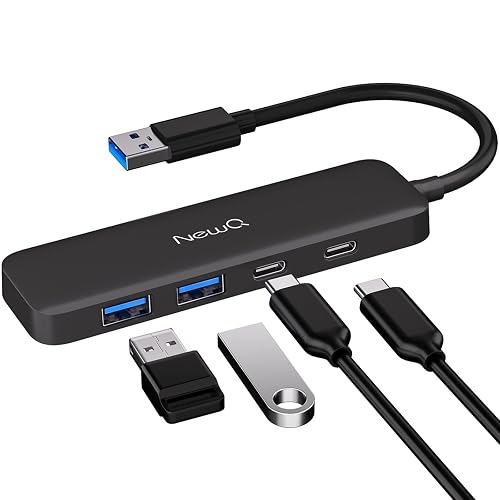
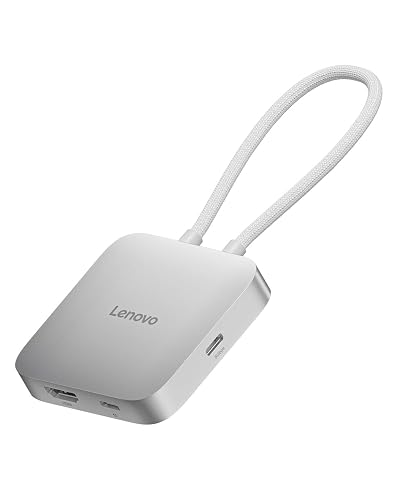
Finding the right hp usb-c travel hub comes down to three things: whether your laptop has enough ports when you are away from your desk, whether the hub can pass power through to your laptop, and whether it will drive an external display without drama. This list ranks five HP-branded and HP-compatible options against those needs. The criteria were port count and type, power delivery wattage, display output, portability, and the owner feedback patterns that come up most often for each model. No product here was tested in a lab or used first-hand for this article.
Our top picks at a glance
- 1
 TOP CHOICEBest overallHP Universal USB-C Multiport HubView on Amazon
- 2
 TOP CHOICEBest for desk-based travelersHP USB C Docking Station 5-in-1View on Amazon
- 3
 TOP CHOICEBest for compact carryHP USB-C Travel Hub G2View on Amazon
- 4
 Best for card reader and HDMI extrasAcer 4K USB C to HDMI Splitter HubView on Amazon
- 5
 Best for newer HP travel setupsHP Travel G3 5-Port USB-C HubView on Amazon
Our Top Picks
| Product | Best for | Key feature |
|---|---|---|
| HP Universal USB-C Multiport Hub | General laptop travel | Broad port mix for everyday peripherals |
| HP USB C Docking Station 5-in-1 | Desk-based travelers | 100W Power Delivery pass-through and 4K HDMI |
| HP USB-C Travel Hub G2 | Compact carry | Small footprint that fits a laptop sleeve |
| Acer 4K USB C to HDMI Splitter Hub | Card readers and HDMI extras | SD/TF card slots and 100W PD port |
| HP Travel G3 5-Port USB-C Hub | Newer HP travel setups | Scalable Power Delivery and 4K display support |
HP Universal USB-C Multiport Hub
HP Universal USB-C Multiport Hub
Best for: General laptop travel with a mix of USB-A and USB-C peripherals
This is the most flexible option on the list for someone who carries a mouse, a flash drive, a headset and a monitor cable. It suits travelers whose laptop has only one or two USB-C ports and who need the extra ports without buying a larger dock.
Key specs
- USB-C multiport design for laptops with USB-C input
- Multiple USB-A and USB-C downstream ports
- HDMI output for an external display
Pros
- Broad port selection covers most everyday accessories
- Compact enough for a backpack side pocket
- Works across a wide range of laptop brands
Cons
- Owners often report that power pass-through varies with the charger wattage used
- Heavier use of several high-draw devices at once can slow file transfers
Bottom line: A strong first choice for travelers who want one hub that covers most ports without a large footprint.
HP USB C Docking Station 5-in-1
HP USB C Docking Station – 5-in-1 Multi-Port USB C Hub with 4K HDMI, 100W Power Delivery, for Laptops, MacBook, iPad, Thinkpad and More, Black
Best for: Desk-based travelers who need power and a monitor at the same time
This model is aimed at people who set up at a hotel desk or coworking space and want a single cable to charge the laptop, drive a 4K display and connect a few accessories. It fits users who value power delivery over the lightest possible bag.
Key specs
- 5-in-1 layout with 4K HDMI output
- 100W Power Delivery pass-through, as stated in the listing name
- Compatible with laptops, MacBook, iPad and ThinkPad models per the listing
Pros
- 100W pass-through can charge larger laptops while in use
- 4K HDMI output suits external monitors
- Single-cable setup reduces desk clutter
Cons
- Larger and heavier than a pocket travel hub
- Requires a compatible high-wattage charger to reach full power delivery
Bottom line: Best for travelers who work at a desk most of the day and want one cable for power, display and peripherals.
HP USB-C Travel Hub G2
HP USB-C Travel Hub G2
Best for: Compact carry with essential ports
The G2 is built for people who want the smallest practical hub for a laptop bag or sleeve. It suits frequent flyers and commuters who need HDMI and USB ports on the road but do not need a full docking setup.
Key specs
- USB-C connection to the host laptop
- Compact body designed for travel
- Core port set focused on display and USB connectivity
Pros
- Small enough to stay in a laptop sleeve
- Covers the basic display and USB needs for travel
- Simple plug-and-play setup
Cons
- Fewer ports than the larger HP hubs on this list
- Owners often report that high-draw devices can share limited bandwidth
Bottom line: The right choice when portability matters more than port count.
Acer 4K USB C to HDMI Splitter Hub
4K USB C to HDMI Splitter Hub, 100W Max PD Port, 2 USB 3.0 & 1 USB C Data Ports 5Gbps, SD/TF Card Reader Acer USB C Hub, 7 in 1 Multi-Port Adapter for Laptop/Mac Type C Devices
Best for: Users who need card readers and multiple USB ports alongside HDMI
This seven-in-one hub is a good fit for photographers, content creators and anyone who regularly moves files from SD or microSD cards. It is not an HP product, but it works with HP laptops and Macs and covers a wider set of ports than most compact HP travel hubs.
Key specs
- 100W Max PD port per the listing name
- 2 USB 3.0 ports and 1 USB-C data port at 5Gbps, per the listing
- SD and TF card reader slots
Pros
- Built-in card readers remove the need for a separate adapter
- Seven ports cover most travel needs in one device
- Good value among multi-port options for its feature set
Cons
- Brand is not HP, so warranty support runs through Acer
- Owners sometimes mention that the body runs warm under sustained power delivery
Bottom line: The best pick here for travelers who need card reading and HDMI more than strict HP compatibility.
HP Travel G3 5-Port USB-C Hub
HP Travel G3 5-Port USB-C Hub – 2 USB-C Ports, 2 USB-A, 1 HDMI, Compatible with Multiple Brands & Systems, 4K Display Support, Scalable Power Delivery and Sustainable Design (86T46AA)
Best for: Newer HP travel setups that mix USB-C and USB-A devices
The G3 is the most recent HP travel design on this list, with two USB-C ports, two USB-A ports and one HDMI port. It suits travelers who want a balanced five-port layout with modern power delivery and display support.
Key specs
- 5 ports: 2 USB-C, 2 USB-A, 1 HDMI
- 4K display support, as stated in the listing name
- Scalable Power Delivery, per the listing
Pros
- Balanced port mix for mixed-generation accessories
- 4K display support for external monitors
- Compatible with multiple laptop brands and systems
Cons
- Scalable power delivery means output depends on the connected charger
- Only one HDMI port, so multi-display setups need another solution
Bottom line: A well-rounded five-port option for travelers who want current HP design with a balanced port set.
Buying Guide
Port count and port type
Count the ports you use in a typical travel day, including display, storage, input devices and charging. Most travelers need at least one HDMI output, two USB-A ports for older peripherals and one USB-C port for a second device. Check whether the hub’s USB-C ports are data, power or both.
Good picks for this: HP Universal USB-C Multiport Hub, HP Travel G3 5-Port USB-C Hub
Power delivery wattage
Power delivery is the wattage the hub can pass through to your laptop while it is connected. Laptops commonly charge at 45W to 100W depending on the model. Check your laptop’s charger rating and make sure the hub’s pass-through is at least that high. Owners often report that a hub’s stated wattage is only reached with a matching charger.
Good picks for this: HP USB C Docking Station 5-in-1, Acer 4K USB C to HDMI Splitter Hub
Display output and resolution
If you plan to use an external monitor, confirm the HDMI port’s supported resolution and refresh rate in the listing. Many hubs list 4K output at 30Hz, which is fine for documents and video but may feel slow for fast-moving content. Confirm the output works with your laptop’s graphics before you travel.
Good picks for this: HP USB C Docking Station 5-in-1, HP Travel G3 5-Port USB-C Hub
Size and weight
A travel hub should fit in a laptop sleeve or a small pouch. Compact hubs are typically a few inches long and light enough to ignore in a bag. Larger docks add weight and bulk but offer more ports. Choose based on whether the hub will live in your bag or on your desk.
Good picks for this: HP USB-C Travel Hub G2, HP Universal USB-C Multiport Hub
Storage and card reader support
If you move files from cameras or drones, look for SD and microSD slots. Card readers built into the hub save you from carrying a separate adapter. Check whether the reader supports the card sizes you use.
Good picks for this: Acer 4K USB C to HDMI Splitter Hub
Build quality and heat
Aluminum or sturdy plastic housings tend to handle daily travel better than thin shells. Owners often mention heat when a hub is pushing high power delivery and display output at once. Avoid running a hub at maximum load inside a closed bag for long periods.
Good picks for this: HP USB C Docking Station 5-in-1, HP Travel G3 5-Port USB-C Hub
Compatibility with your laptop
Confirm that your laptop has a USB-C port that supports data, video and power. Some older laptops use USB-C for charging only. Check your laptop’s manual or manufacturer specifications before buying.
Good picks for this: HP Universal USB-C Multiport Hub, HP Travel G3 5-Port USB-C Hub
FAQ
What is the best hp usb-c travel hub for everyday travel?
For most travelers, the HP Universal USB-C Multiport Hub offers the broadest port mix in a compact body. The HP Travel G3 is a strong alternative if you want a balanced five-port layout with modern power delivery.
Do HP USB-C travel hubs work with non-HP laptops?
Many HP-branded hubs are designed to work across multiple laptop brands. Compatibility depends on the laptop having a USB-C port that supports video and data. Check the listing for stated compatibility before buying.
Will a travel hub charge my laptop?
Some hubs pass power through to the laptop, but the wattage depends on the hub and the charger you use. Check your laptop’s required charging wattage and match it against the hub’s power delivery rating.
Can I connect two monitors to a USB-C travel hub?
Most compact travel hubs in this price-agnostic list have one HDMI port, so they support a single external display. For two monitors, look for a docking station with multiple display outputs or a hub that lists dual-display support.
Why does my hub get warm?
Heat is normal when a hub passes power, drives a display and runs USB devices at the same time. Owners often report warmth under sustained load. Reduce the number of active devices or use a higher-wattage charger to ease the load.
How do I know if my USB-C port supports video output?
Look for a USB-C port with a lightning-bolt or display icon, or check the laptop’s specifications for DisplayPort Alt Mode or Thunderbolt support. If the specs are unclear, contact the laptop manufacturer.
Conclusion
The best hp usb-c travel hub depends on what you carry. Choose the HP Universal USB-C Multiport Hub for broad everyday port coverage, the HP USB C Docking Station 5-in-1 if you work at a desk and need 100W pass-through, the HP USB-C Travel Hub G2 for the smallest carry, the Acer 4K USB C to HDMI Splitter Hub if you need card readers, and the HP Travel G3 5-Port USB-C Hub for a balanced modern layout. Confirm your laptop’s power and display requirements before you buy.
Sources
- USB specifications, including USB Type-C and Power Delivery standards
- HP's official product documentation and compatibility guidance for USB-C accessories
- Guidance on battery and charger efficiency for portable electronics (energy.gov)
Related reading
- HP USB-C Travel Hub G3 Review: Features and Performance
- Travel Hub USB C: 6 Best Picks for Laptop Travel in 2026
- 6 Best Microsoft USB-C Travel Hub Picks for Surface and Laptop Users (2026)
- Wirecutter USB C Hub: 5 Best Picks Compared (2026)
- Usb-c Hub for Steam Deck: What to Buy, What to Avoid, and Why
About Owen Palmer
Owen Palmer is part of our editorial team and reviews and edits our consumer tech how-to & troubleshooting guides, checking product details against manufacturer specifications and owner feedback.