By Owen Palmer
Updated November 2026
Choosing a usb c hub for iMac 24 inch comes down to which ports you actually use every day. The 24-inch iMac has a limited set of rear and side connections, so a good hub should add USB-A and USB-C ports, a card reader, and ideally 4K HDMI output without slowing down your main display or your storage. The seven models below were compared on port mix, video support, storage expansion, build quality and the patterns owners tend to report, rather than on hands-on testing.
Our top picks at a glance
- 1
 TOP CHOICEBest overallUSB C Hub for iMac 24 inch (M1/M3/M4/M6), iMac USB Adapter MultiportsView on Amazon
- 2
 TOP CHOICEBest for storage expansionPULWTOP iMac Usb Hub, Aluminum Desgin Perfect for i-Mac 24" 2021/2023/View on Amazon
- 3
 TOP CHOICEBest budget pickUSB C Hub Multiport Adapter for iMac M6/M4/M3/M1, 6 in 1 iMac 2026/202View on Amazon
- 4
 Best for wired networkingPULWTOP Aluminum iMac M6 Hub with HDMI 4K@60Hz, 2.5G Ethernet, 5 USB AView on Amazon
- 5
 Best for high-speed storageiMac hub for 24” iMac, 10Gbps USB-C/A, 4K HDMI, SD/TF,iMac docking staView on Amazon
- 6
 Best for a clean deskPULWTOP Shelf Hub for iMac with USB A/C 10Gbps, 2 USBA 2.0, SD/TF CardView on Amazon
- 7
 Best for full dockingiMac Hub with Max 4TB M.2 SSD Enclosure, Max 10Gbps Data, 4 USB Ports,View on Amazon
Our Top Picks
Quick Comparison
| Product | Best for | Key feature |
|---|---|---|
| USB C Hub for iMac 24 inch (M1/M3/M4/M6) | Everyday port expansion | 4K HDMI with Type-C 10Gbps data |
| PULWTOP iMac Usb Hub (M.2 NVMe enclosure) | Storage expansion | M.2 NVMe SSD enclosure up to 4TB |
| USB C Hub Multiport Adapter for iMac | Budget setups | Six-in-one port mix with USB 3.0 |
| PULWTOP Aluminum iMac M6 Hub | Wired networking | 2.5G Ethernet plus 4K HDMI |
| iMac hub for 24” iMac, 10Gbps 8in1 | High-speed storage | 10Gbps USB-C/A with M.2 NVMe expansion |
| PULWTOP Shelf Hub for iMac | Clean desk layouts | Shelf-style hub with 10Gbps USB-A/C |
| Minisopuru DS802 iMac Docking Station | Full docking | Up to 4TB M.2 SSD enclosure with 10Gbps data |
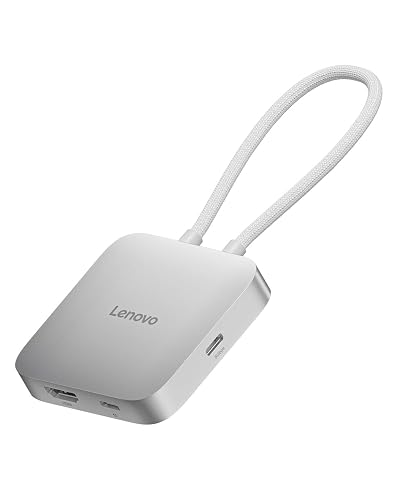
USB C Hub for iMac 24 inch (M1/M3/M4/M6), iMac USB Adapter Multiports with 4K HDMI, Type-C 10Gbps, SD/TF Card Reader
USB C Hub for iMac 24 inch (M1/M3/M4/M6), iMac USB Adapter Multiports with 4K HDMI, Type-C 10Gbps, SD/TF Card Reader
Best for: Everyday port expansion with video output
This model suits buyers who want HDMI for a second display along with a card reader and extra USB ports without adding storage hardware.
Key specs
- Compatible with 24-inch iMac M1, M3, M4 and M6 models
- 4K HDMI output
- Type-C port rated 10Gbps
- SD and TF card reader
Pros
- Covers HDMI, USB and card reading in one compact unit
- Type-C data port supports fast external drives
- Simple plug-and-play setup on the iMac
Cons
- No built-in storage enclosure
- Port count is modest for heavy peripheral setups
Bottom line: A strong default choice for most 24-inch iMac owners who need HDMI and a card reader.
PULWTOP iMac Usb Hub, Aluminum Desgin Perfect for i-Mac 24″ 2021/2023/2024/2026, iMac Dock with 4*USB A/C, SD/TF, Silver USB C HUB for iMac 24 inch M1/M3/M4/M6 with M.2 NVMe 4TB SSD Enclosure
PULWTOP iMac Usb Hub, Aluminum Desgin Perfect for i-Mac 24" 2021/2023/2024/2026, iMac Dock with 4*USB A/C, SD/TF, Silver USB C HUB for iMac 24 inch M1/M3/M4/M6 with M.2 NVMe 4TB SSD Enclosure
Best for: Storage expansion
Users who want an SSD slot built into the hub, keeping external storage tidy on the side of the iMac.
Key specs
- Aluminum body in silver finish
- Four USB ports across USB-A and USB-C
- SD and TF card slots
- M.2 NVMe enclosure listed up to 4TB
Pros
- Combines a dock and an SSD enclosure
- Aluminum build matches the iMac look
- Covers many common ports
Cons
- SSD capacity depends on the drive you install
- Owners often note the hub runs warm under sustained transfers
Bottom line: Best for users who want an integrated SSD slot and a tidy dock.
USB C Hub Multiport Adapter for iMac M6/M4/M3/M1, 6 in 1 iMac 2026/2024/2023/2021 USB C Port Hub with USB 3.0 Ports, SD/Micro SD Card Readers & 7 Color Panels
USB C Hub Multiport Adapter for iMac M6/M4/M3/M1, 6 in 1 iMac 2026/2024/2023/2021 USB C Port Hub with USB 3.0 Ports, SD/Micro SD Card Readers & 7 Color Panels
Best for: Budget setups
Buyers who need a few extra ports and card readers without paying for storage or networking they will not use.
Key specs
- Six-in-one port configuration
- USB 3.0 ports
- SD and micro SD card readers
- Compatible with multiple recent iMac generations
Pros
- Straightforward port set for basic needs
- Compatible with several iMac generations
- Card readers cover common camera and phone workflows
Cons
- USB 3.0 is slower than the Type-C 10Gbps ports on some other models
- No Ethernet or built-in storage
Bottom line: A practical pick for users who mainly need extra USB and card reader access.
PULWTOP Aluminum iMac M6 Hub with HDMI 4K@60Hz, 2.5G Ethernet, 5 USB A/C 10Gbps, SD/TF, iMac M4 Dock for 2021-2026, Silver 11-in-1 USB C Hub for iMac 24″ M1/M3/M4/M6 with M.2 NVMe 4TB SSD Enclosure
PULWTOP Aluminum iMac M6 Hub with HDMI 4K@60Hz, 2.5G Ethernet, 5 USB A/C 10Gbps, SD/TF, iMac M4 Dock for 2021-2026, Silver 11-in-1 USB C Hub for iMac 24" M1/M3/M4/M6 with M.2 NVMe 4TB SSD Enclosure
Best for: Wired networking
Users who want a wired internet connection to the iMac and a large number of ports without a separate Ethernet adapter.
Key specs
- HDMI output at 4K 60Hz
- 2.5G Ethernet port
- Five USB ports rated 10Gbps across USB-A and USB-C
- SD and TF card readers
- M.2 NVMe enclosure listed up to 4TB
Pros
- Wired 2.5G Ethernet is a clear advantage for stable connections
- Large port count in one hub
- Covers video, networking and storage together
Cons
- Heavier and larger footprint than basic hubs
- Full performance depends on the connected devices and cables
Bottom line: The right choice for users who need wired networking and a large port set on one desk.
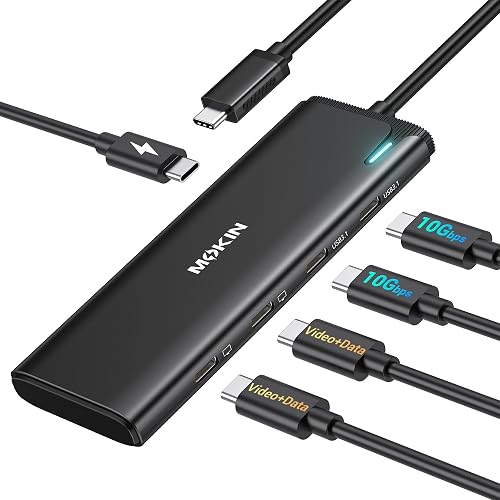
iMac hub for 24” iMac, 10Gbps USB-C/A, 4K HDMI, SD/TF, iMac docking station with M.2 NVMe SSD expansion up to 4TB 8in1 USB-C Hub for 24” iMac M6/M4/M3/M1, 10Gbps, HDMI, SD/TF, M.2 NVMe SSD
iMac hub for 24” iMac, 10Gbps USB-C/A, 4K HDMI, SD/TF,iMac docking station with M.2 NVMe SSD expansion up to 4TB 8in1 USB-C Hub for 24” iMac M6/M4/M3/M1, 10Gbps, HDMI, SD/TF, M.2 NVMe SSD
Best for: High-speed storage
Creators and office users who move large files and want fast external drives connected through the hub.
Key specs
- 10Gbps USB-C and USB-A ports
- 4K HDMI output
- SD and TF card readers
- M.2 NVMe SSD expansion up to 4TB
Pros
- 10Gbps ports suit fast external SSD workflows
- Storage slot and video output in one hub
- Compact dock design
Cons
- Speed gains require 10Gbps-capable drives and cables
- Limited detail on thermal performance in listing information
Bottom line: Suited to users who want fast external storage and a clean dock for large file work.
PULWTOP Shelf Hub for iMac with USB A/C 10Gbps, 2 USBA 2.0, SD/TF Card Reader for iMac24 inch & Studio Display 2, Sliver iMac Accessories for iMac 2021/2023/2024,USB C Hub for iMac for M1/M3/M4/M6
PULWTOP Shelf Hub for iMac with USB A/C 10Gbps, 2 USBA 2.0, SD/TF Card Reader for iMac24 inch & Studio Display 2, Sliver iMac Accessories for iMac 2021/2023/2024,USB C Hub for iMac for M1/M3/M4/M6
Best for: Clean desk layouts
Buyers who prefer a shelf-style hub that keeps cables organized and sits neatly beside the display.
Key specs
- USB-A and USB-C ports rated 10Gbps
- Two USB-A 2.0 ports
- SD and TF card reader
- Silver aluminum finish
Pros
- Shelf design helps keep cables tidy
- Good mix of fast and standard USB ports
- Card reader included
Cons
- No HDMI output listed
- Fewer ports than full docking models
Bottom line: A good match for users who want a neat desk and do not need video output through the hub.
iMac Hub with Max 4TB M.2 SSD Enclosure, Max 10Gbps Data, 4 USB Ports, SD/TF, iMac Accessories for i-Mac 2021/2023/2024/2026. Minisopuru DS802 iMac Docking Station for 24 inch iMac M1/M3/M4/M5/M6, Blu
iMac Hub with Max 4TB M.2 SSD Enclosure, Max 10Gbps Data, 4 USB Ports, SD/TF, iMac Accessories for i-Mac 2021/2023/2024/2026. Minisopuru DS802 iMac Docking Station for 24 inch iMac M1/M3/M4/M5/M6, Blu
Best for: Full docking
Users who want a dock that combines storage, card reading and USB ports in one unit for a fully loaded desk.
Key specs
- M.2 SSD enclosure up to 4TB
- Max 10Gbps data rate
- Four USB ports
- SD and TF card readers
Pros
- Storage, USB and card reading in one dock
- Broad compatibility listed across several iMac generations
- Fast data rate for external drives
Cons
- Listing lists a shifting set of iMac models, so confirm your generation
- Fewer ports than the eleven-port models
Bottom line: Best for users who want storage and ports in one dock and have a compatible iMac.
Buying Guide
Port Mix and Port Count
Count the devices you plug in daily, such as keyboard, mouse, card reader, drives and display. Make sure the hub gives you that many ports plus one or two spares. A mix of USB-A and USB-C matters because many accessories still use USB-A.
Good picks for this: USB C Hub for iMac 24 inch (M1/M3/M4/M6), USB C Hub Multiport Adapter for iMac
Video Output and HDMI Support
Check whether 4K HDMI output is listed and at what refresh rate. Many owners use a second monitor, and a hub that only lists 1080p may not suit that setup. Confirm the display you plan to use supports the resolution.
Good picks for this: PULWTOP Aluminum iMac M6 Hub, USB C Hub for iMac 24 inch (M1/M3/M4/M6)
Data Speed and Port Ratings
Look for 10Gbps USB-C and USB-A ports if you move large files to external SSDs. A 10Gbps port only delivers that speed when the drive, cable and hub all support it, so check the whole chain.
Good picks for this: iMac hub for 24” iMac 10Gbps, PULWTOP Shelf Hub for iMac
Storage Expansion
If you want internal-style storage outside the iMac, look for an M.2 NVMe enclosure. Check the maximum capacity listed and the drive type it accepts, typically M.2 NVMe SSDs. Keep backups on a separate drive regardless of the enclosure.
Good picks for this: PULWTOP iMac Usb Hub with M.2 NVMe enclosure, Minisopuru DS802 iMac Docking Station
Ethernet and Networking
A wired Ethernet port is useful when Wi-Fi is unstable or you need a reliable connection for large uploads. A 2.5G port is faster than standard gigabit, but your router and internet plan must support the speed to benefit from it.
Good picks for this: PULWTOP Aluminum iMac M6 Hub with 2.5G Ethernet
Size, Fit and Desk Layout
The 24-inch iMac has a slim, flat base, so check the hub footprint and where it will sit. A shelf-style or under-display hub suits tidy desks, while a larger dock may need more space.
Good picks for this: PULWTOP Shelf Hub for iMac, PULWTOP iMac Usb Hub
Compatibility and Build Quality
Confirm the listed iMac generations match yours, since compatibility lists differ between models. Aluminum bodies generally feel sturdier and help with heat dissipation, though owners often report that hubs run warm during long transfers.
Good picks for this: Minisopuru DS802 iMac Docking Station, PULWTOP Aluminum iMac M6 Hub
FAQ
Do I need a powered hub for an iMac?
Most users with light peripherals do not need external power. A powered hub becomes useful if you connect bus-powered drives or devices that draw a lot of current, since the iMac’s USB ports have a limited output.
Can a USB-C hub add a second monitor to a 24-inch iMac?
Some hubs with HDMI output can drive an external display, but the supported resolution and refresh rate depend on the hub and the monitor. Check that the listing names 4K output and your monitor’s input type.
Will any USB-C hub work with every iMac 24 inch model?
No. Compatibility lists differ by iMac generation and chip, so confirm the listed M-series models match yours before buying.
Do I need a 10Gbps hub?
Only if you transfer large files to fast external SSDs regularly. For keyboards, mice and basic storage, standard USB speeds are usually sufficient.
Is an M.2 SSD enclosure in a hub the same as an internal drive?
No. A hub enclosure is external storage and generally slower than the iMac’s internal drive. It is useful for extra capacity, not for replacing internal storage.
How do I know if the hub is overheating?
Some warmth during heavy transfers is normal. Owners often report the hub becomes noticeably hot after long sessions, so look for good ventilation and avoid stacking objects on top.
Should I buy a dock or a simple hub?
A simple hub is enough for a few extra ports. A dock makes sense if you want storage, networking and multiple displays managed from one unit.
Conclusion
For most 24-inch iMac owners, the USB C Hub for iMac 24 inch (M1/M3/M4/M6) offers the most balanced mix of HDMI, USB and card reading. Choose the PULWTOP iMac Usb Hub if you want an SSD slot, the PULWTOP Aluminum iMac M6 Hub if wired networking matters, and the Minisopuru DS802 if you want a full dock. Budget buyers may find the USB C Hub Multiport Adapter covers basic needs. Confirm compatibility with your exact iMac model before ordering.
For related reading, see USB-C Hub for Mac: How to Choose and Connect One (Step-by-Step), USB-C Hub with Ethernet Port: How to Choose and Set One Up, USB-C Hub vs Docking Station (2026): Which Is Better for Your Setup?, USB Type C Hub with HDMI: How to Choose and Connect One (Step-by-Step), and Powered USB C Hub Picks: 5 Best for Multi-Device Desks (2026).
Sources
- Official USB specifications, including the speed classes behind 5Gbps and 10Gbps port ratings
- Apple's technical specifications for iMac models and their supported ports and displays
- Guidance on safe battery and electronics use, relevant when connecting external drives (energy.gov)
Before you buy: helpful guides
About Owen Palmer
Owen Palmer is part of our editorial team and reviews and edits our consumer tech how-to & troubleshooting guides, checking product details against manufacturer specifications and owner feedback.