
 By Owen Palmer
Updated November 2026
Shopping for a portable monitor for laptop nearby use usually starts with one problem: your laptop screen is too small for the work you need to do, but a full desktop setup is not practical. A portable monitor solves that by adding a second screen you can carry in a bag and connect in seconds. This list focuses on seven models from the same product family, compared on screen size, resolution, connection options, weight, and the patterns owners tend to mention in their feedback. Each pick is matched to a specific need so you can find the right fit quickly.
Our top picks at a glance
- 1
 TOP CHOICEBest overallPortable Monitor for Laptop 1080P FHD IPS with USB-C and HDMI (KYY 15.6")View on Amazon
- 2
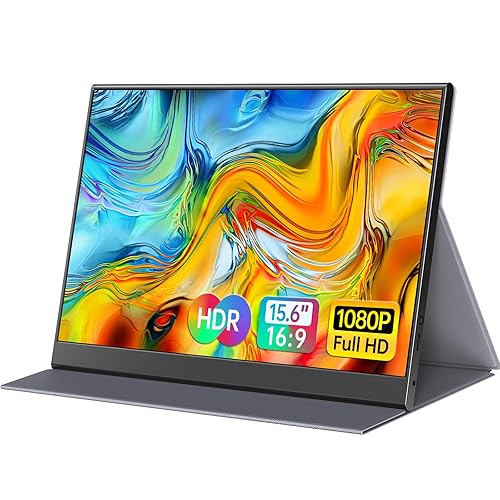 TOP CHOICEBest for slim carry6inch Portable Monitor, 1080P USB-C HDMI Second External Monitor for LaptopView on Amazon
- 3
 TOP CHOICEBest for larger screenAOC 16" Portable Monitor FHD 60Hz USB-C IPS Ultra Slim 16T20View on Amazon
- 4
 Best for multi-device useInnoView Portable Monitor, 15.6 Inch FHD 1080P HDMI USB C Second External MonitorView on Amazon
- 5
 Best for ultralight travelLaptop Screen Extender 14.2" FHD 1080P Dual Portable MonitorView on Amazon
- 6
 Best budget pickcocopar Portable Monitor 15.6 Inch 1080P FHD 60Hz 85% sRGB Travel MonitorView on Amazon
- 7
 Best for a bigger desk-style viewVisionOwl Portable Monitor for Laptop, IPS 18.5 Inch Second MonitorView on Amazon
Our Top Picks
The table below summarizes the seven models. The detailed notes follow, ordered by how well each one fits the selection criteria: portability, screen quality, connectivity, and value for everyday laptop use.
Quick Comparison
| Product | Best for | Key feature |
|---|---|---|
| KYY Portable Monitor 15.6″ 1080P | Everyday laptop extension | IPS panel with USB-C and HDMI |
| 15.6inch Portable Monitor (1080P USB-C HDMI) | Slim carry | Ultra-thin zero-frame design |
| AOC 16T20 Portable Monitor | Larger screen | 16-inch ultra-slim body with VESA mount |
| InnoView Portable Monitor 15.6″ | Multi-device use | Works with laptops, phones, and game consoles |
| Laptop Screen Extender 14.2″ | Ultralight travel | Lightweight dual-screen design |
| cocopar Portable Monitor 15.6″ | Budget setups | 85% sRGB color coverage |
| VisionOwl Portable Monitor 18.5″ | Desk-style viewing | Built-in kickstand and speakers |
Portable Monitor for Laptop 1080P FHD IPS with USB-C and HDMI (KYY 15.6″)
KYY Portable Monitor 15.6" 1080P Computer Monitor Screen Extender w/Cover | Portable Monitor for Laptop 1080P FHD IPS with USB-C and HDMI, Laptop Screen Extender for Travel HDR Gaming Monitor w/Speake
Best for: Everyday laptop extension with flexible connections
This model suits people who want a straightforward second screen for email, documents, and video calls, and who may connect it to both a laptop and a gaming console.
Key specs
- 15.6-inch IPS panel
- 1920 x 1080 (Full HD) resolution
- USB-C and HDMI inputs
- Built-in speaker and protective cover
Pros
- IPS panel gives wide viewing angles
- Works with USB-C and HDMI sources
- Cover doubles as a stand
Cons
- Full HD is modest for detailed photo editing
- Built-in speaker is best for voice, not music
Bottom line: A solid default choice for users who want a reliable, all-round second screen at a 15.6-inch size.
15.6inch Portable Monitor, 1080P USB-C HDMI Second External Monitor for Laptop
15.6inch Portable Monitor,1080P USB-C HDMI Second External Monitor for Laptop,PC,Mac Phone,PS,Xbox,Swich,IPS Ultra-Thin Zero Frame Gaming Display/Premium Smart Cover
Best for: Slim carry and minimal bulk
This is a good match for people who commute with a laptop and want the thinnest possible second screen to slide into a bag.
Key specs
- 15.6-inch IPS display
- 1080P resolution
- USB-C and mini HDMI connections
- Ultra-thin zero-frame bezel design
Pros
- Very thin profile for travel
- Borderless look maximizes usable area
- Connects to laptops, phones, and consoles
Cons
- Thin bodies can flex more under pressure than thicker frames
- Resolution matches other 15.6-inch models rather than exceeding them
Bottom line: Best for people whose top priority is keeping the setup as light and flat as possible.
AOC 16″ Portable Monitor FHD 60Hz USB-C IPS Ultra Slim 16T20
AOC 16" Portable Monitor FHD 60Hz USB-C IPS Ultra Slim Smart Cover 16T20 | 1920×1080 Computer Monitor, USB-C, Mini HDMI, Built-in Speakers, Smart Cover, Ultra Slim, VESA Mount, Low Blue Light
Best for: Larger screen area without a major size jump
A good choice if you find 15.6 inches cramped for spreadsheets or side-by-side windows and want a bit more room.
Key specs
- 16-inch IPS panel
- 1920 x 1080 resolution at 60Hz
- USB-C and mini HDMI
- Built-in speakers and VESA mount support
Pros
- Extra screen width helps with multitasking
- VESA mount option for monitor arms
- Low blue light mode is listed in the specs
Cons
- Slightly heavier than the 14- and 15.6-inch options
- 60Hz refresh rate is fine for office work but not for fast gaming
Bottom line: Pick this if you want the most screen area in the compact portable category and do not need a high refresh rate.
InnoView Portable Monitor, 15.6 Inch FHD 1080P HDMI USB C Second External Monitor
InnoView Portable Monitor, 15.6 Inch FHD 1080P HDMI USB C Second External Monitor for Laptop, Desktop, MacBook, Phones, Tablet, PS5/4, Xbox, Switch, Built-in Speaker with Protective Case
Best for: Connecting one screen to many devices
This suits people who switch between a laptop, a tablet, a phone, and a gaming console and want one portable display for all of them.
Key specs
- 15.6-inch Full HD display
- HDMI and USB-C inputs
- Built-in speaker
- Includes a protective case
Pros
- Broad device compatibility
- Protective case included for transport
- Plug-and-play setup for most laptops
Cons
- Case adds some bulk to the carry
- Speaker output is limited
Bottom line: A practical pick for people who want one monitor that works across several devices.
Laptop Screen Extender 14.2″ FHD 1080P Dual Portable Monitor
Laptop Screen Extender 1.87lbs Ultra-Portable & Ultra Slim, 14.2" FHD 1080P Dual Portable Monitor for 14"-17.3" Laptop, Plug & Play Travel Monitor Extender Compatible with Wins/Mac/Chrome/Android
Best for: Ultralight travel and airplane tray tables
Designed for people who need a second screen on the road and care most about weight and a slim footprint.
Key specs
- 14.2-inch Full HD display
- Listed weight of about 1.87 lbs
- Designed for laptops from 14 to 17.3 inches
- Plug-and-play connection
Pros
- Very light for its size
- Works with a wide range of laptop sizes
- Compact enough for tight airline seats
Cons
- Smaller screen than 15.6-inch alternatives
- Fewer port options are described in the listing
Bottom line: Ideal for frequent flyers and anyone whose main concern is weight over screen size.
cocopar Portable Monitor 15.6 Inch 1080P FHD 60Hz 85% sRGB Travel Monitor
cocopar Portable Monitor 15.6 Inch 1080P FHD 60Hz 85% sRGB Travel Monitor with Speaker HDMI USB-C Second Screen for Laptop MacBook Surface PC Xbox PS4/5, VESA Mountable, with Cover Stand
Best for: Budget setups that still need decent color
A sensible option for students or occasional users who want a reliable second screen without spending heavily.
Key specs
- 15.6-inch Full HD display at 60Hz
- 85% sRGB color coverage
- HDMI and USB-C inputs
- VESA mount support and included cover stand
Pros
- Color coverage is stated in the listing
- Includes a stand cover
- Mountable for fixed desk setups
Cons
- Older design with a thicker body than newer slim models
- Color coverage is good for office work but not for professional color grading
Bottom line: The best fit for people who want a budget pick with a clear spec sheet and standard features.
VisionOwl Portable Monitor for Laptop, IPS 18.5 Inch Second Monitor
VisionOwl Portable Monitor for Laptop, IPS USB-C HDMI Travel Second Monitor for MacBook Pro Air, PC, PS5, Xbox, Portable Second Screen, Built-in Kickstand, Speakers, VESA Mountable, 18.5 Inch
Best for: Desk-style viewing when you have a little more space
This is the largest model here and fits users who set up a portable screen at a hotel desk or home office rather than carrying it everywhere.
Key specs
- 18.5-inch IPS display
- USB-C and HDMI connections
- Built-in kickstand and speakers
- VESA mount compatible
Pros
- Largest screen in this list
- Kickstand allows easy setup without extra gear
- VESA mount for permanent desk use
Cons
- Heaviest and bulkiest option here
- Less practical for airplane tray tables
Bottom line: Choose this if your portable setup mostly lives on a desk and you want the biggest screen area available.
Buying Guide
Use these factors to narrow the list before you buy. Most portable monitors share similar basics, so the differences usually come down to size, weight, ports, and how you plan to use the screen.
Screen size and weight
Portable monitors typically range from about 14 to 18.5 inches. Smaller screens are easier to carry, while larger ones give more room for side-by-side windows. Check the listed weight and think about whether you will carry the monitor daily or only on occasional trips.
Good picks for this: Laptop Screen Extender 14.2″ FHD Dual Portable Monitor; 15.6inch Portable Monitor for Laptop
Resolution and panel type
Most models in this category use Full HD (1920 x 1080). For text-heavy work, Full HD is usually sufficient at 15.6 inches. IPS panels generally offer wider viewing angles than basic TN panels, which matters if you share the screen with someone else.
Good picks for this: Portable Monitor for Laptop 1080P FHD IPS with USB-C and HDMI; VisionOwl Portable Monitor for Laptop 18.5 Inch
Ports and connectivity
Check what your laptop outputs. USB-C with DisplayPort Alt Mode can often power the monitor and carry video over one cable. HDMI is common on older laptops and game consoles. Confirm that the monitor accepts your laptop’s connection type before buying.
Good picks for this: InnoView Portable Monitor 15.6 Inch; AOC 16″ Portable Monitor FHD 60Hz
Refresh rate and color
Most portable monitors run at 60Hz, which is fine for office work, video calls, and streaming. Color coverage figures such as sRGB percentages are useful for casual photo review. If you do serious color work, look for specifications beyond what budget portable models usually provide.
Good picks for this: cocopar Portable Monitor 15.6 Inch 1080P FHD 60Hz 85% sRGB; AOC 16″ Portable Monitor FHD 60Hz USB-C
Mounting and stand options
A built-in kickstand or cover stand lets you prop the monitor without extra hardware. VESA mount support, typically 75 x 75 mm or 100 x 100 mm on portable models, lets you attach it to a monitor arm or wall bracket. Check the listing for mount compatibility if you plan a fixed setup.
Good picks for this: VisionOwl Portable Monitor for Laptop 18.5 Inch; cocopar Portable Monitor 15.6 Inch
Durability and protection
Portable screens are exposed to bumps in bags and on tables. A protective cover or case reduces scratches and helps protect the panel edges. Frameless designs look clean but can be more vulnerable at the corners, so handle them with care.
Good picks for this: InnoView Portable Monitor 15.6 Inch (includes case); Portable Monitor for Laptop 1080P FHD IPS with USB-C and HDMI (includes cover)
Power and charging
Many portable monitors draw power from the laptop through USB-C, which saves a separate adapter. Power draw varies by model and screen brightness. If your laptop struggles to supply enough power, a powered USB-C hub or the monitor’s own adapter may be needed.
Good picks for this: 15.6inch Portable Monitor 1080P USB-C HDMI; Laptop Screen Extender 14.2″ FHD Dual Portable Monitor
FAQ
What is a portable monitor for laptop nearby use?
It is a lightweight external display, usually 14 to 18.5 inches, that connects to your laptop with a single cable and adds screen space. It is designed to be carried and set up wherever you work.
Do portable monitors need a separate power adapter?
Many models run on power from the laptop through USB-C, but some require their own adapter or a powered hub. Check the listed power requirements before you buy, especially if your laptop has limited USB-C output.
Is 1080p enough for a portable monitor?
For office work, web browsing, and video calls, Full HD is generally sufficient at 15.6 inches. Higher resolutions are more useful for detailed photo editing or design work, which is not the main purpose of most portable models.
What is the difference between HDMI and USB-C on these monitors?
HDMI is widely supported by laptops, consoles, and TVs. USB-C can carry video and sometimes power over a single cable, which is convenient for travel. The right choice depends on which ports your laptop and other devices provide.
Can I use a portable monitor with a phone or tablet?
Some models list phone or tablet compatibility, but this depends on the device’s video output and the cable you use. Confirm compatibility in the product specifications before relying on it.
Are portable monitors good for gaming?
Most models in this list run at 60Hz, which is adequate for casual games and streaming but not for fast-paced competitive play. If high refresh rates matter to you, look for models that specifically list higher refresh rates.
How should I care for a portable monitor?
Use the included cover when transporting it, avoid pressing on the screen, and clean it with a soft microfiber cloth. Keep the cable connections dry and avoid leaving the monitor in hot vehicles for long periods.
Conclusion
For most people looking for a portable monitor for laptop nearby use, the KYY 15.6-inch model is a balanced starting point with IPS panel quality and flexible ports. If weight matters most, the slim 15.6-inch zero-frame model or the 14.2-inch extender is a better match. Those who want more screen area should consider the 16-inch AOC or the 18.5-inch VisionOwl. Budget-conscious buyers will find the cocopar model covers the basics with stated color coverage. Match the screen size and connection type to your laptop and daily routine, and the right choice will follow.
Sources
- Guidance on energy use and power consumption for electronic devices, useful when comparing power draw (energy.gov)
- Technical standards and research on display technology and connectivity interfaces
- Workplace ergonomics guidance on screen placement and viewing distance for laptop users
Before you buy: helpful guides
Related reading
- Triple Portable Monitor for Laptop 15.6-Inch: 5 Best Picks Compared (2026)
- Top 5 Portable 2nd Monitors for Laptop Picks Compared for 2026
About Owen Palmer
Owen Palmer is part of our editorial team and reviews and edits our consumer tech how-to & troubleshooting guides, checking product details against manufacturer specifications and owner feedback.


