
 By Owen Palmer
Updated November 2026
A usb c hub with audio jack solves a common desk problem: your laptop or tablet has only USB-C ports, but you still need a headphone or speaker connection, a monitor output, and room for storage cards or USB-A devices. This guide narrows the field using four criteria: whether the 3.5mm audio jack is confirmed in the product listing, how much power delivery the hub passes through to your laptop, the mix of video and data ports, and how well the design suits everyday desk, travel, or tablet use. Each pick below is drawn from listing specifications and owner feedback patterns. None of these units were tested in our own lab.
Our top picks at a glance
- 1
 TOP CHOICEBest overallBelkin USB-C Hub 7-in-1 MultiPort Docking StationView on Amazon
- 2
 TOP CHOICEBest for multi-port desks9IN1 USB C Hub for MacBook Pro/Air (M1-M5), KIROSA 4K HDMI Multiport AdapterView on Amazon
- 3
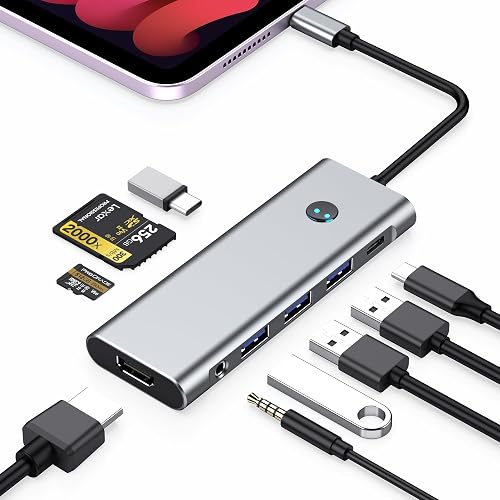 TOP CHOICEBest for iPad usersUSB C HUB for iPad Pro Adapter Multiport Docking Station 4K 60Hz HDMIView on Amazon
- 4
 Best for Neo MacBook and Pro laptopsType-C Docking Station with 3.5mm Auxiliary/Card Reader/100W PD/4 USB-AView on Amazon
- 5
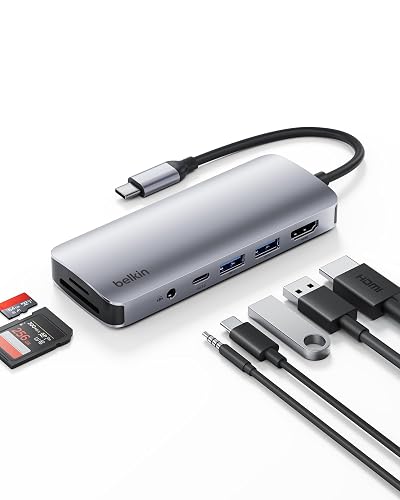 Best budget pickBelkin USB-C Docking Station 7-in-1 for Neo MacBook and iPad ProView on Amazon
Our Top Picks
Quick Comparison
| Product | Best for | Key feature |
|---|---|---|
| Belkin USB-C Hub 7-in-1 MultiPort Docking Station | Everyday laptop desks | 85W Power Delivery 3.0 with 4K HDMI and 3.5mm audio |
| 9IN1 USB C Hub for MacBook Pro/Air (KIROSA) | Multi-device desks | Nine ports including 100W PD and SD/TF readers |
| USB C HUB for iPad Pro Adapter Multiport Docking Station | Tablet workflows | 4K 60Hz HDMI output with a 3.5mm audio jack |
| Type-C Docking Station with 3.5mm Auxiliary (8-in-1) | Laptops with limited ports | 100W PD charging alongside four USB-A ports |
| Belkin USB-C Docking Station (7-in-1, Neo MacBook) | Compact budget setups | Card slots and audio jack in a small footprint |
Belkin USB-C Hub 7-in-1 MultiPort Docking Station
Belkin USB-C Hub, 7-in-1 MultiPort Docking Station for MacBook & Windows – 85W USB-C Power Delivery 3.0, 4K HDMI 1.4, 2x USB-A 3.0, SD 3.0, Micro SD 3.0, & 3.5mm Audio Jack
Best for: Everyday laptop desks that need reliable power delivery and a wired audio connection.
This hub suits people who use one laptop at a desk and want a single cable to handle charging, a external display, a headset, and storage cards. It is the most conventional pick here and the one most likely to fit a standard home or office setup.
Key specs
- 85W USB-C Power Delivery 3.0 pass-through charging
- 4K HDMI 1.4 video output
- 2 x USB-A 3.0 ports
- SD 3.0 and microSD 3.0 card readers
- 3.5mm audio jack
Pros
- Listing names a clear 85W power delivery rating, which suits most mid-sized laptops
- Covers the full set of everyday ports in one unit
- Brand has a broad track record with USB-C accessories
Cons
- HDMI 1.4 caps resolution below what newer HDMI standards offer
- Only two USB-A ports, which may be tight for many peripherals
Bottom line: Pick this if you want a dependable, all-round hub for one laptop and do not need the highest video bandwidth.
9IN1 USB C Hub for MacBook Pro/Air (M1-M5), KIROSA 4K HDMI Multiport Adapter
9IN1 USB C Hub for MacBook Pro/Air (M1-M5), KIROSA 4K HDMI Multiport Adapter with 3.5mm Audio, 100W PD, 5Gbps USB 3.0, SD/TF Reader – Compatible with Dell XPS, ThinkPad & USB-C Laptops
Best for: Multi-device desks where you need many ports from one hub.
Users who connect a monitor, storage, a card reader, and audio at the same time will find the port count useful. It also suits people with Dell, Lenovo, or other USB-C laptops, based on the compatibility note in the listing.
Key specs
- 100W Power Delivery pass-through
- 4K HDMI output
- 5Gbps USB 3.0 ports
- SD and TF card reader
- 3.5mm audio jack
Pros
- Nine ports in one body cover most desk needs
- 100W pass-through is enough for many larger laptops
- USB 3.0 speeds are useful for external drives
Cons
- Many ports mean a larger body that takes more desk space
- Owners often note that heavy simultaneous loads can run warm
Bottom line: A good choice for a desk with several peripherals and a laptop that needs strong charging.
USB C HUB for iPad Pro Adapter Multiport Docking Station 4K 60Hz HDMI
USB C HUB for iPad Pro Adapter Multiport Docking Station 4K 60Hz HDMI, 100W PD, SD/TF Card Reader, 3 USB A, 3.5mm Audio Jack, 9 in 1 USB C Dock for iPad Air/Galaxy Dex/Tablet/MacBook/iPhone/HP/Dell
Best for: Tablet workflows, especially iPad Pro and iPad Air setups that need an external display and audio.
This model is aimed at tablet users who want a monitor and headphones without a laptop. It also lists compatibility with phones and other USB-C devices, which suits mixed setups.
Key specs
- 4K 60Hz HDMI output
- 100W Power Delivery pass-through
- 3 x USB-A ports
- SD and TF card reader
- 3.5mm audio jack
Pros
- 4K 60Hz output is a stronger video spec than many older hubs
- Three USB-A ports cover common tablet accessories
- Broad device list in the listing
Cons
- Broad compatibility claims mean you should confirm your exact device
- Tablet-first design can feel less robust than laptop-focused docks
Bottom line: The best fit among these for iPad users who want 4K video and a headphone jack in one adapter.
Type-C Docking Station with 3.5mm Auxiliary/Card Reader/100W PD/4 USB-A
Type-C Docking Station with 3.5mm Auxiliary/Card Reader/100W PD/4 USB-A for MacBook Neo Pro Air, PC, Laptop, Computer USB C Hub with Audio Jack 8-in-1 USB Extender Splitter Multiport Adapter
Best for: Laptops with limited ports that need USB-A and audio in one unit.
This hub targets people whose laptop has only two or three USB-C ports and who still use older USB-A peripherals. The four USB-A ports are the main draw.
Key specs
- 100W Power Delivery pass-through
- 4 x USB-A ports
- Card reader
- 3.5mm auxiliary audio jack
Pros
- Four USB-A ports suit older keyboards, mice, and drives
- 100W charging supports larger laptops
- Listing covers a wide range of laptop types
Cons
- Video output is not clearly specified in the listing name, so check before buying if you need a monitor
- Owners often report the hub gets warm under heavy loads
Bottom line: Choose this for a port-hungry desk where USB-A devices matter more than a 4K display.
Belkin USB-C Docking Station 7-in-1 for Neo MacBook and iPad Pro
USB-C docking station for Neo MacBook, iPad Pro, and XPS, includes SD/MicroSD card slots, USB-A ports, 3.5mm audio jack Belkin USB-C Hub 7 in 1 4K HDMI, PD, USB-A, SD & Audio
Best for: Compact budget setups that still need card slots and audio.
This is the lightest option in the group. It suits students, travelers, or anyone who wants a small hub for occasional use rather than a full desk station.
Key specs
- 4K HDMI output
- Power Delivery pass-through
- USB-A ports
- SD and microSD card slots
- 3.5mm audio jack
Pros
- Compact body fits in a bag
- Covers HDMI, storage cards, and audio
- Brand name is widely recognized for USB-C accessories
Cons
- Fewer ports than the nine-port option
- Power delivery wattage is less prominent in the listing, so confirm it matches your charger needs
Bottom line: A practical pick for light use, travel, or a secondary workspace.
Buying Guide
Confirm the 3.5mm audio jack
Not every hub with “audio” in its name passes a headphone signal. Look for a clearly stated 3.5mm jack in the product name or specifications, and check whether it is a stereo output or a combined headset port with microphone support.
Good picks for this: Belkin USB-C Hub 7-in-1, 9IN1 USB C Hub for MacBook Pro/Air
Check Power Delivery wattage
Power delivery pass-through determines how fast the hub can charge your laptop while in use. Match the hub’s wattage to your charger. Many laptop chargers run between 65W and 100W, so a hub rated below your charger can slow charging under load.
Good picks for this: 9IN1 USB C Hub for MacBook Pro/Air, Type-C Docking Station with 3.5mm Auxiliary
Match video output to your display
HDMI version and resolution limits matter. HDMI 1.4 supports 4K at lower refresh rates, while 4K 60Hz needs a newer HDMI standard. Check whether your monitor needs 60Hz and whether your laptop supports DisplayPort Alt Mode.
Good picks for this: USB C HUB for iPad Pro Adapter, Belkin USB-C Hub 7-in-1
Count the ports you actually use
List every device you connect daily: keyboard, mouse, drive, card reader, headset, monitor. Count USB-A and USB-C separately, since many older accessories still use USB-A. A hub with more ports is useful, but unused ports add bulk.
Good picks for this: Type-C Docking Station with 3.5mm Auxiliary, 9IN1 USB C Hub for MacBook Pro/Air
Consider size and portability
Desktop hubs are heavier and take more space. If you travel, a compact model fits better in a laptop sleeve. Measure the space behind your monitor or beside your laptop before choosing a larger unit.
Good picks for this: Belkin USB-C Docking Station 7-in-1, Belkin USB-C Hub 7-in-1
Look at build and heat handling
Hubs that pass high power and run several ports at once can get warm. Aluminum housings tend to dissipate heat better than plastic, and owners often report that vented designs run cooler under load. Avoid placing a hub under papers or in a closed bag during long sessions.
Good picks for this: 9IN1 USB C Hub for MacBook Pro/Air, Type-C Docking Station with 3.5mm Auxiliary
Verify device compatibility
Broad compatibility lists are common, but your exact laptop or tablet model matters. Confirm your device supports USB-C video output and power delivery before buying. For iPads, check the model year and whether it supports external display output. A related read: 5 Best Tripp Lite USB-C Hub Options for Laptop Users (2026).
Good picks for this: USB C HUB for iPad Pro Adapter, Belkin USB-C Docking Station 7-in-1
FAQ
Does a USB-C hub with audio jack work with all laptops?
Most laptops with USB-C ports support the basic data and audio functions a hub provides. Video output and charging depend on whether your port supports DisplayPort Alt Mode and Power Delivery. Check your laptop manual for those features.
Can I charge my laptop through a USB-C hub?
Many hubs include a Power Delivery pass-through port. Plug your charger into that port and the hub passes power to the laptop. The wattage listed on the hub sets the upper limit.
Why does my headphone sound stop working when I connect a hub?
Common causes include the wrong audio output selected in your operating system, a loose connection, or a hub that does not fully pass the audio signal. Set the hub audio jack as the default output in your sound settings and reseat the cable.
Do I need HDMI 2.0 for a 4K monitor?
For 4K at 60Hz, HDMI 2.0 or newer is generally required. HDMI 1.4 can show 4K at lower refresh rates, which may be fine for office work but not for smooth video.
Can I use a USB-C hub with an iPad?
Yes, many hubs are designed for iPad Pro and iPad Air models. Confirm your model supports external display output and check the hub’s listed compatibility before buying.
Is a powered hub better than a passive hub?
A powered hub uses its own power supply to run connected devices, which helps with high-draw peripherals like external drives. Passive hubs rely on the laptop for power and suit light devices like keyboards and card readers.
Conclusion
The best usb c hub with audio jack depends on what you connect. For a balanced desk setup, the Belkin USB-C Hub 7-in-1 is a dependable starting point. If you need many ports, the 9IN1 USB C Hub for MacBook Pro/Air offers the widest range. Tablet users should look at the iPad-focused docking station for its 4K 60Hz output, while laptops with limited USB-A needs fit the four-USB-A Type-C dock. For travel or occasional use, the compact Belkin 7-in-1 is the lightest choice. Check your device compatibility and power requirements before you buy.
Sources
- Official USB specifications, including USB-C and Power Delivery standards
- HDMI standard versions and the resolution and refresh rates each supports
- Guidance on electronic device power use and safe charging practices (energy.gov)
Before you buy: helpful guides
- Usb-c Hub for Steam Deck: What to Buy, What to Avoid, and Why
- Dell Pro 32 Plus 4k Usb-c Hub Monitor P3225qe: A Practical Guide (2026)
- USB C Hub for iPad: How to Choose the Right One (Step-by-Step)
- USB-C Hub with Ethernet Port: How to Choose and Set One Up
- Usb C Hub for Chromecast: Does It Work and Which Setup to Use?
About Owen Palmer
Owen Palmer is part of our editorial team and reviews and edits our consumer tech how-to & troubleshooting guides, checking product details against manufacturer specifications and owner feedback.



