By Owen Palmer
Updated November 2026
A USB 3.0 hub with USB-C port is the simplest way to add the connections a modern laptop often lacks, such as USB-A drives, a keyboard receiver and a wired monitor. This list is built around four criteria: how many ports and of which type, the data speed each port is rated for, whether the hub passes power through to the laptop, and the consistency of owner feedback on heat and reliability. No hands-on testing was done for this guide; the picks reflect specifications and common owner reports.
Our top picks at a glance
- 1
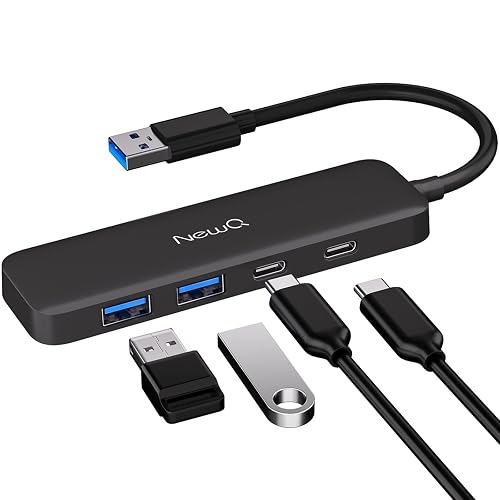 TOP CHOICEBest overallDual USB C USB A 3.0 Hub: USB Hub 4 Ports with 2* USB-C 3.0 and 2* USB-A 3.0View on Amazon
- 2
 TOP CHOICEBest for multi-display setups4K USB C to HDMI Splitter Hub: 100W Max PD Port, 2 USB 3.0 and 1 USB-C Data PortsView on Amazon
- 3
 TOP CHOICEBest for a compact deskUSB Hub 3.0 Splitter with 2 USB-C and 2 USB-A, 4 Ports Ultra-Slim Multiport ExpanderView on Amazon
- 4
 Best for port variety7-in-1 USB 3.0 Hub: 1x USB 3.0 + 4x USB 2.0 + 2x USB-CView on Amazon
- 5
 Best for high-speed USB-C dataUGREEN USB-C Multiport Splitter: 4 Ports USB-C 3.2 10Gbps Data, AluminumView on Amazon
Our Top Picks
| Product | Best for | Key feature |
|---|---|---|
| Dual USB C USB A 3.0 Hub | Everyday desk use | Four ports: two USB-C 3.0 and two USB-A 3.0 |
| 4K USB C to HDMI Splitter Hub | Multi-display setups | HDMI video output plus 100W pass-through power port |
| USB Hub 3.0 Splitter with 2 USB-C and 2 USB-A | Compact desks | Long 4 ft cable for flexible placement |
| 7-in-1 USB 3.0 Hub | Maximum port count | One USB 3.0 plus four USB 2.0 and two USB-C ports |
| UGREEN USB-C Multiport Splitter | Fast USB-C data | USB-C 3.2 rated at 10Gbps on its data ports |
Dual USB C USB A 3.0 Hub: USB Hub 4 Ports with 2* USB-C 3.0 and 2* USB-A 3.0
Dual USB C USB A 3.0 Hub: USB Hub 4 Ports with 2* USB-C 3.0 and 2* USB-A 3.0, Ultra Slim Portable USB Splitter Adapter for Laptop, PS4, Flash Drive, HDD, Xbox, Printer, Mouse, Keyboard, Computer
Best for: Everyday desk use
This is a good fit for someone who needs two USB-A devices and two USB-C connections on a single laptop, such as a flash drive, a mouse, a keyboard receiver and a phone cable. Its ultra-slim body suits travel bags.
Key specs
- 4 ports: 2 USB-C 3.0 and 2 USB-A 3.0
- Plug-and-play operation with no driver installation
- Ultra-slim, portable design
Pros
- Covers the most common desk peripherals
- Small enough to leave connected in a bag
- Simple setup on most operating systems
Cons
- No video output or card reader
- Bus power is shared across all four ports, so heavy drives may need a powered option
Bottom line: A sensible first hub for someone who mainly needs more USB ports and not video output.
4K USB C to HDMI Splitter Hub: 100W Max PD Port, 2 USB 3.0 and 1 USB-C Data Ports
4K USB C to HDMI Splitter Hub, 100W Max PD Port, 2 USB 3.0 & 1 USB C Data Ports 5Gbps, SD/TF Card Reader Acer USB C Hub, 7 in 1 Multi-Port Adapter for Laptop/Mac Type C Devices
Best for: Multi-display setups
Aimed at users who want to drive an external monitor over HDMI while keeping USB devices and a charger connected. The listing describes a 4K HDMI output, a power delivery port and an SD/TF card reader.
Key specs
- 4K HDMI video output
- 100W maximum power delivery port
- 2 USB 3.0 ports and 1 USB-C data port at 5Gbps
- SD and TF card reader
Pros
- Combines video, charging and data in one device
- Card reader is useful for photographers
- Covers a wide range of laptop types
Cons
- Actual 4K refresh rate depends on the host laptop and cable
- Power delivery rating only applies if the charger supplies enough wattage
Bottom line: The right choice for someone running an external display who also needs charging and a card reader.
USB Hub 3.0 Splitter with 2 USB-C and 2 USB-A, 4 Ports Ultra-Slim Multiport Expander
USB Hub 3.0 Splitter with 2 USB-C and 2 USB-A, 4 Ports Ultra-Slim Multiport Expander Adapter with 4ft Extension Long Cable Cord, USB Extender for Desktop, Computer, PC, Laptop, iMac and More
Best for: Compact desks
Suited to a crowded desk where the hub sits out of the way. The extended cable lets you reach a laptop placed a few feet from the outlet or tower.
Key specs
- 4 ports: 2 USB-C and 2 USB-A, USB 3.0 class
- 4 ft extension cable
- Ultra-slim body
Pros
- Long cable gives flexible placement
- Low profile fits under monitor stands
- Works with desktops as well as laptops
Cons
- Long cables are more prone to tangling
- No power delivery pass-through
Bottom line: Best for people who want to keep the hub tucked away on a desk with limited space.
7-in-1 USB 3.0 Hub: 1x USB 3.0 + 4x USB 2.0 + 2x USB-C
7-in-1 hub: 1x USB 3.0 + 4x USB 2.0 + 2x USB-C, 5Gbps transfer, Plug and play, Aluminum casing, For MacBook/PC/iPad/Xbox/PS4 7-in-1 USB C Hub Aluminum USB 3.0 for MacBook PC iPad
Best for: Port variety
For users who need the largest number of connections from one device, including several older USB 2.0 peripherals that do not need full speed.
Key specs
- 7 ports: 1 USB 3.0, 4 USB 2.0, 2 USB-C
- 5Gbps transfer rating on the USB 3.0 port
- Aluminum casing
Pros
- Highest port count in this list
- Aluminum body helps with heat dissipation
- Plug-and-play setup
Cons
- Only one port runs at USB 3.0 speed
- Bus-powered, so many devices at once can strain the host
Bottom line: A good option when you need many ports and mostly low-bandwidth peripherals.
UGREEN USB-C Multiport Splitter: 4 Ports USB-C 3.2 10Gbps Data, Aluminum
USB-C Multiport Splitter for MacBook Air/Pro, iMac, iPad Pro, iPhone 17/17 Pro, Galaxy S26 and More Devices, 1ft Cable UGREEN USB C Hub, 4 Ports USB-C 3.2 10Gbps Data, Aluminum, Only Adapter
Best for: Fast USB-C data
Aimed at users with recent MacBook, iPad or Android laptops who want USB-C data transfer at higher rated speeds than typical USB 3.0 hubs.
Key specs
- 4 USB-C ports with 10Gbps data rating (USB 3.2)
- Aluminum housing
- 1 ft cable
Pros
- Higher rated data speed than many USB 3.0 hubs
- Short cable keeps the setup tidy
- Solid aluminum build
Cons
- Real throughput depends on the host port and drive
- Short cable limits placement
Bottom line: Pick this if your laptop has USB-C ports rated for 10Gbps and you move large files often.
Buying Guide
Port types and count
Count the devices you use daily before choosing a hub. USB-A ports accept most drives and peripherals, while USB-C ports need a matching cable or adapter. A four-port hub covers most desk setups; seven ports suit people with many accessories.
Good picks for this: Dual USB C USB A 3.0 Hub, 7-in-1 USB 3.0 Hub
Data transfer speed
USB 3.0 (also called USB 3.2 Gen 1) is rated at 5Gbps. USB 3.2 Gen 2 is rated at 10Gbps. Check the listing for the rated speed of each port, not just the hub as a whole. Real transfers are limited by the slowest component in the chain.
Good picks for this: UGREEN USB-C Multiport Splitter, 4K USB C to HDMI Splitter Hub
Power delivery
If you want to charge your laptop through the hub, look for a power delivery port and its maximum wattage. Your laptop charger must supply at least that wattage. A hub rated at 100W will not charge a laptop that needs more than its charger provides.
Good picks for this: 4K USB C to HDMI Splitter Hub
Video output
For an external monitor, you need a hub with HDMI or DisplayPort output. Confirm the maximum resolution and refresh rate in the listing and check that your laptop supports video over USB-C. Not all USB-C ports carry video.
Good picks for this: 4K USB C to HDMI Splitter Hub
Size and cable length
Ultra-slim hubs fit in a laptop bag, while longer cables help if the hub sits on a shelf or a different desk surface. Very short cables limit placement, and very long cables can tangle. Choose a length that matches your desk layout.
Good picks for this: USB Hub 3.0 Splitter with 2 USB-C and 2 USB-A, UGREEN USB-C Multiport Splitter
Build and heat
Aluminum housings tend to dissipate heat better than plastic, which matters when drives are copying files or a hub is powering several devices. Owners often report that aluminum models feel more solid on the desk.
Good picks for this: 7-in-1 USB 3.0 Hub, UGREEN USB-C Multiport Splitter
Card readers and extras
If you import photos or video, an SD or TF card reader saves a separate dongle. Confirm the card formats the reader supports before buying.
Good picks for this: 4K USB C to HDMI Splitter Hub
FAQ
Does a USB 3.0 hub with USB-C port work with all laptops?
Most laptops with a USB-C port will connect to a USB-C hub, but the hub’s functions depend on what the laptop’s port supports. Video output and power delivery require specific support on the host port.
What is the difference between USB 3.0 and USB 3.2?
USB 3.0 was renamed USB 3.2 Gen 1 and is rated at 5Gbps. USB 3.2 Gen 2 is rated at 10Gbps. Both use the same connector shapes, so the speed depends on the ports and cables used.
Will a USB hub slow down my drive?
Possibly. A hub’s ports share bandwidth, so several fast drives on one hub can reduce each drive’s speed. A single drive on a USB 3.0 port should reach close to the port’s rated speed.
Can I charge my laptop through the hub?
Only if the hub has a power delivery port and your laptop charger supplies enough wattage. Check the hub’s maximum rating and your charger’s output before connecting.
Do I need drivers for a USB hub?
Most USB hubs are plug-and-play and do not need drivers on common operating systems. Specialized display or card reader functions may require a driver or firmware update, which the manufacturer lists in its documentation.
How do I know if my USB-C port supports video?
Look for a small icon of a monitor or the letters DP or Thunderbolt next to the port, or check your laptop’s specifications. Not every USB-C port supports DisplayPort Alt Mode.
Conclusion
For most desks, the Dual USB C USB A 3.0 Hub covers the everyday mix of USB-A and USB-C devices. Choose the 4K USB C to HDMI Splitter Hub if you need an external display and charging, the compact USB Hub 3.0 Splitter if space is tight, the 7-in-1 hub for the largest number of ports, and the UGREEN USB-C Multiport Splitter when your laptop’s USB-C ports support faster data rates. Confirm your laptop’s port capabilities before buying, since the hub can only deliver what the host supports.
Sources
- the official USB specifications, including the speed classes for USB 3.0, 3.2 Gen 1 and 3.2 Gen 2
- guidance on electronics efficiency and safe use of power adapters (energy.gov)
Before you buy: helpful guides
- USB-C Hub with Ethernet Port: How to Choose and Set One Up
- Anker Nano USB-C Hub: Setup, Ports and Troubleshooting Guide (2026)
- 4-Port USB-C Hub with Power Delivery: How to Choose and Set One Up (2026)
- Hiearcool Usb Type-c Hub Pro: Setup, Ports and Troubleshooting Guide
- Targus USB-C to 4-Port USB-A Hub: Setup, Specs and Troubleshooting
Related reading
About Owen Palmer
Owen Palmer is part of our editorial team and reviews and edits our consumer tech how-to & troubleshooting guides, checking product details against manufacturer specifications and owner feedback.