By Owen Palmer
Updated November 2026
Finding the right lenovo powered usb c travel hub comes down to three things: how many ports you actually need, whether the hub can pass power to your laptop, and how many external displays it can drive. Lenovo sells several compact docks and hubs that fit that brief, and they differ more than their names suggest. This guide compares seven of them against those criteria, so you can match a model to your bag, your laptop and the way you work on the road.
Lenovo Powered USB C Travel Hub: Our Selection Criteria
Our top picks at a glance
- 1
 TOP CHOICEBest overallLenovo Powered USB-C Travel Hub – for Notebook – USB Type CView on Amazon
- 2
 TOP CHOICEBest for power delivery on the goLenovo USB-C 5-in-1 Travel Hub, 90W Power DeliveryView on Amazon
- 3
 TOP CHOICEBest for a slim, all-in-one dockLenovo USB-C Slim Travel Dock, 8 PortsView on Amazon
- 4
 Best for dual external displaysLenovo USB-C Dual Display Travel Dock – 7 PortsView on Amazon
- 5
 Best for multi-display and card readingAcer 4K USB C to HDMI Splitter Hub, 100W Max PD PortView on Amazon
- 6
 Best for ultra-thin portabilityLenovo Slim USB-C 3.2 Hub, 5-in-1 with HDMI 2.1View on Amazon
- 7
 Best budget pickLenovo USB-C 7-in-1 HubView on Amazon
Each model below was assessed using published specifications, brand reputation, and the patterns owners tend to report in their feedback. We looked at power delivery wattage, video output (resolution and number of displays), port mix (USB-A, USB-C, HDMI, Ethernet, card readers), physical size and whether the cable is built in. We did not run any of these hubs through our own tests, so treat the specs as the manufacturer and listing describe them and check them against your laptop before buying.
Our Top Picks
The table below gives a quick comparison. Read the individual sections that follow for the trade-offs behind each one. A related read: Best USB-C Hubs for Laptops: 6 Hubs Compared.
| Product | Best for | Key feature |
|---|---|---|
| Lenovo Powered USB-C Travel Hub | Overall travel use with wired network | Powered hub with Ethernet, HDMI and VGA |
| Lenovo USB-C 5-in-1 Travel Hub | Charging while connected | 90W Power Delivery pass-through |
| Lenovo USB-C Slim Travel Dock | Desk-style setups on the road | 8 ports with integrated cable |
| Lenovo USB-C Dual Display Travel Dock | Two external monitors | Dual 4K display support |
| Acer 4K USB C to HDMI Splitter Hub | Multi-display and card reading | 100W PD port plus SD/TF card reader |
| Lenovo Slim USB-C 3.2 Hub | Minimal bag space | Ultra-thin body with 4K HDMI 2.1 |
| Lenovo USB-C 7-in-1 Hub | Budget-conscious travelers | Seven-port mix in one compact hub |
Lenovo Powered USB-C Travel Hub – for Notebook – USB Type C
Lenovo Powered USB-C Travel Hub – for Notebook – USB Type C – 3 X USB Ports – 1 X USB 2.0 – Network (RJ-45) – HDMI – VGA – Wired
Best for: Overall travel use with a wired network connection
This is the most traditional of the group: a powered hub that brings back the ports many thin laptops have dropped, including a wired network jack. It suits people who work from hotels or conference rooms where Ethernet is still more reliable than Wi-Fi.
Key specs
- USB Type-C connection to the laptop
- 3 x USB ports, including 1 x USB 2.0
- Network (RJ-45) port
- HDMI and VGA outputs
- Wired, external power supply for the powered design
Pros
- Wired Ethernet port for stable network connections
- Covers legacy VGA projectors as well as modern HDMI displays
- Powered design helps keep attached USB devices running
Cons
- Bulkier than the slim models and needs its own power source
- Only one USB port is USB 2.0, which is slow for storage
Bottom line: A good fit for people who still rely on wired networking or older projectors and do not mind carrying a slightly larger hub.
Lenovo USB-C 5-in-1 Travel Hub, 90W Power Delivery
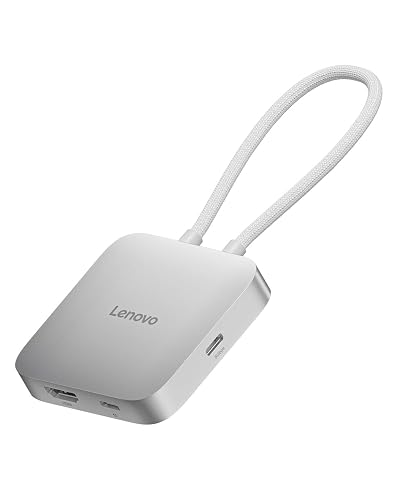
Lenovo USB-C 5-in-1 Travel Hub, 90W Power Delivery, 4K 60Hz HDMI, Dual USB-C and USB-A Ports, Plug and Play, Compact, Silver Grey
Best for: Charging while connected on the go
A compact hub built around pass-through charging. It is aimed at travelers who want one cable to handle power, a monitor and a few accessories without carrying a separate charger for the hub.
Key specs
- 90W Power Delivery pass-through charging
- 4K at 60Hz HDMI output
- Dual USB-C and USB-A ports
- Plug-and-play setup, no drivers required
Pros
- High-wattage pass-through is useful for most mainstream laptops
- Plug-and-play operation keeps setup simple
- Small enough for a laptop sleeve
Cons
- Only two USB-C/USB-A pairs, so it is not ideal for many peripherals
- Pass-through charging depends on your laptop’s charger supporting the same wattage
Bottom line: The right choice if your priority is charging through the hub with a single HDMI display at the desk or in a hotel room.
Lenovo USB-C Slim Travel Dock, 8 Ports
Lenovo USB-C Slim Travel Dock, 8 Ports, Up to 65W PD Pass Through, Integrated USB-C Cable, 4K Display Support, Black
Best for: Desk-style setups on the road
This dock packs eight ports into a slim body with an integrated cable, so you can run a near-desk setup from a hotel room or a coworking space without carrying loose adapters.
Key specs
- 8 ports in total
- Up to 65W Power Delivery pass-through
- Integrated USB-C cable
- 4K display support
Pros
- Integrated cable reduces the number of loose pieces to pack
- Port count covers keyboard, mouse, storage and a display together
- 65W pass-through suits many mid-range laptops
Cons
- Pass-through wattage is below the 90W of some other Lenovo hubs
- Built-in cable means you cannot swap in a longer or shorter one
Bottom line: Best for professionals who want a dock-style layout on the road and whose laptop charges within 65W.
Lenovo USB-C Dual Display Travel Dock – 7 Ports
Lenovo USB-C Dual Display Travel Dock – 7 Ports, Integrated Cable, Universal Compatibility, Two displays at 4K – Black
Best for: Two external monitors
If you need to drive two screens from a single laptop while traveling, this is the dock in the lineup built for that job. It is aimed at people who use a laptop as the centerpiece of a multi-monitor setup.
Key specs
- 7 ports in total
- Support for two 4K displays
- Integrated cable
- Universal compatibility with USB-C laptops
Pros
- Dual 4K output is rare in travel-sized docks
- Integrated cable keeps the dock tidy in a bag
- Seven ports cover most desk peripherals
Cons
- Dual-display performance depends on your laptop’s USB-C video support
- Larger footprint than single-display hubs
Bottom line: The pick for anyone who needs two monitors on the road, provided their laptop supports multi-display over USB-C.
Acer 4K USB C to HDMI Splitter Hub, 100W Max PD Port
4K USB C to HDMI Splitter Hub, 100W Max PD Port, 2 USB 3.0 & 1 USB C Data Ports 5Gbps, SD/TF Card Reader Acer USB C Hub, 7 in 1 Multi-Port Adapter for Laptop/Mac Type C Devices
Best for: Multi-display setups and card reading
Not a Lenovo product, but a well-known third-party hub included here because it covers a use case the Lenovo models do not: combining a 100W power port with an SD/TF card reader for photographers and video users.
Key specs
- 100W maximum Power Delivery port
- 2 x USB 3.0 and 1 x USB-C data ports at 5Gbps
- SD and TF card reader
- 4K HDMI output
Pros
- Built-in card reader is useful for camera workflows
- Higher charging ceiling than most Lenovo hubs in this group
- Multiple data ports for drives and peripherals
Cons
- Not a Lenovo product, so compatibility notes are not from Lenovo
- Seven ports in a bulkier body than the slim Lenovo models
Bottom line: A strong alternative for creators who need card reading and high-wattage charging in one hub.
Lenovo Slim USB-C 3.2 Hub, 5-in-1 with HDMI 2.1
Lenovo Slim USB-C 3.2 Hub, 5-in-1 USB-C Hub with HDMI 2.1 (4K@60Hz), 10Gbps USB-C & USB-A Ports, 100W PD-in (65W Charging), Ultra-Thin Portable Dock with Cable Management for Laptop, Seashell
Best for: Minimal bag space
This is the thinnest model in the list, designed for people who want a hub that disappears into a laptop sleeve and still delivers 4K video output and fast data.
Key specs
- 5-in-1 layout with HDMI 2.1 at 4K 60Hz
- 10Gbps USB-C and USB-A ports
- 100W PD input with 65W charging to the laptop
- Ultra-thin body with cable management
Pros
- 10Gbps data speed suits fast external drives
- HDMI 2.1 support at 4K 60Hz
- Thin profile is easy to slip into a sleeve
Cons
- Five ports is fewer than the larger docks
- Charging to the laptop is capped at 65W
Bottom line: Right for minimalist travelers who want fast data and 4K output without carrying a larger dock.
Lenovo USB-C 7-in-1 Hub
Lenovo USB-C 7-in-1 Hub
Best for: Budget-conscious travelers
A straightforward seven-port hub for people who need a broad port mix without paying for dual-display or high-wattage features they will not use.
Key specs
- 7 ports in one compact hub
- USB-C connection to the laptop
- Covers standard USB, HDMI and card-reader functions
Pros
- Good port count for a simple hub
- Straightforward setup for everyday travel
- Covers the basics most users need
Cons
- Lacks the higher wattage and dual-display options of the premium models
- Owners often mention less headroom for demanding multi-device setups
Bottom line: A sensible budget pick for light to moderate travel use.
Buying Guide
Use the factors below to narrow the list before you buy. Matching the hub to your laptop’s charging and display specs matters more than any single feature.
Power Delivery Wattage
Pass-through charging is only as good as the wattage your laptop needs. Check your charger’s rating and compare it with the hub’s stated maximum. A 65W hub will not fully sustain a laptop that expects 90W under heavy load.
Good picks for this: Lenovo USB-C 5-in-1 Travel Hub, Lenovo USB-C Slim Travel Dock
Video Output and Display Count
Look at the maximum resolution and refresh rate, and whether the hub supports one or two displays. Dual-display output depends on your laptop’s own USB-C video capability, so confirm that in your laptop’s documentation.
Good picks for this: Lenovo USB-C Dual Display Travel Dock, Lenovo Slim USB-C 3.2 Hub
Port Mix and Data Speed
Count the devices you carry: keyboard, mouse, flash drive, SD card, Ethernet cable. Check whether USB ports are USB 2.0 or 3.x, since 10Gbps ports are significantly faster for large file transfers.
Good picks for this: Acer 4K USB C to HDMI Splitter Hub, Lenovo Powered USB-C Travel Hub
Size, Weight and Fit
Measure the sleeve or pocket you will carry the hub in. Slim models fit into laptop sleeves, while docks with integrated cables are bulkier but tidier. Integrated cables cannot be replaced, so think about cable length too.
Good picks for this: Lenovo Slim USB-C 3.2 Hub, Lenovo USB-C Slim Travel Dock
Wired Networking and Legacy Ports
If you still rely on Ethernet or older VGA projectors, make sure the hub includes those ports. Many slim hubs drop them entirely.
Good picks for this: Lenovo Powered USB-C Travel Hub
Build Quality and Heat
Travel hubs get tossed in bags and sometimes run warm when charging. Look for metal or well-reinforced housings and avoid bending the cable sharply at the connector. Owners often report that cable strain is the most common point of failure.
Good picks for this: Lenovo USB-C Dual Display Travel Dock, Acer 4K USB C to HDMI Splitter Hub
Use Case: Creators Versus Office Workers
Photographers and video editors benefit from card readers and fast data ports. Office workers on the road often need Ethernet, dual displays and a stable charge. Match the hub to the job, not the other way around.
Good picks for this: Acer 4K USB C to HDMI Splitter Hub, Lenovo USB-C 7-in-1 Hub
FAQ
Does a Lenovo powered USB C travel hub charge my laptop?
Some models offer pass-through Power Delivery, so you can charge the laptop through the hub. Check the stated wattage on the specific model and compare it with your laptop charger’s rating.
Will a travel hub work with any USB-C laptop?
Most hubs work with any USB-C laptop that supports data and video over the port, but charging and multi-display output depend on your laptop’s own capabilities. Confirm the required specs in your laptop’s documentation.
What is the difference between a travel hub and a travel dock?
A hub generally adds ports to a laptop, while a dock is usually larger and more desk-like, often with an integrated cable and more display options. Docks are better for longer stays, hubs for quick trips.
Do I need a powered hub?
A powered hub uses its own power supply, which helps keep connected USB devices working reliably. It is most useful when you attach drives or peripherals that draw significant current.
Can I use two monitors with a Lenovo travel hub?
Only the dual-display dock in this list is built for two external screens. Dual output also depends on your laptop supporting multi-display over USB-C.
How do I know if the hub’s wattage is enough?
Compare the hub’s maximum pass-through figure with your laptop charger’s output. If the laptop needs more power under load than the hub passes through, it may charge slowly or drain while heavily used.
Conclusion
For most travelers, the Lenovo Powered USB-C Travel Hub covers the widest range of needs thanks to its wired network port and legacy display outputs. If charging through the hub matters most, the 90W Lenovo USB-C 5-in-1 Travel Hub is the stronger fit. Choose the Lenovo USB-C Dual Display Travel Dock for two monitors, the Lenovo Slim USB-C 3.2 Hub for minimal bag space, and the Lenovo USB-C 7-in-1 Hub when budget is the main concern. Check wattage, display support and port needs against your own laptop before you buy.
Sources
- Official USB specifications, including Type-C and Power Delivery standards for hubs and docks
- Background on charging efficiency and battery care for portable electronics (energy.gov)
- Technical standards and research on high-speed data and display interfaces
Related reading
- Travel Hub USB C: 6 Best Picks for Laptop Travel in 2026
- Powered USB C Hub Picks: 5 Best for Multi-Device Desks (2026)
- Lenovo USB-C to 4 Port USB-A Hub Review (2026)
- HP USB-C Travel Hub G3 Review: Features and Performance
- 6 Best Microsoft USB-C Travel Hub Picks for Surface and Laptop Users (2026)
- 6 Best Lenovo USB C 7-in-1 Hub Picks Compared (2026)
About Owen Palmer
Owen Palmer is part of our editorial team and reviews and edits our consumer tech how-to & troubleshooting guides, checking product details against manufacturer specifications and owner feedback.