By Owen Palmer
Updated November 2026
If you carry a laptop and a handful of accessories, a lenovo usb c travel hub can turn a single USB-C port into an HDMI output, extra USB ports and a charging input. This Lenovo 5-in-1 model is aimed at people who want a compact, plug-and-play hub that covers the basics without the bulk of a full desk dock. It makes most sense for remote workers using a laptop with one or two USB-C ports, frequent travelers who need to present on a hotel or conference TV, and anyone who wants pass-through charging for a laptop that drains quickly. It is less suited to people who need many simultaneous ports, dual external monitors or a built-in Ethernet jack, since those needs point toward larger docks or dedicated hubs.
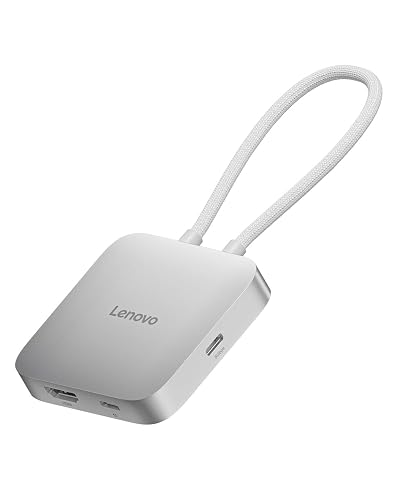
Lenovo USB-C 5-in-1 Travel Hub, 90W Power Delivery, 4K 60Hz HDMI, Dual USB-C and USB-A Ports, Plug and Play, Compact, Silver Grey
Product Overview
The Lenovo USB-C 5-in-1 Travel Hub is a small, silver-grey hub built around a single USB-C upstream connection. Its name points to five functional connections: a 4K 60Hz HDMI output, two USB-C ports, two USB-A ports, and a 90W Power Delivery input for charging a host laptop while it is connected. The design is intended for portability, so it is light enough to slip into a laptop sleeve or a bag’s front pocket. Lenovo positions it as a plug-and-play accessory, meaning it does not require a separate driver installation on most modern operating systems.
In practice, the hub is meant to solve a common problem. Many ultrabooks and thin laptops ship with only a few ports, and when you need to project a slide deck, charge the machine and plug in a flash drive at the same time, you run short. A compact hub like this one fills that gap while staying small enough to take on the road.
Key Features & Specifications
The table below lists the specifications that the product name and category make clear. Check the Amazon listing for the complete port layout and cable length before purchasing, since details such as cable length are set by the manufacturer and can vary between revisions.
| Feature | Specification |
|---|---|
| Hub type | Compact travel hub, 5-in-1 configuration |
| Video output | HDMI, supports 4K at 60Hz |
| Power Delivery | Up to 90W pass-through charging |
| USB-C ports | Two |
| USB-A ports | Two |
| Connection | Plug and play, no driver required on most systems |
| Design | Compact, silver grey finish |
Pros & Cons
Pros
- Compact footprint that suits laptop sleeves and carry-on bags.
- 90W Power Delivery pass-through lets you charge a laptop while using the hub, which covers most mainstream ultrabooks.
- 4K 60Hz HDMI output is adequate for presentations, streaming to a TV and extended desktop use at a single external display.
- Plug-and-play operation means setup is usually a matter of connecting and waiting a few seconds for the system to detect ports.
- Mixed USB-A and USB-C ports cover both legacy peripherals and newer devices.
Cons
- Five ports is a limited count for users who run a keyboard, mouse, webcam, drive and monitor all at once.
- No Ethernet port is listed, so wired networking needs a separate adapter.
- Single HDMI output means it does not support dual external displays.
- Pass-through charging power is capped by the laptop’s own charging capability and the host port; some laptops will charge more slowly than their rated wattage suggests.
- Owners who expect a desk-dock feature set will find the lack of expansion ports restrictive.
Performance Analysis
Performance with a hub like this depends on three factors: the host laptop’s USB-C implementation, the total power drawn by connected devices, and the bandwidth shared among ports. The HDMI output at 4K 60Hz is the feature most users will judge first. Owners who connect the hub to a 4K display generally report stable video at 60Hz when the source laptop supports DisplayPort Alt Mode, which is standard on most current USB-C laptops. Older or budget laptops may fall back to 30Hz or lower resolutions, so checking your laptop’s USB-C specification before buying is worthwhile.
The 90W Power Delivery input is sized for common ultrabooks and mid-range laptops. Manufacturers specify that the hub passes power through, but the actual charge rate is negotiated between the host and the charger. If your laptop normally uses a 65W charger, the hub will not push it beyond that. Owners often note that the hub is most useful as a single-cable solution: one connection gives you video, charging and peripherals, which reduces desk clutter.
Because the five ports share one upstream connection, heavy simultaneous transfers, such as copying large files to an external drive while streaming video, can slow down. For typical use, including document work, video calls and presentations, the hub is generally considered sufficient. Users who need sustained high-bandwidth throughput across several devices will find a larger dock better suited to the job.
Who Should Buy This Product?
This hub fits people whose needs are modest and well defined. A consultant who travels with a thin laptop, a presentation remote and a flash drive will get what they need from it. So will a student who wants to connect a classroom projector and charge the laptop through one port. It is also a reasonable choice for a home desk setup that only needs one external display and a couple of extra USB ports.
You should skip it if you rely on dual monitors, wired Ethernet, SD card reading or a large number of simultaneous peripherals. In those cases, a larger hub or a full docking station will avoid frustrating port shortages. Anyone whose laptop lacks a DisplayPort Alt Mode-capable USB-C port should also verify compatibility first, since video output depends on the host.
Buying Guide
Before buying any lenovo usb c travel hub, confirm three things. First, check that your laptop has a USB-C port that supports video output and Power Delivery; the port usually has a small lightning or thunderbolt symbol or is labeled in the spec sheet. Second, count the devices you connect at once and make sure the hub has enough ports with a margin of one or two. Third, decide whether you need pass-through charging at 90W or whether a lower wattage is enough for your laptop.
If this model does not fit your setup, two Lenovo alternatives are worth comparing. For a larger port count in a slim body, consider the Lenovo USB-C Slim Travel Dock, which offers eight ports and up to 65W pass-through charging.

Lenovo USB-C Slim Travel Dock, 8 Ports, Up to 65W PD Pass Through, Integrated USB-C Cable, 4K Display Support, Black
For users who need two displays, the Lenovo USB-C Dual Display Travel Dock with seven ports and two 4K outputs covers that requirement in a travel-friendly format.

Lenovo USB-C Dual Display Travel Dock – 7 Ports, Integrated Cable, Universal Compatibility, Two displays at 4K – Black
If you want a broader look at the category before deciding, the guide Travel Hub USB C: 6 Best Picks for Laptop Travel in 2026 compares options across brands. Readers who specifically want a Lenovo-branded multi-port option may also find 6 Best Lenovo USB C 7-in-1 Hub Picks Compared (2026) useful. For a simpler, port-focused alternative, Lenovo USB-C to 4 Port USB-A Hub Review (2026) covers a different approach. If you are deciding between a hub and a dock entirely, USB-C Hub vs Docking Station (2026): Which Is Better for Your Setup? explains the trade-offs. And for compatibility with other laptop brands, HP USB-C Travel Hub G3 Review: Features and Performance shows how a similar travel form factor performs on a different platform.
FAQ
Does the Lenovo USB-C 5-in-1 Travel Hub work with any USB-C laptop?
Not every USB-C port supports video output and Power Delivery. The hub needs a host port that supports DisplayPort Alt Mode for HDMI video and PD for charging. Check your laptop’s specifications for both features before buying.
Can I charge my laptop while using the hub?
Yes, the hub offers 90W Power Delivery pass-through. The actual charging speed depends on your laptop and charger. Laptops that normally draw less than 90W will charge at their own rate.
Will it support two external monitors?
The listing describes a single HDMI output at 4K 60Hz. For two displays, Lenovo’s dual-display dock is the better option.
Does it need drivers to work?
The product is marketed as plug and play. Most modern Windows and macOS systems detect the ports automatically, though you may want to update your laptop’s USB and graphics drivers for the most stable performance.
Is there an Ethernet port?
No Ethernet port is listed on this model. Wired networking requires a separate USB-C to Ethernet adapter.
Is it suitable for travel?
Its compact body and single-cable connection make it practical for carry-on bags. Check the cable length and your destination’s power outlet type before traveling.
Will it slow down my USB devices?
Ports share bandwidth on the upstream connection. Light use such as keyboards, mice and document transfers should be fine. Heavy simultaneous file transfers may slow down.
Final Verdict
The Lenovo USB-C 5-in-1 Travel Hub is a sensible, compact choice for people who need HDMI output, pass-through charging and a few extra ports in a single small accessory. Its 90W Power Delivery and 4K 60Hz HDMI cover the most common travel and presentation scenarios. It is not the right tool for dual monitors, Ethernet or heavy port expansion, and buyers with those needs should look at the larger Lenovo docks. If your requirements are simple and your laptop has a compatible USB-C port, this hub is a practical, portable solution. View on Amazon
Related reading
- 6 Best Microsoft USB-C Travel Hub Picks for Surface and Laptop Users (2026)
- Wirecutter USB C Hub: 5 Best Picks Compared (2026)
- Usb-c Hub for Steam Deck: What to Buy, What to Avoid, and Why
About Owen Palmer
Owen Palmer is part of our editorial team and reviews and edits our consumer tech how-to & troubleshooting guides, checking product details against manufacturer specifications and owner feedback.