By Lauren Holland
Updated November 2026
A power bank charger notebook setup can keep a laptop running when no wall outlet is nearby, but only if the power bank and cable support the wattage your laptop needs. In this guide, you will check your laptop’s charging requirements, confirm that a power bank can deliver them, and troubleshoot the most common reasons charging stalls or stops. The short answer: match the power bank’s USB-C Power Delivery output to your laptop’s charger rating, and use a cable rated for that wattage.
Step 1: Find Your Laptop’s Charging Requirement
Start with the rating printed on your laptop’s original charger or on the label on the bottom of the laptop. Look for a wattage figure such as 45W, 65W or 100W. Many thin laptops made in the last several years use USB-C charging, while many business and gaming laptops still use a proprietary barrel connector that most power banks cannot supply. If your laptop has a round barrel plug, a standard power bank will usually not charge it without an adapter, so check the manufacturer’s specifications before you buy.
Shopping for one? See our guide: Dell Laptop Battery Charger Review: Is the JUOVI 65W Power Bank Worth It?.
Step 2: Confirm the Power Bank Supports USB-C Power Delivery
Charging a laptop requires USB Power Delivery (PD) negotiation, not just a USB-C port. The power bank’s spec sheet should list a PD output and a wattage at or above your laptop’s requirement. A power bank rated at 20W can charge a phone quickly but will charge a laptop very slowly or not at all. For more on how wattage and PD work, see Understanding USB-C Charger Wattage and Power Delivery.
Capacity matters too. A 20000mAh battery holds roughly 74Wh of energy before conversion losses, which is often enough to add a meaningful charge to a mid-size laptop but rarely a full charge. Larger packs, such as those covered in Power Bank Charger 30000mAh: 3 Best Picks for Travel and Heavy Use (2026), give more runtime for heavier workloads.
Step 3: Use the Right Cable and Connection Method
A cable that only carries charging current will not reliably deliver high wattage. Use a USB-C to USB-C cable rated for at least 60W or 100W, depending on your laptop. Plug the cable directly into the power bank’s PD output port, not a standard USB-A port. Some power banks have one high-power port and one lower-power port, so check which port is the PD port before you connect.
Checklist before you plug in
- Laptop wattage rating noted (for example, 65W)
- Power bank lists PD output at or above that wattage
- Cable rated for the same wattage or higher
- Connected to the PD port, not a USB-A port
- Laptop charging indicator confirms charging is active
Step 4: Check the Charging Status and Troubleshoot
After connecting, look at the laptop’s battery indicator. If it shows “not charging” or the percentage drops, the power bank is not supplying enough power. Owners often report that unplugging and reconnecting forces renegotiation, which can fix the issue. Try a different cable, confirm the port, and check that the power bank is charged. If the laptop still does not charge, the laptop may be drawing more power than the bank can supply under heavy load. Close demanding applications or reduce screen brightness to test this.
Common Mistakes
- Assuming any USB-C port on a power bank will charge a laptop.
- Using a thin, low-rated cable that limits wattage.
- Expecting a full laptop charge from a small battery pack.
- Ignoring the laptop’s barrel connector and needing an adapter.
- Charging a laptop from a power bank while it is also heavily loaded, which drains the bank faster than it recharges.
Recommended Gear
A high-wattage USB-C cable is the single most useful accessory. Search for cables labeled for 100W charging to match most laptop requirements.
View on Amazon
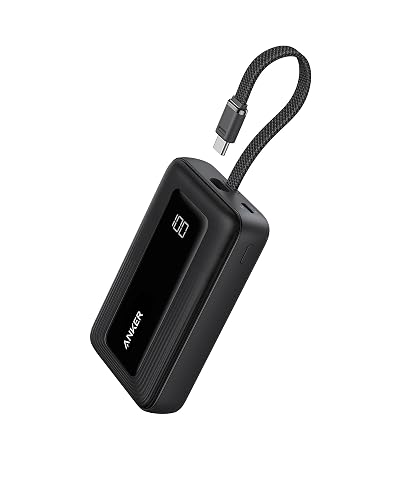
A USB-C power bank with a dedicated PD output in the 65W to 100W range suits most laptops better than small phone-focused packs.
View on Amazon
FAQ
Can a power bank charge a laptop?
Yes, if the laptop uses USB-C charging and the power bank supports USB Power Delivery at a wattage equal to or higher than the laptop’s requirement. Barrel-connector laptops usually need a separate adapter.
How long will a power bank run a laptop?
It depends on the bank’s capacity and the laptop’s power draw. A typical 20000mAh pack may add a partial charge to a mid-size laptop, while light use extends runtime. Results vary widely by model and workload.
Why does my laptop say it is not charging from the power bank?
The most common causes are insufficient wattage, a low-rated cable, or connecting to a non-PD port. Confirm all three, then reconnect the cable to trigger renegotiation.
Conclusion
A power bank charger notebook setup works best when wattage, port and cable all match. Check your laptop’s rating, confirm PD output from the bank, and use a properly rated cable. For laptops with barrel connectors or very high power draw, consult the manufacturer or a qualified technician before relying on a portable battery.
Related reading
- USB-C Chargers, Power Banks and Wireless Chargers Explained
- Top 7 Personalized Power Bank Chargers Worth Considering in 2026
- Power Bank with AC Outlet: Does It Work Like a Wall Charger?
- Power Bank Charger 20000mAh: 6 Best Picks for Travel and Everyday Use (2026)
Ready to choose one?
About Lauren Holland
Lauren Holland is part of our editorial team and reviews and edits our consumer tech how-to & troubleshooting guides, checking product details against manufacturer specifications and owner feedback.