
 By Owen Palmer
Updated November 2026
A portable triple screen monitor adds two extra displays to a laptop so you can spread apps, documents and video calls across more space without a desk setup. This guide compares six models that connect over USB-C or HDMI, work with common laptop sizes and fit into a travel bag. Our selection looked at panel resolution and type, weight and thickness, connection options, compatibility with Windows, macOS and Android, included cables and stand support, and patterns in owner feedback about setup and reliability.
Our top picks at a glance
- 1
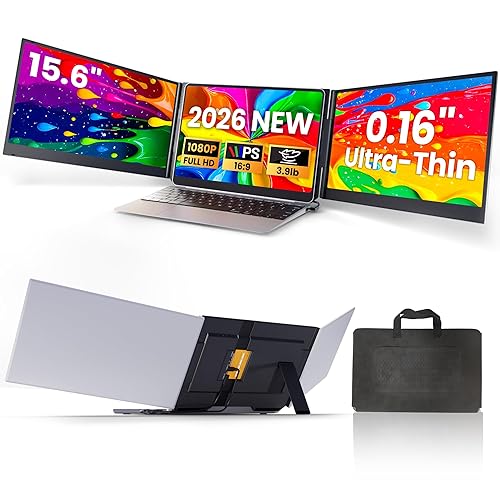 TOP CHOICEBest overallLaptop Screen Extender, 15.6" Ultra Light & Thin Triple Portable MonitorView on Amazon
- 2
 TOP CHOICEBest for plug-and-play simplicityPlug & Play via USB-C/HDMI Travel Dual Monitor Extender, 15.6" Laptop Screen ExtenderView on Amazon
- 3
 TOP CHOICEBest for four-screen workstationsPortable Triple Monitor 1080P FHD with 1 USB-C Connect 4 Screen WorkstationView on Amazon
- 4
 Best for ultra-thin travelKEFEYA Laptop Screen Extender 15.6"View on Amazon
- 5
 Best for built-in audioCIDETTY Laptop Screen Extender 14" FHDView on Amazon
- 6
 Best budget pick14" Triple Laptop Screen Extender, 3.0 lbs Lightweight FHD IPS Portable MonitorView on Amazon
Our Top Picks
Quick Comparison
| Product | Best for | Key feature |
|---|---|---|
| Laptop Screen Extender, 15.6″ Ultra Light & Thin Triple Portable Monitor | Overall balance of size and features | 1080P IPS display with two USB-C/HDMI cables |
| Plug & Play via USB-C/HDMI Travel Dual Monitor Extender (15.6″) | Users who want no driver setup | Driver-free operation over USB-C or HDMI |
| Portable Triple Monitor 1080P FHD with 1 USB-C Connect 4 Screen Workstation | Multi-window workstation use | Aluminum alloy body and auto rotation |
| KEFEYA Laptop Screen Extender 15.6″ | Slim carry-on setups | About 0.16-inch ultra-thin profile |
| CIDETTY Laptop Screen Extender 14″ FHD | Presentations and video calls | Built-in speakers |
| 14″ Triple Laptop Screen Extender, 3.0 lbs | Lightest carry weight | About 3.0 lb with USB-C plug-and-play |
Laptop Screen Extender, 15.6″ Ultra Light & Thin Triple Portable Monitor
Laptop Screen Extender, 15.6" Ultra Light & Thin Triple Portable Monitor for Laptop with 1080P FHD IPS Display, Two Cable USB-C/HDMI Plug-Play Monitor Extender for Mac/Win/Android, Fits 13-17" Laptops
Best for: Overall balance of size, connections and everyday productivity
This model suits people who want a full-size 15.6-inch panel that still folds into a laptop sleeve. It fits laptops from roughly 13 to 17 inches and is aimed at users who switch between Windows, Mac and Android devices.
Key specs
- 15.6-inch 1080P FHD IPS display
- USB-C and HDMI connection options
- Two cables included in the listing
- Compatible with laptops listed at 13 to 17 inches
Pros
- IPS panel gives wide viewing angles for a portable screen
- Works with both USB-C and HDMI sources
- Thin body suits bag storage
Cons
- Brightness is adequate indoors but can wash out in direct sunlight
- Stand support is limited, so a separate stand is often used
Bottom line: A strong first choice for remote workers who want a dependable 15.6-inch extender without specialized setup.
Plug & Play via USB-C/HDMI Travel Dual Monitor Extender, 15.6″ Laptop Screen Extender
Plug & Play via USB-C/HDMI,No Need Driver, for 12"-17.3" Laptops, Travel Dual Monitor Extender for Win/Mac/Android/PS5/Chrome 15.6" Laptop Screen Extender, 1080P FHD Ultra-Slim Triple Portable Monitor
Best for: Users who want no driver setup
This listing emphasizes driver-free operation and compatibility with laptops from 12 to 17.3 inches, including devices that run Windows, macOS, Android and Chrome OS. It is a practical pick for travelers who connect to unfamiliar hotel desks or conference-room laptops.
Key specs
- 15.6-inch 1080P FHD display
- USB-C and HDMI connectivity
- Listed for laptops from 12 to 17.3 inches
Pros
- Driver-free setup is simple on supported systems
- Covers a wide range of laptop sizes
- Ultra-slim body for travel
Cons
- Some owners report needing to adjust display settings after connecting
- Power draw from a single USB-C port can be marginal on some older laptops
Bottom line: Best for travelers who value fast, no-install connections over custom display tuning.
Portable Triple Monitor 1080P FHD with 1 USB-C Connect 4 Screen Workstation
Portable Triple Monitor 1080P FHD with 1 USB-C Connect 4 Screen Workstation, Aluminum Alloy, Auto Rotation for 12–17", Driver KYY Triple Screen Laptop Monitor Extender 15.6" Quad Laptop Screen Extende
Best for: Multi-window workstation use
This model is marketed for users who want to run more than three windows at once, with an aluminum alloy body and automatic screen rotation. It suits designers, traders and developers who keep reference material open on several panels.
Key specs
- 1080P FHD display
- Single USB-C connection
- Aluminum alloy housing
- Automatic rotation support
- Listed for laptops from 12 to 17 inches
Pros
- Metal body feels sturdier than plastic alternatives
- Auto rotation helps with vertical document views
- Single-cable connection reduces clutter
Cons
- Metal construction adds noticeable weight compared with the lightest options
- Four-screen claims depend on your laptop’s graphics and port capacity
Bottom line: Pick this if you regularly need several windows open and want a sturdier build.
KEFEYA Laptop Screen Extender 15.6″
KEFEYA Laptop Screen Extender 15.6", FHD 1080P Portable Triple Monitor for Laptops 13-17.3", 0.16" Ultra-Thin Dual Laptop Monitor Extender for Windows/Mac/Dex/Chrome/Surface, Plug n Play
Best for: Slim carry-on setups
The listing highlights an ultra-thin profile around 0.16 inches and compatibility with Windows, Mac, Samsung DeX, Chrome and Surface devices. It is a good match for people who want the thinnest possible panel in a briefcase or slim sleeve.
Key specs
- 15.6-inch FHD 1080P display
- Approximately 0.16-inch thickness as listed
- Plug-and-play connection
- Compatible with Windows, Mac, DeX and Chrome
Pros
- Very thin profile fits tight bags
- Broad platform compatibility
- Simple plug-and-play setup
Cons
- Thin frames can flex if handled roughly
- Limited built-in stand support
Bottom line: A good choice for slim-bag commuters who prioritize thickness above everything else.
CIDETTY Laptop Screen Extender 14″ FHD
CIDETTY Laptop Screen Extender, 14” FHD 1080P IPS Ultra-Thin Dual/Triple Monitor Display, HDMI/USB-C Plug-Play Portable Monitor for Laptop, Built-in Speakers(Mac, Win, Android)
Best for: Presentations and video calls
This model adds built-in speakers and supports both dual and triple configurations over HDMI or USB-C. It suits users who give presentations or join video meetings from a laptop away from a desk.
Key specs
- 14-inch FHD 1080P IPS display
- HDMI and USB-C plug-and-play connections
- Built-in speakers
- Compatible with Mac, Windows and Android
Pros
- Built-in speakers are useful for presentations without extra hardware
- IPS panel offers good color consistency
- Works across several operating systems
Cons
- Speaker volume is modest in noisy rooms
- Smaller 14-inch panel offers less workspace than 15.6-inch options
Bottom line: Pick this if audio and presentation use matter more than maximum screen size.
14″ Triple Laptop Screen Extender, 3.0 lbs Lightweight FHD IPS Portable Monitor
14" Triple Laptop Screen Extender, 3.0 lbs Lightweight FHD IPS Portable Monitor for Laptop, USB-C Plug & Play Multi Screen Attachment for 13-17.3" laptops with Windows/Mac/Chrome
Best for: Lightest carry weight
The listing stresses a weight of about 3.0 pounds and USB-C plug-and-play use with 13 to 17.3-inch laptops. It is aimed at frequent flyers and anyone who counts every ounce in a bag.
Key specs
- 14-inch FHD IPS display
- About 3.0 lb listed weight
- USB-C plug-and-play connection
- Compatible with Windows, Mac and Chrome
Pros
- Light enough for daily carry
- IPS panel for consistent viewing angles
- Simple single-cable setup
Cons
- Lower-cost builds can show brightness variation across the panel
- Smaller screen than 15.6-inch alternatives
Bottom line: A budget-friendly, lightweight choice for travelers who want extra screens without bulk.
Buying Guide
Screen Size and Resolution
A 15.6-inch panel gives more usable workspace, while 14-inch models are easier to pack. Full HD at 1920 x 1080 pixels is the common baseline; text sharpness improves noticeably when the panel size and resolution match your typical viewing distance.
Good picks for this: Laptop Screen Extender, 15.6″ Ultra Light & Thin Triple Portable Monitor; CIDETTY Laptop Screen Extender 14″ FHD
Connection Type: USB-C vs. HDMI
Check whether your laptop outputs video over USB-C (DisplayPort Alt Mode) and whether its ports support enough bandwidth. HDMI connections are widely supported, but USB-C with power delivery reduces cable clutter. Confirm your laptop’s port specifications before buying.
Good picks for this: Plug & Play via USB-C/HDMI Travel Dual Monitor Extender; Portable Triple Monitor 1080P FHD with 1 USB-C Connect 4 Screen Workstation
Laptop Compatibility and Size Range
Most listings specify a supported laptop range such as 13 to 17 inches. Match the range to your device, and remember that the extender’s mounting clips or magnets need to sit securely on your laptop’s lid or base.
Good picks for this: KEFEYA Laptop Screen Extender 15.6″; 14″ Triple Laptop Screen Extender, 3.0 lbs
Weight and Thickness
Weight and profile determine whether the monitor fits in a laptop sleeve or carry-on. Panels listed around 3 pounds are noticeably easier to carry for long trips than heavier aluminum builds.
Good picks for this: 14″ Triple Laptop Screen Extender, 3.0 lbs; KEFEYA Laptop Screen Extender 15.6″
Built-in Features: Speakers and Rotation
Built-in speakers help with presentations but are usually quieter than a dedicated headset. Auto rotation is useful if you read long documents in portrait orientation. Decide which of these you will actually use.
Good picks for this: CIDETTY Laptop Screen Extender 14″ FHD; Portable Triple Monitor 1080P FHD with 1 USB-C Connect 4 Screen Workstation
Durability and Build Material
Aluminum housings resist flexing better than thin plastic, which matters if the monitor is packed daily. Look for reinforced hinges or a protective sleeve, and avoid stacking heavy items on the panel in your bag.
Good picks for this: Portable Triple Monitor 1080P FHD with 1 USB-C Connect 4 Screen Workstation; Laptop Screen Extender, 15.6″ Ultra Light & Thin Triple Portable Monitor
Care and Power Management
Keep the panel clean with a microfiber cloth and avoid pressure on the screen surface. If your laptop cannot supply enough power over one USB-C port, use a powered hub or the included charging accessory. Manufacturers generally advise against extended operation at maximum brightness to reduce heat and power draw.
Good picks for this: Plug & Play via USB-C/HDMI Travel Dual Monitor Extender; 14″ Triple Laptop Screen Extender, 3.0 lbs
FAQ
Can any laptop run a portable triple screen monitor?
Most modern laptops with USB-C video output or an HDMI port can, but you must confirm that the port supports video output and enough bandwidth. Older machines may only support one extra display.
Do I need to install drivers?
Many listings describe driver-free plug-and-play operation on supported systems. Some owners still need to adjust display settings in the operating system after connecting.
Is USB-C or HDMI better?
USB-C is more convenient because it can carry video and sometimes power over one cable. HDMI is more widely supported on older devices. Choose based on your laptop’s ports.
How much weight can I expect to carry?
Lightweight models are often listed around 3 pounds, while aluminum builds weigh more. Check the listed weight against your bag limits.
Do these monitors need a separate stand?
Many include only a limited stand or rely on a magnetic or clip attachment. A separate stand or VESA mount can improve viewing angle and stability.
Can I use one with a phone or tablet?
Several listings mention Android and DeX compatibility, but support varies by device. Confirm that your phone or tablet outputs video over USB-C before buying.
Will it drain my laptop battery quickly?
Extra displays increase power consumption. Expect shorter battery life when running two additional screens, and lower the brightness to conserve power.
Conclusion
For most laptop users, the Laptop Screen Extender, 15.6″ Ultra Light & Thin Triple Portable Monitor offers the best balance of size and connectivity. Choose the plug-and-play USB-C/HDMI travel model if you want minimal setup, the four-screen USB-C workstation if you run many windows at once, the KEFEYA model for the thinnest profile, the CIDETTY model for presentations with built-in audio, or the 3.0-pound 14-inch unit if weight matters most. Confirm your laptop’s port and power specifications before buying.
Sources
- Guidance on power use and battery efficiency for portable electronics (energy.gov)
- Standards and measurement references relevant to display and electronics specifications (nist.gov)
- Technical standards for USB and display interfaces
Related reading
- Triple Portable Monitor for Laptop 15.6-Inch: 5 Best Picks Compared (2026)
- Portable Triple Monitor Setup: A Step-by-Step Guide for Laptop Users
- 7 Best Portable Triple Monitors for Laptops for Remote Work and Travel
- 7 Best Portable Tri Screen Monitor Options for Laptop Users (2026)
- 7 Best 4K Touch Screen Portable Monitors for Laptop Users (2026)
- 6 Best Fopo Triple Portable Monitor Options for Laptop Users (2026)
About Owen Palmer
Owen Palmer is part of our editorial team and reviews and edits our consumer tech how-to & troubleshooting guides, checking product details against manufacturer specifications and owner feedback.



