 By Lauren Holland
Updated November 2026
Most phone chargers fall somewhere between 5 watts and 30 watts, and the exact number is printed on the charger itself. To answer how many watts is a phone charger for your specific unit, you only need to read the label, do one quick calculation from its volts and amps, and then compare that figure to what your phone supports. This guide shows you where to look, how to do the math, and how to decide whether your current charger is holding your phone back.
Step 1: Read the Wattage Printed on the Charger
Look at the small text on the brick, usually near the plug prongs or on the back. You will see two values: an output voltage (V) and an output current (A). Some chargers also print the total wattage directly, but many only list volts and amps, so you may need to calculate it yourself.
Shopping for one? See our guide: 6 Best Phone Charger Cords iPhone Buyers Should Considers in 2026.
Look for the output line, not the input line. The input line describes the wall power the charger draws, such as “100-240V ~ 50/60Hz 0.5A.” The output line will read something like “5V 2A” or “9V 2A” for the USB side.
Step 2: Calculate Watts From Volts and Amps
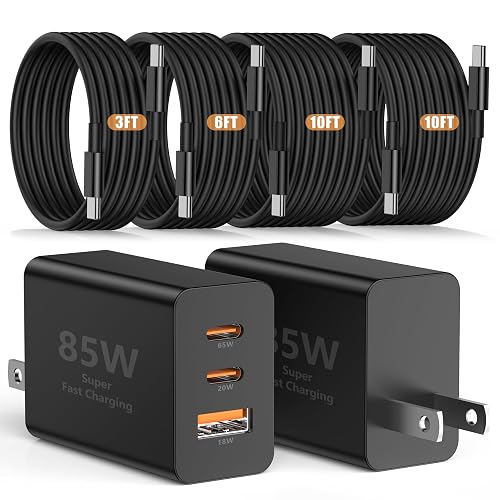
Watts equal volts multiplied by amps. A charger rated 5V and 2A delivers 10 watts. A charger rated 9V and 2A delivers 18 watts, and 20V at 3A equals 60 watts. Apply this to every output port if the charger has more than one.
- 5V × 1A = 5W (a basic, older phone charger)
- 5V × 2A = 10W (common standard output)
- 9V × 2A = 18W (a typical fast-charging profile)
- 5V × 3A = 15W (a higher-current USB output)
- 20V × 3A = 60W (USB-C Power Delivery range)
Step 3: Check What Your Phone Actually Accepts
A charger’s rating is a ceiling, not a guarantee. Your phone negotiates the power it will draw, so a 30-watt charger will not push 30 watts into a phone that tops out at 20. Check your phone’s maximum charging wattage in the manufacturer’s specifications, which are typically listed on the official support page for your model.
Keep in mind that the cable matters too. A USB-C cable rated only for low current can cap charging speed even when the charger and phone both support more. Many owners report slower charging after swapping in a thin, unbranded cable, so verify the cable’s rating when speed is the goal.
Common Wattage Ranges and What They Mean
| Wattage range | Typical use | Charging speed |
|---|---|---|
| 5W to 10W | Older phones, basic USB-A bricks | Slow; often 2 to 3+ hours for a full charge |
| 18W to 20W | Modern phones with USB-C fast charging | Good for everyday use |
| 25W to 30W | Newer flagship phones with high-speed profiles | Fast; best for quick top-ups |
| 45W to 65W | Multi-device or laptop-capable chargers | Fast for phones, also charges tablets and laptops |
Tips for Picking the Right Wattage
- Match the charger to your phone’s maximum input, not to the highest number on the box.
- Use a USB-C cable rated for the power level you need.
- A higher-wattage charger is safe for a lower-wattage phone, because the phone controls the draw.
- If your phone charges slowly, test a different charger and cable before assuming the phone is faulty.
Common Mistakes
- Reading the input wattage (the wall side) instead of the output.
- Assuming all USB-C ports deliver fast charging. Some are limited to basic 5W output.
- Buying a low-wattage replacement and expecting fast charging from it.
- Ignoring a damaged or frayed cable, which can limit power and create heat.
Recommended Gear
A USB-C power meter lets you read real-time voltage and amperage as your phone charges, which confirms what your charger is actually delivering. View on Amazon
A certified USB-C to USB-C cable rated for higher current helps your phone reach its top charging speed. View on Amazon
FAQ
How many watts is a typical phone charger?
Many older chargers output 5 to 10 watts, while modern fast chargers commonly output 18 to 30 watts. The exact figure depends on the charger’s output rating and your phone’s maximum intake.
How many watts phone charger do I need for fast charging?
Choose a charger that meets or exceeds your phone’s stated maximum charging wattage, and pair it with a cable rated for that power. Going above your phone’s limit does not hurt it, but it will not speed up charging beyond the phone’s cap.
Can a higher-watt charger damage my phone?
Generally no, because the phone and charger negotiate the power level before charging begins. Using a well-made charger from a reputable brand is the safer choice regardless of wattage.
Conclusion
To find how many watts is a phone charger, read the output volts and amps on the brick and multiply them. Then compare that number with your phone’s maximum input and check that your cable can carry it. Matching all three gives you the fastest safe charge your setup allows.
Related reading
- Wireless Phone Charger for Car: How to Choose, Mount and Use One (2026)
- Phone Charger iPhone SE: How to Choose and Use the Right One
- Phone Charger iPhone 4: How to Choose and Use the Right One
- Phone Charger for Cigarette Lighter: How to Choose and Use One (2026)
Ready to choose one?
About Lauren Holland
Lauren Holland is part of our editorial team and reviews and edits our consumer tech how-to & troubleshooting guides, checking product details against manufacturer specifications and owner feedback.