
 By Colin Foster
Updated November 2026
If you are looking for a free tablet with EBT, the first question is usually not which brand looks best but which device will actually handle the job. Most people want something for schoolwork, video calls, streaming, reading and basic apps, and they want it to work reliably without a hefty learning curve. The picks below were selected by comparing manufacturer specifications, brand reputation, and the patterns owners commonly describe in their feedback. We weighed screen size, battery capacity, storage and expansion options, camera quality, connectivity, and how well each model suits a particular household. Before you buy, confirm the current eligibility rules for any program with your state or local benefits office, since program details change. If you want more background, see Top 5 Tablets for Muscle Relaxation Options Compared in 2026.
Our top picks at a glance
- 1
 TOP CHOICEBest overallCOOPERS Tablet 10 inch, Android 16 Tablet, 32GB ROM 1TB Expand Computer TabletsView on Amazon
- 2
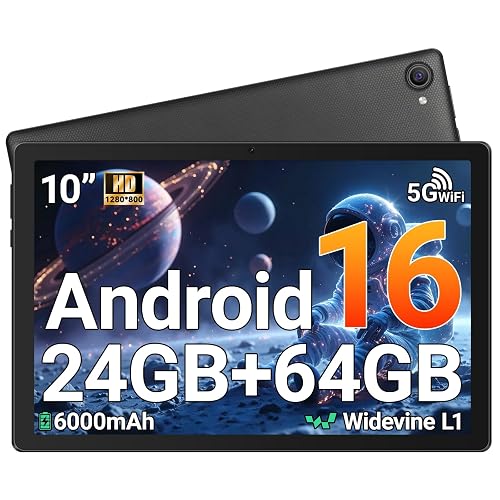 TOP CHOICEBest for streaming and multitaskingTablet 10 Inch Android 16 Tablet, 24GB RAM 64 GB ROM 1 TB ExpandView on Amazon
- 3
 TOP CHOICEBest for seniors and giftingTECLAST P35 Android 16 Tablet 10 Inch for Seniors & KidsView on Amazon
- 4
 Best for young kidsKids Tablet 7 inch Android, 4GB RAM 32GB ROM with Parental ControlView on Amazon
- 5
 Best budget pick for light useTablet 7Inch Android 14.0 with Protective Case, 8GB RAM + 32GB ROMView on Amazon
- 6
 Best for on-the-go connectivity4G LTE Tablets 11 inch Android 16 Tablet with T-Mobile SIM SupportView on Amazon
- 7
 Best for a clean, simple systemPRITOM Tablet 10 inch, 64GB, Tablet Android, HD IPS Screen, 6000mAhView on Amazon
Our Top Picks
Quick Comparison
| Product | Best for | Key feature |
|---|---|---|
| COOPERS Tablet 10 inch | Everyday all-around use | 32GB storage expandable up to 1TB |
| Tablet 10 Inch Android 16 Tablet | Streaming and multitasking | 24GB RAM and WiFi 6 |
| TECLAST P35 Android 16 Tablet | Seniors and gifting | Eye protection display and easy-to-use interface |
| Kids Tablet 7 inch Android | Young children | Parental controls and silicone case |
| Tablet 7Inch Android 14.0 | Light use on a tight budget | Compact size with protective case |
| 4G LTE Tablets 11 inch | On-the-go connectivity | Cellular support with SIM card slot |
| PRITOM Tablet 10 inch | Simple, low-clutter setup | GMS certified with low bloatware |
COOPERS Tablet 10 inch, Android 16 Tablet, 32GB ROM 1TB Expand Computer Tablets
COOPERS Tablet 10 inch, Android 16 Tablet, 32GB ROM 1TB Expand Computer Tablets, Quad Core Processor 6000mAh Battery, 1280×800 IPS Touch Screen, 2+8MP Dual HD Camera, Bluetooth WiFi Tablets PC
Best for: Everyday all-around use
This is a solid choice for someone who wants a full-size screen for reading, browsing, video calls and schoolwork without paying for features they will not use. The 10-inch display makes text and video easier to see than a small phone.
Key specs
- 10-inch display, 1280×800 IPS touchscreen
- 32GB built-in storage, expandable up to 1TB with a memory card
- 6000mAh battery
- Dual 2MP and 8MP cameras
- Bluetooth and WiFi connectivity
Pros
- Large screen suits reading and video
- Expandable storage keeps costs of upgrades low
- Long battery life for a full day of light use
Cons
- The 1280×800 resolution is modest for sharp detail
- Camera quality is basic and suited to video calls rather than photography
Bottom line: A dependable pick for a household that wants a larger screen for general use and does not need high-end performance.
Tablet 10 Inch Android 16 Tablet, 24GB RAM 64 GB ROM 1 TB Expand
Tablet 10 Inch Android 16 Tablet, 24GB RAM 64 GB ROM 1 TB Expand, 6000 mAh Battery, Dual Camera, 1280×800 IPS HD Touchscreen, Widevine L1, WiFi 6, BT5.4
Best for: Streaming and multitasking
This model suits someone who keeps several apps open at once, streams video for long stretches, or wants a bit more headroom than entry-level tablets offer. The larger memory allocation helps with switching between apps.
Key specs
- 10-inch IPS touchscreen, 1280×800 resolution
- 24GB RAM and 64GB storage, expandable up to 1TB
- 6000mAh battery
- Dual cameras
- WiFi 6 and Bluetooth 5.4
Pros
- Generous RAM for multitasking
- WiFi 6 supports more stable connections on compatible routers
- Widevine L1 listed for HD streaming support
Cons
- Same modest display resolution as other 10-inch models in this range
- Battery life under heavy streaming will be shorter than under light use
Bottom line: The best fit for users who stream and switch between apps often and want extra performance headroom.
TECLAST P35 Android 16 Tablet 10 Inch for Seniors & Kids
TECLAST P35 Android 16 Tablet 10 Inch for Seniors & Kids, GPS Navigation, Google Kids Space, 16GB RAM 32GB ROM 2TB Expandable, 6000mAh, 5GHz WiFi, Dual Camera, Eye Protection, Easy-to-Use Gift
Best for: Seniors and gifting
This tablet is aimed at people who want a simpler experience with a larger screen and features geared toward ease of use, including eye protection settings and a kid-oriented space that can also keep things uncluttered for older users.
Key specs
- 10-inch display
- 16GB RAM and 32GB storage, expandable up to 2TB
- 6000mAh battery
- Dual cameras and 5GHz WiFi
- GPS navigation
Pros
- Eye protection display mode for longer reading sessions
- Simplified interface suits first-time tablet users
- Built-in GPS and 5GHz WiFi
Cons
- Interface simplification can feel limiting for users who want full customization
- Owners sometimes note that setup takes some patience at first
Bottom line: A good match for seniors or a thoughtful gift where ease of use matters more than power.
Kids Tablet 7 inch Android, 4GB RAM 32GB ROM with Parental Control
Kids Tablet 7 inch Android, 4GB RAM 32GB ROM, 1TB Expandsion, with Parental Control, WiFi, Bluetooth, Dual Camera with Silicone Case, 1PCS (Blue)
Best for: Young children
A compact tablet with parental controls and a protective silicone case is the practical choice for a young child who will drop and handle the device often. The smaller screen keeps it manageable in small hands.
Key specs
- 7-inch display
- 4GB RAM and 32GB storage, expandable up to 1TB
- Dual cameras
- WiFi and Bluetooth
- Silicone case included
Pros
- Parental control features help manage screen time and content
- Silicone case adds drop protection
- Lightweight and easy to hold
Cons
- Small screen limits comfortable reading for older users
- Parental control settings should be reviewed carefully during setup
Bottom line: A sensible choice for a younger child who needs a durable device with built-in content controls.
Tablet 7Inch Android 14.0 with Protective Case, 8GB RAM + 32GB ROM
Tablet 7Inch Android 14.0 with Protective Case, 8GB(3+5GB Expand) RAM+ 32GB ROM, 1024 x 600 IPS Screen, Dual Camera, 3000mAh Battery,Bluetooth 5.0 WiFi Tab (Pink)
Best for: Light use on a tight budget
Someone who mainly reads, checks email, streams occasional video and uses a few basic apps may find this compact model covers their needs. The included protective case is a useful extra for everyday handling. You may also like 7 Best Tablet Holders for Vehicles of 2026.
Key specs
- 7-inch 1024 x 600 IPS screen
- 8GB RAM (including expanded memory) and 32GB ROM
- 3000mAh battery
- Dual cameras
- Bluetooth 5.0 and WiFi
Pros
- Compact and easy to carry
- Protective case included
- Suitable for simple daily tasks
Cons
- The 3000mAh battery is smaller than most larger models, so charging is more frequent
- The lower display resolution limits sharpness for text-heavy reading
Bottom line: A basic, portable option for light use where a small screen and modest battery are acceptable.
4G LTE Tablets 11 inch Android 16 Tablet with T-Mobile SIM Support
4G LTE Tablets, 5G WiFi+Cellular, T-Mobile SIM Card Support, 13+8MP Dual Camera Support, 1TB Expansion HD Touchscreen Tableta Tablet 11 inch Android 16 Tablet 2026 Latest Update Octa-Core 128GB+20GB
Best for: On-the-go connectivity
This model is designed for people who need mobile data access away from home WiFi, since it supports cellular connectivity with a SIM card. It fits people who use a tablet for maps, messaging and streaming outside the house.
Key specs
- 11-inch HD touchscreen
- Octa-core processor listed
- 128GB storage with expansion support
- 13MP and 8MP dual cameras
- 4G LTE and 5G WiFi, with T-Mobile SIM support noted in the listing
Pros
- Cellular connectivity works away from WiFi
- Larger 11-inch screen
- Good storage capacity for apps and media
Cons
- Cellular plans are an ongoing cost that should be checked before buying
- Carrier compatibility should be confirmed for the specific SIM you plan to use
Bottom line: Best for users who need mobile data on the device itself and are prepared to confirm carrier compatibility first.
PRITOM Tablet 10 inch, 64GB, Tablet Android, HD IPS Screen, 6000mAh
GMS Certified, Stable system, Dual Camera, WiFi, Bluetooth, Fashionable and durable, Low bloatware PRITOM Tablet 10 inch, 64GB, Tablet Android, HD IPS Screen, 6000mAh, Black
Best for: Simple, low-clutter setup
This tablet is pitched at users who want a stable, straightforward system with little preinstalled software to sort through. The GMS certification indicates the device includes standard Google services.
Key specs
- 10-inch HD IPS screen
- 64GB storage
- 6000mAh battery
- Dual cameras
- WiFi and Bluetooth
- GMS certified
Pros
- GMS certification supports standard Android app compatibility
- Low bloatware keeps the home screen cleaner
- 64GB storage is a comfortable starting point
Cons
- Processor performance is modest for demanding apps or games
- Camera capability is basic
Bottom line: A clean, dependable option for someone who wants a simple, standard Android experience on a larger screen.
Buying Guide
Screen size and resolution
Screen size affects how comfortable a tablet is for reading, video and video calls. Models from 10 to 11 inches suit reading and streaming, while 7-inch models are easier to hold and carry. Resolution also matters: 1280×800 is adequate for casual viewing but looks softer on text-heavy content than higher-resolution panels. Check the listed resolution before you buy if clear text is important to you.
Good picks for this: COOPERS Tablet 10 inch, Kids Tablet 7 inch Android
Storage and expandable memory
Built-in storage determines how many apps, photos and downloaded videos you can keep without a memory card. Many budget tablets accept microSD cards, which lets you add storage later. Check whether the card slot is listed and what maximum capacity the manufacturer specifies, since listings vary.
Good picks for this: TECLAST P35 Android 16 Tablet, Tablet 10 Inch Android 16 Tablet
Battery capacity and real-world use
Battery ratings in milliamp-hours indicate capacity, but actual runtime depends on screen brightness, video streaming and background apps. A 6000mAh battery generally offers longer use than a 3000mAh battery under the same conditions. Plan on charging daily if you stream heavily.
Good picks for this: PRITOM Tablet 10 inch, COOPERS Tablet 10 inch
Processor and RAM for multitasking
RAM determines how many apps can stay open at once without reloading. Users who switch between messaging, video and browsing often benefit from 16GB or more of RAM when it is listed. Processor specifications matter less for light tasks but affect how smoothly demanding apps run.
Good picks for this: Tablet 10 Inch Android 16 Tablet, TECLAST P35 Android 16 Tablet
Connectivity: WiFi only or cellular
WiFi-only tablets need a home or public network to access the internet. Cellular models support a SIM card for mobile data, but this adds an ongoing plan cost and requires carrier compatibility. Confirm which SIM types and bands the device supports before you commit.
Good picks for this: 4G LTE Tablets 11 inch Android 16 Tablet, Tablet 10 Inch Android 16 Tablet
Parental controls and safety features
If the tablet will be used by a child, built-in parental controls let you set content limits, app permissions and screen time. Review the settings during setup rather than relying on defaults. A protective case also reduces damage from drops.
Good picks for this: Kids Tablet 7 inch Android, TECLAST P35 Android 16 Tablet
Durability and care
A protective case and a screen protector are inexpensive ways to reduce damage. Keep the tablet away from extreme heat, avoid charging it overnight under a pillow or blanket, and use the charger the manufacturer specifies. Update the software when updates are offered to receive security patches.
Good picks for this: Tablet 7Inch Android 14.0 with Protective Case, Kids Tablet 7 inch Android
FAQ
What does a free tablet with EBT actually mean?
Some benefit programs and community organizations provide tablets or connectivity support to eligible households. Program names, eligibility rules and whether devices are provided at no cost vary by state and provider. Contact your state or local benefits office for current details before assuming a device is available.
Can I buy a tablet with EBT funds?
EBT benefits generally cover eligible food purchases, and rules about which retailers and items qualify are set by federal and state agencies. Whether a tablet qualifies is not something this site can confirm, so check current SNAP guidance from the USDA or your state agency.
Do I need a cellular plan for a tablet?
Only cellular models need a SIM card and mobile plan. WiFi-only tablets work fully on a home or public network. If you plan to use mobile data, confirm carrier compatibility and check the ongoing plan cost before buying.
How much storage is enough for a basic tablet?
For reading, browsing and video calls, 32GB to 64GB is usually workable, especially with a memory card slot. Heavy photo, video or game libraries will need more space or an expandable card.
Are kids’ tablets safe for young children?
Tablets with built-in parental controls let you manage content and screen time, but no setting replaces supervision. Review the controls during setup and keep the device in a shared space when possible.
How do I keep my tablet battery healthy?
Avoid extreme heat, do not leave the device charging unattended for long stretches, and use the charger the manufacturer specifies. Partial charges are generally gentler on lithium batteries than repeatedly running them to zero.
Should I choose a 7-inch or 10-inch tablet?
A 7-inch model is easier to hold and fits in a bag, which suits children and light users. A 10-inch model gives more screen area for reading, video and multitasking. Consider how and where the tablet will be used most often.
Conclusion
For most households looking for a dependable everyday tablet, the COOPERS Tablet 10 inch offers a balanced mix of screen size and storage. Heavier multitaskers and streamers may prefer the 24GB RAM model. Seniors and gift buyers will likely appreciate the TECLAST P35 for its simplified setup, while parents of young children should look at the 7-inch Kids Tablet with parental controls. The 4G LTE model suits anyone who needs mobile data away from WiFi, and the PRITOM model works well for a clean, standard Android experience. Match the pick to the actual use case, confirm program eligibility with the relevant office, and check specifications on the listing before you buy.
Sources
- Official SNAP and EBT program rules, eligible food guidance and benefit administration details (fns.usda.gov)
- Information on the Affordable Connectivity and Lifeline-related consumer programs and eligibility context (fcc.gov)
- Consumer guidance on scams, device purchasing and online shopping safety (consumer.ftc.gov)
Related reading
- iPhone Tablet Air 2: What It Is and How to Tell Which One You Have
- iPad Tablet Not Charging: Cable vs Port Fix – Which Should You Check First?
- Windows Surface Tablet Charger: How to Choose and Test One (2026)
About Colin Foster
Colin Foster is part of our editorial team and reviews and edits our consumer tech how-to & troubleshooting guides, checking product details against manufacturer specifications and owner feedback.



