
 By Colin Foster
Updated November 2026
Choosing an e ink tablet for note-taking comes down to a few practical questions: how the screen feels under a pen, whether it supports color, how much storage you need, what stylus comes in the box, and how long the battery lasts between charges. The picks below are based on product listings, brand reputation and common owner feedback patterns, so you can match a model to the way you actually work.
Our top picks at a glance
- 1
 TOP CHOICEBest overallreMarkable Paper PureView on Amazon
- 2
 TOP CHOICEBest for color notesreMarkable Paper ProView on Amazon
- 3
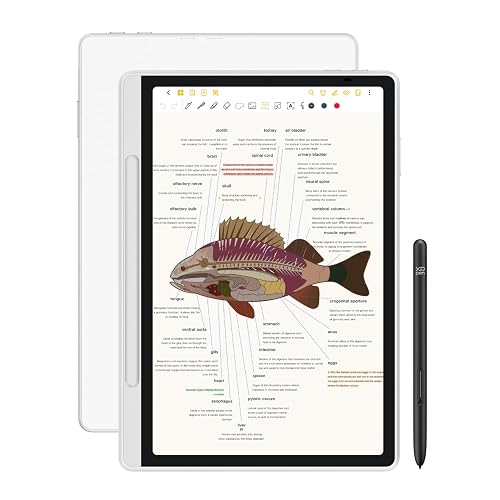 TOP CHOICEBest for drawing and sketchingXPPen Magic Note PadView on Amazon
- 4
 Best for reading-heavy useBOOX Tablet Go Color 7 Gen IIView on Amazon
- 5
 Best for studentsXPPen Note PlusView on Amazon
- 6
 Best bundle for premium buyersRemarkable Paper Pro BundleView on Amazon
Our Top Picks
Quick Comparison
| Product | Best for | Key feature |
|---|---|---|
| reMarkable Paper Pure | Distraction-free writing | 10.3-inch black and white display |
| XPPen Magic Note Pad | Drawing and sketching | 16384 pressure levels |
| reMarkable Paper Pro | Color note-taking | 11.8-inch color e ink screen |
| BOOX Tablet Go Color 7 Gen II | Reading and annotation | Color screen, active stylus |
| XPPen Note Plus | Students and meetings | Syncs notes to phone |
| Remarkable Paper Pro Bundle | Premium bundled setup | Leather folio and Marker Plus |
reMarkable Paper Pure
10.3” paper tablet with black and white display, e ink digital notebook for better thinking, writing, and reading reMarkable Paper Pure with Marker Plus and Ocean Blue Sleeve Folio
Best for: Distraction-free writing and thinking.
This suits people who want a focused digital notebook with a plain black and white page and minimal interface clutter.
Pros
- Large 10.3-inch display suited to full-page notes
- Clean writing surface with little visual distraction
Cons
- No color, which limits diagrams and highlighting
XPPen Magic Note Pad
Paper Note-Taking Tablet with 16384 Pressure Levels, X3 Pro Pencil (PD04D), Magnetic Folio, 6+128GB for Writing/Reading XPPen 3-in-1 Color Digital Notebook 10.95'' Magic Note Pad
Best for: Drawing and sketching alongside written notes.
A good fit for designers and visual thinkers who want very fine pen response and a magnetic folio for protection.
Pros
- 16384 pressure levels for fine line control
- Includes a magnetic folio and 6+128GB configuration
Cons
- Smaller 10.95-inch screen than full-size paper tablets
reMarkable Paper Pro
11.8” color e ink paper tablet with reading light for writing, reading, and better thinking reMarkable Paper Pro Digital Notebook with Marker Plus
Best for: Color note-taking and highlighting.
This is aimed at users who need color for annotations, diagrams or study materials and want a larger writing area.
Pros
- 11.8-inch color e ink screen with a built-in reading light
- Marker Plus pen works well for detailed writing
Cons
- Color e ink renders more softly than black and white pages
BOOX Tablet Go Color 7 Gen II
BOOX Tablet Go Color 7 Gen II E Ink Tablet Digital Notebook Support Active Stylus InkSense (Black)
Best for: Reading-heavy use with annotation.
Owners who read PDFs and ebooks as much as they take notes often favor this model for its compact size and active stylus support.
Pros
- Compact 7-inch color screen that slips into a bag easily
- Active stylus with InkSense support
Cons
- Small screen is cramped for large handwritten pages
XPPen Note Plus
Writing Tablet for Students, Wireless Smart Notebook for Sketching, Note-Taking, Digital Art & Meeting, Drawing Tablet XPPen Note Plus Digital Notebook with Pen Syncs to Phone
Best for: Students and meeting notes.
This works for students and professionals who want notes to sync to a phone for sharing or review.
Pros
- Wireless sync with a phone app for quick sharing
- Versatile for notes, sketching and meetings
Cons
- Phone syncing depends on app compatibility with your device
Remarkable Paper Pro Bundle
Remarkable Paper Pro Bundle – Premium Leather | Includes 11.8” Remarkable Paper Tablet, Marker Plus Pen with Eraser, and a Book Folio Cover in Black Leather (Renewed)
Best for: A premium, ready-to-use setup.
Buyers who want the tablet, pen and cover in one package, and who value a leather folio for daily carry, tend to prefer this bundle.
Pros
- Includes Marker Plus pen with eraser and a leather book folio
- Ready to use out of the box with no accessory hunting
Cons
- This listing is renewed rather than new, so check the seller’s condition notes
Buying Guide
Screen Color and Size
Black and white e ink is sharper and easier on the eyes for long writing sessions. Color panels are useful for highlighting and diagrams but render more softly, and screen size determines how much of a page you see at once.
Stylus Quality and Pressure Sensitivity
Pressure levels affect how well the tablet handles thin and thick strokes. Check whether the stylus is included and whether it needs charging or batteries.
Storage, Sync and App Support
Consider how notes move off the device. Look for cloud sync, phone apps and export formats such as PDF if you need to share or archive your work.
FAQ
Do e ink tablets work well for handwritten note-taking?
Yes, most e ink tablets are built around handwriting and feel close to writing on paper. Response is generally smooth, and the screen does not glow, which many people find easier on the eyes during long sessions. Lag and ghosting vary by model, so it helps to check how each one handles fast writing.
Is a color e ink screen better than black and white for notes?
Color helps if you use highlighting, color-coded notes, diagrams or sketches, since it makes those marks easier to tell apart. If you mostly write plain text and sketch in black, a black and white screen is often sharper and simpler. Color e ink screens typically show colors more softly than a standard tablet display.
Can I convert handwritten notes to text on these devices?
Many e ink tablets offer handwriting recognition or can export notes to formats like PDF, and some support sending notes to cloud services. The quality of conversion depends on the software and your handwriting. Check the app support and export options for each model before you buy.
How important is the stylus that comes with the tablet?
The stylus has a big effect on how the device feels, especially pressure sensitivity and tilt response for shading. Some tablets include a pen and others sell it separately, so confirm what is in the box. A stylus that works with a range of pressure levels gives a more natural result.
How much storage do I need for note-taking?
Text and handwritten pages take up very little space, so even modest storage is usually enough for everyday notes. If you plan to store many books, large PDFs or art files, look for a model with more capacity or a microSD option. Cloud sync can also reduce how much you need to keep on the device.
Are e ink tablets good for reading as well as writing?
Many e ink tablets handle reading well because the text looks sharp and the screen is easy on the eyes. Some models include a front light for reading in dim conditions. If reading is a large part of your use, pay attention to screen size, page refresh speed and the reading app options.
Conclusion
If you want a dependable, paper-like note-taking experience with a strong ecosystem, the reMarkable models are a solid place to start, with the Paper Pure suiting most everyday users and the Paper Pro fitting those who want color. For drawing, sketching or a more compact notepad feel, the XPPen options are worth a close look, and for heavier reading alongside notes, the BOOX Tablet Go Color 7 Gen II is a good match.
Choose based on your main use: plain writing favors a black and white screen, color and diagrams favor a color model, and reading-heavy routines favor devices with strong reading features. Comparing screen type, stylus, storage and app support against your own habits will point you to the right tablet.
Related reading
- 4 Best Tablet Computers with Pen for Note-Taking and Drawing (2026)
- iPhone Tablet Air 2: What It Is and How to Tell Which One You Have
- iPad Tablet Not Charging: Cable vs Port Fix – Which Should You Check First?
- Windows Surface Tablet Charger: How to Choose and Test One (2026)
About Colin Foster
Colin Foster is part of our editorial team and reviews and edits our consumer tech how-to & troubleshooting guides, checking product details against manufacturer specifications and owner feedback.


