Quick answer
Our overall pick is the Logitech MK270 Wireless Keyboard and Mouse Combo for its reliable 2.4GHz connection and long battery life. The other picks are for users wanting a compact mechanical keyboard, a simple standalone keyboard, or a retro-styled set.
Choosing the best wireless keyboard can help you reduce desk clutter and work more comfortably. The right model depends on whether you need a full number pad, quiet typing, or multi-device connectivity.
We compared manufacturer listings and specifications on Amazon to find options that suit different setups. Our picks are based on features like battery type, connection technology, and included accessories.
Our picks at a glance

Pros
- Includes a wireless mouse in the combo
- Long claimed battery life for both keyboard and mouse
- Spill-resistant keyboard design
- Full-size layout with number pad and multimedia keys
Cons
- Compatible operating system is listed as Windows only
- Keyboard and mouse require disposable batteries
- The listing does not mention Bluetooth connectivity
Pros
- Compatible with Windows and MacOS
- Low-profile, quiet key design
- Includes a full number pad
- Long claimed battery life
Cons
- Requires two AAA batteries (not rechargeable)
- The listing does not mention Bluetooth connectivity
- Not water resistant

Pros
- Tri-mode connectivity (Bluetooth, 2.4GHz, USB-C)
- Compact 98-key layout with number pad
- Built-in rechargeable battery
- Water-resistant and has RGB backlighting
Cons
- Full recharge takes 7-8 hours per listing
- Uses membrane switches, not mechanical
- The listing does not mention included switch or keycap pullers
Pros
- Unique retro style with round keycaps
- Includes a matching wireless mouse
- Single receiver for both keyboard and mouse
- Comes with a 12-month warranty
Cons
- Requires AA batteries for both keyboard and mouse
- The listing does not mention MacOS compatibility
- Connectivity is 2.4GHz only, no Bluetooth listed

Pros
- Hot-swappable mechanical switches
- Tri-mode wireless connectivity
- Includes a multi-function control knob
- RGB backlighting and rechargeable battery
Cons
- 75% layout lacks a dedicated number pad
- The listing does not mention MacOS compatibility
- Layout is listed as QWERTZ, not QWERTY
How we chose
We compared manufacturer listings and specifications on Amazon as of October 2026. We did not test or use these products hands-on. Our selections are based on comparing features like connectivity options, battery life claims, keyboard layout, and included components like a mouse or receiver.
Best Wireless Keyboards: our picks in detail
1. Best overall wireless keyboard: Logitech MK270 Wireless Combo
The Logitech MK270 is a full-size wireless keyboard and mouse combo. It connects via a USB receiver with a range listed up to 33 feet. The keyboard has a standard 104-key layout with multimedia hotkeys and a spill-resistant design.
According to the listing, the keyboard battery can last up to 36 months and the mouse up to 12 months, both using AA batteries. The included mouse is ambidextrous. The combo is compatible with Windows PCs and laptops.
Best for: This is the best wireless keyboard for users who want a reliable, full-size keyboard and mouse set with long battery life.
Pros
- Includes a wireless mouse in the combo
- Long claimed battery life for both keyboard and mouse
- Spill-resistant keyboard design
- Full-size layout with number pad and multimedia keys
Cons
- Compatible operating system is listed as Windows only
- Keyboard and mouse require disposable batteries
- The listing does not mention Bluetooth connectivity
2. Best for Mac and Windows users: HP 230 Wireless Keyboard
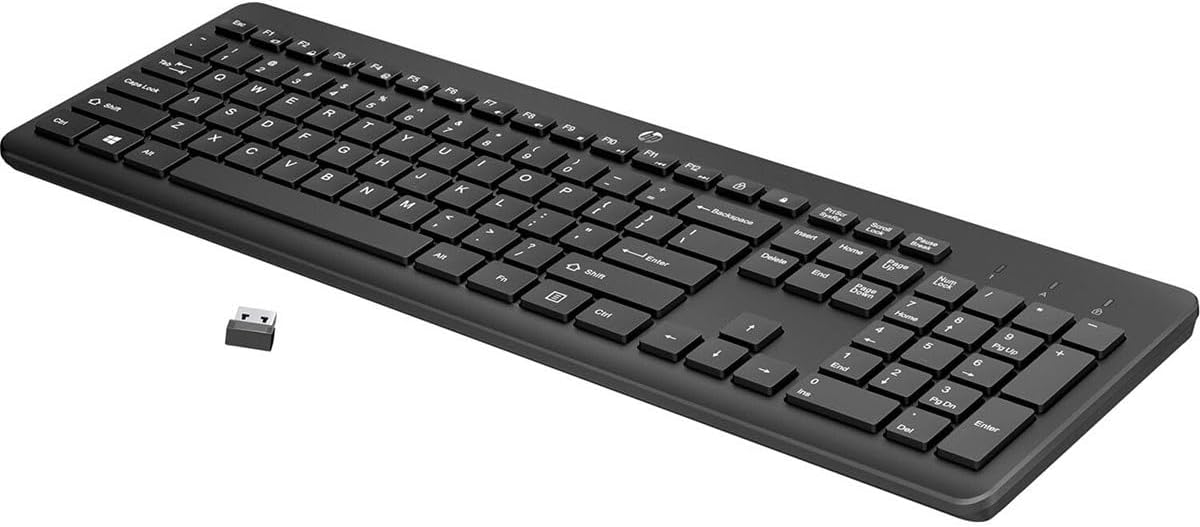
The HP 230 is a standalone wireless keyboard with a low-profile, quiet design. It features a full layout with a number pad and 12 shortcut keys. It connects via a wireless USB receiver.
The listing states it is compatible with both Windows and MacOS. It is powered by two included AAA batteries, with a claimed battery life of up to 16 months. Its dimensions are 17.32 inches long by 5.76 inches wide.
Best for: This is the best wireless keyboard for users who need a simple, quiet keyboard compatible with both Windows and Mac computers.
Pros
- Compatible with Windows and MacOS
- Low-profile, quiet key design
- Includes a full number pad
- Long claimed battery life
Cons
- Requires two AAA batteries (not rechargeable)
- The listing does not mention Bluetooth connectivity
- Not water resistant
3. Best compact multi-device keyboard: AULA K99 Wireless Keyboard
The AULA K99 is a 98-key compact wireless keyboard that saves desk space while keeping arrow keys and a number pad. It offers three connection modes: Bluetooth 5.0, 2.4GHz wireless via a receiver, and USB-C wired. It can connect to up to five devices.
It has a membrane design for quiet typing and a built-in 2000mAh rechargeable battery. It features an adjustable kickstand and RGB backlighting. It is listed as compatible with PCs, Macs, tablets, and phones.
Best for: This is the best wireless keyboard for users with limited desk space who need to switch between multiple computers or devices.
Pros
- Tri-mode connectivity (Bluetooth, 2.4GHz, USB-C)
- Compact 98-key layout with number pad
- Built-in rechargeable battery
- Water-resistant and has RGB backlighting
Cons
- Full recharge takes 7-8 hours per listing
- Uses membrane switches, not mechanical
- The listing does not mention included switch or keycap pullers
4. Best retro-style wireless keyboard: MOFII Retro Wireless Combo
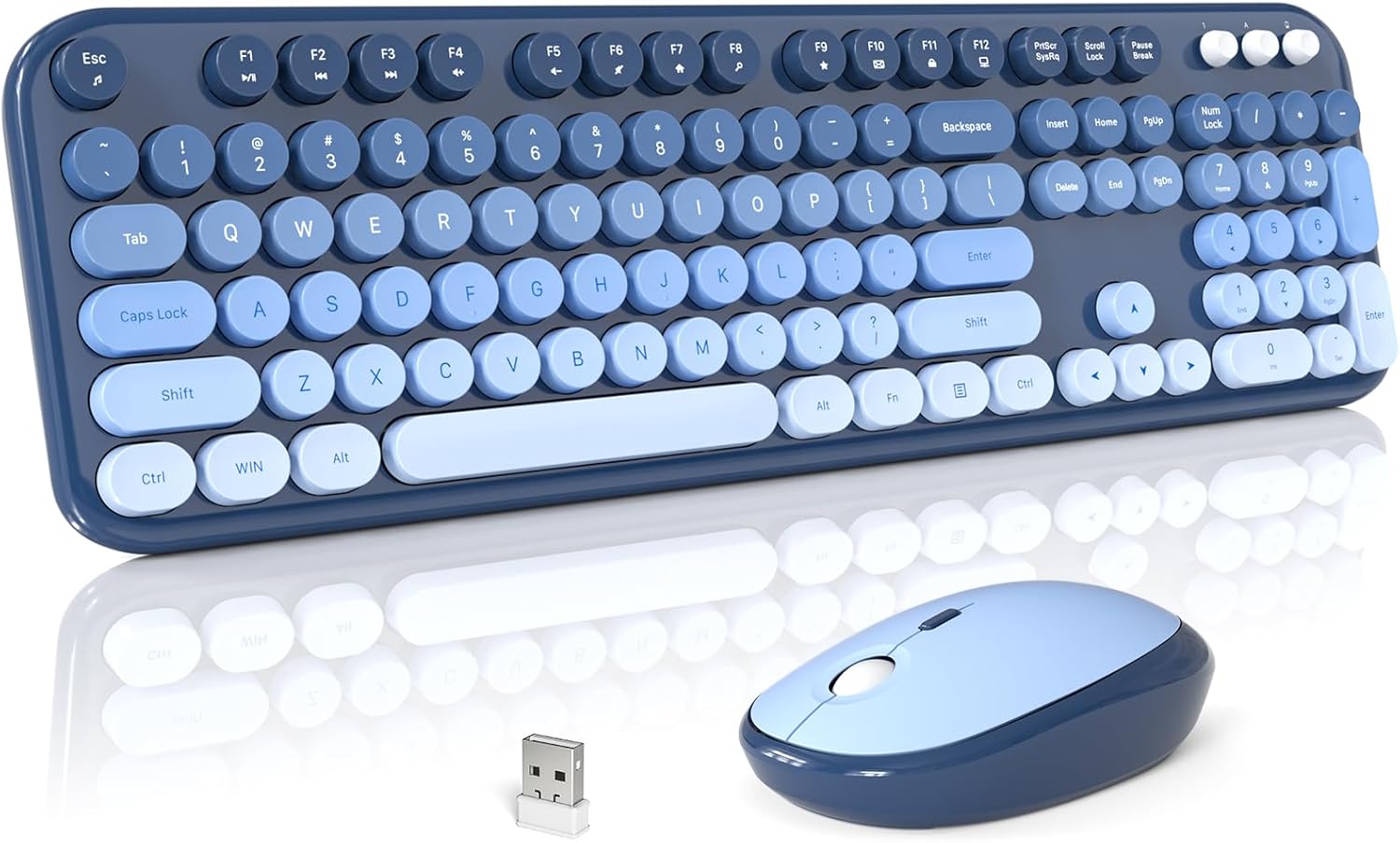
The MOFII wireless keyboard and mouse combo has a retro typewriter aesthetic with round keycaps. It connects via a single 2.4GHz USB nano receiver with a 35-foot range. The keyboard has a full-size layout with a number pad and 12 multimedia shortcut keys.
Both the keyboard and mouse use one AA battery each and enter sleep mode after inactivity to save power. It is compatible with Windows, Chrome OS, and Linux. The listing includes a 12-month warranty.
Best for: This is the best wireless keyboard for users who want a distinctive retro look in a keyboard and mouse set.
Pros
- Unique retro style with round keycaps
- Includes a matching wireless mouse
- Single receiver for both keyboard and mouse
- Comes with a 12-month warranty
Cons
- Requires AA batteries for both keyboard and mouse
- The listing does not mention MacOS compatibility
- Connectivity is 2.4GHz only, no Bluetooth listed
5. Best wireless mechanical keyboard: AULA F75 Pro Mechanical Keyboard
The AULA F75 Pro is a 75% layout wireless mechanical keyboard with 81 keys. It features tri-mode connectivity via Bluetooth 5.0, 2.4GHz wireless, and USB-C wired. It has a hot-swappable PCB, allowing you to change switches without soldering.
It comes with pre-lubed linear switches, RGB backlighting, and a multi-function control knob. The keyboard has a built-in rechargeable battery and a water-repellent design. It is compatible with Windows, Android, PCs, and game consoles.
Best for: This is the best wireless keyboard for gamers or typists who want a customizable, compact mechanical keyboard with a knob.
Pros
- Hot-swappable mechanical switches
- Tri-mode wireless connectivity
- Includes a multi-function control knob
- RGB backlighting and rechargeable battery
Cons
- 75% layout lacks a dedicated number pad
- The listing does not mention MacOS compatibility
- Layout is listed as QWERTZ, not QWERTY
Wireless keyboard picks at a glance
| Model | Connection | Battery | Layout & Keys | Special Features |
|---|---|---|---|---|
| Logitech MK270 Combo | 2.4GHz USB receiver | 2x AA (keyboard), 1x AA (mouse) | Full-size, 104 keys | Includes mouse, spill-resistant |
| HP 230 Keyboard | 2.4GHz wireless | 2x AAA | Full-size, 105 keys | Low-profile keys, Mac/Windows |
| AULA K99 | Bluetooth 5.0, 2.4GHz, USB-C | 2000mAh rechargeable | Compact 98-key | Tri-mode, RGB, water-resistant |
| MOFII Retro Combo | 2.4GHz USB receiver | 1x AA (each) | Full-size, Not listed | Retro style, includes mouse |
| AULA F75 Pro Mechanical | Bluetooth 5.0, 2.4GHz, USB-C | Rechargeable | 75%, 81 keys | Hot-swappable, knob, RGB |
How to choose a wireless keyboard
When looking for the best wireless keyboard, the first decision is the connection type. Most use a 2.4GHz USB receiver for a stable, plug-and-play link to one computer. Keyboards with Bluetooth let you connect to multiple devices like tablets and phones, but may require pairing. Some models offer both. Check our guide on desk accessories for more on organizing your setup.
Consider the keyboard’s layout and size. Full-size keyboards include a number pad, useful for data entry. Compact layouts like 75% or 98-key save space but keep arrow keys. The key switch type affects feel and sound. Membrane keyboards are typically quieter, while mechanical switches offer tactile feedback and are customizable. Learn more in our article on mechanical vs membrane keyboards.
What to look for
- Connectivity: Decide between a dedicated USB receiver for one PC, Bluetooth for multiple devices, or a model that offers both.
- Battery Life: Check if it uses disposable batteries or has a built-in rechargeable battery, and note the manufacturer’s claimed runtime.
- Layout: Choose a full-size keyboard with a number pad, or a compact layout to save desk space.
- Extra Features: Look for multimedia keys, backlighting, a included mouse, or ergonomic designs like adjustable tilt.
Finally, check compatibility with your operating system. Most work with Windows, but Mac or Linux support isn’t always listed. Also, consider if you need a keyboard for a specific use, like gaming with anti-ghosting or an office with quiet keys. For connecting multiple peripherals, see our explainer on USB hubs vs docking stations.
FAQ
What’s the difference between a 2.4GHz wireless keyboard and a Bluetooth keyboard?
A 2.4GHz keyboard uses a small USB receiver plugged into your computer. It typically offers a stable, low-latency connection dedicated to that one device. A Bluetooth keyboard connects directly to your computer’s or device’s built-in Bluetooth, allowing you to pair with multiple devices (like a laptop and a tablet) without a dongle, though pairing is required.
Do wireless keyboards work with any computer?
Most wireless keyboards are designed for Windows PCs. Compatibility with MacOS, Chrome OS, or Linux varies. Always check the product’s listed compatible operating systems. Keyboards with a USB receiver generally need a free USB-A or USB-C port, depending on the dongle.
How long do batteries last in a wireless keyboard?
Battery life varies widely. Some listings claim over a year for keyboards using disposable AA or AAA batteries. Keyboards with built-in rechargeable batteries may need charging every few days or weeks, depending on usage and features like backlighting. The manufacturer’s manual will have the most accurate estimates.
Can I use a wireless keyboard for gaming?
Yes, but for fast-paced games, look for features often listed on gaming keyboards, such as a high polling rate (for the 2.4GHz connection), anti-ghosting, and mechanical switches. Some wireless gaming keyboards emphasize low latency in their specifications.
References
- Amazon product listings and manufacturer specifications (accessed October 2026)
- Bluetooth Technology Website
- USB Implementers Forum