By Reid Preston
Quick answer
Our overall pick is the Amazon Smart Home Starter Kit for its all-in-one approach with a hub, plug, and bulbs. Other kits are better for those prioritizing advanced color lighting, reliable in-wall dimmers, or dedicated home security.
Choosing the right smart home starter kit can feel overwhelming with so many options. To help, we’ve compared the manufacturer specifications and features for 13 different kits. Whether you’re looking for a complete ecosystem, specific lighting control, or security monitoring, this list can help you find a match based on what the listings tell us.
Quick picks
- All-in-one Alexa kit: Amazon Smart Home Starter Kit (see on Amazon)
- Expanded Hue lighting: Philips Hue Starter Kit with Bridge Pro (see on Amazon)
- Reliable in-wall dimming: Lutron Caseta Deluxe Smart Dimmer Starter Kit (see on Amazon)
- Matter-compatible sensors: Tapo Door Sensor Starter KIT (see on Amazon)
13 Best Smart Home Starter Kits compared
| # | Product | Best for | Hub Included | Number of Devices | Voice Assistant Compatibility |
|---|---|---|---|---|---|
| 1 | Amazon Smart Home Starter Kit | Best overall smart home starter kit | Yes (Echo Hub) | 6 (Hub, Plug, 4 Bulbs) | Alexa |
| 2 | Broadlink Smart Home Starter Kit | Best for fast, app-based device setup | Yes (Hub) | 5 (Hub, 3 Bulbs, 1 Switch) | Alexa, Google Home |
| 3 | Honeywell Home Smart Home Security Starter Kit | Best for a DIY security system with video | Yes (Security Hub) | Not listed | Alexa, Google |
| 4 | Philips Hue Essential Starter Kit (4 Bulbs) | Best for color ambiance lighting | Yes (Hue Bridge) | 5 (Bridge, 4 Bulbs) | Alexa, Google Assistant, Apple Home |
| 5 | Philips Hue Starter Kit with Bridge Pro | Best for a large, expandable lighting system | Yes (Hue Bridge Pro) | 5 (Bridge Pro, 4 Bulbs) | Apple Home, Alexa, Google, Samsung SmartThings |
| 6 | Philips Hue Essential Starter Kit (2 Bulbs) | Best starter for color lighting on a smaller scale | Yes (Hue Bridge) | 3 (Bridge, 2 Bulbs) | Alexa, Google Assistant, Samsung SmartThings, Apple Home |
| 7 | Philips Hue Smart Light Bulbs Starter Kit | Best for unlocking Hue automations and Matter | Yes (Hue Bridge) | 3 (Bridge, 2 Bulbs) | Not listed |
| 8 | Sengled Smart Light Bulb Starter Kit | Best for Wi-Fi-based smart bulbs | Yes (Sengled Smart Hub) | 5 (Hub, 4 Bulbs) | Alexa, Google Home |
| 9 | Lutron Caseta Deluxe Smart Dimmer Starter Kit | Best for whole-home, reliable dimming | Yes (Lutron Smart Hub) | 4+ (2 Dimmers, Hub, Remotes) | Alexa, Google, HomeKit |
| 10 | Lutron Caseta Smart Dimmer Starter Kit (1 Dimmer) | Best for a single, most-connected smart switch | Yes (Lutron Smart Hub) | 3+ (1 Dimmer, Hub, Remote) | Alexa, Apple HomeKit, Google Home, Ring, Sonos |
| 11 | Lutron Caseta Diva Smart Dimmer Starter Kit | Best for adding a wireless 3-way switch | Yes (Lutron Smart Hub) | 3+ (1 Dimmer, Hub, Remote) | Alexa, Apple HomeKit, Google Home |
| 12 | Tapo Door Sensor Starter KIT | Best for Matter-compatible entry sensors | Yes (Tapo H100 Smart Hub) | 4 (3 Sensors, 1 Hub) | Matter compatible |
| 13 | myQ Smart Access Starter Kit | Best for a keyless entry video door lock | Not listed | 4 (Lock, Keypad, Adapter, Chime) | Not listed |
How we chose
Our picks come from comparing manufacturer listings and specifications on Amazon as of October 2026. We did not test, use, or review these products hands-on. We focused on what each kit includes, its stated compatibility, and the features described by the manufacturer.
All-in-One Smart Home Kits
These kits aim to provide a broad foundation with a hub and multiple device types.
1. Best overall smart home starter kit: Amazon Smart Home Starter Kit

Pros
- Includes a hub, plug, and four bulbs for a broad start
- Listing emphasizes easy, guided setup
- Hub is stated to work with thousands of devices
Cons
- The listing does not mention compatibility with <a href="https://csa-iot.org/all-solutions/matter" rel="noopener" target="_blank">Matter</a> or other ecosystems like Google or Apple.
This Amazon kit includes an Echo Hub, an Amazon Smart Plug, and four Amazon Basics Smart Bulbs. The listing states it’s designed for Alexa and promises an easy, guided setup. The Echo Hub is described as a central point to bring together thousands of connected devices like cameras, lights, locks, and thermostats.
Best for: Anyone who wants a simple, all-in-one introduction to a smart home centered on Alexa.
2. Best for fast, app-based device setup: Broadlink Smart Home Starter Kit

Pros
- Listing emphasizes very fast, account-free setup
- Includes a mix of bulbs and a switch
- Works with Alexa and Google Home
Cons
- The listing does not mention Matter or other major smart home standards.
This Broadlink kit includes a hub, three smart bulbs, and a switch. It uses FastCon and BLE technology for what the listing calls “zero setup,” claiming to add up to 90 devices in one second through its app without an account. It works with Alexa and Google Home and includes out-of-the-box preset automations.
Best for: Users who want a quick, app-centric setup process for a mix of lights and switches.
3. Best for a DIY security system with video: Honeywell Home Smart Home Security Starter Kit

Pros
- Includes a security camera with 1080p video and audio
- Built-in Alexa for voice control
- Can integrate with other smart devices
Cons
- The listing does not specify how many sensors or accessories are included.
This Honeywell Home kit is a gray security hub with a camera. It features smart motion detection, night vision, and records 1080p HD video clips with audio. The listing states it works with Alexa and Google for integration and has a built-in Alexa for voice commands and queries.
Best for: A do-it-yourself home security system with video monitoring and smart home integration.
Smart Lighting Starter Kits
These kits focus on transforming your home lighting with smart bulbs and a dedicated bridge.
4. Best for color ambiance lighting: Philips Hue Essential Starter Kit (4 Bulbs)

Pros
- Includes four color-changing smart bulbs
- Compatible with multiple major voice assistants
- Listing mentions a library of preset scenes
Cons
- Requires the included bridge for full functionality.
This Philips Hue kit includes a Hue Bridge and four E26 smart bulbs capable of producing millions of colors. The listing mentions dimming down to 2% brightness and compatibility with Alexa, Google Assistant, and Apple Home for voice control. It comes with preset light scenes designed by Hue’s lighting experts.
Best for: Users who want to start with vibrant, customizable color lighting throughout their home.
5. Best for a large, expandable lighting system: Philips Hue Starter Kit with Bridge Pro

Pros
- Bridge Pro supports a high capacity of devices
- Enables motion-activated lighting without separate sensors
- Compatible with Apple Home, Alexa, Google, and Samsung SmartThings
Cons
- The listing does not mention if the Bridge Pro supports <a href="https://csa-iot.org/all-solutions/matter" rel="noopener" target="_blank">Matter</a>.
This Philips Hue kit includes a Bridge Pro and four A19 E26 color smart bulbs. The Bridge Pro is stated to support over 150 lights and 50 accessories. It also enables features like Hue MotionAware, which can use the bulbs themselves for motion-activated lighting without separate sensors.
Best for: Users planning a large-scale smart lighting system who need high device capacity and advanced features.
6. Best starter for color lighting on a smaller scale: Philips Hue Essential Starter Kit (2 Bulbs)

Pros
- More entry to Philips Hue color lighting
- Compatible with multiple voice assistants and platforms
- Includes the necessary bridge
Cons
- Only includes two smart bulbs.
This Philips Hue Essential kit includes a Hue Bridge and two E26 color smart bulbs. The bulbs offer millions of colors and dimming down to 2% brightness. The listing states compatibility with Alexa, Google Assistant, Samsung SmartThings, and Apple Home for voice and app control.
Best for: Trying out Philips Hue color lighting with a smaller, two-bulb setup.
7. Best for unlocking Hue automations and Matter: Philips Hue Smart Light Bulbs Starter Kit

Pros
- Listing mentions Matter compatibility
- Bridge enables automations and remote control
- Connection is separate from your Wi-Fi network
Cons
- Only includes two smart bulbs.
This Philips Hue kit includes a bridge and two A19 color smart bulbs. The listing specifically mentions using Matter to connect devices to the Hue system and highlights features like automations and control from anywhere. The bridge provides a stable connection that doesn’t use your Wi-Fi network for the bulbs.
Best for: Users interested in the Matter standard and the full automation capabilities of the Hue ecosystem.
8. Best for Wi-Fi-based smart bulbs: Sengled Smart Light Bulb Starter Kit

Pros
- Includes four smart bulbs and a hub
- Hub supports both 2.4G and 5G Wi-Fi
- Compatible with Alexa and Google Home
Cons
- Bulbs are soft white only, not color-changing.
This Sengled kit includes a smart hub and four soft white (2700K) dimmable smart bulbs. The hub connects to your router via Ethernet and supports both 2.4G and 5G Wi-Fi networks. The bulbs work with Alexa and Google Home for voice control, and the app allows for scheduling wake-up and sleep lighting modes.
Best for: An economical start with multiple white smart bulbs and basic scheduling features.
In-Wall Smart Switch Kits
These kits are for controlling existing light fixtures by replacing your wall switches.
9. Best for whole-home, reliable dimming: Lutron Caseta Deluxe Smart Dimmer Starter Kit

Pros
- Hub operates on a dedicated wireless protocol, not Wi-Fi
- Dimmers work with existing bulbs (no smart bulbs required)
- No neutral wire required for installation
Cons
- Requires replacing existing wall switches.
This Lutron Caseta Deluxe kit includes two smart dimmers, a hub, and Pico remotes. The hub is stated to work without Wi-Fi for a reliable connection. The dimmers work with existing bulbs and do not require a neutral wire. The listing mentions compatibility with Alexa, Google, and Apple HomeKit.
Best for: Homeowners who want to replace existing light switches with reliable, whole-home dimming control.
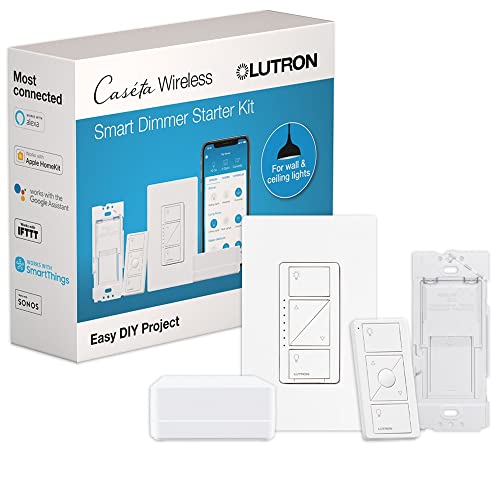
10. Best for a single, most-connected smart switch: Lutron Caseta Smart Dimmer Starter Kit (1 Dimmer)
Pros
- Transforms existing fixtures without smart bulbs
- Wide compatibility with other smart home systems
- Hub uses a dedicated wireless connection
Cons
- Only includes one dimmer switch.
This Lutron Caseta starter kit includes one smart dimmer, a Pico remote, and a hub. The dimmer transforms existing lights into smart lights without needing smart bulbs. The listing states the hub provides a stable connection without using Wi-Fi and works with Alexa, Apple HomeKit, Google Home, Ring, and Sonos.
Best for: Starting with a single, highly compatible smart light switch for a key room.
11. Best for adding a wireless 3-way switch: Lutron Caseta Diva Smart Dimmer Starter Kit

Pros
- Enables wireless 3-way switch setup
- No neutral wire required
- Hub uses a dedicated wireless protocol
Cons
- Only includes one primary dimmer switch.
This Lutron Caseta Diva kit includes one smart dimmer, a hub, and a Pico remote. It’s designed to let you add a second switch location for 3-way control without running new wires. The listing states the hub works without Wi-Fi and the system is compatible with Alexa, Apple HomeKit, and Google Home.
Best for: Controlling a light from two locations without the hassle of running new electrical wire.
Security & Access Starter Kits
These kits are designed for monitoring entry points and securing your home.
12. Best for Matter-compatible entry sensors: Tapo Door Sensor Starter KIT

Pros
- Matter compatible
- Includes three contact sensors and a hub
- Hub supports a large number of devices with extended battery life
Cons
- Sensors require the included hub to operate.
This Tapo kit includes three smart door/window contact sensors and one smart hub with a built-in chime. The listing states it is Matter compatible. The hub uses a low-power wireless protocol to connect up to 64 devices and extend battery life. It provides real-time notifications and can trigger a 90dB alarm.
Best for: Securing multiple doors and windows with a system that supports the Matter standard.
13. Best for a keyless entry video door lock: myQ Smart Access Starter Kit

Pros
- 3-in-1 device: lock, doorbell, and camera
- Multiple entry methods including facial recognition
- 2K HDR video with color night vision
Cons
- The listing does not mention compatibility with broader smart home platforms like Alexa or Google.
This Chamberlain myQ kit combines a smart deadbolt lock, a video doorbell, and a 2K HDR camera into one device. It offers five ways to enter: facial recognition, fingerprint, PIN, app control, or a physical key. The listing mentions 24/7 visibility with color night vision and two-way audio.
Best for: Replacing a front door lock with a keyless, video-enabled smart lock system.
How to choose a smart home starter kit
The right smart home starter kit depends on what you want to automate first and which ecosystem you prefer. Start by deciding if you want to control lights, secure entry points, or have a bit of everything. A kit with a hub often provides a more reliable and expandable system than devices that connect directly to your Wi-Fi.
Compatibility is key. Check if the kit works with the voice assistant you use, like Alexa or Google Assistant, or if it integrates with Apple Home or Samsung SmartThings. For future-proofing, look for support for the Matter standard, which aims to improve interoperability between different brands.
What to look for
- Your Starting Goal: Choose a kit focused on your priority, whether it’s lighting, security, or a general introduction.
- Hub vs. Hubless: A dedicated hub can offer a more stable connection for many devices and enable more advanced features.
- Ecosystem Compatibility: Ensure the kit works with your preferred voice assistant or smart home platform for seamless control.
- Expandability: Consider how many additional devices the system can support if you plan to grow your smart home later.
Always follow the manufacturer’s manual for installation and safety instructions. For more general advice on choosing tech, see our Tech Buying Guide.
FAQ
What is a smart home hub?
A smart home hub is a central device that connects to your router and communicates with your other smart devices, often using a specific wireless protocol like Zigbee or Z-Wave. It can make your system more reliable by handling device communications separately from your home Wi-Fi network and often enables more complex automations.
Do I need a starter kit, or can I buy devices separately?
You can buy devices separately, but a starter kit is often designed to ensure compatibility and provide a discounted bundle of devices that work together from the start. Kits that include a hub are especially useful as buying the hub separately can be an additional cost.
Are smart home starter kits difficult to install?
Most starter kits are designed for do-it-yourself installation. Lighting kits often involve screwing in bulbs and plugging in a bridge, while switch kits may require replacing existing wall switches (always follow electrical safety guidelines). Security and sensor kits typically use adhesive mounting. The listings we reviewed frequently emphasize easy setup.
What is Matter, and why does it matter?
Matter is a new smart home connectivity standard developed by major tech companies. Its goal is to allow devices from different manufacturers to work together more reliably. Choosing a Matter-compatible device can help ensure it works with a wider range of ecosystems in the future.
References
- Amazon product listings and manufacturer specifications (accessed October 2026)
- Connectivity Standards Alliance, Matter

About Reid Preston
Reid focuses on practical advice for consumer tech how-to & troubleshooting: what matters before you buy, what to skip, and how to get more out of what you already own.