Quick answer
Our overall pick is the tomtoc 360 Protective Laptop Case for 14-inch MacBook Pro, which its listing describes with CornerArmor protection, a front pocket and an extra strap. The HYZUO sleeve suits readers who want a built-in stand, and the 15.6-inch and 16-inch sleeves suit larger laptops.
If you are looking for the best laptop sleeves for your device, the right choice depends on your exact laptop model, the protection and closure features you want, and whether you need a pocket or a stand. This roundup covers 12 sleeves for 13-inch to 16-inch laptops, grouped by size, and each entry reports only what the manufacturer’s Amazon listing states.
Quick picks
- Overall pick for 14-inch laptops: tomtoc 360 Protective 14-inch Laptop Sleeve (see on Amazon)
- Built-in stand flap: HYZUO 13.3-14-inch Sleeve with Stand (see on Amazon)
- Two zipper pockets: MasiBloom 13-inch Two-Pocket Laptop Sleeve (see on Amazon)
- Patterned padded style: CCPK 13-inch Padded Laptop Sleeve (see on Amazon)
- Travel handle and double zippers: Ytonet 16-inch TSA-Friendly Laptop Sleeve (see on Amazon)
12 Best Laptop Sleeves compared
| # | Product | Best for | Size | Color | Weight |
|---|---|---|---|---|---|
| 1 | tomtoc 360 Protective 14-inch Laptop Sleeve | Best overall for 14-inch laptops with full 360 protection | 14-inch for New MacBook Pro | Black | 0.53 lb |
| 2 | ProCase 14-inch Slim Laptop Sleeve | Best for slim 14-inch carry with a multi-pocket front | 14-inch | Willow Green | Not listed |
| 3 | ampoock 14-inch Memory Foam Laptop Case | Best for 14-inch with memory foam and an attached pocket | 14 inch | Black | 0.37 lb |
| 4 | HYZUO 13.3-14-inch Sleeve with Stand | Best for a stand-style flap on 13.3 to 14-inch laptops | 13.3-14 Inch | Brown | 0.44 lb |
| 5 | tomtoc 360 Protective 13-inch Laptop Sleeve | Best for 13-inch MacBook Air with 360 protection | 13-inch for New MacBook Air & Pro | Black | 0.53 lb |
| 6 | MasiBloom 13-inch Two-Pocket Laptop Sleeve | Best for 13-inch with two zipper pockets and a pink finish | 13 x 9 x 0.7 inches | Bright Pink | 0.29 lb |
| 7 | CCPK 13-inch Padded Laptop Sleeve | Best for a long list of 13 to 14-inch models | 13.3 inch / 13-14 inch MacBook | Black | 0.15 lb |
| 8 | Vandel Slim 13-inch Patterned Laptop Sleeve | Best for a patterned, padded 13-inch sleeve | 13-13.3 Inch | Neutral Checker | 0.39 lb |
| 9 | AREYLO 13.3-inch Neoprene Laptop Sleeve | Best for a plain black 13.3-inch neoprene sleeve | 13.3 Inch | Black | 0.29 lb |
| 10 | AREYLO 15.6-inch Neoprene Laptop Sleeve | Best for 15.6-inch neoprene sleeves | 15.6 inch | Black | 0.37 lb |
| 11 | Ytonet 16-inch TSA-Friendly Laptop Sleeve | Best for 16-inch laptops with a handle and double zippers | 16 inch | Grey | 0.68 lb |
| 12 | Hsmienk 15.6-inch Fleece-Lined Laptop Sleeve | Best for 15.6-inch with a fleece-lined interior | 15.6 inch | Black | 0.35 lb |
How we chose
We compared manufacturer listings and specifications for each sleeve on Amazon as of November 2026. We did not test these products hands-on, so every fact in this roundup comes from the listing’s features and specs.
Our criteria were: whether the listing names a clear laptop size or compatibility list, which protection and padding features it describes, how its closures and pockets are described, and whether it states color and weight. Where a listing leaves out a detail, we say so rather than fill the gap.
Best for 14-inch laptops
These sleeves are listed for 14-inch laptops or, in one case, the 13.3-to-14-inch range.
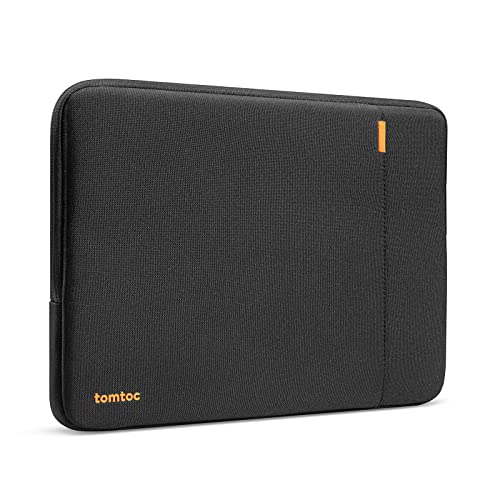
1. Best overall for 14-inch laptops with full 360 protection: tomtoc 360 Protective 14-inch Laptop Sleeve
Pros
- 360 protection described with CornerArmor Technology
- Extra front pocket and an additional strap are listed
- Title describes the sleeve as water-resistant
Cons
- Listing sizes it for 14-inch laptops
- The listing does not mention a stand
This 14-inch tomtoc sleeve uses CornerArmor Technology, which the listing says protects against falls, shocks and vibrations. The listing also cites spill-resistant recycled fabrics, YKK zippers and a soft interline lining. An extra front pocket holds a charger, cable or mouse, and the listing mentions an additional strap. The title describes it as water-resistant.
Best for: Readers who want 360 protection and a front pocket for a 14-inch laptop.
2. Best for slim 14-inch carry with a multi-pocket front: ProCase 14-inch Slim Laptop Sleeve

Pros
- Multi-compartment front pocket for accessories
- Shock-absorbing padding and plush lining are listed
- Slim profile described in the listing
Cons
- The listing asks buyers to confirm size before purchasing
- The listing does not state a weight
This ProCase sleeve for 14-inch laptops lists thick shock-absorbing padding and an ultra-soft plush lining. A multi-compartment front pocket is meant for chargers, power banks, USB cables, docking hubs and a mouse. The listing gives internal dimensions of 12.8 x 9.05 x 0.9 inches and asks buyers to confirm size before purchasing. It comes in Willow Green.
Best for: Readers with a 14-inch laptop who carry chargers, cables and small accessories every day.
3. Best for 14-inch with memory foam and an attached pocket: ampoock 14-inch Memory Foam Laptop Case

Pros
- Memory foam interior is listed
- Attached pocket holds small accessories
- Double-way zipper closure for easy access
Cons
- The listing does not mention water resistance or a stand
- Internal size is listed at 13.7 x 9.5 x 0.8 inches, so check it against your laptop
This 14-inch ampoock case is made of memory foam, which the listing describes as an inner layer beneath a fabric outer layer that guards against dust, dirt and scratches. An attached pocket is listed for mice, headphones, pens, phones, cables and storage cards. The listing describes a double-way zipper closure and a top-loading zipper. It names compatibility with MacBook Pro 14 and MacBook Air 13.
Best for: Readers with a 14-inch laptop who want memory foam padding and a pocket for small accessories.
4. Best for a stand-style flap on 13.3 to 14-inch laptops: HYZUO 13.3-14-inch Sleeve with Stand

Pros
- Flap folds into a stand, according to the listing
- Accessories pouch included
- Magnet closure described as not damaging the laptop
Cons
- Brown is the only color listed
- The listing does not mention water resistance
This HYZUO sleeve in brown has a flap that folds into a triangle to act as a laptop stand, which the listing says helps with typing and helps keep the laptop cool. An accessories pouch is included for a mouse, charger, cable or power bank. The listing describes an invisible magnet closure that will not damage the laptop. Internal dimensions are listed as 12.8 x 8.66 inches.
Best for: Readers with a 13.3 to 14-inch laptop who want a sleeve that folds into a stand.
Best for 13-inch laptops
These sleeves are listed for 13-inch and 13.3-inch laptops, with some also listing 14-inch or older models.
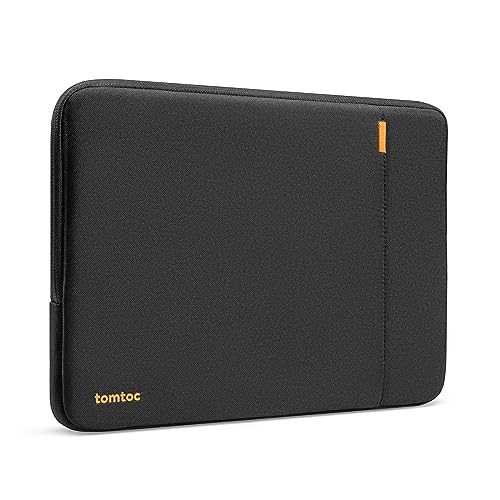
5. Best for 13-inch MacBook Air with 360 protection: tomtoc 360 Protective 13-inch Laptop Sleeve
Pros
- CornerArmor Technology described in the listing
- YKK zippers and soft lining are listed
- Front pocket and additional strap are included
Cons
- Listed for 13-inch models only
- The listing does not mention a stand
This 13-inch tomtoc sleeve shares the 360 protection concept of the 14-inch model, with CornerArmor Technology and spill-resistant recycled fabrics. YKK zippers and a soft interline lining are listed, along with an extra front pocket and an additional strap. It is listed for the 13-inch MacBook Air and Pro, and for ASUS Zenbook and Vivobook 13-inch models.
Best for: Readers with a 13-inch MacBook Air or Pro who want 360 protection and a front pocket.
6. Best for 13-inch with two zipper pockets and a pink finish: MasiBloom 13-inch Two-Pocket Laptop Sleeve

Pros
- Two zippered pockets are listed
- Velvet lining is described to help prevent scratches
- Light listed weight at 0.29 lb
Cons
- The listing does not mention water resistance or a stand
- Listed for 13-inch models, so a 14-inch laptop is outside the range
This bright pink MasiBloom sleeve is listed for 13-inch MacBook Neo and Air models, with a memory foam body that the listing describes as lightweight at 120 g. Two zippered pockets are listed: a large one for a laptop or tablet and a small one for a mouse, mouse pad, earphones or charger. A velvet lining and 6mm memory foam are listed for cushioning.
Best for: Readers with a 13-inch laptop who want two zipper pockets and a pink finish.
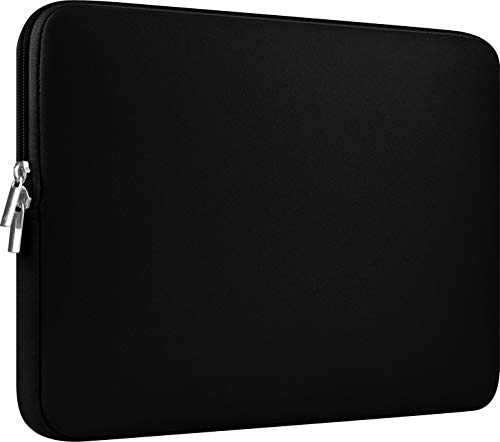
7. Best for a long list of 13 to 14-inch models: CCPK 13-inch Padded Laptop Sleeve
Pros
- Long compatibility list in the listing
- Slim padded design described
- Light listed weight at 0.15 lb
Cons
- The listing does not mention a stand
- Broad compatibility list, so confirm your exact model before ordering
This black CCPK sleeve is listed for 13-inch to 14-inch laptops and has a padded shape the listing describes as slim and modern. Internal dimensions are listed as 12.99 x 8.86 x 0.59 inches. The compatibility list is long, covering older MacBook Air and Pro 13 models, newer MacBook Air 13.6 and Pro 14 models, and several 14-inch ASUS, Acer and Chromebook laptops.
Best for: Readers with a 13-inch or 14-inch laptop who want to check a long listed compatibility list.
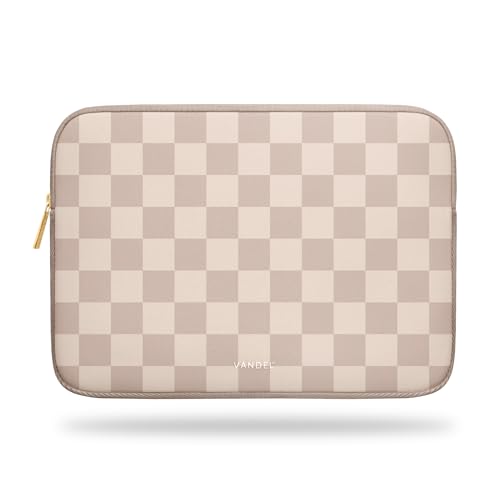
8. Best for a patterned, padded 13-inch sleeve: Vandel Slim 13-inch Patterned Laptop Sleeve
Pros
- Neutral Checker pattern described in the listing
- Padded shell listed to guard against bumps and spills
- Slim profile described
Cons
- The listing does not mention a front pocket
- The listing does not mention a stand or water resistance
This slim Vandel sleeve is listed for 13-inch to 13.3-inch laptops, with internal dimensions of 12.8 x 8.9 x 0.9 inches. It is a padded neoprene shell that the listing says guards against bumps and spills. The listing describes a Neutral Checker pattern in clean, modern colors and says it can be used as a sleeve or a pouch that slides into a bag.
Best for: Readers with a 13-inch laptop who want a patterned, padded sleeve.
9. Best for a plain black 13.3-inch neoprene sleeve: AREYLO 13.3-inch Neoprene Laptop Sleeve

Pros
- Neoprene build described as slim and lightweight
- Front external pocket for extra storage
- Light listed weight at 0.29 lb
Cons
- The listing does not mention a stand
- The listing does not mention water resistance
This black AREYLO sleeve is listed as a 13.3-inch size, with external dimensions of 14 x 10 x 0.8 inches. It has a front external pocket and a top-loading zipper. The listing says its neoprene offers an ultra slim, lightweight design with protection against dust, bumps, scratches, scuffs and spills. Compatibility includes MacBook Pro 14 inch 2021 and 2022, MacBook Air 13 inch and Dell Latitude 14.
Best for: Readers with a 13.3-inch laptop who want a plain black neoprene sleeve with a front pocket.
Best for 15.6-inch and 16-inch laptops
These sleeves are listed for larger laptops in the 15.6-inch and 16-inch range.
10. Best for 15.6-inch neoprene sleeves: AREYLO 15.6-inch Neoprene Laptop Sleeve
Pros
- Neoprene build described as slim and lightweight
- External first pocket for extra storage
- Listed weight is light at 0.37 lb
Cons
- Listed for 15 to 16 inch models, so a 14-inch laptop is outside the range
- The listing does not mention water resistance
This 15.6-inch AREYLO sleeve is made of neoprene, which the listing describes as slim and lightweight with protection against dust, bumps, scratches and spills. It has a first external pocket for extra storage and a top-loading zipper. External dimensions are listed as 15.5 x 11 x 0.8 inches. The compatibility list includes several 15.6-inch ASUS, Acer and HP models.
Best for: Readers with a 15.6-inch laptop who want a slim neoprene sleeve with an outside pocket.
11. Best for 16-inch laptops with a handle and double zippers: Ytonet 16-inch TSA-Friendly Laptop Sleeve

Pros
- Portable handle and double zippers are listed
- TSA-friendly design described in the listing
- Mesh storage pocket for accessories
Cons
- Heaviest listed weight in this roundup at 0.68 lb
- The listing does not mention a stand
This 16-inch Ytonet sleeve lists a TSA-friendly design, a portable handle and top-opening double zippers that open wide. The laptop compartment is listed at 14.6 x 10.6 x 1.6 inches, with a separate mesh pocket for storage. The title describes it as water resistant. The compatibility list names several 16-inch models, including MacBook Pro 16 and HP OmniBook 5 16 inch.
Best for: Readers with a 16-inch laptop who want a handle and double zippers for travel.
12. Best for 15.6-inch with a fleece-lined interior: Hsmienk 15.6-inch Fleece-Lined Laptop Sleeve

Pros
- Fleece lining and foam padding are listed
- External pocket for charger and small items
- Works as a briefcase or bag insert, per the listing
Cons
- Sized for 15.6-inch laptops; the listing does not mention 13-inch or 14-inch models
- The listing does not mention water resistance
This 15.6-inch Hsmienk sleeve has a polyester foam padding layer and a fleece lining, which the listing says helps protect against dust, dirt, debris and scratches. It includes a first external pocket for items such as a charger. External dimensions are listed as 15.7 x 11.2 x 1 inches. The listing describes it as slim and portable, able to be carried as a briefcase or slid into a backpack or messenger bag.
Best for: Readers with a 15.6-inch laptop who want a fleece-lined sleeve with an external pocket.
How to choose the best laptop sleeves for your device
Start with your laptop’s exact model rather than the screen size alone. Sleeves are often labeled by diagonal size, but listed internal dimensions and model compatibility lists are more reliable. Several listings in this roundup ask you to confirm size before buying, and that step is worth taking.
Next, look at the protection features the listing actually states. Words such as padded, memory foam, neoprene or fleece lining describe different materials. A listing that describes water resistance makes a different claim from one that does not mention water at all. Read the wording carefully and do not assume protection that the listing does not describe.
Closures and pockets matter for daily use. Zippers, double-way zippers and magnetic closures each change how easily you reach your laptop. A front pocket or an attached accessory pocket can keep chargers and cables together, while a flap that folds into a stand is useful if you type with the sleeve in front of you.
Weight and carry style are worth comparing when a sleeve will ride in a bag all day. Where a listing states a weight, compare it with your bag’s load. Where it does not, check the listed dimensions instead.
Heat and ventilation deserve attention when a sleeve is used around a running laptop. Follow your laptop manufacturer’s manual for guidance on heat, charging and airflow, and do not cover vents in any way the manual warns against.
For travel, our home office, travel and smart home starter guide shows how sleeves fit alongside other gear. The By Use Case hub groups accessories by how you work and travel.
What to look for
- Confirm your exact laptop model against the listed compatibility list.
- Compare internal dimensions with your laptop’s size, not the diagonal alone.
- Note which protection features the listing actually states.
- Check the pocket, zipper and closure type against how you carry your gear.
- Look at the listed weight if the sleeve will ride in a bag every day.
FAQ
Are the best laptop sleeves the same as laptop cases?
In this roundup, a sleeve is a padded pouch that holds the laptop behind a zipper or other closure. Some of the best laptop sleeves we compared add a pocket or a stand, and each listing describes what it adds, so check the features list before buying.
How do I know a sleeve fits my laptop?
Compare the listed internal dimensions with your laptop’s size and check the compatibility list for your exact model. Several listings ask you to confirm size first, so do that before ordering.
Does a water-resistant sleeve make my laptop waterproof?
No. Some listings describe water resistance, but that is not the same as waterproof protection. For guidance on liquids and heat around your laptop, follow the manufacturer’s manual.
References
- Amazon product listings and manufacturer specifications (accessed November 2026)