By Lauren Holland
Updated November 2026
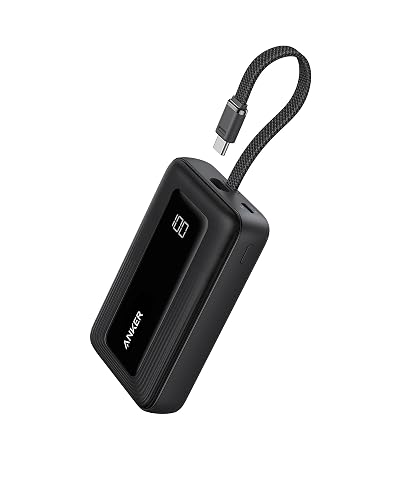
An Anker MagSafe power bank snaps onto the back of a compatible iPhone and tops up the battery without a cable. This guide explains how to attach it correctly, how to get the most out of wireless charging, and what to check when the charge seems slow or the magnet won’t hold. The goal is simple: a stable connection, a charge you can trust, and fewer surprises when you’re away from an outlet.
Check Your Phone and Case First
MagSafe depends on a ring of magnets in the phone, so compatibility comes first. iPhone 12 and later models include built-in MagSafe, and most iPhone 8 through iPhone 11 models work with the magnetic ring added to a case. Thick cases, metal plates, and wallet cases with credit card slots can weaken the magnetic pull or block the coil alignment. If the power bank slides off when you tilt the phone, the case is the likely cause.
Shopping for one? See our guide: 6 Best Anker Zolo Power Banks for Travel and Everyday Use (2026).
Attach and Start Charging
Line up the power bank with the center of the phone’s back. Once the magnets catch, you should feel a firm hold and see a charging indicator on the iPhone screen. Many power banks also have a small light that changes color or pulses while the wireless link is active. If nothing happens, remove the bank, wipe both surfaces with a dry cloth, and try again.
Confirm the Power Bank Is Charged
Before you rely on the bank, press its button to check the battery level. Most Anker models show this as a row of small LEDs. A full bank will feed your phone more energy than one at half charge, so top it up through its USB-C port before a trip.
Get Better Charging Speed
Wireless charging loses some energy as heat, so speed depends on conditions. Keep the phone out of direct sun and off soft surfaces like a bed or couch cushion, which trap heat. Avoid using heavy apps or video recording while charging. If your phone supports it, the iPhone’s standby or optimized charging features can also slow the final stretch to protect battery health.
| Factor | What to do |
|---|---|
| Case thickness | Use a MagSafe-compatible case under about 3 mm for best alignment |
| Heat | Remove a rugged case if the phone feels hot to the touch |
| Bank charge level | Keep it above 20 percent before relying on it |
| Accessories | Remove wallets, rings and metal stickers from between the two devices |
Troubleshoot Common Problems
If the bank won’t stay attached, check the case and the magnets first. If the phone isn’t charging, confirm that the bank has power and that MagSafe charging is enabled in the phone’s settings. If the bank gets warm during charging, that is normal to a degree, but it should not become uncomfortable. Stop using it and let it cool if it becomes hot, swells, or emits a smell. Those are signs of a possible battery fault, and you should contact Anker support or a qualified technician rather than continuing to use the device.
Test Before You Travel
Run one full charge at home before a long trip. This confirms the magnet holds in your case, the indicator behaves as expected, and you know roughly how much charge the bank delivers. For the full range of models and their specs, see Anker Nano MagSafe Power Bank: Setup, Charging Tips and Troubleshooting and Anker MagGo Power Bank: Which Model Fits and How to Use It (2026).
Recommended gear
- A slim MagSafe-compatible case: Keeps the magnetic alignment consistent without adding bulk. View on Amazon
- A small USB-C cable: Lets you recharge the bank from a laptop or wall adapter. View on Amazon
- A microfiber cleaning cloth: Removes dust and oils that weaken the magnetic hold. View on Amazon
Common Mistakes
- Using a thick wallet case that blocks the magnets.
- Leaving the bank in a hot car or direct sunlight while charging.
- Assuming a full-looking phone battery means the bank is full.
- Ignoring a bank that has become hot, swollen or unusually noisy.
- Placing a metal card or sticker between the phone and the bank.
FAQ
Does an Anker MagSafe power bank work with Android phones?
Most Anker MagSafe banks are designed for iPhones with MagSafe. Some Android phones support Qi wireless charging, but the magnetic alignment may differ, so check the manufacturer’s compatibility list before buying.
Why does my power bank keep falling off?
The most common causes are a thick or metal-containing case, dust on either surface, or a phone that is not MagSafe-compatible. Clean both surfaces and remove any accessories between them.
Can I charge the power bank and my phone at the same time?
Some models allow pass-through charging through the USB-C port, but this varies by model. Check the product manual, since pass-through use can heat the bank more than charging a phone alone.
Conclusion
A stable magnetic connection, a case that doesn’t block the coil, and a bank charged before you leave will cover most problems. Test the setup at home, keep the phone cool while charging, and act quickly if the bank gets hot or swells. With those habits, an Anker MagSafe power bank becomes a reliable way to keep your phone running all day.
Related reading
- Anker Zolo Power Bank 20 000mah: 6 Best Picks for Travel and Everyday Use (2026)
- Anker Power Bank 20K 87W: Specs, Uses and Charging Tips
Ready to choose one?
About Lauren Holland
Lauren Holland is part of our editorial team and reviews and edits our consumer tech how-to & troubleshooting guides, checking product details against manufacturer specifications and owner feedback.