By Owen Palmer
Updated November 2026
Shopping for a dell laptop battery adapter usually comes down to three things: whether the wattage matches what your laptop needs, whether the barrel or USB-C connector physically fits, and whether the cable length suits how you work. This guide compares seven Dell-compatible AC adapters on those criteria, drawing on manufacturer specifications, brand reputation, and the patterns owners commonly report about fit, heat, and durability. We did not test these units ourselves, so check the wattage and connector against your own charger label before you buy.
Our top picks at a glance
- 1
 TOP CHOICEBest overallDell Laptop Charger 65W USB Type C AC Power AdapterView on Amazon
- 2
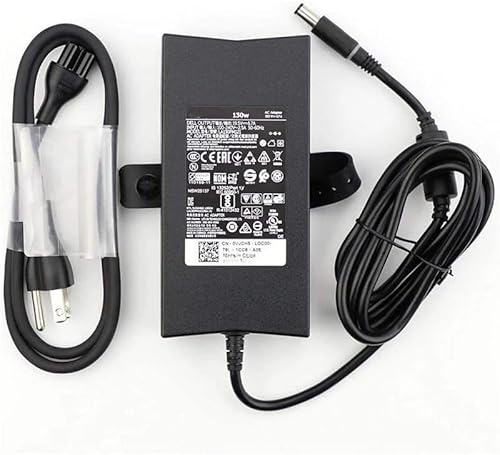 TOP CHOICEBest for high-performance workstationsDell Rugged Laptop PC 130W AC/DC AdapterView on Amazon
- 3
 TOP CHOICEBest for Latitude business laptopsDell 65W 4.5mm Tip Laptop ChargerView on Amazon
- 4
 Best for Inspiron modelsDell Inspiron Laptop Charger 65W 4.5mmView on Amazon
- 5
 Best for 90W-class laptopsDell 90W AC Power Adapter 4.5mmView on Amazon
- 6
 Best budget pickDell 45W Replacement AC AdapterView on Amazon
- 7
 Best for older Latitude and Precision unitsBIG TIP 65W AC Adapter for Dell LA65NS2-01View on Amazon
Our Top Picks
| Product | Best for | Key feature |
|---|---|---|
| Dell Laptop Charger 65W USB Type C AC Power Adapter | Modern Latitude 2-in-1 and business laptops | USB Type C output with power cord included |
| Dell Rugged Laptop PC 130W AC/DC Adapter | High-draw Vostro and Latitude workstations | 130W output for demanding configurations |
| Dell 65W 4.5mm Tip Laptop Charger | Latitude 3000 and 3500 series owners | Standard 4.5mm barrel tip for many Dell models |
| Dell Inspiron Laptop Charger 65W 4.5mm | Inspiron 13, 14, and 15 owners | Listed compatibility across many Inspiron series |
| Dell 90W AC Power Adapter 4.5mm | Mid-to-high power Dell laptops | 90W output with a 1 m cable |
| Dell 45W Replacement AC Adapter | Light-use and budget replacements | Lower wattage for compact systems |
| BIG TIP 65W AC Adapter for Dell LA65NS2-01 | Older Latitude, Precision, and E-series laptops | Wide list of compatible legacy models |
Dell Laptop Charger 65W USB Type C AC Power Adapter
Dell Laptop Charger 65W Watt USB Type C AC Power Adapter Include Power Cord for Dell Latitude 3340 3440 3540 5340 5440 5540 7340 7440 7640 9440 2in1
Best for: Modern Latitude 2-in-1 and business laptops that charge over USB-C.
This adapter suits owners of newer Latitude models who want a USB-C connection and a power cord in the box. Owners generally find it a straightforward swap when the original charger is lost or fails.
Key specs
- 65W output
- USB Type C connector
- Power cord included
Pros
- Clean USB-C connection for compatible models
- Power cord included, so no separate cable purchase
- Covers a broad list of Latitude 2-in-1 and business models
Cons
- Only useful if your laptop has a USB-C charging port
- Listing compatibility should be checked against your exact model number
Bottom line: Best choice for Latitude owners with a USB-C charging port who want a direct replacement.
Dell Rugged Laptop PC 130W AC/DC Adapter
Dell Rugged Laptop PC Genuine 19.5V 6.7A 130watt AC/DC Adapter 130 Watt Power Supply Cord Battery Charger Cable PSU OEM 130W for Dell Vostro 3750 Latitude 5501 5591 5401 5491 E6540 5424 5420
Best for: High-performance workstations and high-draw Vostro and Latitude configurations.
This unit targets laptops that draw more power under load, such as those with discrete graphics or high-core processors. A 130W output gives headroom that lower-wattage adapters cannot.
Key specs
- 130W output
- 19.5V, 6.7A rating as listed
Pros
- High wattage for demanding workloads
- Rated for Vostro and Latitude models that need more power
- Suitable as a replacement for original high-wattage bricks
Cons
- Larger and heavier than standard 65W bricks
- Overkill for light-use laptops that only need 45W or 65W
Bottom line: Pick this if your original charger is rated 130W and you rely on sustained high performance.
Dell 65W 4.5mm Tip Laptop Charger
Dell 65W 4.5mm tip Laptop Charger,Latitude 3320 3330 3340 3420 3430 3435 3440 3450 3520 3530 3535 3540 AC Adapter, Black, DA65NM191
Best for: Latitude 3000 and 3500 series owners who need a 4.5mm barrel replacement.
The 4.5mm barrel is common across many Dell business laptops. If your current charger uses that connector and outputs 65W, this model is designed to match.
Key specs
- 65W output
- 4.5mm barrel tip
Pros
- Matches the common 4.5mm connector on many Latitude models
- Covers a long list of 3000 and 3500 series numbers
- Black finish suits office environments
Cons
- Cable length is fixed, so check reach before buying
- Compatibility depends on matching the exact model number
Bottom line: A strong pick for Latitude 3000 and 3500 owners with a 4.5mm barrel charger.
Dell Inspiron Laptop Charger 65W 4.5mm
Dell Inspiron Laptop Charger Genuine 65W watt 4.5mm tip AC Power Adapter for Inspiron 13 14 15 3000 5000 7000 Series 5558 5755 3147 7348-2in1 5555 5559 0G6j41 0MGJN with Power Cord
Best for: Inspiron 13, 14, and 15 owners who need a direct replacement.
Inspiron laptops are some of the most common Dell models, and many share the 65W, 4.5mm configuration. This listing covers a wide range of Inspiron series numbers.
Key specs
- 65W output
- 4.5mm tip
- Power cord included
Pros
- Broad Inspiron compatibility list
- Power cord included
- Simple plug-and-play replacement for matching models
Cons
- Inspiron models vary in wattage, so verify your label first
- Not suited to USB-C-only laptops
Bottom line: Best for Inspiron owners whose original charger is a 65W, 4.5mm unit.
Dell 90W AC Power Adapter 4.5mm
Dell 90W AC Power Adapter, 4.5mm Connector, with 1m Cable, for Laptops
Best for: Mid-to-high power Dell laptops that call for a 90W adapter.
Some Dell laptops, particularly those with larger batteries or mid-range graphics, specify 90W. This adapter covers that middle ground between 65W and 130W units.
Key specs
- 90W output
- 4.5mm connector
- 1 m cable
Pros
- Fills the 90W gap between common 65W and 130W bricks
- 1 m cable offers reasonable reach
- Standard 4.5mm connector
Cons
- Not interchangeable with 65W units on laptops that do not support 90W
- Requires confirming the original wattage before purchase
Bottom line: Choose this if your original adapter is labeled 90W with a 4.5mm tip.
Dell 45W Replacement AC Adapter
Dell 45W Replacement AC Adapter for Dell
Best for: Light-use and compact Dell laptops, and budget replacements.
Lower-wattage laptops often run on 45W chargers. This adapter is a practical option for owners whose original unit is 45W and who want a dependable spare.
Key specs
- 45W output
Pros
- Lower wattage suits compact, light-use laptops
- Budget-friendly for a spare charger
- Smaller and lighter than higher-wattage bricks
Cons
- Too little output for high-performance models
- Compatibility is narrower than newer universal-style listings
Bottom line: A sensible choice when your original charger is 45W and you want a spare for travel or a second location.
BIG TIP 65W AC Adapter for Dell LA65NS2-01
for Latitude 14 7414 5290 5490 7280 7480 7450 7290 E5470 E6420 E6430 Power Supply Cord 7.4mm BIG TIP 65W AC Adapter For Dell LA65NS2-01 Laptop PC Battery Charger
Best for: Older Latitude, Precision, and E-series laptops that use the LA65NS2-01 style charger.
Legacy Dell business laptops often share the LA65NS2-01 model family. This listing targets that group and includes a 7.4mm connector.
Key specs
- 65W output
- 7.4mm connector
- LA65NS2-01 model reference
Pros
- Covers many older Latitude and Precision models
- Clear model reference for matching
- Useful for legacy fleets that need replacements
Cons
- Third-party listing, so confirm build quality and certifications
- Connector type differs from newer 4.5mm Dell models
Bottom line: Best for owners of older Latitude or Precision laptops with a 7.4mm, LA65NS2-01-compatible charger.
Buying Guide
Wattage
Wattage is the most important specification. Look at the rating printed on your original adapter, such as 45W, 65W, 90W, or 130W. A charger with a higher wattage is generally safe, since the laptop draws only what it needs, but a lower-wattage unit may charge slowly or fail to power the system under load.
Good picks for this: Dell 65W 4.5mm Tip Laptop Charger, Dell Rugged Laptop PC 130W AC/DC Adapter
Connector type and tip size
Dell uses several connector styles, including the 4.5mm barrel, the 7.4mm barrel, and USB-C. Check the physical plug on your current cable before ordering. A mismatched tip will not fit or will fall out during use.
Good picks for this: Dell Laptop Charger 65W USB Type C AC Power Adapter, BIG TIP 65W AC Adapter for Dell LA65NS2-01
Model number compatibility
Dell often groups several laptop series under one charger. Find your exact model number on the bottom of the laptop or in the original charger label, then compare it to the compatibility list in the listing. Matching only the series name is not enough.
Good picks for this: Dell Inspiron Laptop Charger 65W 4.5mm, Dell 65W 4.5mm Tip Laptop Charger
Cable length and reach
Cable length affects where you can sit while charging. A 1 m cable works well at a desk, while a shorter cord may be awkward on a couch or in a conference room. Consider where the outlet sits relative to your workspace before buying.
Good picks for this: Dell 90W AC Power Adapter 4.5mm, Dell 45W Replacement AC Adapter
Physical size and weight
High-wattage bricks are larger and heavier. If you carry your laptop daily, a compact 45W or 65W adapter may be more comfortable than a 130W unit. Balance the power needs of your laptop against how much you want to carry.
Good picks for this: Dell 45W Replacement AC Adapter, Dell Laptop Charger 65W USB Type C AC Power Adapter
Build quality and certifications
Look for listings that state safety certifications and output ratings clearly. Third-party adapters vary in quality, so favor units with explicit voltage, amperage, and wattage printed on the housing. Avoid any charger that gets unusually hot or emits a burning smell during use.
Good picks for this: Dell Rugged Laptop PC 130W AC/DC Adapter, Dell 90W AC Power Adapter 4.5mm
Care and replacement
Protect the cable at the connector end, where most failures begin. Coil the cord loosely and avoid tight bends. If the adapter becomes warm during normal charging or the indicator light flickers, stop using it and replace it.
Good picks for this: Dell Inspiron Laptop Charger 65W 4.5mm, BIG TIP 65W AC Adapter for Dell LA65NS2-01
FAQ
Can I use a higher-wattage dell laptop battery adapter on my laptop?
Generally yes. Laptops draw only the power they need, so a higher-wattage adapter is usually safe as long as the voltage and connector match. Always confirm the voltage and tip size first.
What happens if I use a lower-wattage adapter?
The laptop may charge slowly or fail to power demanding tasks. It can also drain the battery faster than the charger replenishes it. Use the wattage printed on your original charger as the minimum.
How do I find the right connector for my Dell laptop?
Compare the physical plug on your current cable. Common types are the 4.5mm barrel, the 7.4mm barrel, and USB-C. Matching the tip size is necessary for a secure fit.
Is a third-party Dell adapter safe to use?
It can be, provided the listing clearly states voltage, amperage, wattage, and safety certifications. Avoid adapters that run hot or lack clear labeling.
Why does my laptop say it is not charging even with a new adapter?
Check that the connector is fully seated, the outlet works, and the adapter wattage meets the laptop requirement. Cable damage or a worn charging port can also cause this. For battery-related concerns, consult a qualified repair technician.
Does the cable length matter for everyday use?
Yes. A longer cable gives more freedom in where you work, while a short cable can strain the connector if you move the laptop often.
Should I buy a spare adapter for travel?
A spare is useful if you travel or work in more than one location. Choose a compact model that matches your laptop wattage and connector.
Conclusion
For most Dell owners, the best dell laptop battery adapter is the one that matches your original wattage, connector, and model number. The Dell Laptop Charger 65W USB Type C AC Power Adapter suits modern USB-C Latitude systems, while the Dell 65W 4.5mm Tip Laptop Charger fits many business models with a barrel plug. The Dell Rugged Laptop PC 130W AC/DC Adapter serves high-draw workstations, and the Dell 45W Replacement AC Adapter is a practical budget choice for light-use laptops. Confirm your model number and connector before ordering, and consult a professional if you notice overheating or repeated failures.
For related troubleshooting, see Dell Laptop Power Switch: How to Find, Test and Fix It (Step-by-Step) if your laptop does not respond to the charger at all, and Lithium-Ion Battery Charging Explained: Cycles, Heat and Optimized Charging for guidance on how charging habits affect battery life. If you need a docking setup alongside your charger, What Is a Laptop Docking Station? A Complete Guide explains the options.
Sources
- Guidance on battery and charger energy efficiency and safe use (energy.gov)
- Consumer safety recalls and warnings for electrical chargers and adapters (cpsc.gov)
- Safety certification standards for power adapters and electrical products (ul.com)
About Owen Palmer
Owen Palmer is part of our editorial team and reviews and edits our consumer tech how-to & troubleshooting guides, checking product details against manufacturer specifications and owner feedback.