Quick answer
Our overall pick for the best desktop speakers is the Creative Pebble V3 for its simple USB-C setup and clear dialog audio processing. The Edifier M60 is a strong choice for users who prioritize high-resolution audio and more powerful output from a compact design.
Choosing the best desktop speakers can enhance your work-from-home setup, gaming, or media streaming. We looked at manufacturer specifications to find options that balance sound quality, connectivity, and a compact footprint suitable for a desk.
Our selections are based on comparing listed features and specs from Amazon product listings. We focused on audio output, connection methods, and design to help you find the right fit for your space.
Quick picks
- Simple USB-C Setup: Creative Pebble V3 (see on Amazon)
- High-Resolution Audio: Edifier M60 (see on Amazon)
Best Desktop Speakers compared
| # | Product | Best for | Connectivity | Total RMS Power | Driver Size |
|---|---|---|---|---|---|
| 1 | Creative Pebble V3 | Best overall desktop speakers | USB-C, Bluetooth 5.0, 3.5 mm | 8W RMS | 2.25″ full-range |
| 2 | Edifier M60 | Best for high-resolution audio | USB-C, AUX, Bluetooth 5.3 | 66W RMS | 3″ mid-bass, 1″ tweeter |
How we chose
We compared manufacturer listings and specifications on Amazon as of October 2026. We did not conduct hands-on testing. Our criteria included audio power and processing, available connectivity options like USB-C and Bluetooth, and the physical design and dimensions of the speakers.
Best Desktop Speakers: our picks in detail
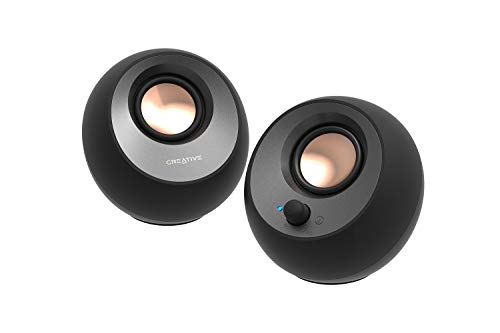
1. Best overall desktop speakers: Creative Pebble V3
Pros
- Simple USB-C plug-and-play connectivity reduces cable clutter.
- Includes Clear Dialog audio processing for clearer spoken words.
- Compact, minimalist design with elevated drivers.
- Also connects via Bluetooth 5.0 and a 3.5 mm input.
Cons
- The listing does not mention support for high-resolution audio codecs.
- Amplified audio mode requires a specific 10W USB port.
The Creative Pebble V3 are 2.0 USB-C desktop speakers designed for a simple, plug-and-play setup. They feature custom-tuned 2.25-inch full-range drivers and are listed as being 50% louder than previous models, with a built-in gain switch for amplified audio when connected to a 10W USB-C or USB-A port. They include Clear Dialog audio processing aimed at making spoken words more intelligible.
Connectivity is centered on a single USB-C cable for both audio and power, helping to reduce desk clutter. They also support Bluetooth 5.0 for wireless streaming and have a 3.5 mm audio input. The design features 45-degree elevated drivers and a longer cable between the right and left speaker for flexible placement.
Best for: Users who want a straightforward, compact speaker system with clear dialog enhancement and minimal cabling.
2. Best for high-resolution audio: Edifier M60

Pros
- Hi-Res Audio certified with powerful 66W RMS output.
- Bluetooth 5.3 supports LDAC codec for high-resolution wireless audio.
- Compact design with a user-friendly touch control panel.
- Features both USB-C and AUX wired input options.
Cons
- The listing does not mention any specific audio processing for dialog clarity.
- At nearly 10 pounds, it is heavier than many compact speakers.
The Edifier M60 is a compact multimedia speaker system with a total output power of 66W RMS. It uses a two-way design with a 1-inch silk dome tweeter and a 3-inch aluminum diaphragm mid-bass driver per speaker, powered by a Class-D amplifier. It is Hi-Res Audio certified for both wired and wireless transmission.
It offers multiple connectivity options, including Bluetooth 5.3 with support for the LDAC codec for high-resolution streaming from compatible Android devices. Wired connections include USB-C and AUX inputs. Control is via a cap-sensitive touch panel with an automatic backlight, and extended functions are available through a dedicated mobile app.
Best for: Listeners who want powerful, high-resolution audio from a very compact desktop speaker system.
How to choose desktop speakers
When looking for the best desktop speakers, your decision will hinge on how you use your computer and the space you have available. The right choice balances audio quality, connectivity, and physical size.
First, consider the audio power and driver design. Some speakers use a single full-range driver for simplicity, while others, known as two-way speakers, separate the audio signal between a tweeter for high frequencies and a woofer for mids and lows. This can provide clearer, more detailed sound. Power, often listed as RMS (Root Mean Square), gives an idea of potential volume and dynamic range, but more watts don’t always mean better sound in a small room.
Next, look at connectivity. Modern computers often have USB-C ports, making USB-C speakers a neat, single-cable solution for audio and power. Bluetooth is essential for wireless streaming from phones or tablets. For the highest quality wireless audio, check if the speaker supports advanced codecs like LDAC. Don’t forget a standard 3.5 mm AUX input for connecting older devices.
What to look for
- Audio Setup: Decide between simple full-range drivers or a more detailed two-way system with separate tweeters and woofers.
- Connection Methods: Prioritize the inputs you’ll use most, like USB-C for modern laptops or Bluetooth for wireless flexibility.
- Size and Design: Measure your desk space. A compact, minimalist design can fit almost anywhere, while angled drivers can help direct sound toward your ears.
- Extra Features: Some speakers offer special audio processing for clearer dialog, touch controls, or companion apps for further customization.
Finally, think about the physical footprint. Desktop space is precious. A speaker’s width, height, and depth determine how much room it will take up. Some models have a very small profile, similar to a large smartphone. For more background on audio gear, see our broader Audio Gadgets Guide.
FAQ
What does RMS power mean for speakers?
RMS (Root Mean Square) power is a measure of a speaker’s continuous power handling or output capability. It’s generally a more reliable indicator of a speaker’s potential volume and performance than peak power ratings. A higher RMS wattage can often mean the speaker can play louder with less distortion, but the overall sound quality depends on the driver design and audio processing.
Is USB-C better than a 3.5 mm connection for speakers?
USB-C can be more convenient, as a single cable often handles both audio transmission and power, reducing clutter. The audio quality over USB-C is digital, which can be less susceptible to interference than an analog 3.5 mm connection. However, a 3.5 mm AUX input remains a valuable universal port for connecting a wide variety of older audio sources, like PCs, gaming consoles, or MP3 players. For more on audio connections, read our guide on Microphones, Audio Adapters and Cables.
What is Hi-Res Audio certification?
Hi-Res Audio is a certification that indicates a device can reproduce audio that exceeds the quality of standard CD audio (which is 16-bit/44.1kHz). Speakers with this certification are designed to handle high-resolution audio files, which contain more data and can potentially deliver greater detail, clarity, and a wider soundstage, provided you are playing a high-resolution source file.
What is the LDAC codec in Bluetooth?
LDAC is an audio coding technology developed by Sony that allows for the transmission of high-resolution audio over a Bluetooth connection. It supports a much higher data transfer rate (up to 990 kbps) than standard Bluetooth codecs like SBC, which can result in better sound quality when streaming from compatible sources, such as Android devices running version 8.0 or later.
References
- Amazon product listings and manufacturer specifications (accessed October 2026)
- Bluetooth Technology Website