

As an Amazon Associate I earn from qualifying purchases. This page may contain affiliate links.
Shopping for an xbox series s portable monitor usually comes down to a few practical questions: how big a screen you need, whether 1080p is enough or 4K matters, whether the display has two HDMI inputs so you can keep a second device plugged in, and whether it supports FreeSync for smoother frame pacing. Portable panels also differ in how they draw power, so you need to know whether the Xbox Series S can run them from its own USB port or whether a separate adapter is required. The picks below are ranked by how well they fit those criteria, based on manufacturer specifications, brand track record and common owner feedback rather than any testing on our end.
Our Top Picks
Quick Comparison
| Product | Best for | Key feature |
|---|---|---|
| G-STORY 12.5″ 1080P Portable Gaming Monitor for Xbox Series S, FreeSync | Compact carry-on setups | Small footprint with FreeSync |
| G-STORY 15.6″ Portable Monitor for Xbox Series S 4K Portable Gaming Monitor | Larger screen and 4K detail | 4K IPS panel with two HDMI inputs |
| G-STORY 14″ 1080P Portable Gaming Monitor for Xbox Series S, 2 HDMI FreeSync | Balanced size and sharpness | Dual HDMI with FreeSync |
| ARZOPA 1080P FHD Kickstand Portable Monitor 16.1” 144Hz | Fast-motion gaming | 144Hz refresh rate |
| G-STORY 14″ Portable Monitor for Xbox Series X 4K Portable Gaming Monitor | Users who want 4K on a 14-inch panel | 4K resolution with HDR |
G-STORY 12.5″ 1080P Portable Gaming Monitor for Xbox Series S, FreeSync

G-STORY 12.5" 1080P Portable Gaming Monitor for Xbox Series S, FreeSync
This is the most compact option in the group, aimed at people who want a screen that slips into a backpack alongside the console. It suits dorm rooms, hotel stays and short trips where desk space is limited.
Key specs
- 12.5-inch diagonal display
- 1080p (Full HD) resolution
- FreeSync support
Pros
- Very light and easy to pack
- FreeSync helps reduce screen tearing during gameplay
- Full HD is sharp at this size
Cons
- Smaller screen can feel cramped for split-screen play
- Limited room for detailed text or menus at a distance
G-STORY 15.6″ Portable Monitor for Xbox Series S 4K Portable Gaming Monitor

G-STORY 15.6" Portable Monitor for Xbox Series S 4K Portable Gaming Monitor IPS Screen for Xbox Series S(not Included) with Two HDMI, HDR, Freesync Game Mode Travel Monitor
This model is for players who want a bigger picture and sharper detail from the Series S. Owners who use it as a secondary display for work as well as gaming tend to value the extra room.
Key specs
- 15.6-inch diagonal IPS panel
- 4K resolution
- Two HDMI inputs, HDR and FreeSync support
Pros
- Large, detailed image for its class
- Two HDMI inputs let you switch between sources
- IPS panel offers wide viewing angles
Cons
- Heavier and bulkier than the 12.5-inch and 14-inch models
- 4K output requires the console to be set to a matching resolution to look its best
G-STORY 14″ 1080P Portable Gaming Monitor for Xbox Series S, 2 HDMI FreeSync

G-STORY 14" 1080P Portable Gaming Monitor for Xbox Series S, 2 HDMI FreeSync
This is the middle ground: a 14-inch screen that is easier to carry than the 15.6-inch model but roomier than the smallest option. It fits well for people who split time between a desk and travel.
Key specs
- 14-inch diagonal display
- 1080p (Full HD) resolution
- Two HDMI inputs and FreeSync support
Pros
- Good balance of size and portability
- Dual HDMI makes it easy to add a second device
- Full HD keeps text and HUD elements readable
Cons
- At 1080p, it will not match the detail of 4K panels at this size
- Built-in speakers, if any, are typically basic
ARZOPA 1080P FHD Kickstand Portable Monitor with HDR, Ultra Slim, Eye Care 16.1” 144Hz

ARZOPA1080P FHD Kickstand Portable Monitor with HDR, Ultra Slim, Eye Care, External Second Screen for Laptop, PC, PS5, Mac, Xbox 16.1'' 144Hz Portable Gaming Monitor 106% sRGB – Z1FC
This display is aimed at players who care more about motion smoothness than maximum resolution. The 144Hz refresh rate is the main draw for fast shooters and racing games, and the kickstand makes it usable without an extra stand.
Key specs
- 16.1-inch diagonal display
- 1080p (FHD) resolution
- 144Hz refresh rate
- Built-in kickstand and ultra-slim body
Pros
- 144Hz is noticeably smoother than standard 60Hz for fast motion
- Kickstand allows flexible desk or tabletop placement
- Large 16.1-inch screen for its class
Cons
- Xbox Series S outputs at up to 120Hz, so the 144Hz headroom is not fully used with this console
- Thin body means fewer rigid mounting options on the go
G-STORY 14″ Portable Monitor for Xbox Series X 4K Portable Gaming Monitor
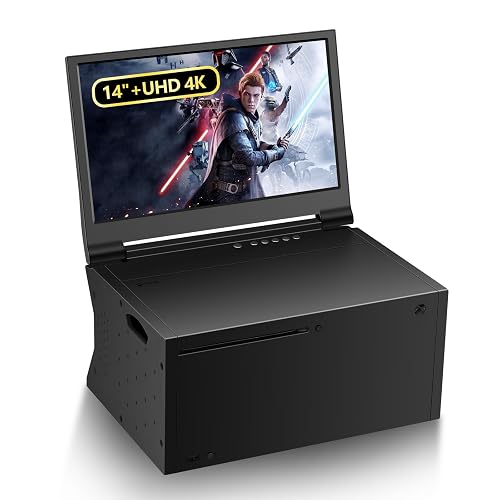
G-STORY 14‘’ Portable Monitor for Xbox Series X 4K Portable Gaming Monitor IPS Screen for Xbox Series X(not Included) with Two HDMI, HDR, Freesync Game Mode Travel (14“&4K for Xbox Series X)
This listing is labeled for Xbox Series X, but the 4K spec and HDMI connectivity are the same type of feature the Series S can use. It is worth a look for players who want 4K sharpness on a 14-inch panel, provided they confirm compatibility with the Series S output settings before buying.
Key specs
- 14-inch diagonal IPS panel
- 4K resolution
- Two HDMI inputs, HDR and FreeSync support
Pros
- 4K detail at a compact 14-inch size
- Two HDMI inputs for flexible source switching
- HDR support adds contrast in compatible games
Cons
- Listing is marketed for the Series X, so check the Series S display settings carefully
- 4K gaming demands more from the console, which may mean lower frame rates in demanding titles
Buying Guide
Selection criteria
The picks above were compared on screen size, resolution, input count, refresh rate and the presence of features like FreeSync and HDR. Brand reputation and recurring owner feedback, such as comments about build quality and HDMI reliability, also shaped the order. None of these rankings reflect personal testing.
Important features
For an xbox series s portable monitor, the features that matter most are:
- Resolution: 1080p is sufficient for most 12 to 14-inch screens. 4K helps on 15-inch and larger displays, especially if you sit close.
- Refresh rate: The Series S supports up to 120Hz output in compatible modes, so a 120Hz or 144Hz panel gives you the most headroom.
- FreeSync: Helps match the display’s refresh rate to the frame rate the console produces, reducing tearing.
- HDMI inputs: Two ports let you keep the console and a laptop or streaming stick connected at the same time.
Specs to check
- Confirm the power method. Many portable monitors draw power from the console’s USB port, but the Series S USB ports can deliver limited current, so check the manufacturer’s power specification.
- Check the HDMI version and whether the cable is included.
- Look at panel type. IPS panels generally offer better viewing angles than TN panels.
- Measure your carry bag and desk space before choosing between 12.5, 14, 15.6 and 16.1-inch sizes.
Choosing by need
- Travel and tight bags: The 12.5-inch G-STORY model is the easiest to pack.
- Balanced everyday use: The 14-inch 1080p G-STORY with dual HDMI is a sensible middle choice.
- Largest and sharpest image: The 15.6-inch 4K model suits players who want detail.
- Fast-paced games: The 144Hz ARZOPA display offers the smoothest motion among these options.
Things to watch out for
Some listings reference other consoles in their titles. Read the specification sheet rather than the headline, and confirm the display accepts the Series S output resolution and refresh rate. Also consider that 4K output and high refresh rates place more load on the console, which can affect performance in demanding games. For more background on how these monitors connect and draw power, see Portable Monitors Explained: Connections, Power and Who Needs One and 15 Best Portable Monitors.
FAQ
Does an xbox series s portable monitor need its own power supply?
Many models can run from the console’s USB port, but power demands vary. If the screen flickers or shuts off, use a powered USB hub or the adapter that ships with the monitor, if one is included.
Can I use a portable monitor with the Xbox Series S and a laptop at the same time?
Yes, if the monitor has two HDMI inputs. You can switch between sources with the monitor’s input button. A USB hub can also help when connecting multiple accessories; see USB Hub vs Docking Station, Plus Keyboards, Mice and Monitor Arms.
Is 1080p enough for a portable monitor used with the Series S?
For screens under about 15 inches, 1080p looks sharp to most viewers at normal travel distances. Larger screens benefit more from 4K.
What does FreeSync do on a portable gaming monitor?
FreeSync synchronizes the display’s refresh rate with the frame rate the console outputs. This reduces screen tearing and stutter when the frame rate fluctuates.
Do I need a 144Hz monitor for the Xbox Series S?
Not necessarily. The Series S can output up to 120Hz in supported modes, so a 120Hz or 144Hz panel gives headroom, but a 60Hz display will still work for most games.
Are portable monitors good for travel with a console?
They are a practical option when you need a second screen away from home. Pack the monitor in a padded case, and keep the HDMI and USB cables together. For broader travel gear ideas, see Portable Gadgets and USB Accessories for Travel and Everyday Carry.
Should I buy a stand or mount for a portable monitor?
Models with kickstands are easiest to use on a table. If you plan to use the monitor at a fixed desk, a monitor arm can improve posture and screen height; see How Monitor Arms Improve Desk Ergonomics.
Conclusion
For the most portable setup, the 12.5-inch G-STORY model is the easiest to carry. The 14-inch 1080p G-STORY with dual HDMI offers a practical balance for most people. Players who want a larger, sharper picture should look at the 15.6-inch 4K model, while those who prioritize motion smoothness will find the 144Hz ARZOPA display the best fit. Confirm power and compatibility details in each listing before buying, and check your bag and desk dimensions first. For a wider look at options, see Best Wireless Monitor for Laptop and Best External Monitor for Laptop.




