Quick answer
Our overall pick is the UGREEN USB Bluetooth adapter, because its listing combines Bluetooth 6.0 with backward compatibility, up to five connected devices and no driver installation on Windows 11, 10 and 8.1. The TP-Link suits travelers who want a very small adapter, the Techkey suits large rooms where the listed range matters, and the Cudy suits people who also need Linux support. The Avantree suits Bluetooth-only setups, while the SUMEE suits older Windows 7 and 8 PCs.
If you are shopping for the best USB Bluetooth adapter for a desktop or laptop without built-in Bluetooth, the choice usually comes down to operating system support, the Bluetooth version listed, and how many devices you need connected at once. This roundup compares eight USB Bluetooth adapters using the details manufacturers publish on Amazon.
Our Bluetooth Versions category explains the standards behind these labels. Each product below is described only by what its listing states.
Quick picks
- Overall pick for Windows desktops: UGREEN Bluetooth 6.0 USB Adapter (see on Amazon)
- Smallest nano design for travel: TP-Link UB500 Nano USB Adapter (see on Amazon)
- Largest listed range in this roundup: Techkey USB Bluetooth 6.0 Long Range (see on Amazon)
- Windows and Linux support: Cudy BU530 Bluetooth 5.3 Nano (see on Amazon)
- Older Windows 7 and 8 PCs: SUMEE USB Bluetooth 5.0 Adapter (see on Amazon)
8 Best USB Bluetooth Adapters compared
| # | Product | Best for | Bluetooth version | Color | Weight |
|---|---|---|---|---|---|
| 1 | UGREEN Bluetooth 6.0 USB Adapter | Best overall | Bluetooth 6.0 | Black | About 0.011 lb (listed) |
| 2 | TP-Link UB500 Nano USB Adapter | Best nano size for travel | Bluetooth 5.4 | Golden, black | About 0.0044 lb (listed) |
| 3 | Techkey USB Bluetooth 6.0 Long Range | Best for the largest listed range | Bluetooth 6.0 | Black | Not listed |
| 4 | Amazon Basics Bluetooth 5.4 USB | Best plain Windows-only setup | Bluetooth 5.4 | Black | About 0.0044 lb (listed) |
| 5 | Cudy BU530 Bluetooth 5.3 Nano | Best for Windows and Linux | Bluetooth 5.3 | Black | About 0.0044 lb (listed) |
| 6 | Avantree DG45 USB Bluetooth Adapter | Best for Bluetooth-only devices | Not listed | Black | About 0.0044 lb (listed) |
| 7 | KAIY USB Bluetooth 5.3 PC Adapter | Best for PC gaming controllers | Bluetooth 5.3 | Black | About 0.019 lb (listed) |
| 8 | SUMEE USB Bluetooth 5.0 Adapter | Best for Windows 7 and 8 PCs | Bluetooth 5.0 | Black | Not listed |
How we chose
We compared manufacturer listings and specifications on Amazon as of November 2026. We did not test any of these adapters by hand, so every point below comes from what each listing says.
Our criteria were the operating systems each listing names, the Bluetooth version and backward compatibility claims, the number of devices each listing says can connect at once, driver requirements, and the limitations written into each listing. We also skipped size and dimension fields that did not look plausible for a USB dongle. For background on how port types and wireless versions relate, see USB-C, Wi-Fi and Bluetooth Versions Explained.
8 Best USB Bluetooth Adapters: our picks in detail
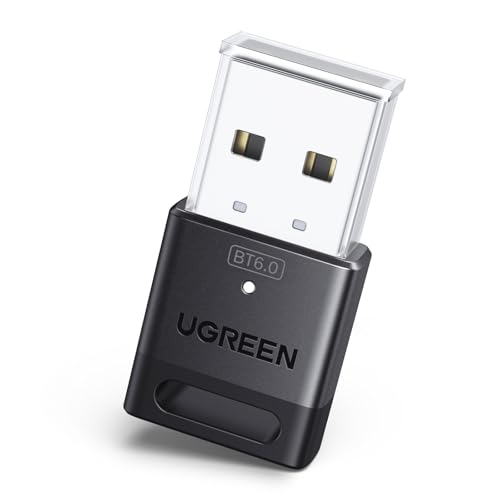
1. Best overall: UGREEN Bluetooth 6.0 USB Adapter
Pros
- Bluetooth 6.0 with backward compatibility listed
- Up to five devices connected at once, per the listing
- No driver installation listed for Windows 11, 10 and 8.1
Cons
- Windows only; the listing says Linux, macOS and Windows 7 are not supported
- Not listed for game consoles, TVs or cars
- The listing warns that walls and interference can affect range
The UGREEN adapter lists Bluetooth 6.0 with EDR technology, and the listing says it is backward compatible with Bluetooth 5.4, 5.3 and earlier versions. It also uses EDR and BLE, and the listing states it can keep up to five Bluetooth devices connected at once, such as a mouse, keyboard, phone and headphones.
Setup is described as plug and play with no driver installation under Windows 11, 10 and 8.1. The listing states it is for Windows only, so Linux, macOS and Windows 7 are not supported. It is not listed for PlayStation, Switch or Xbox consoles, TVs or cars, and the listing notes that obstructions and wireless interference can affect range.
Best for: Windows 8.1, 10 or 11 PC users who want Bluetooth 6.0 and support for up to five connected devices.
2. Best nano size for travel: TP-Link UB500 Nano USB Adapter

Pros
- Nano design listed for staying in a port
- Bluetooth 5.4 with EDR and BLE
- Backward compatible with listed older versions
- Windows 7 supported with a downloadable driver
Cons
- Plug and play on Windows 8.1 to 11 needs an internet connection
- Bluetooth 5.4 use requires the latest driver from the TP-Link website
- The listing does not mention macOS or Linux support
The TP-Link UB500 lists Bluetooth 5.4 plus EDR, and says it is backward compatible with Bluetooth 5.3 down through 1.1. Its nano design is described as small enough to stay in a USB port whether you are traveling or at home, which is the main reason it stands out in this group.
The listing says plug and play works on Windows 8.1, 10 and 11, but an internet connection is required. For Windows 7, a driver must be downloaded from the TP-Link website. The listing also says the latest driver from TP-Link is needed to use Bluetooth 5.4. It is listed in golden and black and is described as suited to desktops, printers, phones and headsets.
Best for: Windows 8.1, 10 or 11 users who want a very small adapter that can stay in a port while traveling.
3. Best for the largest listed range: Techkey USB Bluetooth 6.0 Long Range

Pros
- Listed range of up to 600 ft in open areas
- Up to seven Bluetooth devices, per the listing
- Bluetooth 6.0 with EDR and BLE
- No driver installation listed
Cons
- Windows 11, 10 and 8.1 only, per the listing
- The listing says obstructions and interference can affect range
- The listing does not mention a weight
The Techkey adapter describes a Class 1 radio with an extended antenna and lists a transmission range of up to 600 feet (200 meters) in open areas. The listing notes that physical obstructions and wireless interference can still affect the connection, so the figure applies to open areas.
It lists Bluetooth 6.0 with EDR and BLE, and states compatibility with versions back to 2.1+EDR. Plug and play is described with no driver installation needed. The listing says it can connect up to seven Bluetooth devices, including speakers, keyboards, headsets, mice and printers. It is described as exclusively compatible with Windows 11, 10 and 8.1, with no Mac OS, Linux or car stereo support.
Best for: Desktop PC users in a large room who want the largest range figure in this roundup and run Windows 11, 10 or 8.1.
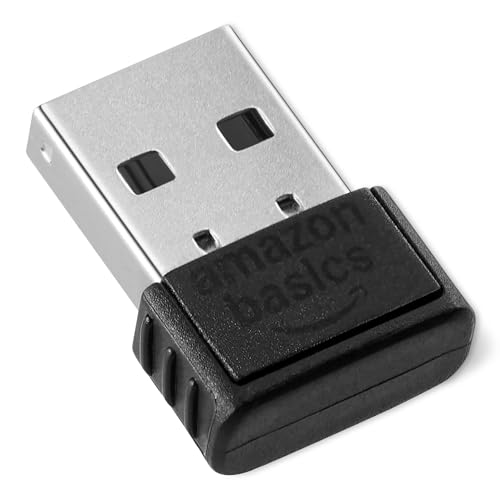
4. Best plain Windows-only setup: Amazon Basics Bluetooth 5.4 USB
Pros
- Bluetooth 5.4 with backward compatibility
- Up to six devices connected simultaneously, per the listing
- Plug-in nano design for quick setup
- Ultra-lightweight with a black finish
Cons
- Windows 8.1, 10 and 11 only
- Built-in Bluetooth must be disabled before use, per the listing
- The listing does not mention driver download steps
The Amazon Basics adapter lists Bluetooth 5.4 and says it is backwards compatible with Bluetooth 5.3 through 1.1. It is described as a nano receiver that plugs in for quick setup on laptops and PCs. The listing says it can connect up to six devices at the same time through any standard USB port.
The listing states it works only with Windows 8.1, 10 and 11, and is not compatible with Mac, Linux, Chrome, Unix, PlayStation or Windows 7 and earlier. It also says to disable any built-in Bluetooth on the device before use. The adapter is described as ultra-lightweight with a black finish, and the listing says it uses EDR and BLE for efficient connectivity.
Best for: Windows 8.1, 10 or 11 laptop and desktop owners who want a simple Bluetooth 5.4 dongle and can disable built-in Bluetooth first.
5. Best for Windows and Linux: Cudy BU530 Bluetooth 5.3 Nano

Pros
- Windows and Linux support listed
- Automatic driver setup on Windows 10 and 11
- Backward compatible with 4.x, 3.x and 2.x devices
- FCC and CE certification listed
Cons
- Automatic driver setup is listed for Windows 10 and 11 only
- Linux and older Windows versions need a manual driver from the download center
- The listing does not mention macOS support
The Cudy BU530 is a Bluetooth 5.3 nano adapter that plugs into a USB-A port. The listing describes automatic driver setup on Windows 10 and 11, with a manual driver for Windows 7, Windows 8.1 and Linux available from the Cudy download center. It also says no CD or complex configuration is needed for most modern systems.
The listing states backward compatibility with Bluetooth 4.x, 3.x and 2.x devices, and it names headphones, speakers, keyboards, mice, game controllers and IoT sensors as compatible device types. Cudy describes the adapter as FCC and CE certified and says an installation guide is included. The listing says its light weight avoids strain on ports.
Best for: Owners of Windows 11, 10, 8.1 or 7 PCs, or Linux machines, who want a Bluetooth 5.3 nano adapter with a manual driver option.
6. Best for Bluetooth-only devices: Avantree DG45 USB Bluetooth Adapter

Pros
- Clear Bluetooth-only scope in the listing
- Up to seven Bluetooth devices, per the listing
- Non-audio devices can be used at the same time
- Voice calls with the headphone microphone listed
Cons
- Not for 2.4G or Wi-Fi devices, per the listing
- Only one Bluetooth audio device can be active at a time
- Windows 11, 10, 8.1 and 8 only
The Avantree DG45 is positioned for Bluetooth devices only. The listing says it adds Bluetooth to a Windows PC or laptop for headphones, speakers, keyboards, mice, printers, smartphones, tablets, smartwatches and supported Bluetooth game controllers. The title and listing both state that it is not for Wi-Fi or 2.4G wireless devices.
The listing says it supports pairing with up to seven Bluetooth devices. Keyboards, mice and other non-audio devices can be used at the same time, but only one Bluetooth audio device can be active at a time. It also supports stereo music streaming and voice calls with the headphone microphone. The listing states it works with Windows 11, 10, 8.1 and 8 only, and is not compatible with macOS, ChromeOS, Linux, Windows 7, XP, Vista, TVs, car stereos or gaming consoles.
Best for: Windows 8, 8.1, 10 or 11 PC users who connect Bluetooth headphones, speakers, keyboards, mice and printers, but not 2.4G or Wi-Fi peripherals.
7. Best for PC gaming controllers: KAIY USB Bluetooth 5.3 PC Adapter

Pros
- Bluetooth 5.3 listed
- Up to five devices connected at once
- No CD drivers or software downloads listed
- Connects with PC gaming controllers, per the listing
Cons
- Designed for Windows PC use only; no TVs, car stereos or consoles
- The listing does not give a range figure, despite the long-range wording in the title
- Windows 11, 10 and 8.1 are the only versions named
The KAIY adapter lists Bluetooth 5.3 and describes a long-range Bluetooth dongle for desktops and laptops. The listing says it uses low-latency EDR technology and is intended to keep audio in sync with video, gaming and video calls. It is described as a nano design that can stay plugged in.
The listing says it can connect up to five different devices at once, including a mouse, keyboard, printer, smartphone and headset. It is described as plug and play, with no CD drivers or software downloads needed, and it names Windows 11, 10 and 8.1. The listing notes it is designed for Windows PC use and does not support direct audio connection to TVs, car stereos or gaming consoles, although it connects with PC gaming controllers.
Best for: Windows 11, 10 or 8.1 PC players who want a Bluetooth 5.3 dongle for controllers and headphones, without console or TV connections.
8. Best for Windows 7 and 8 PCs: SUMEE USB Bluetooth 5.0 Adapter

Pros
- Windows 7, 8, 8.1 and 10 listed
- Range of up to 20 m in open space, per the listing
- 24-month warranty listed
- Step-by-step installation guide included
Cons
- The listing does not mention Windows 11
- Built-in Bluetooth must be disabled to avoid a conflict
- Not compatible with Linux, Xbox One, TVs or car stereos
The SUMEE adapter lists Bluetooth V5.0 and is listed for Windows 10, 8, 8.1 and 7 on a laptop or desktop. The listing says it turns a non-Bluetooth PC into a Bluetooth-capable one, and it names speakers, headphones, headsets, keyboards, mice and game controllers as supported. It describes a compact USB adapter that the listing says can be left in for laptop travel.
The listing gives a range of up to 20 m in open space and says it is fully compatible with older Bluetooth equipment. It notes that built-in Bluetooth on the computer can cause a conflict, so the listing advises disabling it first. The adapter is not compatible with Linux, Xbox One, TV or car stereo systems. A 24-month warranty and a step-by-step installation guide are listed.
Best for: Owners of Windows 7, 8 or 8.1 PCs who want a basic Bluetooth 5.0 dongle and can disable built-in Bluetooth first.
How to choose the best USB Bluetooth adapter
Start with your operating system. Several listings here name Windows 11, 10 and 8.1 as the only supported systems, and a few add Windows 7 or Linux. If a listing says macOS or Linux are not supported, treat that as a hard limit rather than a setting you can change.
Next, check the Bluetooth version and backward compatibility. Most listings here state a version, and many say they work with older devices. A newer version on the adapter does not upgrade an older headset, so confirm that your own devices fall within the compatibility the listing describes. For how versions and audio profiles relate, see our Bluetooth Audio Codecs and Profiles Explained guide. The Bluetooth SIG website covers the standards themselves.
Then look at device limits and conflict notes. Some listings say to disable built-in Bluetooth first, and some say only one Bluetooth audio device can be active at a time. If you rely on a 2.4G USB receiver or a Wi-Fi peripheral, read the compatibility notes closely, because the Avantree listing states it does not support those.
Consider drivers and setup. Some listings describe plug and play with no driver installation, while others need an internet connection or a manual download for older systems. Nano designs are described as staying in a port, which suits travel, but range figures apply only to the conditions the manufacturer states. If you connect a USB adapter alongside other devices, follow the manufacturer’s manual for safe use. For port types, see USB-C, Wi-Fi and Bluetooth Versions Explained.
What to look for
- The Windows versions the listing names, and whether Linux or macOS is excluded.
- The Bluetooth version and the backward compatibility claims.
- The listed number of devices that can connect at once.
- Driver requirements: plug and play, internet needed, or a manual download.
- Stated limits such as range, console or TV compatibility, and built-in Bluetooth conflicts.
FAQ
Do these adapters need a driver installed?
It depends on the listing. The UGREEN, Techkey and KAIY listings describe plug and play with no driver installation on supported Windows versions. The TP-Link listing requires an internet connection on Windows 8.1 through 11 and a downloaded driver for Windows 7. Cudy offers automatic driver setup on Windows 10 and 11, with manual drivers for other systems. Follow the manufacturer’s manual for setup.
Can I use one with a PlayStation, Xbox or TV?
Several listings say no. UGREEN says it cannot be used directly on PS3, PS4, PS5, Switch or Xbox consoles. Avantree and SUMEE list TVs and gaming consoles as unsupported, and KAIY says it does not support direct audio connection to TVs, car stereos or consoles. Check the listing before buying for a console or TV setup.
Will these work with a 2.4G keyboard or a Wi-Fi printer?
The Avantree listing states that it is not compatible with 2.4G or Wi-Fi devices. The other listings we compared do not mention support for 2.4G USB receivers or Wi-Fi peripherals, so check each listing against the devices you plan to use.
Should I turn off built-in Bluetooth first?
Amazon Basics and SUMEE both say to disable built-in Bluetooth before use or expect a conflict. Check your computer’s manual for how to turn its built-in Bluetooth off.
References
- Amazon product listings and manufacturer specifications (accessed November 2026)
- Bluetooth SIG, bluetooth.com