Quick answer
Our overall pick is the Philips Wi-Fi Front Lock Set for its combination of a keypad, fingerprint reader, and built-in Wi-Fi in a coordinated set with handles. The other picks suit those who want a lock that learns fingerprints, a model with a strong security certification, or a system with extensive user code and IC card support.
Finding the best smart lock means balancing convenience, security, and compatibility with your home setup. Modern smart locks offer keyless entry through apps, codes, and fingerprints, and many connect directly to your Wi-Fi for remote control. In this roundup, we compared manufacturer specifications for several widely available models to highlight their key features and help you decide which one fits your needs.
Our picks at a glance

Pros
- Built-in Wi-Fi for remote control without a hub
- Five unlocking methods including fingerprint and voice
- Supports up to 100 user codes and unlimited one-time codes
- Includes two matching handles for a complete set
Cons
- The listing does not mention a specific security certification like BHMA grade
- Requires a 2.4GHz Wi-Fi network (implied by standard Wi-Fi connectivity)

Pros
- AI learning fingerprint scanner for improved recognition
- Built-in Wi-Fi for remote app control
- Includes USB-C port for emergency power
- IP53 weather-resistant rating
Cons
- The listing does not mention support for creating temporary or one-time access codes
- Integration with a Wyze Video Doorbell for visual verification requires an additional product

Pros
- BHMA-certified for high residential security, durability, and finish
- Built-in Wi-Fi for remote access without a hub
- Manages up to 100 access codes
- Includes a limited lifetime mechanical and finish warranty
Cons
- The listing does not mention a fingerprint unlocking option
- No physical handles are included with the deadbolt
Pros
- Built-in Wi-Fi for direct remote app control
- Fast fingerprint unlock (0.3 seconds per listing)
- Supports various PIN code types for flexible access
- Includes a handle for a complete installation
Cons
- The listing does not mention a specific weatherproof or security certification
- Requires a 2.4GHz Wi-Fi network
Pros
- Supports over 250 codes and 1,000+ IC cards for extensive user management
- IP54 weatherproof and BHMA/ANSI Grade 3 certified
- Includes two lever handles
- Offers app and web portal control with no subscription fee
Cons
- Remote access and voice control require a separate G2 gateway
- Auto-lock timer range (5–900s) may be longer than some users prefer
How we chose
We compared manufacturer listings and specifications on Amazon as of October 2026. We did not test or use any products hands-on. Our picks are based on comparing features like connectivity, unlocking methods, security certifications, and included components.
What to look for
- Connectivity: Built-in Wi-Fi allows remote control without a separate hub, while Bluetooth may require a gateway for remote access.
- Unlocking Methods: Look for a combination of app, fingerprint, keypad codes, and physical keys for flexibility.
- User Management: The ability to create permanent, temporary, and one-time access codes is useful for guests and rentals.
- Security & Durability: Check for industry certifications like BHMA grades and weatherproof ratings for long-term reliability.
Best Smart Locks: our picks in detail
1. Best overall: Philips Wi-Fi Front Lock Set
The Philips Wi-Fi Front Lock Set includes a smart deadbolt and two matching handles for a coordinated look. It connects to your home Wi-Fi network without a hub, allowing you to lock, unlock, and monitor the door status remotely via an app. The lock offers five unlocking methods: the app, fingerprints, PIN codes, physical keys, and voice commands via Amazon Alexa or Google Assistant.
You can create unlimited one-time PIN codes or up to 100 user codes, including temporary, permanent, recurring, or one-time options. It features an auto-lock function with a timer you can set. The listing states it fits most standard doors with a thickness of 35–50mm and includes four batteries.
Best for: This is our top pick for a complete, Wi-Fi-connected lock and handle set with versatile access options.
Pros
- Built-in Wi-Fi for remote control without a hub
- Five unlocking methods including fingerprint and voice
- Supports up to 100 user codes and unlimited one-time codes
- Includes two matching handles for a complete set
Cons
- The listing does not mention a specific security certification like BHMA grade
- Requires a 2.4GHz Wi-Fi network (implied by standard Wi-Fi connectivity)
2. Best for fast fingerprint access: Wyze Auto-Lock Bolt v2
The Wyze Auto-Lock Bolt v2 is a fingerprint keyless entry smart lock with a scanner that the listing claims unlocks in 0.5 seconds. It uses an AI learning scanner that improves recognition over time. The lock has built-in Wi-Fi, allowing remote management and status checks through the Wyze app, and it can integrate with a Wyze Video Doorbell for visual verification.
Unlocking options include fingerprint, the app, a code, or physical backup keys. It includes eight AA batteries, which the listing states provide up to 8 months of use, and has a USB-C port for emergency power from a power bank. The lock has an IP53 rating for weather resistance.
Best for: This lock is best for users who prioritize a fast, learning fingerprint scanner and integration with Wyze’s ecosystem.
Pros
- AI learning fingerprint scanner for improved recognition
- Built-in Wi-Fi for remote app control
- Includes USB-C port for emergency power
- IP53 weather-resistant rating
Cons
- The listing does not mention support for creating temporary or one-time access codes
- Integration with a Wyze Video Doorbell for visual verification requires an additional product
3. Best with advanced security certification: Schlage Encode Smart WiFi Deadbolt
The Schlage Encode is a smart WiFi deadbolt with a built-in touchscreen keypad. It connects directly to your home Wi-Fi network, allowing remote lock/unlock, access code management, and lock history viewing via the Schlage Home app. You can manage up to 100 access codes.
It works with Alexa and Google Home for voice control. The lock features a built-in, customizable alarm and is certified to the highest residential Security, Durability, and Finish rating by BHMA (Builders Hardware Manufacturers Association). It has a fingerprint-resistant touchscreen and an auto-lock function.
Best for: This lock is best for those seeking a well-known brand with a high BHMA security certification and straightforward keypad access.
Pros
- BHMA-certified for high residential security, durability, and finish
- Built-in Wi-Fi for remote access without a hub
- Manages up to 100 access codes
- Includes a limited lifetime mechanical and finish warranty
Cons
- The listing does not mention a fingerprint unlocking option
- No physical handles are included with the deadbolt
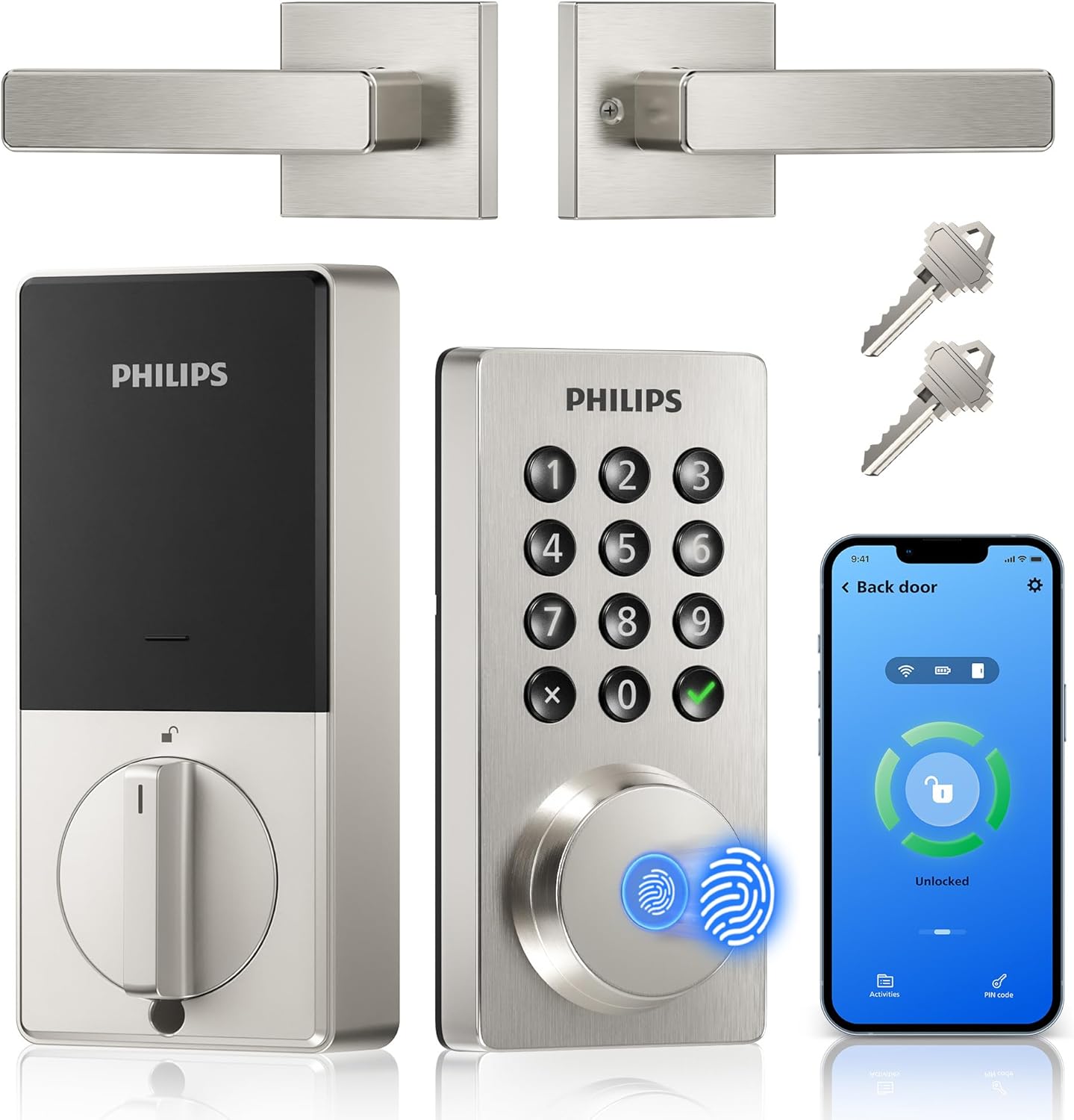
4. Best for fast fingerprint and app control: Philips WiFi Keypad Door Lock with Handle
This Philips WiFi Keypad Door Lock includes a handle and connects to 2.4GHz Wi-Fi without a hub. You can control it remotely via an app to lock, unlock, manage user codes and fingerprints, and check access history. It unlocks via fingerprint in 0.3 seconds, according to the listing.
Unlocking methods include the app, voice commands with Alexa or Google Assistant, fingerprint, and passcodes. It supports permanent, one-time, periodic, and recurring PIN codes. The lock has an auto-lock feature with a timer you can set from 0 to 180 seconds. It is made of aluminum.
Best for: This lock is best for users who want a combination of very fast fingerprint access, built-in Wi-Fi, and a handle included.
Pros
- Built-in Wi-Fi for direct remote app control
- Fast fingerprint unlock (0.3 seconds per listing)
- Supports various PIN code types for flexible access
- Includes a handle for a complete installation
Cons
- The listing does not mention a specific weatherproof or security certification
- Requires a 2.4GHz Wi-Fi network
5. Best for extensive user and code management: Veise VE06-L Smart Deadbolt Lock
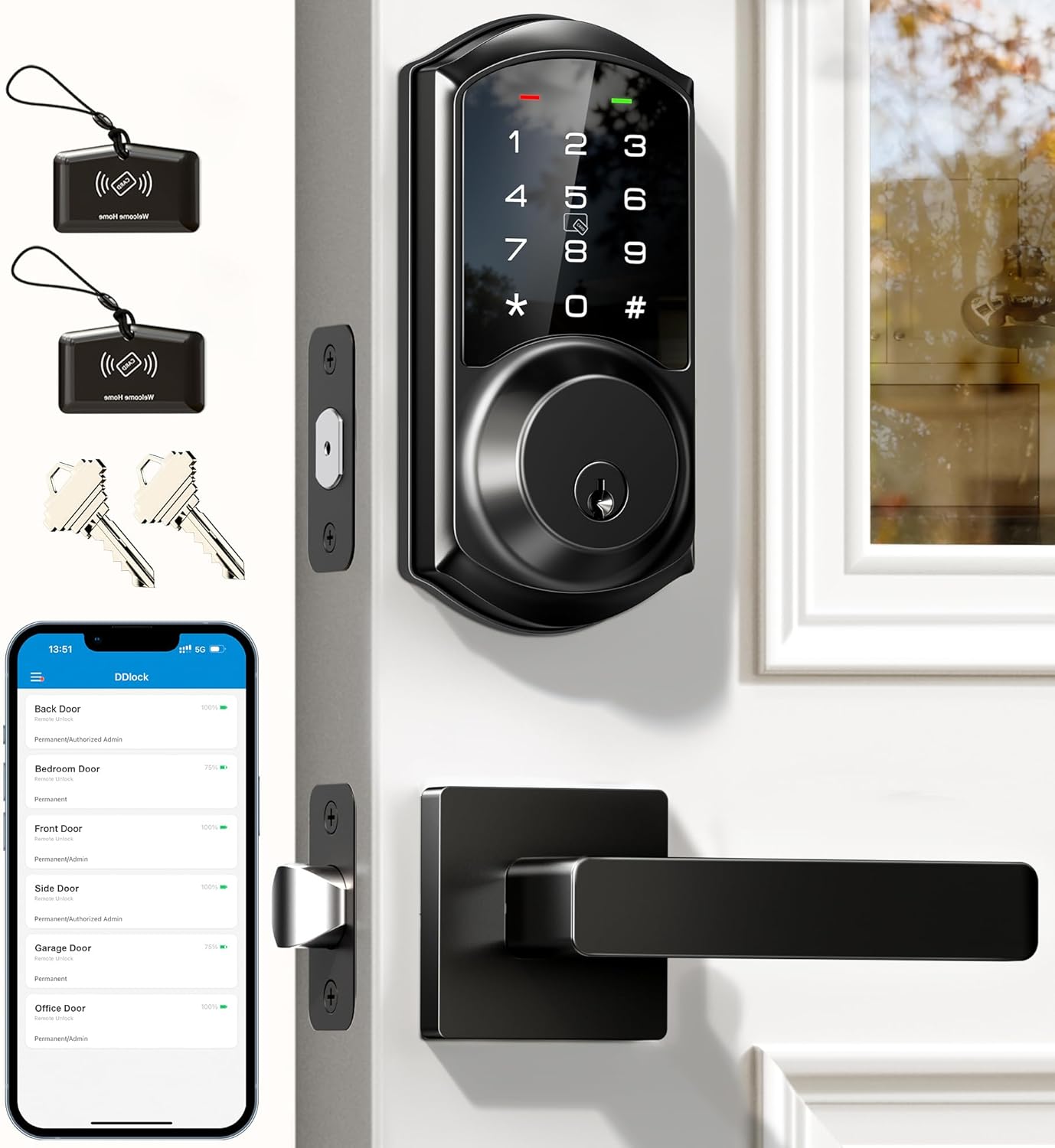
The Veise VE06-L is a smart deadbolt lock that comes with two lever handles. It can be unlocked via an app, codes, IC cards (with a capacity for over 1,000 cards), an e-key, or physical keys. It works with a G2 gateway (sold separately) for remote access and integration with Alexa and Google Assistant.
Through the app and web portal, you can create and manage over 250 codes, including permanent, scheduled, recurring, and one-time options. It has anti-peeping protection for codes. The lock is IP54 weatherproof and certified to BHMA/ANSI Grade 3. It includes a one-year limited warranty, extendable to two years with registration.
Best for: This lock is best for landlords or large households needing to manage many users with codes, IC cards, and remote web portal access.
Pros
- Supports over 250 codes and 1,000+ IC cards for extensive user management
- IP54 weatherproof and BHMA/ANSI Grade 3 certified
- Includes two lever handles
- Offers app and web portal control with no subscription fee
Cons
- Remote access and voice control require a separate G2 gateway
- Auto-lock timer range (5–900s) may be longer than some users prefer
Smart lock picks at a glance
| Model | Key Unlocking Methods | Connectivity | Notable Features | Included Components |
|---|---|---|---|---|
| Philips Wi-Fi Front Lock Set | App, Fingerprint, PIN, Key, Voice | Wi-Fi | Auto-lock, 100 user codes | Door lock, handle set, 4 batteries |
| Wyze Auto-Lock Bolt v2 | Fingerprint, App, Code, Key | Wi-Fi | AI fingerprint scanner, IP53, USB-C backup | Lock, 8 AA batteries |
| Schlage Encode Smart WiFi Deadbolt | PIN, App, Voice, Key | Wi-Fi, Bluetooth | BHMA certified, 100 codes, alarm | Installation hardware |
| Philips WiFi Keypad Door Lock | Fingerprint, App, PIN, Voice, Key | Wi-Fi, Bluetooth | 0.3s fingerprint, various PIN codes | Lock, handles, hardware |
| Veise VE06-L Smart Deadbolt | App, Code, IC Card, E-key, Key | Bluetooth (Wi-Fi via gateway) | 250+ codes, 1000+ IC cards, IP54, BHMA Grade 3 | Lock, 2 handles, 2 keys, 2 IC cards |
How to choose a smart lock
Choosing the best smart lock starts with understanding how you want to access your home and which features matter most for your situation. The core appeal is keyless entry, which you can learn more about in our guide on how smart locks work.
First, consider connectivity. Built-in Wi-Fi, like on the Philips and Schlage models, lets you control the lock remotely without buying an extra hub. Locks that use only Bluetooth, like the Veise, typically need a separate gateway for remote access. If you want to integrate your lock with other devices like video doorbells, check for compatibility within the same brand’s ecosystem or with broader smart home platforms.
Next, look at access methods. A good smart lock should offer multiple ways to unlock. Fingerprint readers provide quick, personal access, while PIN codes are essential for guests, housekeepers, or rental situations. The ability to create temporary or one-time codes is particularly useful. Always ensure the lock includes physical keys as a reliable backup.
Finally, check for durability and security ratings. For exterior doors, a weatherproof rating (like IP54) is important. Certifications from the Builders Hardware Manufacturers Association (BHMA) indicate the lock has been tested for security, durability, and finish. For a broader look at integrating security devices, see our article on smart cameras, video doorbells and locks.
FAQ
Do I need a hub for my smart lock?
Not necessarily. Many modern smart locks, like the Philips and Schlage models in this roundup, have built-in Wi-Fi and connect directly to your home network, allowing for remote control via an app without a separate hub. Locks that use Bluetooth typically require a hub or gateway for remote access when you’re away from home.
What happens if the batteries die or the Wi-Fi is down?
All the smart locks we compared include physical keys as a backup unlocking method. Several, like the Wyze lock, also have a USB-C port for emergency power from a power bank. The smart functions may be unavailable during a power or internet outage, but you can still use the key or, if the lock has power, the keypad or fingerprint reader.
Are smart locks secure?
Smart locks employ various security measures. Look for features like encrypted connections, tamper alarms, and anti-peeping keypads that allow you to enter random digits before and after your real code. Industry certifications, such as BHMA grades, indicate the lock has been tested for physical security and durability. Always follow the manufacturer’s manual for installation and use.
Can I give temporary access to guests?
Yes, most smart locks support this. A key feature to look for is the ability to create temporary or one-time use PIN codes through the companion app. You can set these codes to expire after a single use or after a specific date and time, which is ideal for guests, delivery personnel, or service providers.
References
- Amazon product listings and manufacturer specifications (accessed October 2026)
- Wi-Fi Alliance
- Connectivity Standards Alliance (Matter)