By Lauren Holland
Updated November 2026
Yes, a power bank can charge a laptop, but only if it delivers enough power over the right connection. In this guide you will learn how to check whether your laptop supports power bank charging, how to match wattage and watt-hour capacity to your machine, and how to avoid the mistakes that leave you with a dead battery or a laptop that won’t charge at all.
How Laptop Charging Differs from Phone Charging
Most phones draw between 15 and 30 watts while charging. Laptops are far hungrier. A typical ultrabook may request 45 to 65 watts, while a gaming or workstation laptop can ask for 100 watts or more under load. A standard phone-sized power bank rated at 18 or 20 watts will usually keep a laptop from losing charge only when it is idle, and it often won’t charge the battery at all during heavy use.
Laptops also negotiate power differently. Phones often accept a simple 5-volt connection, but most modern laptops require USB Power Delivery (USB-PD) with a specific voltage profile, commonly 15V, 20V or higher. If the power bank cannot offer that profile, the laptop either refuses to charge or charges extremely slowly.
Step 1: Check Whether Your Laptop Charges Over USB-C
Start with the charging port on your laptop. This determines whether a power bank can work at all.
- Look at the charging port. If it is a round barrel plug or a proprietary magnetic connector, a USB-C power bank will not charge the laptop directly without an adapter, and many barrel-connector laptops cannot be charged from a power bank at all.
- If the port is USB-C, check the adapter that came with your laptop. Read the label for the rated wattage and voltage profiles, usually written as something like 20V 3.25A (65W).
- Note the wattage. That number tells you the minimum output your power bank must provide.
Some laptops support USB-C charging only from certain power sources. Your laptop’s manual or the manufacturer’s specification page will list the supported charging standards. When in doubt, consult the manufacturer’s support documentation.
Step 2: Match the Power Bank’s Output to Your Laptop’s Demand
A power bank must advertise a USB-C output rated at or above what your laptop needs. Here is a rough guide:
| Laptop type | Typical charging demand | Power bank output to look for |
|---|---|---|
| Lightweight ultrabook | 30 to 45 W | 45 W USB-C PD or higher |
| Standard thin-and-light laptop | 45 to 65 W | 65 W USB-C PD |
| Performance or creator laptop | 90 to 100 W | 100 W USB-C PD |
| Gaming or workstation laptop | 120 W or more | Often not practical with standard power banks |
Keep in mind that a power bank rated at 100 W on its label may still deliver less when the battery is low or when only one port is in use. Check whether the rating applies to a single port or is shared across multiple ports.
Step 3: Confirm the Battery Capacity Is Large Enough
Output wattage tells you how fast the laptop charges. Capacity, measured in watt-hours (Wh), tells you how much total energy you have. Laptop batteries commonly hold 40 to 100 Wh. Power banks lose some energy in conversion, typically around 10 to 20 percent, so you need more stored energy than the laptop’s battery size to fully recharge it.
A rough formula is:
- Laptop battery capacity (Wh) ÷ 0.8 = approximate power bank capacity needed for one full charge.
- Example: a 60 Wh laptop battery divided by 0.8 is about 75 Wh of power bank capacity.
Power banks with more than 100 Wh are restricted on many airlines, so check the rules for your route before you fly. Manufacturers specify watt-hour ratings on the label, so look for the Wh figure rather than only the mAh figure. Milliamp-hours can be misleading because the voltage used to calculate them varies between products.
Estimate Real-World Charging Time
Divide the power bank’s usable capacity by the laptop’s average charging draw. A 100 Wh power bank supplying roughly 60 W to a laptop may give you about one and a half charges, but actual results vary with battery health, temperature and how much you use the laptop while it charges.
Step 4: Use the Right Cable and Port
Cable quality matters more than many people expect. A cable that only supports USB 2.0 data speeds or lacks the proper power-delivery wiring may limit charging to a few watts. Use a USB-C cable rated for at least 60 W, and 100 W or 240 W if your laptop needs it. Look for an e-marked cable when you go above 60 W.
Plug into the power bank’s USB-C PD port, not a standard USB-A port. A USB-A port normally tops out at 5V to 12V, which most laptops will not accept.
Step 5: Test and Monitor the Charge
- Connect the power bank to the laptop and wait a few seconds.
- Open your laptop’s battery or power settings. It should show that it is charging, and the wattage reading should be close to what you expect.
- If the laptop reports a slow charge or “plugged in, not charging,” check the cable, the port and the power bank’s output rating.
- Keep the setup on a hard, ventilated surface while it runs.
Common Mistakes to Avoid
- Assuming any USB-C power bank will work. A phone-focused USB-C bank rated at 18 or 20 W will not keep up with most laptops.
- Ignoring the watt-hour rating. A small power bank may power the laptop briefly but will not provide a full charge.
- Using a damaged or uncertified cable. Frayed cables and counterfeit accessories can overheat or fail to negotiate power correctly.
- Charging in a warm place. Heat reduces both power bank and laptop battery health. Avoid direct sunlight, car dashboards and bedding.
- Forgetting airline limits. Power banks above 100 Wh generally need airline approval, and many airlines restrict them in checked luggage.
- Trusting the label without checking. Look for named USB-PD support and clear wattage specs rather than vague “fast charge” claims.
Tips for Better Results
- Charge the power bank fully before a trip so it starts at 100 percent.
- Keep the laptop’s screen brightness low and close heavy applications to reduce power draw.
- If your laptop supports it, enable battery charge limits to extend long-term battery health.
- Carry a short USB-C cable rated for high wattage in your bag as a backup.
- Choose a power bank with a digital display or app so you can see live input and output wattage.
Recommended gear
These types of accessories are commonly recommended for laptop charging from a power bank. Confirm each product’s specifications against your laptop before buying.
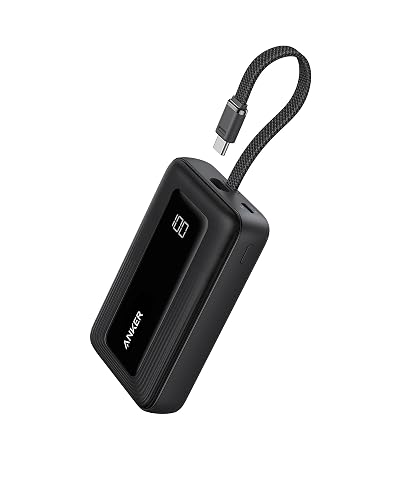
- Anker Prime 100W Power Bank is a high-capacity USB-C PD option designed for laptops, offering enough output for many thin-and-light machines. View on Amazon
- Anker 100W USB-C to USB-C Cable is an e-marked cable that supports high-wattage charging, helpful for laptops that need more than 60 W. View on Amazon
- Baseus 65W USB-C Power Bank suits lighter laptops that draw around 45 to 65 W and is a common budget-friendly choice. View on Amazon
If you want a deeper comparison first, see Power Bank Charger Notebook: Can You Charge a Laptop from One? (2026) for a laptop-specific breakdown, or read 5 Best Power Banks for Laptops: Top Picks Compared (2026) to see how different models stack up. For capacity planning, 7 Best 100 Wh Power Banks for Travel and Laptops (2026) explains what the watt-hour rating means in practice. If you are charging a handheld gaming device, Steam Deck Power Bank: How to Pick One That Charges While You Play (2026) covers a related use case. Finally, Dell Laptop Battery Charger Review: Is the JUOVI 65W Power Bank Worth It? shows how a 65 W bank performs with a common business laptop.
FAQ
Can a power bank charge a laptop that uses a barrel plug?
Usually not directly. Some barrel-plug laptops can be powered by a power bank with a suitable DC output and an adapter, but this requires matching voltage and polarity. Doing it incorrectly can damage the laptop, so check the manufacturer’s guidance first.
Can I charge a laptop with a power bank while I use it?
Yes, if the power bank’s output is higher than the laptop’s power draw. Otherwise, the battery will drain slowly. Heavy tasks like gaming or video editing often draw more than a standard bank supplies.
How many times can a power bank fully charge a laptop?
It depends on the laptop battery size and the power bank’s usable watt-hours. A 100 Wh power bank may deliver about one to one and a half charges to a 60 Wh laptop battery, though real results vary.
Is it safe to charge a laptop from a power bank?
It is generally safe when you use a reputable power bank with USB-PD support, a quality cable and proper ventilation. Avoid damaged gear, extreme heat and unverified no-name products.
Why does my laptop say it is plugged in but not charging?
The most common causes are an insufficient wattage rating, a cable that cannot carry enough power or a power bank port that does not support USB-PD. Try a higher-wattage bank and a certified high-power cable.
Can I take a laptop power bank on a plane?
Power banks are usually permitted in carry-on bags, but airlines commonly restrict capacities above 100 Wh and may require approval for those between 100 and 160 Wh. Check your airline’s current policy before you travel.
Will charging from a power bank wear out my laptop battery faster?
Charging any battery adds cycles, but the effect depends more on heat and charge habits than on the source. Keeping the laptop cool and using charge limits, where available, helps preserve battery health.
Conclusion
A power bank can charge a laptop when it offers USB-C Power Delivery at a wattage that meets or exceeds the laptop’s requirement and has enough watt-hour capacity for your needs. Confirm the port type, check the adapter’s rating and choose a bank that matches. For demanding machines, a dedicated high-wattage power bank is the safest route, and for anything unusual, consult the laptop manufacturer’s documentation.
Ready to choose one?
About Lauren Holland
Lauren Holland is part of our editorial team and reviews and edits our consumer tech how-to & troubleshooting guides, checking product details against manufacturer specifications and owner feedback.