Quick answer
Our overall pick is the ErGear Single Monitor Arm for its combination of wide compatibility, tool-free VESA mounting, and a 2-year warranty. The WALI arm is a strong choice for heavier flat screens, while the HUANUO FlowLift Pro is best for those who want a mechanical spring design and a lifetime warranty.
Finding the best monitor arm can transform your workspace, freeing up desk space and making it easier to achieve a comfortable, ergonomic viewing position. We compared the manufacturer specifications and features from several widely available listings to help you choose the right one for your setup.
Our picks at a glance

Pros
- Tool-free VESA mounting for easy setup
- Wide compatibility for 13–34 inch screens
- Includes both C-clamp and grommet mounting options
- Built-in cable management
Cons
- The listing does not mention compatibility with glass desks
- Maximum weight capacity is lower than some other arms
Pros
- High weight capacity for flat screens (26.4 lbs)
- Extensive ±180° swivel range
- Long 10-year warranty
- Includes both mounting options
Cons
- The listing recommends installation only on wooden desks
- Lower weight capacity for curved screens (19.8 lbs)

Pros
- Simple one-piece design for quick installation
- Good tilt range (-50° to +85°)
- Includes a 5-year warranty
- Compatible with a wide range of screen sizes
Cons
- The listing recommends a wood tabletop for mounting
- Maximum supported screen size is listed as 27 inches in specs, contradicting the title

Pros
- Mechanical spring design for long-term stability
- Tool-free snap-in VESA plate
- Visual tension adjustment window
- Lifetime warranty
Cons
- Lower maximum weight capacity (15.4 lbs)
- The listing recommends mounting only on wood desks
Pros
- Very wide tilt adjustment range
- Good height adjustment (up to 18.1 inches)
- Compatible with a range of desk thicknesses
Cons
- Shorter 1-year warranty
- The listing notes it is not recommended for desks with double shelves, enclosed back panels, or curved edges

Pros
- Mechanical spring system (no gas)
- Slim arm design to save space
- Easy 3-step installation
- Includes both mounting options
Cons
- The listing does not specify a maximum weight capacity
- Tilt range starts at -25°, which is less than some competitors
How we chose
We compared manufacturer listings and specifications on Amazon as of October 2026. We did not test, use, or measure any product hands-on. Our picks are based on comparing listed features like compatibility, adjustability, mounting options, and warranty details to identify the best monitor arm for different needs.
Best Monitor Arms: our picks in detail
1. Best overall: ErGear Single Monitor Arm
The ErGear Single Monitor Arm supports monitors from 13 to 34 inches and up to 19.8 lbs, compatible with VESA 75x75mm or 100x100mm patterns. It offers a wide range of motion, including tilt from +80° to -50°, ±90° swivel, and 360° rotation, with height adjustment up to 17.5 inches and reach up to 18.1 inches.
A key feature is its tool-free VESA mounting for quick setup. It includes two desk mounting options: a C-clamp for desks 0.39”–2.56” thick or a grommet base for desks 0.39”–2.95” thick. The arm has built-in cable management and is made from alloy steel. The listing includes a 2-year warranty.
Best for: Best overall for its tool-free VESA mount, wide adjustability, and included 2-year warranty.
Pros
- Tool-free VESA mounting for easy setup
- Wide compatibility for 13–34 inch screens
- Includes both C-clamp and grommet mounting options
- Built-in cable management
Cons
- The listing does not mention compatibility with glass desks
- Maximum weight capacity is lower than some other arms
2. Best for heavier flat screens: WALI Adjustable Single Monitor Arm
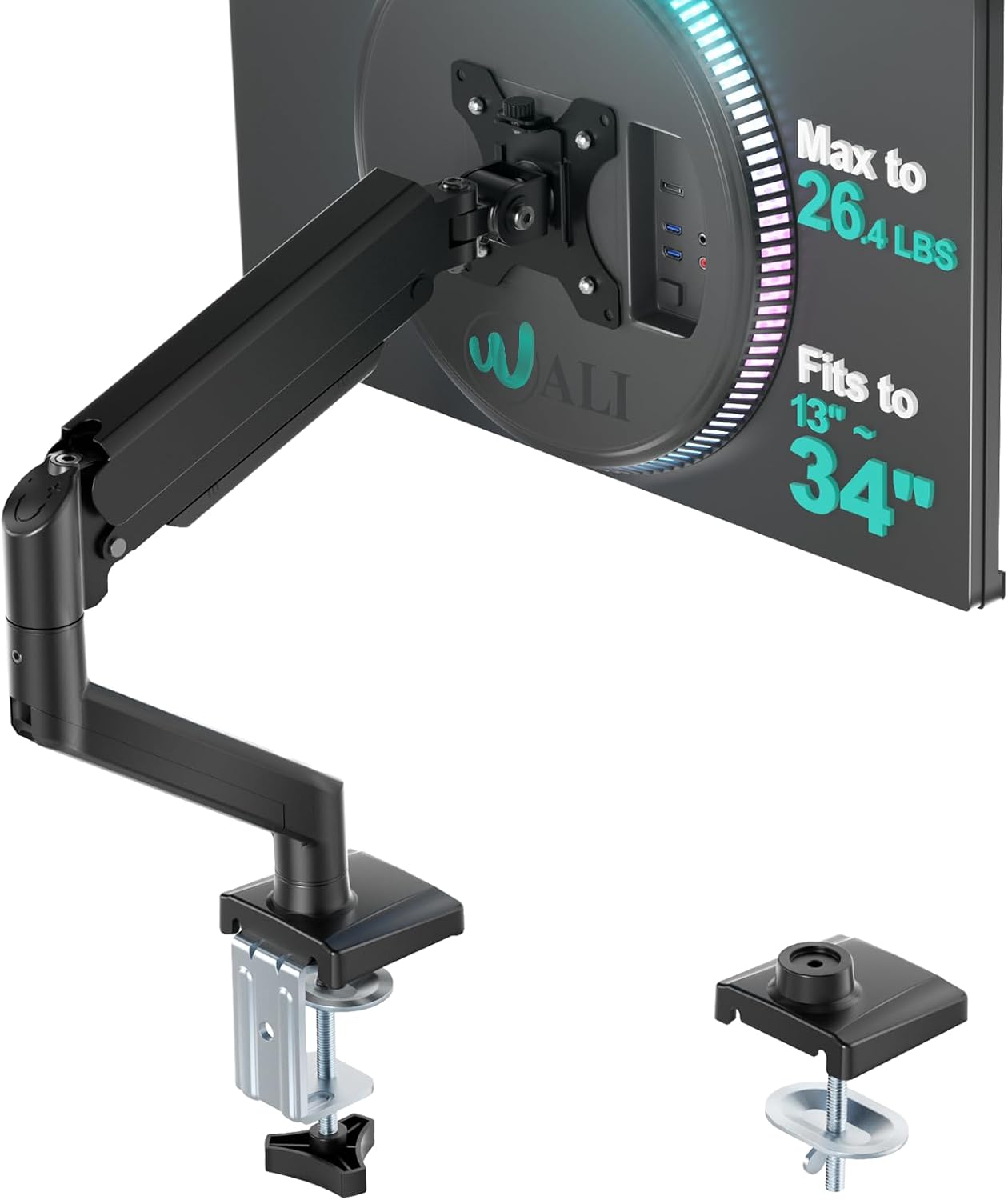
The WALI Adjustable Single Monitor Arm supports screens from 17 to 34 inches, with a maximum load capacity of 26.4 lbs for flat screens and 19.8 lbs for curved screens. It is compatible with VESA 75x75mm and 100x100mm patterns.
It provides extensive motion with ±180° swivel, +70°/-45° tilt, and 360° rotation. The arm can extend out by 19.3 inches and raise up to 17.3 inches above the desk. It offers C-clamp or grommet base mounting for desks 0.39”–2.76” thick. The listing specifies a 10-year warranty and that the arm is made of metal.
Best for: Best for heavier flat screens thanks to its higher 26.4 lb weight capacity.
Pros
- High weight capacity for flat screens (26.4 lbs)
- Extensive ±180° swivel range
- Long 10-year warranty
- Includes both mounting options
Cons
- The listing recommends installation only on wooden desks
- Lower weight capacity for curved screens (19.8 lbs)
3. Best for basic setups: HUANUO FlowLift Single Monitor Mount
The HUANUO FlowLift Single Monitor Mount fits 13 to 32 inch monitors weighing between 4.4 and 19.8 lbs, compatible with VESA 75x75mm and 100x100mm. It offers tilt from -50° to +85°, ±90° swivel, and 360° rotation.
The listing highlights a one-piece design for installation in about three minutes. It includes both C-clamp and grommet mounting options, though it recommends a wood tabletop. The arm is made from alloy steel and comes with a 5-year manufacturer warranty.
Best for: Best for basic setups with its straightforward one-piece design and 5-year warranty.
Pros
- Simple one-piece design for quick installation
- Good tilt range (-50° to +85°)
- Includes a 5-year warranty
- Compatible with a wide range of screen sizes
Cons
- The listing recommends a wood tabletop for mounting
- Maximum supported screen size is listed as 27 inches in specs, contradicting the title
4. Best for mechanical spring design: HUANUO FlowLift Pro Monitor Arm
The HUANUO FlowLift Pro Monitor Arm is designed for 13–32 inch screens weighing 4.4–15.4 lbs, supporting VESA 75x75mm or 100x100mm. It features a MechaSpring mechanical arm designed for longevity and a LockSteady system to resist screen droop.
Unique features include a PrecisionView window for visual tension adjustment and a tool-free InstaMount VESA plate for snap-in setup. It offers tilt and swivel adjustment and is compatible with wood desks 0.59”–3.54” thick. The arm is made of aluminum and comes with a lifetime warranty.
Best for: Best for those who prefer a mechanical spring design and tool-free VESA mounting.
Pros
- Mechanical spring design for long-term stability
- Tool-free snap-in VESA plate
- Visual tension adjustment window
- Lifetime warranty
Cons
- Lower maximum weight capacity (15.4 lbs)
- The listing recommends mounting only on wood desks
5. Best for wide tilt range: Acer Single Monitor Mount
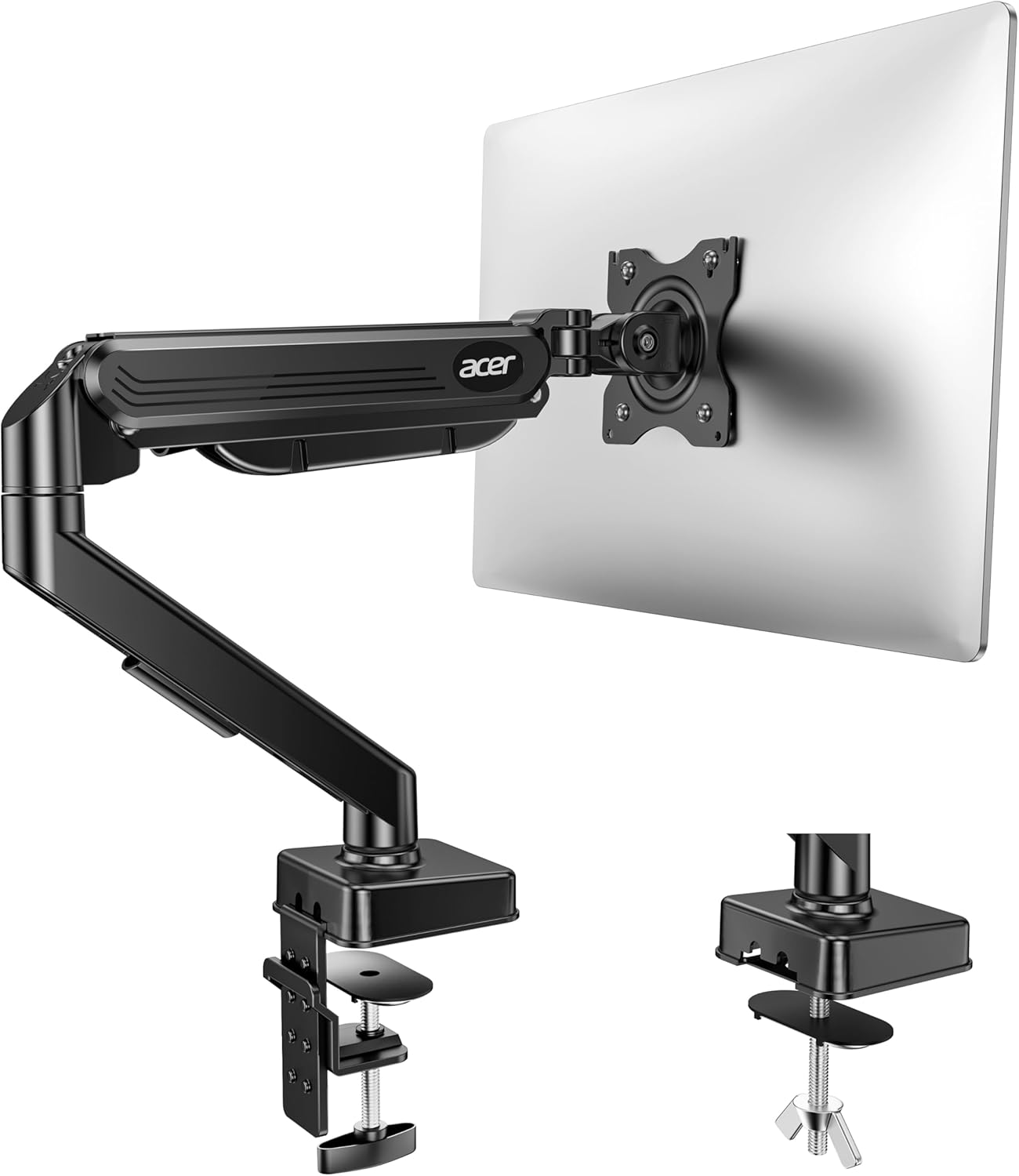
The Acer Single Monitor Mount supports monitors from 17 to 34 inches weighing 4.4–19.8 lbs, compatible with VESA 75x75mm and 100x100mm. It offers a wide tilt range from -60° to +90°, along with ±90° swivel and 360° rotation.
The arm can raise a monitor up to 18.1 inches from the desk. It includes C-clamp or grommet mounting options for desks 0.59”–3.15” thick, recommending wood desktops. It is made from aluminum and comes with a 1-year manufacturer warranty.
Best for: Best for a wide tilt range, from -60° to +90°.
Pros
- Very wide tilt adjustment range
- Good height adjustment (up to 18.1 inches)
- Compatible with a range of desk thicknesses
Cons
- Shorter 1-year warranty
- The listing notes it is not recommended for desks with double shelves, enclosed back panels, or curved edges
6. Best for space-saving design: NB SmooVex Monitor Arm
The NB SmooVex Monitor Arm fits monitors up to 32 inches with VESA 75x75mm and 100x100mm patterns. It uses a mechanical spring system instead of a gas spring. It offers ±90° rotation, tilt from -25° to 90°, swivel, and 230mm of height travel.
The listing mentions a slimmer arm design to save desk space. It includes C-clamp and grommet mounting options for easy installation on most desks. The arm is made of aluminum and comes with a 2-year warranty.
Best for: Best for a space-saving, slim arm design with a mechanical spring.
Pros
- Mechanical spring system (no gas)
- Slim arm design to save space
- Easy 3-step installation
- Includes both mounting options
Cons
- The listing does not specify a maximum weight capacity
- Tilt range starts at -25°, which is less than some competitors
Our picks at a glance
| Product | Screen Size | Max Weight | Key Feature | Warranty |
|---|---|---|---|---|
| ErGear Single Monitor Arm | 13–34 in | 19.8 lbs | Tool-free VESA mount | 2-year |
| WALI Adjustable Single Monitor Arm | 17–34 in | 26.4 lbs (flat) | High weight capacity | 10-year |
| HUANUO FlowLift Single | 13–32 in | 19.8 lbs | One-piece design | 5-year |
| HUANUO FlowLift Pro | 13–32 in | 15.4 lbs | Mechanical spring | Lifetime |
| Acer Single Monitor Mount | 17–34 in | 19.8 lbs | Wide -60° to +90° tilt | 1-year |
| NB SmooVex Monitor Arm | Up to 32 in | Not listed | Slim space-saving design | 2-year |
How to choose a monitor arm
Choosing the best monitor arm starts with verifying three key specs from your monitor: its VESA mounting pattern (usually 75x75mm or 100x100mm), its screen size, and its weight. The arm you select must support all three. Next, consider your desk. Check its thickness and material; many arms are only recommended for solid wood desks and may not be suitable for glass, very thin, or hollow-core surfaces.
Adjustability is crucial for ergonomic comfort. Look for a good range of tilt, swivel, and height adjustment to position the screen at eye level. Finally, consider the mounting mechanism. Most offer a choice between a C-clamp (which attaches to the desk edge) and a grommet mount (which goes through a hole in the desk). Ensure the clamp fits your desk’s thickness.
What to look for
- Compatibility: Confirm the arm matches your monitor’s VESA pattern, size, and weight.
- Desk Fit: Check the mounting clamp’s thickness range and desk material recommendations.
- Adjustability: Look for sufficient tilt, swivel, and height range to achieve a comfortable viewing angle.
- Warranty: A longer warranty can indicate the manufacturer’s confidence in the product’s durability.
FAQ
What is VESA mounting?
VESA mounting refers to a standard pattern of four screw holes on the back of a monitor or TV. The most common patterns for monitors are 75x75mm and 100x100mm. You must check your monitor’s manual or the back of the monitor itself to confirm its VESA pattern before purchasing any monitor arm.
Can I use a monitor arm on a glass or standing desk?
You must check the manufacturer’s listing carefully. Many monitor arms specify that they are only recommended for use on wooden desks. Using a clamp on a glass desk can pose a risk of cracking. For standing desks, ensure the arm’s clamp can securely attach to the desk’s frame or edge as it moves.
What’s the difference between a gas spring and a mechanical spring arm?
Gas spring arms use pressurized gas in a cylinder to help counterbalance the monitor’s weight, allowing for smooth, float-like movement. Mechanical spring arms use a physical metal spring system. Some listings suggest mechanical springs may offer more consistent performance over a longer period without the potential for gas pressure loss.
How do I adjust the tension on a monitor arm?
Most monitor arms have a tension adjustment knob, usually located at the joint near the VESA plate or at the base. You turn this knob to increase or decrease the resistance, allowing the arm to hold your monitor’s specific weight steadily in place. Always follow the manufacturer’s instructions for adjustment.
References
- Amazon product listings and manufacturer specifications (accessed October 2026)