By Owen Palmer
Updated November 2026
Finding the best USB-C hub for Mac mini comes down to counting what you actually plug in. The Mac mini has a handful of ports on the back and front, and most desk setups need more: a display, a keyboard receiver, external storage, a card reader and sometimes Ethernet. This guide compares four hubs on the criteria that matter most for that job: port mix, video output, power passthrough, data speed, build and how well each fits a compact desk. Each pick is chosen from its published specifications, brand reputation and common owner feedback patterns. None of these products were tested in a lab for this article.
Our top picks at a glance
- 1
 TOP CHOICEBest overallDesktop USBC Hub 9-in-1View on Amazon
- 2
 Best for compact desksSatechi Pro Hub Mini USB-C Multiport AdapterView on Amazon
- 3
 Best for charging while dockedSatechi 7-in-1 USB-C Hub Pro SlimView on Amazon
- 4
 Best budget pickAnker USB-C Hub 5-in-1View on Amazon
Our Top Picks
Quick Comparison
| Product | Best for | Key feature |
|---|---|---|
| Desktop USBC Hub 9-in-1 | Multi-device desks with lots of peripherals | Nine ports, 4K@60Hz HDMI and 100W PD input |
| Anker USB-C Hub 5-in-1 | Simple setups on a budget | Three USB-A 3.0 ports plus 4K HDMI and 90W pass-through |
| Satechi 7-in-1 USB-C Hub Pro Slim | Charging a laptop-class device while docked | 100W charging and USB4 connectivity |
| Satechi Pro Hub Mini | Compact desks and travel | Ethernet, audio jack and USB4 in a small body |
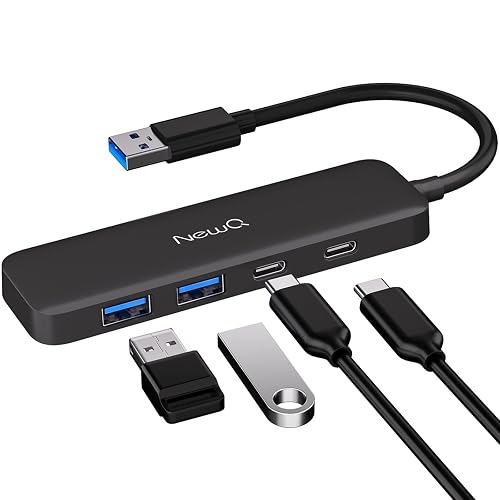
Desktop USBC Hub 9-in-1
Desktop USBC Hub, Plug and Play, 3 USB-A/C 3.0 5Gbps, 2 USB 2.0, SD/TF 104MB/s,1.64ft Cable for MacBook Neo/Air/Pro,iPhone 17 USB C Hub 9-in-1, 28° Ergonomic Aluminum Hub, 4K@60Hz HDMI, PD 100W
Best for: Desks that need the most ports from a single hub
This is the pick for someone who wants to replace a drawer full of adapters with one aluminum hub. It suits a Mac mini that feeds a monitor, a webcam, a card reader for photos and several USB peripherals at once.
Key specs
- Three USB-A/C 3.0 ports at 5Gbps
- Two USB 2.0 ports
- SD and TF card slots rated up to 104MB/s
- 4K@60Hz HDMI output
- PD 100W input for charging the host
- 1.64 ft cable and a 28-degree aluminum body
Pros
- Covers the widest range of ports in this list
- Card readers are useful for photographers and video editors
- Angled body keeps it easy to reach on a crowded desk
Cons
- The short cable can be tight if the Mac mini sits far from the monitor
- Nine ports means a larger footprint than minimal hubs
Bottom line: Choose this if port count matters more than footprint and you use a card reader regularly.
Anker USB-C Hub 5-in-1
USB C Dongle with 90W Max Power Delivery, 3×5Gbps USB A Data Ports, for MacBook, Dell, and More (Charger Not Included) Anker USB-C Hub, 5-in-1 USB Hub for Laptops, 4K HDMI Multiport Adapter
Best for: Simple setups where value matters most
This hub is aimed at users who need a display output and a few USB-A ports for a keyboard, mouse and flash drive. Anker is a long-established charging and accessory brand, and owners commonly praise its straightforward plug-and-play operation.
Key specs
- Three USB-A 3.0 data ports at 5Gbps
- 4K HDMI output
- 90W maximum power delivery pass-through
- Designed for MacBook and Dell laptops, and generally compatible with Mac mini via USB-C
Pros
- Simple layout that is easy to understand
- Pass-through charging keeps the port count low
- Strong brand support and a familiar build
Cons
- No card reader or Ethernet
- Charger is not included, so you need a compatible USB-C power adapter
Bottom line: A sensible pick for a basic desk that needs HDMI and a few USB-A devices.
Satechi 7-in-1 USB-C Hub Pro Slim
SatechiUSB hub, 100W Charging, USB 4, USB 3.2 Gen 2, SD/Micro Card Reader, for Mac, MacBook Air/Pro 7-in-1 USB-C Hub Pro Slim, 100W Charging, 4K HDMI, USB4, Midnight
Best for: Charging while docked
This hub fits users who want one cable to the Mac mini and a clean desk. Its 100W charging support and USB4 connection make it a good match for keeping the host powered while peripherals stay connected.
Key specs
- 100W charging support
- USB 4 and USB 3.2 Gen 2 connectivity
- SD and microSD card reader
- 4K HDMI output
- Midnight finish with a slim profile
Pros
- Pass-through power keeps the desk tidy
- USB4 and 3.2 Gen 2 support fast external drives
- Slim body suits low-profile desks
Cons
- Fewer USB-A ports than the nine-port hub
- Some owners report the power adapter must be a good match for full 100W output
Bottom line: Pick this if you want charging and fast data through one connection on a tidy desk.
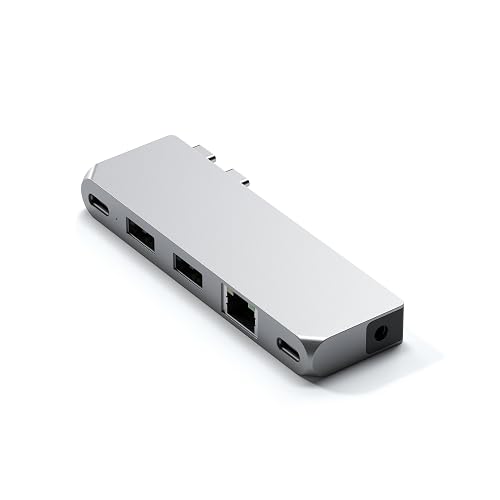
Satechi Pro Hub Mini USB-C Multiport Adapter
SatechiUSB-C and 2 USB-A data ports, Ethernet, audio jack, for MacBook Air/Pro M1-M5 Pro Hub Mini USB-C Multiport Adapter, USB4 Port, Ethernet, Silver
Best for: Compact desks and travel
This is the smallest hub here. It suits a Mac mini on a shared or small desk, or someone who wants Ethernet and audio without a large dongle. Its footprint is much lower than the larger hubs, though you give up some ports.
Key specs
- USB-C and two USB-A data ports
- Ethernet port
- Audio jack
- USB4 port
- Silver finish
Pros
- Small footprint that fits tight spaces
- Ethernet is useful when Wi-Fi is unreliable
- Easy to carry between locations
Cons
- Only two USB-A ports, which may be limiting
- No card reader and no dedicated display output in the listing name
Bottom line: Best for a minimal desk that needs wired networking more than extra storage.
Buying Guide
Port mix and how many devices you connect
Count every device you connect at the same time, including keyboard receivers, drives and a card reader. A hub with three to four USB-A ports and one HDMI output covers most desks. Larger setups with several drives benefit from nine-port designs.
Good picks for this: Desktop USBC Hub 9-in-1, Anker USB-C Hub 5-in-1
Video output and resolution
If you drive a monitor, check the maximum resolution and refresh rate. Many hubs list 4K at 60Hz over HDMI. Confirm your monitor’s input and cable match before buying.
Good picks for this: Desktop USBC Hub 9-in-1, Satechi 7-in-1 USB-C Hub Pro Slim
Power delivery and charging pass-through
Some hubs pass power from a charger through to the host. Check the wattage the hub supports and the adapter you plan to use. Pass-through support keeps the desk to one cable, but the charger must be rated high enough.
Good picks for this: Satechi 7-in-1 USB-C Hub Pro Slim, Anker USB-C Hub 5-in-1
Data speed and drive performance
Look for USB 3.2 Gen 2 or USB4 if you move large files to external SSDs. Standard USB 2.0 ports are fine for keyboards and mice but slow for storage.
Good picks for this: Satechi 7-in-1 USB-C Hub Pro Slim, Desktop USBC Hub 9-in-1
Size, fit and desk space
Measure the space behind and beside the Mac mini. A slim hub can sit under a monitor stand, while a larger one needs open desk area. Cable length matters too: a short cable limits placement.
Good picks for this: Satechi Pro Hub Mini USB-C Multiport Adapter, Satechi 7-in-1 USB-C Hub Pro Slim
Build quality and heat
Aluminum bodies generally dissipate heat better than plastic. A hub that runs warm under load can throttle data speeds, so a metal shell is a practical advantage on a busy desk. We also found Anker 7 in 2 USB C Hub: 7 Best Picks for Every Desk in 2026 useful on this point.
Good picks for this: Desktop USBC Hub 9-in-1, Satechi Pro Hub Mini USB-C Multiport Adapter
Extra features: card readers, Ethernet and audio
Decide whether you need a card reader, wired networking or a headphone jack. These features add size, so include only what your work requires.
Good picks for this: Satechi Pro Hub Mini USB-C Multiport Adapter, Desktop USBC Hub 9-in-1
FAQ
Does a USB-C hub work with the Mac mini?
Yes. The Mac mini has USB-C ports, so a hub that uses USB-C with data and video support will connect directly. Check that the hub lists Mac compatibility.
Do I need a hub with power delivery?
Only if you want to charge the Mac mini through the hub. Many desks use the Mac mini’s own power cable, so pass-through charging is optional.
Why does my external display flicker or show a low resolution?
This is often caused by a cable that cannot carry the required bandwidth or a hub that shares bandwidth across ports. Try a shorter, certified cable and connect the display to the hub’s dedicated HDMI port.
Is USB4 faster than USB 3.2 Gen 2?
USB4 generally offers higher maximum throughput, but real-world speed depends on the drive, cable and host. For most external SSDs, either standard delivers fast transfers.
Can I use a hub for Ethernet instead of Wi-Fi?
Yes. Hubs with an Ethernet port provide a wired connection that can be more stable for large file transfers or video calls.
How do I know if my hub will support 4K at 60Hz?
Check the hub’s published specifications for 4K at 60Hz, and confirm your monitor supports the same resolution and refresh rate over HDMI.
Should I buy a hub with a card reader?
If you import photos or video from SD or microSD cards, a built-in reader saves an extra adapter. Otherwise it adds size without much benefit.
Conclusion
For the widest port selection, the Desktop USBC Hub 9-in-1 is the most complete option on this list. Users who want charging and fast data through a clean desk will find the Satechi 7-in-1 USB-C Hub Pro Slim a strong match. The Satechi Pro Hub Mini suits compact spaces that need Ethernet, and the Anker USB-C Hub 5-in-1 serves basic setups well. Match the hub to the devices you actually connect, and check display and power specs against your monitor and charger before buying.
Sources
- Official USB specifications, including USB4 and USB 3.2 data rates and power delivery standards
- Guidance on energy use and efficient power equipment for home and office setups (energy.gov)
- Standards and technical papers on high-speed data interfaces and cable performance
Before you buy: helpful guides
- Best Mac Usb-c Hub: How to Pick the Right One for Your Mac (2026)
- USB-C Hub for Mac: How to Choose and Connect One (Step-by-Step)
- Usb-c Hub for Steam Deck: What to Buy, What to Avoid, and Why
- Dell Pro 32 Plus 4k Usb-c Hub Monitor P3225qe: A Practical Guide (2026)
- USB C Hub for iPad: How to Choose the Right One (Step-by-Step)
Related reading
- 4 Best USB C Hubs for Mac Mini M4 Picks for Desk Setups (2026)
- 3 Best USB C Hubs for Mac Mini Picks for Desk Setups (2026)
About Owen Palmer
Owen Palmer is part of our editorial team and reviews and edits our consumer tech how-to & troubleshooting guides, checking product details against manufacturer specifications and owner feedback.