By Owen Palmer
Updated November 2026
A USB-C hub for Android phone use turns one charging port into several connections, letting you attach an external monitor, a keyboard, a memory card, a wired network cable or a thumb drive at the same time. The picks below were chosen by checking product listings, brand reputation and common owner feedback patterns, with an eye on Android compatibility, video output, power delivery and how many ports you actually need.
At a glance:
Our top picks at a glance
- 1
 TOP CHOICEBest overallBENFEI USB C Hub 5-in-1View on Amazon
- 2
 TOP CHOICEBest for desktop-style Android setupsGKI 7-in-1 USB-C Docking StationView on Amazon
- 3
 TOP CHOICEBest for video captureUSB C iPhone Hub for ProRes Video RecordingView on Amazon
- 4
 Best for storage and card readingUSB C Hub USB Hub 3.0 for Laptop, 8 in 2View on Amazon
- 5
 Best for multi-display output4K USB C to HDMI Splitter Hub, 7 in 1View on Amazon
- 6
 Best for power delivery and HDMIUSBC Splitter Docking Station with HDMI 2.0, 100W PD, USB-C, USB-A 3.0View on Amazon
Our Top Picks
Quick Comparison
| Product | Best for | Key feature |
|---|---|---|
| BENFEI USB C Hub 5-in-1 | Overall use | 4K HDMI, 100W PD |
| GKI 7-in-1 USB-C Docking Station | Samsung DeX-style setups | 4K HDMI, card reader |
| USB C iPhone Hub for ProRes Video Recording | Video capture | Dual USB-C, micro SD |
| USB C Hub USB Hub 3.0 for Laptop, 8 in 2 | Storage and card reading | Multiple USB 3.0 ports |
| 4K USB C to HDMI Splitter Hub, 7 in 1 | Multi-display output | 4K HDMI, SD/TF slots |
| USBC Splitter Docking Station with HDMI 2.0 | Power delivery plus HDMI | 100W PD, HDMI 2.0 |
BENFEI USB C Hub 5-in-1
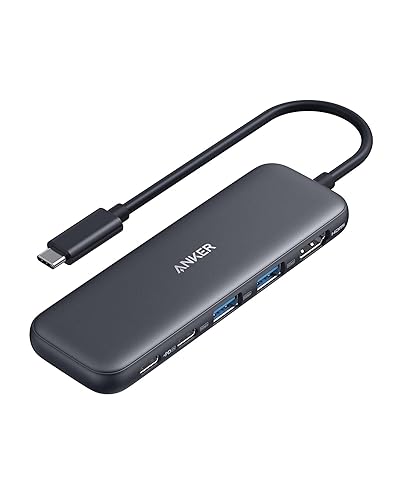
BENFEI USB C Hub 5-in-1 with 4K HDMI(Certified), 100W Power Delivery, 3 USB-A, Silicone Cable, Aluminum Case Compatible with MacBook Pro/Air, iPad Pro, iMac, iPhone 15 Pro/Pro Max, XPS, Thinkpad
Best for: Overall use with a monitor, keyboard and charger connected at once.
This hub suits Android users who want a balanced mix of video output, USB-A ports and pass-through charging in one compact body. Manufacturers specify 4K HDMI output and 100W Power Delivery pass-through.
Pros
- Pass-through charging for keeping the phone topped up
- Aluminum housing with a braided cable
Cons
- Some owners report the HDMI port runs warm during long sessions
GKI 7-in-1 USB-C Docking Station
GKI 7-in-1 USB-C Docking Station, 4K HDMI Hub for Samsung DeX & Android Phones, Dex Dock for iPad/Laptop/iPhone 15-17, External Monitor Adapter with SD/TF Card Reader & USB 3.0
Best for: Desktop-style Android setups, including Samsung DeX-compatible phones.
This dock is aimed at people who want a phone to drive an external display with a keyboard and mouse, while also reading memory cards. Listings describe it as built for Samsung DeX and Android phones.
Pros
- 4K HDMI output for an external monitor
- Built-in SD and TF card reader
Cons
- Desktop-style features depend on your phone’s own DeX or display support
USB C iPhone Hub for ProRes Video Recording
USB C iPhone Hub for ProRes Video Recording – Ultra-Slim Aluminum USB 3.2, Dual USB-C, Micro SD, and Charging Port Hub for iPhone 18/17/16/15 Pro/Pro Max
Best for: Video capture and transferring footage from external storage.
This hub is positioned for creators who shoot video and need a second USB-C port for an external drive or microphone. Its listing focuses on USB 3.2 transfer speeds and a slim aluminum body.
Pros
- Dual USB-C ports and a micro SD slot
- Slim aluminum body that is easy to carry
Cons
- Listing is oriented toward iPhone, so confirm Android compatibility before buying
USB C Hub USB Hub 3.0 for Laptop, 8 in 2
USB C Hub USB Hub 3.0 for Laptop, Upgrade 8 in 2 USB Splitter with USB-C/4 USB A Port Extender, TF/SD Card Slot, 3.5mm Audio Adapter, USBC USB Dongle for PC/Mac/MacBook/Laptop/iPad/Tablet
Best for: Storage and card reading with several USB-A devices.
This hub fits users who need to connect drives, a card reader and a headset without juggling adapters. It is marketed for PCs and tablets, so check how your Android phone handles USB storage.
Pros
- Multiple USB 3.0 and USB-A ports
- TF/SD card slots and a 3.5mm audio port
Cons
- Phone power and data behavior can vary, so test your specific device
4K USB C to HDMI Splitter Hub, 7 in 1
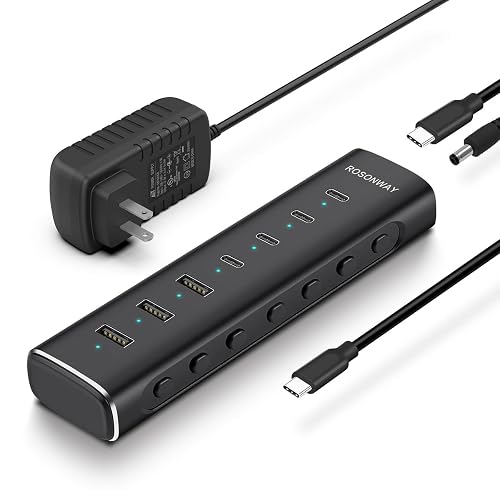
4K USB C to HDMI Splitter Hub, 100W Max PD Port, 2 USB 3.0 & 1 USB C Data Ports 5Gbps, SD/TF Card Reader Acer USB C Hub, 7 in 1 Multi-Port Adapter for Laptop/Mac Type C Devices
Best for: Multi-display output and mixed port needs.
This hub targets people who want HDMI video, card reading, USB data and power delivery in a single adapter. Listings describe 4K output and 5Gbps USB data ports.
Pros
- 4K HDMI output plus SD/TF readers
- Power delivery pass-through
Cons
- Not every Android phone supports DisplayPort Alt Mode, which HDMI output relies on
Buying Guide
Android Compatibility and Display Output
Not every USB-C hub works the same way with Android phones. Look for hubs that explicitly mention Android or DeX support if you plan to connect an external monitor, since video output depends on your phone’s USB-C port supporting DisplayPort Alt Mode. Check your phone’s settings or manufacturer documentation to confirm it supports external display output before you buy.
Power Delivery and Charging Needs
If you want to charge your phone while using the hub, pay attention to the power delivery rating and whether the hub passes power through to the device. Hubs with higher wattage ratings can also keep a connected laptop or tablet charged, which matters if you use one hub across several devices. Make sure the hub’s charging capacity is suitable for your phone’s own charging specifications.
Port Mix and Everyday Use
Think about what you will connect most often. A simple setup for a keyboard, mouse and thumb drive needs only USB-A ports, while a desktop-style setup may also need HDMI, an SD or microSD card reader, or Ethernet. Choosing a hub with only the ports you need usually keeps the device smaller and easier to carry.
Data Speed and Build Quality
Data transfer speed matters when you move large files or back up photos and video from a memory card. Look for USB 3.0 or higher labels on the data ports if speed is important to you. A sturdy aluminum or reinforced housing and a braided or silicone cable can also help the hub hold up to daily travel.
FAQ
Will any USB-C hub work with my Android phone?
Not every hub is compatible with every Android phone. Basic data and USB-A connections usually work, but external display output and charging depend on your phone’s hardware and software support. Check the phone’s specifications before buying.
Can I charge my Android phone while using a USB-C hub?
Some hubs include a power delivery port that lets you charge your phone while it is connected. Charging speed depends on both the hub and your phone’s charging capabilities. Confirm pass-through charging is supported if this is important to you.
Do I need a hub with HDMI to connect my phone to a TV or monitor?
You only need HDMI if you want to show your phone’s screen on a larger display. Many Android phones support this through a USB-C to HDMI connection, though some require a specific mode or additional settings. Check your phone’s display output options first.
What is the difference between USB 3.0 and USB 2.0 ports on a hub?
USB 3.0 ports offer faster data transfer speeds than USB 2.0, which is useful for copying large files from a drive or memory card. USB 2.0 ports are typically fine for keyboards, mice and other low-bandwidth accessories. Choose USB 3.0 if you move large amounts of data.
Do USB-C hubs drain my phone’s battery faster?
Connected accessories and external displays can increase power use, so your battery may drain faster while the hub is in use. Charging through the hub can offset this if the hub supports pass-through power. Keeping the phone plugged in during longer sessions helps.
Can one hub work for both my Android phone and my laptop?
Many USB-C hubs are designed to work with phones, tablets and laptops alike. Compatibility depends on each device’s USB-C implementation, so the hub may work on your laptop while offering different features on your phone. Check which devices the manufacturer lists as supported.
Conclusion
If you want a flexible, all-around option for everyday Android use, the top overall pick offers a balanced set of ports and charging support. If you plan to build a desktop-style setup with a monitor, keyboard and storage, the docking-style option with more connections is the better fit.
Travelers and casual users who mainly need extra USB-A ports or a card reader will likely find a smaller, simpler hub more practical. Match the number of ports and the video and charging features to what you actually plan to connect.
Related reading
- Usb-c Hub for Steam Deck: What to Buy, What to Avoid, and Why
- Usb C Hub for Chromecast: Does It Work and Which Setup to Use?
- Ugreen USB C Hub: How to Choose, Connect and Fix Common Problems (2026)
- USB-C Hub with Ethernet Port: How to Choose and Set One Up
About Owen Palmer
Owen Palmer is part of our editorial team and reviews and edits our consumer tech how-to & troubleshooting guides, checking product details against manufacturer specifications and owner feedback.