
 By Colin Foster
Updated November 2026
If you want a touch screen on laptop hardware, the choice comes down to what you plan to do with it. Some buyers want quick tablet-style navigation for reading and note-taking, others need a sturdy daily driver for school or office work, and some just want a second way to tap through apps. This list weighs each model on its screen type, processor class, memory and storage, operating system fit, and the feedback owners commonly report. The picks run from a lightweight budget option to a larger, business-oriented machine.
Our top picks at a glance
- 1
 TOP CHOICEBest overallHP OmniBook 3 17.3" FHD IPS Touchscreen LaptopView on Amazon
- 2
 TOP CHOICEBest for school and classroom useLenovo Flagship Chromebook 14'' FHD TouchscreenView on Amazon
- 3
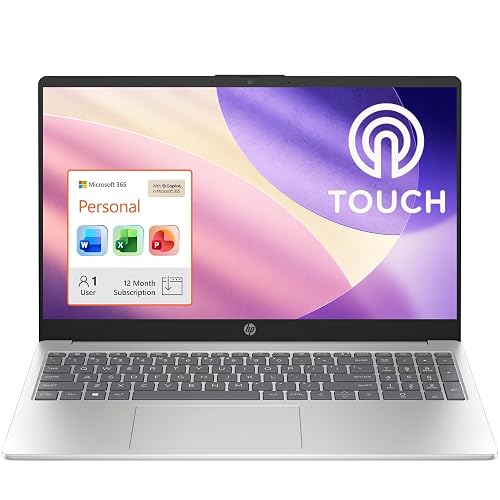 TOP CHOICEBest for office productivityHP Essential 15.6" Touchscreen LaptopView on Amazon
- 4
 Best budget pickHP 14 inch Laptop, HD Display, Intel N150View on Amazon
- 5
 Best for lay-flat presentations6" Laptop with 180° Lay-Flat HingeView on Amazon
Our Top Picks
Quick Comparison
| Product | Best for | Key feature |
|---|---|---|
| HP OmniBook 3 17.3″ FHD IPS Touchscreen Laptop | Large-screen multitasking | 17.3-inch FHD IPS touch display with 12GB DDR5 memory |
| Lenovo Flagship Chromebook 14” FHD Touchscreen | Students and web-based work | 14-inch FHD touchscreen on Chrome OS |
| HP Essential 15.6″ Touchscreen Laptop | Office and home productivity | 15.6-inch touch display with 16GB RAM and 1-year Office 365 |
| HP 14 inch Laptop, HD Display, Intel N150 | Basic browsing and light tasks | Compact 14-inch HD display on Windows 11 Home |
| 15.6″ Laptop with 180° Lay-Flat Hinge | Shared viewing and presentations | 180° lay-flat hinge with USB-C and FHD display |
HP OmniBook 3 17.3″ FHD IPS Touchscreen Laptop
AMD Ryzen 5 130(>i7-1255U), 512GB SSD+512GB External, Backlit Keyboard, Wi-Fi 6, Win11, Silver, for Business & School HP OmniBook 3 17.3" FHD IPS Touchscreen Laptop, 12GB DDR5/1TB storage
Best for: Large-screen multitasking and extended office or school sessions.
This model suits people who want a big touch display for split-window work, spreadsheets and video calls. The 17.3-inch size gives more room than most laptops in this list, which helps when touch gestures are used alongside a keyboard.
Key specs
- 17.3-inch FHD IPS touchscreen
- AMD Ryzen 5 processor class
- 12GB DDR5 memory
- 1TB storage
- Backlit keyboard, Wi-Fi 6, Windows 11
Pros
- Large IPS panel with wide viewing angles
- Generous memory for multitasking
- Backlit keyboard for low-light work
Cons
- Heavier and less portable than 14-inch models
- Battery life under heavy touch use is shorter than owners of lighter machines often expect
Bottom line: Pick this if you want the largest touch display here and mostly work at a desk or table.
Lenovo Flagship Chromebook 14” FHD Touchscreen
Lenovo Flagship Chromebook, 14'' FHD Touchscreen Slim Thin Light Laptop Computer, 8-Core MediaTek Kompanio 520 Processor, 4GB RAM, 64GB eMMC, WiFi 6,Chrome OS, Abyss Blue
Best for: Students and users who live in a browser.
Chrome OS suits users who mainly use web apps, Google Workspace and streaming. The 14-inch touchscreen lets you scroll, tap and annotate without a mouse, which is useful for reading PDFs or using classroom apps.
Key specs
- 14-inch FHD touchscreen
- 8-core MediaTek Kompanio 520 processor
- 4GB RAM, 64GB eMMC storage
- WiFi 6, Chrome OS
Pros
- Light and slim for carrying between classes
- Touchscreen works well with Chrome OS apps
- Simple, low-maintenance software
Cons
- Limited local storage and 4GB RAM can feel tight with many tabs
- Not suited to Windows-only software
Bottom line: A good match for students whose work stays in the browser and cloud apps.
HP Essential 15.6″ Touchscreen Laptop
HP Essential 15.6" Touchscreen Laptop with 1-Year Office 365, 16GB RAM, 1TB Cloud and 128GB SSD, Intel Core, Bluetooth, Wi-Fi, Natural Silver, Windows 11, no Mouse
Best for: Office and home productivity on Windows.
This model offers a full Windows environment with a touch display and a generous memory allocation for everyday office work. It fits people who need Microsoft software and want touch as a convenience rather than a primary input.
Key specs
- 15.6-inch touchscreen
- 16GB RAM
- 128GB SSD plus cloud storage
- Intel Core processor, Wi-Fi, Bluetooth, Windows 11
- 1-year Office 365 included
Pros
- 16GB RAM is well above entry-level laptops
- Included Office 365 subscription
- Full Windows compatibility
Cons
- 128GB SSD is small for large local files
- Touch screen brightness and glare vary by unit, according to some owner reports
Bottom line: Best for buyers who need Windows and Office in one package with a touch display.
HP 14 inch Laptop, HD Display, Intel N150
HP 14 inch Laptop, HD Display, Intel N150, 4 GB RAM, 128 GB UFS, Intel Graphics, Windows 11 Home, Includes a 1-Year Microsoft 365 Personal Subscription. Jet Black, 14-dq6199nr
Best for: Basic browsing, email and light productivity on a tight budget.
This is an entry-level machine for users who want a simple, portable device with a Windows desktop and a Microsoft 365 trial. Expect modest performance and plan your tasks accordingly.
Key specs
- 14-inch HD display
- Intel N150 processor
- 4GB RAM, 128GB UFS storage
- Windows 11 Home, 1-year Microsoft 365 Personal
Pros
- Compact and easy to carry
- Windows 11 with Microsoft 365 included
- Low-cost entry into touch-enabled Windows use
Cons
- 4GB RAM limits heavy multitasking
- HD resolution is less sharp than FHD for reading small text
Bottom line: Suitable for light tasks if budget is the priority, but not for demanding work.
15.6″ Laptop with 180° Lay-Flat Hinge
180° Lay-Flat, 6GB RAM 128GB SSD, USB-C, 1920×1080 FHD, WiFi 5, Bluetooth 4.2, 53.2Wh Battery, Thin & Lightweight 15.6" Laptop with AI Assistant, Office 365, Quad-Core Processor
Best for: Shared viewing, presentations and tabletop collaboration.
The 180-degree hinge lets the screen lie flat, which helps when you show content to others or work across a table. The 15.6-inch FHD display and USB-C port add flexibility for everyday use.
Key specs
- 15.6-inch FHD 1920×1080 display
- 180° lay-flat hinge
- 6GB RAM, 128GB SSD
- USB-C, WiFi 5, Bluetooth 4.2
- 53.2Wh battery
Pros
- Lay-flat hinge is practical for shared viewing
- FHD display on a 15.6-inch panel
- USB-C for charging and peripherals
Cons
- Older Wi-Fi and Bluetooth standards than newer models
- 6GB RAM is adequate but not generous for heavy use
Bottom line: Pick this if the hinge and flat-lay design matter more to you than top-tier specs.
Buying Guide
Screen type and touch technology
Most laptop touch screens use capacitive sensing, which responds to finger contact with good accuracy. Check that the panel is IPS if you care about viewing angles, since many touch displays use IPS. Resolution matters too: FHD (1920×1080) is the usual baseline for text clarity at 14 to 17 inches.
Good picks for this: HP OmniBook 3 17.3″ FHD IPS Touchscreen Laptop, Lenovo Flagship Chromebook 14” FHD Touchscreen
Processor class and performance
Touch input adds little processing load, so the CPU matters more for apps and multitasking. Entry-level processors such as the Intel N-series suit browsing and documents, while Ryzen 5 or Intel Core chips handle more demanding work.
Good picks for this: HP OmniBook 3 17.3″ FHD IPS Touchscreen Laptop, HP Essential 15.6″ Touchscreen Laptop
Memory and storage
For Windows, 8GB RAM is a comfortable minimum, and 4GB often feels tight with many browser tabs. Check whether storage is eMMC, UFS or SSD: SSDs generally feel faster for everyday use. Cloud storage can supplement local space but depends on connectivity.
Good picks for this: HP Essential 15.6″ Touchscreen Laptop, HP OmniBook 3 17.3″ FHD IPS Touchscreen Laptop
Operating system fit
Windows 11 supports the widest range of desktop software and touch gestures. Chrome OS works well for web apps and classroom tools but has limits for specialized programs. Choose based on the software you actually need.
Good picks for this: Lenovo Flagship Chromebook 14” FHD Touchscreen, HP 14 inch Laptop, HD Display, Intel N150
Size, weight and portability
Screens from 14 inches up to 17.3 inches each suit different routines. A 14-inch machine is easier to carry daily, while a 17-inch model is better as a desk-bound workstation. Consider your bag and your commute.
Good picks for this: Lenovo Flagship Chromebook 14” FHD Touchscreen, 15.6″ Laptop with 180° Lay-Flat Hinge
Battery and charging
Touch use draws slightly more power than typing alone, so battery capacity matters. Manufacturers list watt-hour (Wh) ratings; larger numbers generally mean longer runtimes. USB-C charging is convenient because you can share chargers across devices.
Good picks for this: 15.6″ Laptop with 180° Lay-Flat Hinge, Lenovo Flagship Chromebook 14” FHD Touchscreen
Durability and care
Touch screens get fingerprints and occasional pressure, so a sturdy hinge and a scratch-resistant panel help. Clean the screen with a soft microfiber cloth and a small amount of isopropyl-free cleaner, and avoid spraying liquid directly onto the display. For cleaning and battery safety guidance, consult the manufacturer’s manual.
Good picks for this: HP Essential 15.6″ Touchscreen Laptop, HP OmniBook 3 17.3″ FHD IPS Touchscreen Laptop
FAQ
Does a touch screen on laptop hardware drain the battery faster?
Touch input itself uses very little power, but a brighter, larger touch display can shorten runtime. Lower the brightness and use power-saving modes to extend battery life.
Can I add touch to a laptop that doesn’t have a touchscreen?
Generally no. Touch requires a digitizer built into the display panel, so the practical route is to buy a laptop with a touch screen or use an external touch monitor.
Is Chrome OS or Windows better for a touch screen?
Windows supports more desktop software and has broader touch gesture support. Chrome OS is a good fit if you mainly use web apps and Google services.
How do I clean a laptop touch screen safely?
Power off the device, use a soft microfiber cloth lightly dampened with water or a screen-safe cleaner, and wipe gently. Avoid paper towels and harsh chemicals, and check your manufacturer’s guidance before using any product.
Is 14 inches or 15.6 inches better for touch use?
A 14-inch screen is easier to carry, while a 15.6-inch screen gives more room for touch targets and split-screen work. Choose based on how often you travel with the device.
Do I need an external stylus with a touch screen laptop?
Not for basic tapping and scrolling. A stylus helps with drawing, note-taking and precise selection, and some touch models are designed to support one.
Conclusion
For most buyers who want a touch screen on laptop hardware, the HP OmniBook 3 17.3″ offers the largest display and most memory, while the HP Essential 15.6″ balances Windows software with a practical touch panel. Students who work mainly in the browser will find the Lenovo Flagship Chromebook 14” suits them well. Shoppers on a tight budget can consider the HP 14 inch Laptop for light tasks, and the 15.6″ Laptop with 180° Lay-Flat Hinge fits anyone who presents or shares screens often.
If you are still deciding, compare your daily software needs, carrying habits and battery expectations against the specs above. For related troubleshooting, see Lenovo Laptop Screen Display Problem: 8 Causes and Fixes That Work or Problems with HP Laptop Screen: 7 Causes and Fixes to Try First. If you want a second screen instead, 7 Best 4K Touch Screen Portable Monitors for Laptop Users (2026) covers external options.
Sources
- Guidance on battery care and how laptop power use affects runtime (energy.gov)
- Consumer safety information on lithium battery handling and charging (cpsc.gov)
- Standards and measurement resources relevant to display and electronics testing (nist.gov)
Related reading
About Colin Foster
Colin Foster is part of our editorial team and reviews and edits our consumer tech how-to & troubleshooting guides, checking product details against manufacturer specifications and owner feedback.




