
 By Owen Palmer
Updated November 2026
A powered USB-C hub for iPad adds ports your tablet lacks, such as HDMI, USB-A, SD card slots and pass-through charging, while drawing its own power so your iPad battery isn’t drained. The four picks below were chosen by comparing manufacturer specifications, brand reputation and common owner feedback on power delivery wattage, video output, port mix and build quality. A related read: 3 Best USB C Hub SD Card Reader Picks for Everyday Use (2026).
Our top picks at a glance
- 1
 TOP CHOICEBest overallBENFEI USB C Hub 5-in-1 with 4K HDMIView on Amazon
- 2
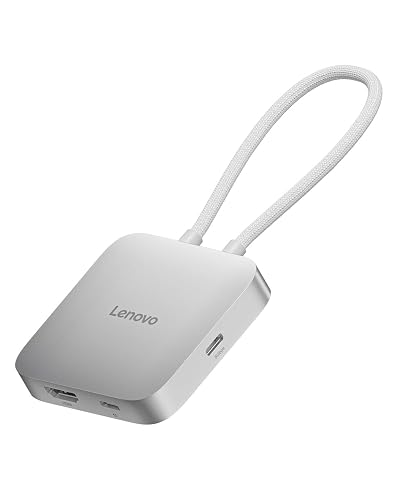 Best for travelLenovo USB-C 5-in-1 Travel HubView on Amazon
- 3
 Best for photographersSatechi OntheGo 5-in-1 USB-C HubView on Amazon
- 4
 Best for expanded portsBelkin USB-C 7-in-1 MultiPort Docking StationView on Amazon
Our Top Picks
Quick Comparison
| Product | Best for | Key feature |
|---|---|---|
| BENFEI USB C Hub 5-in-1 | Everyday desk use | 100W Power Delivery pass-through |
| Lenovo USB-C 5-in-1 Travel Hub | Carrying in a bag | Compact, 90W Power Delivery |
| Satechi OntheGo 5-in-1 USB-C Hub | Photo and video import | SD card reader with magnetic mount |
| Belkin USB-C 7-in-1 MultiPort Docking Station | Maximum port count | Dual card readers and 3.5mm audio |
BENFEI USB C Hub 5-in-1 with 4K HDMI
BENFEI USB C Hub 5-in-1 with 4K HDMI(Certified), 100W Power Delivery, 3 USB-A, Silicone Cable, Aluminum Case Compatible with MacBook Pro/Air, iPad Pro, iMac, iPhone 15 Pro/Pro Max, XPS, Thinkpad
Best for: Everyday desk use with an external display
This hub suits someone who wants HDMI output, USB-A devices and charging through one cable at a desk. Manufacturers list 100W Power Delivery pass-through, which covers most iPad Pro charging needs.
Pros
- 100W Power Delivery pass-through charging
- 4K HDMI output plus three USB-A ports
Cons
- No SD card reader
Lenovo USB-C 5-in-1 Travel Hub
Lenovo USB-C 5-in-1 Travel Hub, 90W Power Delivery, 4K 60Hz HDMI, Dual USB-C and USB-A Ports, Plug and Play, Compact, Silver Grey
Best for: Travel and carrying in a bag
This compact hub fits people who need a slim accessory for hotels, airports or presentations. Owners often report it is plug-and-play with iPad without extra drivers.
Pros
- Compact, lightweight body
- 90W Power Delivery and 4K 60Hz HDMI
Cons
- Fewer USB-A ports than larger hubs
Satechi OntheGo 5-in-1 USB-C Hub
USB hub, 60W PD pass-through charging, SD card reader, 5 Gbps Type-A/Type-C data, magnetic mount, for MacBook Neo/Air/Pro Satechi OntheGo 5-in-1 USB-C Hub, 4K/60Hz HDMI, SD Card Reader, Silver
Best for: Photo and video import
This hub is aimed at creators who move files from cameras and memory cards onto an iPad. The listing specifies a 5 Gbps data rate and a magnetic mount for keeping it attached to the device.
Pros
- SD card reader for direct camera imports
- 60W Power Delivery pass-through
Cons
- Lower wattage than the 100W BENFEI option
Belkin USB-C 7-in-1 MultiPort Docking Station
Belkin USB-C Hub, 7-in-1 MultiPort Docking Station for MacBook & Windows – 85W USB-C Power Delivery 3.0, 4K HDMI 1.4, 2x USB-A 3.0, SD 3.0, Micro SD 3.0, & 3.5mm Audio Jack
Best for: Maximum port count
This is the choice for someone who needs several connections at once, including two card readers and a headphone jack. Manufacturers specify 85W Power Delivery and 4K HDMI 1.4 output.
Pros
- Seven ports including SD and microSD readers
- Built-in 3.5mm audio jack
Cons
- Larger footprint than travel-sized hubs
Buying Guide
Power Delivery Wattage
Check the pass-through wattage listed by the manufacturer. Higher wattage charges your iPad faster while you use the hub, and lower wattage may only maintain the battery level.
Video Output
Confirm the HDMI resolution and refresh rate. A 4K 60Hz rating gives smoother output than 4K 30Hz for external displays.
Port Mix
List the devices you actually connect, such as USB-A drives, SD cards or Ethernet. Pick a hub that covers those needs without extra adapters.
Size and Portability
A compact body suits bags, while a larger body may offer more ports. Choose based on where you will use it most.
Good picks for this: BENFEI USB C Hub 5-in-1 and Belkin USB-C 7-in-1 MultiPort Docking Station
FAQ
Does a powered USB-C hub charge an iPad?
Yes, if the hub supports Power Delivery pass-through, it can send power to the iPad while the hub’s own ports are in use.
What wattage do I need for an iPad Pro?
Many owners aim for at least 60W, and manufacturers of higher-wattage hubs often list 90W or 100W for faster charging. For another angle, check out 3 Best USB C Adaptor Hub Picks for Laptops and Multi-Device Desks (2026).
Do I need a powered hub or a bus-powered one?
A powered hub uses its own power adapter, which is better for connecting drives and charging the iPad at the same time. Bus-powered hubs draw everything from the iPad and may run low on power.
Conclusion
The BENFEI hub suits most desk users who want HDMI and strong charging. The Lenovo travel hub fits people who need something compact, while the Satechi model is the better pick for photo imports. Choose the Belkin docking station if you need the most ports in one device.
Sources
- USB specifications, including Power Delivery and data transfer standards
- Guidance on electronic device safety and charging practices (nist.gov)
- Engineering standards related to digital interfaces and connectivity
Related reading
- USB C Hub for iPad: How to Choose the Right One (Step-by-Step)
- USB C Hub for iPad Air: How to Choose and Connect One (Step-by-Step)
- Usb-c Hub for Steam Deck: What to Buy, What to Avoid, and Why
About Owen Palmer
Owen Palmer is part of our editorial team and reviews and edits our consumer tech how-to & troubleshooting guides, checking product details against manufacturer specifications and owner feedback.


