By Isabella Bishop
Quick answer
Our overall pick for the best VR headsets is the Meta Quest 3 512GB for its balance of high-resolution wireless gaming and mixed reality. Other picks are better for specific needs like PC-powered visuals, flight simulation, or a more accessible entry point.
Choosing among the best VR headsets means balancing factors like resolution, whether it needs a PC, and if you want to blend virtual and real worlds. We compared nine current models from leading brands, focusing on the specifications and features listed by the manufacturers to help you find the right match for gaming, simulation, or creative exploration. For more on comparing tech specs, see our guide on how to compare gadgets.
Quick picks
- Best overall wireless & mixed reality: Meta Quest 3 512GB (see on Amazon)
- Best high-res PC & standalone hybrid: HTC Vive Focus Vision (see on Amazon)
- Best for ultra-sharp flight sim visuals: Pimax Crystal Super (see on Amazon)
- Best accessible entry-level option: Oculus Quest 2 128GB (see on Amazon)
9 Best VR Headsets compared
| # | Product | Best for | Display Resolution (per eye) | Field of View | Connectivity |
|---|---|---|---|---|---|
| 1 | Meta Quest 3 512GB | Best overall wireless and mixed reality headset | 4K+ Infinite Display | Not listed | Standalone, PC VR |
| 2 | Meta Quest 3S 128GB | Best wireless headset with a more accessible bundle | High-Res Display | Not listed | Standalone, PC VR |
| 3 | Oculus Quest 2 128GB | Best accessible entry-level VR headset | 1832 x 1920 | Not listed | Standalone |
| 4 | Pimax Crystal Super | Best headset for ultra-sharp visuals in simulators | 3840 x 3840 | 140° | PC VR (DisplayPort) |
| 5 | Pimax Crystal Light | Best high-clarity PC VR headset with multiple refresh rates | 2880 x 2880 | Not listed | PC VR |
| 6 | Pimax Crystal Light with Controllers | Best lightweight PC VR headset for sims and gaming | 2880 x 2880 | Large FOV (close to natural) | PC VR |
| 7 | DPVR E4 PC VR Headset | Best PC VR headset with a convenient flip-up design | 3664 x 1920 | 116° | PC VR |
| 8 | HTC Vive Focus Vision | Best hybrid headset for high-resolution PC and standalone use | 2448 x 2448 | 120° | Standalone, PC VR (DisplayPort) |
| 9 | HTC Vive XR Elite with Deluxe Pack | Best hybrid headset with premium comfort accessories | Not listed | Not listed | Standalone, PC VR |
How we chose
We compared manufacturer listings and specifications for these nine VR headsets on Amazon as of October 2026. We did not test or use the products hands-on. Our picks are based on the stated features, such as display resolution, processing power, connectivity options (standalone vs. PC-tethered), and tracking capabilities. For a broader look at our comparison process, read our checklist for comparing smart home and accessory devices.
Best all-in-one wireless headsets
These standalone headsets offer wireless freedom for gaming and mixed reality without needing a PC.
1. Best overall wireless and mixed reality headset: Meta Quest 3 512GB

Pros
- Wireless, standalone operation
- High-resolution 4K+ display
- Supports mixed reality blending
Cons
- The listing does not mention the exact field of view.
The Meta Quest 3 is a standalone, wireless VR headset featuring a 4K+ Infinite Display and pancake lenses. It’s powered by a Snapdragon XR2 Gen 2 processor for what the listing calls 2x graphical processing power and 8GB of RAM. It supports mixed reality, blending virtual objects with your physical space, and can also connect to a PC for PC VR gaming.
Best for: Anyone wanting a high-resolution, wire-free headset for gaming and mixed reality experiences.
2. Best wireless headset with a more accessible bundle: Meta Quest 3S 128GB

Pros
- Wireless, standalone operation
- Includes a game bundle
- 8GB RAM for performance
Cons
- The listing does not mention the specific display resolution.
The Meta Quest 3S is a wireless VR headset with a high-res display and 8GB of RAM, powered by the Snapdragon XR2 Gen 2 processor. It supports mixed reality and PC VR connectivity. This version comes as an Amazon-exclusive bundle that includes the game Gorilla Tag.
Best for: Gamers looking for a wireless VR entry point with a widely used game included.
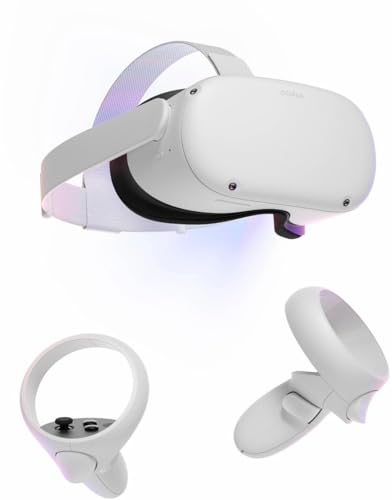
3. Best accessible entry-level VR headset: Oculus Quest 2 128GB
Pros
- Wireless, standalone operation
- Includes protective grip covers and straps
- Proven, widely supported platform
Cons
- Lower resolution compared to newer models
The Oculus Quest 2 is an all-in-one VR headset with 128GB of storage. It features a fast processor, a hand-tracking system, and a display with 1832 x 1920 pixels per eye. This set includes anti-slip controller grip covers and adjustable knuckle straps.
Best for: First-time VR users or those looking for a capable, standalone headset.
Best PC-powered VR headsets
These headsets connect to a PC for high-fidelity graphics, ideal for detailed simulations and gaming.
4. Best headset for ultra-sharp visuals in simulators: Pimax Crystal Super

Pros
- Extremely high 3840x3840 resolution
- Ultra-wide 140° field of view
- QLED & Mini-LED display with local dimming
Cons
- PC-tethered only; no standalone mode mentioned
The Pimax Crystal Super is a PC VR headset designed for flight and racing simulators. It boasts a 3840×3840 QLED and Mini-LED display per eye with local dimming, aspherical lenses for edge-to-edge sharpness, and an ultra-wide 140° field of view. It uses inside-out tracking and connects via DisplayPort.
Best for: Simulation enthusiasts who prioritize the highest possible visual clarity and a wide field of view.
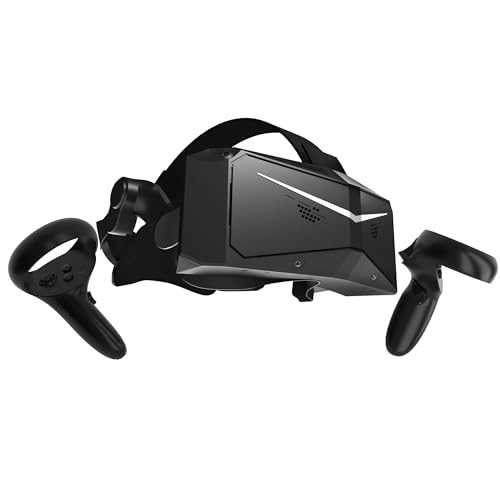
5. Best high-clarity PC VR headset with multiple refresh rates: Pimax Crystal Light
Pros
- High 2880x2880 resolution
- Refresh rates up to 120Hz
- QLED display with local dimming
Cons
- PC-tethered only; no standalone mode mentioned
The Pimax Crystal Light is a PC VR headset with a 2880×2880 QLED display per eye that supports local dimming and HDR. It features glass aspheric lenses and offers refresh rates up to 120Hz for low latency. The listing notes it uses inside-out tracking.
Best for: PC gamers wanting high-resolution visuals with the flexibility to adjust refresh rates.
6. Best lightweight PC VR headset for sims and gaming: Pimax Crystal Light with Controllers
Pros
- High resolution with AI upscaling
- Lightweight design
- Selectable refresh rates
Cons
- PC-tethered only; no standalone mode mentioned
This Pimax Crystal Light version includes controllers and is designed for PC gaming and simulations. It has a 2880×2880 per-eye resolution, a wide field of view, and advanced local dimming. The listing highlights it as 30% lighter than the standard Crystal model and offers selectable 72Hz, 90Hz, or 120Hz refresh rates.
Best for: PC VR users who want a high-resolution yet lighter headset for extended gaming sessions.
7. Best PC VR headset with a convenient flip-up design: DPVR E4 PC VR Headset

Pros
- Flip-up design for easy transitions
- High 3664 x 1920 resolution
- Supports up to 120Hz refresh rate
Cons
- PC-tethered only; no standalone mode mentioned
The DPVR E4 is a PC VR headset designed for SteamVR compatibility. It features a 3664 x 1920 Fast LCD display, adjustable 72Hz, 90Hz, and 120Hz refresh rates, and a 116° field of view. A key feature is its flip-up design, allowing you to switch between VR and your surroundings without removing the headset.
Best for: PC gamers and professionals who prefer the convenience of quickly flipping the headset up to see their surroundings.
Best hybrid PC & standalone headsets
These versatile models can work as standalone devices or connect to a PC for expanded content.
8. Best hybrid headset for high-resolution PC and standalone use: HTC Vive Focus Vision

Pros
- 5K resolution per eye
- Works as standalone and PC VR
- Includes eye and hand tracking
Cons
- Heavier weight at nearly 5.8 pounds
The HTC Vive Focus Vision is a mixed reality and PC VR headset that works both as a standalone device and when connected to a PC via DisplayPort for low-latency gameplay. It features a 5K resolution display (2448 x 2448 per eye), a 120° field of view, a 90 Hz refresh rate, and includes built-in eye and hand tracking.
Best for: Users who want the flexibility of standalone VR and the high-fidelity visuals of a PC-tethered connection.
9. Best hybrid headset with premium comfort accessories: HTC Vive XR Elite with Deluxe Pack

Pros
- Includes deluxe comfort accessories
- Works as standalone and PC VR
- IPD and diopter adjustments
Cons
- The listing does not mention the display resolution or field of view.
The HTC Vive XR Elite is a mixed reality and PC VR headset that works as a standalone device or connects to a PC. This version includes a Deluxe Pack with a face gasket, deluxe strap, temple clips, and an MR gasket. It features base station-free inside-out tracking with four cameras and has stepless IPD and diopter adjustments.
Best for: Users seeking a versatile, comfortable hybrid headset with included premium comfort accessories.
How to choose the best VR headset
Your ideal VR headset depends on how you plan to use it and the hardware you already own. The core decision is between a standalone headset that works wirelessly on its own and a PC-powered headset that delivers higher-fidelity graphics by connecting to a capable computer. Standalone models like the Meta Quest series offer great freedom and simplicity, while PC VR headsets from Pimax and DPVR are built for visual enthusiasts and simulation fans. Also consider mixed reality capabilities, which allow virtual objects to interact with your real-world space, and tracking methods—inside-out tracking (using cameras on the headset) is common and requires no external sensors.
What to look for
- Resolution & Display: Higher resolution (e.g., per-eye specs like 3840×3840) means sharper, more detailed visuals. Display type (QLED, Mini-LED, LCD) affects contrast and color.
- Field of View (FOV): A wider FOV (measured in degrees) increases immersion by expanding your peripheral vision, which is crucial for simulations.
- Connectivity: Decide if you need a wireless, all-in-one device or a headset that tethers to a gaming PC for more graphical power.
- Tracking: Most modern headsets use inside-out tracking for convenience. Check if specific features like eye or hand tracking are listed for more natural interaction.
- Comfort & Fit: Look for listed features like adjustable IPD (interpupillary distance), diopter adjustments, flip-up designs, and included comfort straps, especially for longer sessions.
Always check the manufacturer’s manual for setup, safety, and care instructions. For more on evaluating tech specs, our article on comparing smart home and accessory devices offers a helpful framework.
FAQ
What’s the difference between standalone and PC VR headsets?
Standalone VR headsets have all the necessary processing power and batteries built into the headset itself, allowing for completely wireless use. PC VR headsets must be connected to a powerful computer (usually via a cable) to run; they rely on the PC’s graphics card and processor, which typically allows for higher visual fidelity and more complex experiences.
What is mixed reality?
Mixed reality (MR) is a feature that blends virtual content with your actual physical environment. Using cameras on the headset, it can map your room and allow virtual objects to appear on your real furniture or interact with real-world boundaries. This is different from purely virtual reality, which immerses you in a completely digital world.
Do I need a powerful computer for VR?
You only need a powerful, VR-ready computer if you are buying a PC VR headset that specifically requires a tethered connection. Standalone headsets do not need a computer to function. Always check the headset’s connectivity specifications to see if a PC is required.
What does ‘field of view’ mean for VR?
Field of view (FOV) is the extent of the observable world you can see at any given moment through the headset’s lenses, measured in degrees. A wider FOV (e.g., 140° vs. 100°) provides a greater sense of immersion and peripheral awareness, which is particularly valued in simulation games like flight or racing sims.
References
- Amazon product listings and manufacturer specifications (accessed October 2026)
- Product Comparisons category
- How to Compare Gadgets: Reading Spec Sheets Without Getting Fooled

About Isabella Bishop
Isabella writes about consumer tech how-to & troubleshooting. Each guide starts with research into how products are built and what owners report after months of use, and is revised when better options appear.