By Lauren Whitman
Quick answer
Our overall pick for the best VPN router is the TP-Link ER605, a versatile wired gateway offering multiple WAN ports and support for several VPN protocols. Other picks suit users needing a built-in touchscreen, high 10G capacity, integrated Wi-Fi 7, or a subscription-free decentralized privacy device.
Setting up a VPN router can secure your entire network’s traffic and provide remote access capabilities. The best VPN routers offer a range of features, from the number of supported connections to advanced management interfaces. We compared manufacturer specifications for six models to highlight their key differences.
Our selections are based on the features and technical data provided in the Amazon listings, focusing on aspects like VPN protocol support, port configuration, and network capacity to help you find the best VPN router for your needs.
Quick picks
- Best overall wired VPN gateway: TP-Link ER605 (see on Amazon)
- Best with a built-in touchscreen: Omada Fusion 2.5G VPN Router (see on Amazon)
- Best with integrated Wi-Fi 7: GL.iNet GL-BE9300 Flint 3 (see on Amazon)
6 Best VPN Routers compared
| # | Product | Best for | VPN Protocol Support | WAN Port Configuration | Management Options |
|---|---|---|---|---|---|
| 1 | TP-Link ER605 | Best overall wired VPN gateway | IPsec, OpenVPN, L2TP, PPTP | Up to 3 WAN + 1 USB WAN | Omada SDN, Standalone |
| 2 | Omada Fusion 2.5G VPN Router | Best with a built-in touchscreen | Not listed | Up to 4 WAN (2.5Gb) | Built-in Omada Controller, Cloud, App |
| 3 | TP-Link Omada ER8411 | Best for high-capacity 10G networks | Not listed | Up to 10 WAN (10G & Gigabit) | Omada SDN, Cloud, App |
| 4 | TP-Link ER7206 | Best for increased client capacity | Not listed | Up to 4 WAN (Gigabit & SFP) | Omada SDN, Cloud, App |
| 5 | GL.iNet GL-BE9300 Flint 3 | Best with integrated Wi-Fi 7 | WireGuard, OpenVPN | 5x 2.5G Ports (WAN/LAN config not specified) | Web Admin Panel |
| 6 | Deeper Connect SE | Best for subscription-free privacy | Decentralized DPN | Not listed | Standalone Plug-and-Play |
How we chose
Our picks for the best VPN routers come from comparing manufacturer listings and specifications on Amazon as of October 2026. We did not test or use these products hands-on.
We focused on key criteria: the types and number of VPN connections supported, the flexibility of WAN and LAN port configurations, network capacity for connected clients, and available management options like cloud or SDN integration.
6 Best VPN Routers: our picks in detail
1. Best overall wired VPN gateway: TP-Link ER605

Pros
- Supports four different VPN protocols (IPsec, OpenVPN, L2TP, PPTP)
- Flexible port configuration with up to three WAN ports
- USB port for 4G/3G modem backup WAN connection
- Integrates with Omada SDN for centralized management
Cons
- Wired-only; does not have built-in Wi-Fi
- The listing does not mention a built-in controller for Omada SDN
The TP-Link ER605 is a wired gigabit VPN router designed for flexibility. It features five gigabit ports, configurable as up to three WAN ports for load balancing, plus a USB port that can support a 4G/3G modem for WAN backup. It integrates with the Omada SDN platform for centralized management.
For VPNs, it supports up to 20 LAN-to-LAN IPsec, 16 OpenVPN, 16 L2TP, and 16 PPTP connections. Security features include an SPI firewall, DoS defense, and IP/MAC/URL filtering. It is a standalone device that can also be managed via a local interface.
Best for: This is the best VPN router for users needing a versatile, wired gateway with strong multi-protocol VPN support and multiple WAN options.
2. Best with a built-in touchscreen: Omada Fusion 2.5G VPN Router

Pros
- Built-in 2.51-inch touchscreen for on-site monitoring and troubleshooting
- Five 2.5Gb ports for high-speed wired connections
- Built-in Omada controller enables immediate cloud management
- Quad-core CPU for processing power
Cons
- Wired-only; does not have built-in Wi-Fi
- The listing does not specify the types or maximum number of VPN connections supported
The Omada Fusion VPN Router is a wired multi-WAN device with a distinctive 2.51-inch touchscreen for on-site monitoring. It features five 2.5Gb Ethernet ports, configurable for up to four WAN connections with load balancing and failover. It has a built-in Omada controller for license-free cloud management from the start.
Setup is simplified via Bluetooth using the Omada app. It is powered by a quad-core CPU and includes features like ACL and QoS. The touchscreen provides health scores, speed tests, alerts, and real-time traffic visibility for quick troubleshooting.
Best for: This is the best VPN router for network administrators who want immediate on-device diagnostics via a touchscreen and built-in controller functionality.
3. Best for high-capacity 10G networks: TP-Link Omada ER8411

Pros
- High network capacity supports over 1000 clients
- Flexible configuration with up to ten WAN ports, including 10G SFP+
- USB ports support LTE backup for WAN connectivity
- Integrates with Omada SDN for centralized cloud management
Cons
- Large and heavy form factor
- Wired-only; does not have built-in Wi-Fi
- The listing does not specify the VPN protocols or connection limits
The TP-Link Omada ER8411 is an enterprise wired VPN router built for high network capacity, supporting a maximum of 2,300,000 concurrent sessions and over 1000 clients. It offers extensive port flexibility with up to ten WAN ports, including 10G SFP+ and Gigabit SFP ports, plus USB 3.0 ports that can support LTE backup.
It is designed for integration into the Omada SDN ecosystem, allowing for centralized cloud management of gateways, access points, and switches from a single interface. Security features include powerful firewall policies, DoS defense, and filtering options.
Best for: This is the best VPN router for demanding business environments requiring high client capacity, 10G connectivity, and extensive WAN port options.
4. Best for increased client capacity: TP-Link ER7206

Pros
- Supports a high number of clients (up to 700)
- Flexible port configuration with up to four WAN ports, including an SFP port
- Integrates with Omada SDN for centralized management
- Includes advanced firewall and security filtering
Cons
- Wired-only; does not have built-in Wi-Fi
- The listing does not specify the VPN protocols or connection limits
The TP-Link ER7206 is a professional multi-WAN gigabit VPN router with increased network capacity, supporting up to 700 clients and 150,000 associated client devices. Its port configuration includes a Gigabit SFP WAN port, a standard Gigabit WAN port, two configurable WAN/LAN ports, and a dedicated LAN port for up to four WAN connections.
Like other Omada routers, it can integrate into the Omada SDN platform for centralized management via hardware, software, or cloud-based controllers. It also offers advanced firewall policies, DoS defense, and IP/MAC/URL filtering for security.
Best for: This is the best VPN router for small to medium offices needing to support a higher number of client devices with flexible WAN options.
5. Best with integrated Wi-Fi 7: GL.iNet GL-BE9300 Flint 3

Pros
- Integrated tri-band Wi-Fi 7 with 6 GHz support
- Five 2.5G Ethernet ports for high-speed wired connections
- Supports WireGuard and OpenVPN protocols
- Includes AdGuard Home for ad and tracker blocking
Cons
- VPN speeds are listed as up to 680 Mbps, which may be less than the total Wi-Fi bandwidth
- The listing does not mention integration with broader management systems like SDN
The GL.iNet GL-BE9300 Flint 3 is a tri-band Wi-Fi 7 router that also functions as a VPN router, offering wireless speeds up to 9 Gbps. It features five 2.5G Ethernet ports and supports modern Wi-Fi 7 technologies like Multi-Link Operation (MLO) for reduced latency. The listing claims coverage for up to 2,000 square feet.
For VPN performance, it supports WireGuard and OpenVPN with speeds up to 680 Mbps. It includes AdGuard Home for DNS-based ad and tracker blocking and is designed to connect over a hundred devices. Setup is done via a web admin panel accessed over Ethernet.
Best for: This is the best VPN router for users who want the latest Wi-Fi 7 technology in a single device that also provides capable VPN routing.
6. Best for subscription-free privacy: Deeper Connect SE
Pros
- No monthly subscription fees required
- Plug-and-play operation with no app or account setup
- Compact and portable design for travel
- Includes firewall with ad-blocking and threat prevention
Cons
- The listing does not mention traditional VPN protocols (e.g., OpenVPN, WireGuard) or connection limits
- The listing does not specify port types, speeds, or Wi-Fi capabilities
- Uses a proprietary decentralized privacy network (DPN) technology
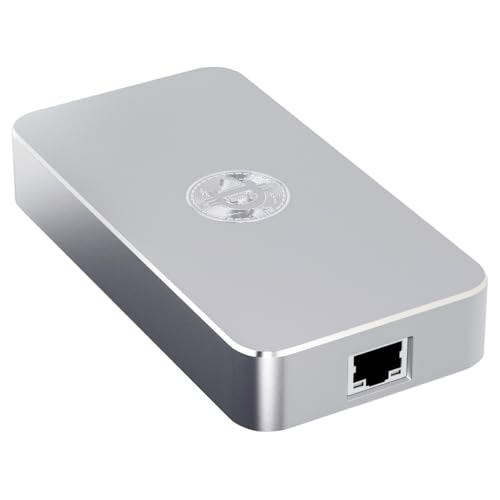
The Deeper Connect SE is a decentralized VPN router (DPN) designed for plug-and-play privacy protection without subscription fees. It encrypts browsing and provides region-free access across home, office, and travel environments like hotels and public Wi-Fi. No apps, accounts, or technical setup are required.
It includes an enterprise-grade firewall with ad-blocking and threat-prevention features. The device is compact and portable, designed for ultra-low power consumption and 24/7 stable operation to protect multiple device connections.
Best for: This is the best VPN router for travelers and users seeking a simple, subscription-free device for encrypted browsing and basic network security.
How to choose the best VPN router
Selecting the best VPN router depends on understanding your network’s specific demands. The core function is to create secure tunnels for your data, but the implementation varies widely. Start by considering where the router will be used—a home office, a small business, or on the go—and what devices need to connect.
What to look for
- VPN Protocol Support: Check which protocols the router supports, such as OpenVPN, WireGuard, IPsec, L2TP, or PPTP. Some routers support multiple protocols and a high number of concurrent connections, which is crucial for business use or multiple remote users.
- Port Configuration and Speed: Look at the WAN and LAN ports. Multiple WAN ports allow for load balancing or failover using different internet connections. Port speeds (Gigabit, 2.5G, 10G) determine your wired network’s maximum throughput.
- Management and Integration: Consider how you’ll manage the router. Some offer standalone web interfaces, while others integrate into software-defined networking (SDN) platforms like Omada for centralized control of switches and access points. Cloud management allows for remote access.
- Wireless vs. Wired: Decide if you need a combined wireless access point and VPN router, or a dedicated wired gateway. Dedicated wired routers often offer more robust VPN performance and port options, while combo units simplify setup.
Finally, assess the network capacity listed by the manufacturer, such as the maximum number of supported clients or concurrent sessions. This is especially important for business environments. For more general guidance on setting up network devices, see our Tech Setup and Troubleshooting Guide.
FAQ
What is the difference between a VPN router and a regular router?
A VPN router has built-in software to establish VPN connections, either allowing remote clients to securely access the local network (server mode) or routing all the network’s internet traffic through a VPN service (client mode). A regular router typically only supports VPN pass-through, which allows VPN traffic from individual devices to pass through but does not create the VPN tunnel itself.
Do I need a separate wireless access point if I buy a wired VPN router?
Yes, if you choose a wired-only VPN router (like several in our list), you will need to connect it to a separate wireless access point or a Wi-Fi router configured in access point mode to provide wireless connectivity to your devices. This is a common setup in business environments for flexibility.
What does “multi-WAN” mean on a VPN router?
Multi-WAN means the router has two or more Wide Area Network (WAN) ports. This allows you to connect multiple internet sources—like two different ISP modems or a modem and a cellular backup. The router can use these connections for load balancing (splitting traffic for more bandwidth) or automatic failover (switching to a backup if one connection fails).
Can I use any VPN service with these routers?
Compatibility depends on the VPN protocols supported by both your chosen router and your VPN service provider. Most commercial VPN services support OpenVPN or WireGuard. You must configure the router with the server details and credentials provided by your VPN service. Always check the VPN service’s support pages for router setup guides.
References
- Amazon product listings and manufacturer specifications (accessed October 2026)

About Lauren Whitman
Lauren covers consumer tech how-to & troubleshooting, comparing specs, features and long-term owner feedback to help readers choose with confidence.