
 By Lauren Holland
Updated November 2026
Choosing an anker 20 000mah power bank comes down to three things: how many watts it can push out, how many ports you need running at once, and whether it has to charge a laptop or only a phone. This list weighs each model by its listed output, port layout, cable setup and the patterns owners commonly report, not by any test we ran ourselves. Each pick below is matched to one clear need.
Our top picks at a glance
- 1
 TOP CHOICEBest overallAnker Zolo Power Bank,20,000mAh 30W Portable Charger with Built-in USB-CView on Amazon
- 2
 TOP CHOICEBest for laptopsAnker 3-Port 87W Max Fast Charging Battery PackView on Amazon
- 3
 TOP CHOICEBest for two devices at onceAnker 20,000mAh Battery Pack with Dual Built-In USB-C CablesView on Amazon
- 4
 Best for iPhone ownersAnker High-Speed Portable Charger for iPhone 17 / 16 / 15 SeriesView on Amazon
- 5
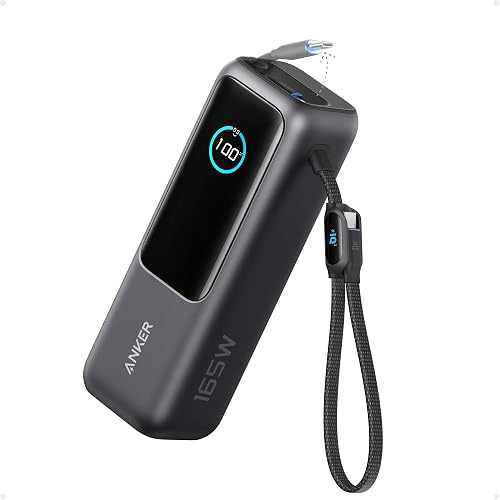 Best for heavy travelAnker 3 USB-C Ports with 100W Max Each Laptop Power Bank, 25,000mAhView on Amazon
- 6
 Best for mixed cablesAnker Power Bank,20,000mAh 30W Portable Charger,USB-C and Lightning CablesView on Amazon
- 7
 Best for iPhone and GalaxyAnkerHigh-Speed Charging for iPhone 17 / 16 / 15 Series, Galaxy, and MView on Amazon
Our Top Picks
| Product | Best for | Key feature |
|---|---|---|
| Anker Zolo Power Bank 20,000mAh 30W | Overall use | 30W USB-C output |
| Anker 3-Port 87W Battery Pack | Laptops | 87W max total output |
| Anker 20,000mAh Dual USB-C Battery Pack | Two devices | Dual built-in USB-C cables |
| Anker Portable Charger for iPhone 17/16/15 | iPhone owners | High-speed iPhone charging |
| Anker 3 USB-C Laptop Power Bank 25,000mAh | Heavy travel | 165W total output |
| Anker Power Bank 20,000mAh 30W | Mixed cables | USB-C and Lightning cables |
| Anker Zolo Charger for iPhone and Galaxy | iPhone and Galaxy | Built-in USB-C cable |
Anker Zolo Power Bank,20,000mAh 30W Portable Charger with Built-in USB-C
Anker Zolo Power Bank,20,000mAh 30W Portable Charger with Built-in USB-C
Best for: Overall everyday charging
This suits someone who wants one dependable bank for a phone, earbuds and a tablet without carrying extra cables.
Pros
- 30W USB-C output handles most modern phones quickly
- Built-in USB-C cable reduces what you carry
Cons
- 30W is not enough for most laptops
Anker 3-Port 87W Max Fast Charging Battery Pack
3-Port 87W Max Fast Charging Battery Pack, for MacBook, iPhone 16 / 15 Series, Samsung, Switch, and More Anker Power Bank, 20,000mAh Travel Essential, Built-in USB-C Cable(Black)
Best for: Laptops
This fits a traveler who needs to top up a MacBook or similar laptop alongside a phone from one bank.
Pros
- 87W max output covers many USB-C laptops
- Three ports let several devices charge at once
Cons
- Heavier than phone-focused models
Anker 20,000mAh Battery Pack with Dual Built-In USB-C Cables
Anker20,000mAh Battery Pack with Dual Built-In USB-C Cables, and USB-A Ports Power Bank,20,000mAh 45W Portable Charger,Dual Built-in USB-C Cables
Best for: Two devices at once
This works well for couples or commuters who want two phones charging from one bank without hunting for cables.
Pros
- Two built-in USB-C cables reduce clutter
- 45W rating supports fast charging on compatible devices
Cons
- Built-in cables are not replaceable if damaged
Anker High-Speed Portable Charger for iPhone 17 / 16 / 15 Series
AnkerHigh-Speed Portable Charger for iPhone 17 / 16 / 15 Series, Galaxy, and More Zolo Power Bank,20,000mAh 30W Portable Charger with Built-in USB-C
Best for: iPhone owners
This is aimed at iPhone users who want a bank matched to recent models and their charging speeds.
Pros
- Built-in USB-C cable fits recent iPhone models
- Compact enough for a pocket or small bag
Cons
- Output is modest for laptops
Anker 3 USB-C Ports with 100W Max Each Laptop Power Bank, 25,000mAh
3 USB-C Ports with 100W Max Each, Built-In Retractable Cables, Flight-Ready, for iPhone 17 Series ,MacBook, and More Anker Laptop Power Bank, 25,000mAh Travel Essential with 165W Total Output
Best for: Heavy travel
This suits frequent flyers and remote workers who need the most total power and extra capacity for long days away from outlets.
Pros
- 165W total output across three ports
- Retractable cables reduce tangling
Cons
- Larger and heavier than standard 20K banks
Anker Power Bank,20,000mAh 30W Portable Charger,USB-C and Lightning Cables
Anker Power Bank,20,000mAh 30W Portable Charger,USB-C and Lightning Cables
Best for: Mixed cables
This is for households with a mix of USB-C and older Lightning devices that still need to charge from one bank.
Pros
- Includes both USB-C and Lightning cables
- 30W output for fast phone charging
Cons
- Extra cable adds some bulk to the bag
Buying Guide
Wattage and Output Power
Check the total output rating before you buy. A 30W bank is fine for most phones and earbuds, while laptops usually need 45W or more, and some models list 87W, 100W per port, or 165W total for heavier machines. Higher output charges faster, but only if your devices can accept that power.
Number and Type of Ports
Count how many devices you plan to charge at the same time and look at the port mix. Models with two or three USB-C ports let you charge a phone, tablet and laptop together, while a USB-A port is handy for older accessories. Make sure at least one port supports Power Delivery if you want fast charging on newer devices.
Built-In Cables Versus Standalone Cables
Some banks include built-in or retractable cables, which means one less thing to pack and lose. Others rely on cables you supply yourself. If you use an iPhone with a Lightning connector or a newer model with USB-C, pick the setup that matches your devices so you are not forced to buy an adapter.
Portability and Flight Rules
A 20,000mAh capacity is a good balance between charging power and weight, but it still adds bulk to a bag. Most airlines allow power banks in carry-on luggage but not in checked bags, and capacity limits can apply, so review your airline’s policy before a trip. Look at the weight and dimensions to decide whether you will actually carry it every day.
Charging Speed and Device Compatibility
Fast charging depends on both the bank and the device. A powerful bank will not speed up a phone that only accepts slower charging, so check which standards your gadgets support. Matching the bank to your main devices gives you the most useful charging speed without paying for features you will not use.
FAQ
Can a 20,000mAh power bank charge a laptop?
Many 20,000mAh models can charge laptops, but the result depends on the laptop’s power needs and the bank’s output rating. Banks with 45W or higher output are generally better suited for laptop use. Check the laptop’s charging requirements before relying on a bank for a full charge.
How many times can a 20,000mAh bank charge a phone?
A 20,000mAh bank can typically charge a standard smartphone more than once, though the exact number depends on the phone’s battery size and losses during conversion. Real-world results vary with usage and charging conditions. Expect roughly two or more full charges for many common phone models.
Can I bring a power bank on a plane?
Most airlines allow power banks in carry-on bags but do not permit them in checked luggage. Capacity limits and approval rules can differ by airline and country, so confirm the current policy before you fly. Keep the bank easily accessible during the flight.
Is it safe to charge two devices at once?
Charging two devices at the same time is generally safe when you use a bank designed for multiple ports. The total output is shared between the ports, so each device may charge more slowly. Using the manufacturer’s cables and avoiding extreme heat helps keep charging safe.
How long does a power bank take to recharge itself?
Recharge time depends on the input rating of the bank and the charger you use. Higher input wattage shortens the wait, while a low-power wall adapter will take longer. Check the specifications printed on the bank for the most accurate guidance.
Conclusion
If you mostly charge a phone and want a simple, lightweight option, a 30W 20,000mAh bank with built-in USB-C is a practical everyday choice. Travelers who need to power a laptop should look at the higher-output models with multiple ports and 87W or more total output.
Households with several devices benefit most from banks that offer dual USB-C cables or extra ports, while frequent flyers should prioritize retractable cables and a compact design that fits airline rules. Match the bank to your heaviest device and your typical number of connections, and you will get the most value from your purchase.
Related reading
- Anker Zolo Power Bank 20 000mah: 6 Best Picks for Travel and Everyday Use (2026)
- Anker Power Bank 10 000mAh: What to Know Before You Buy or Charge (2026)
- How to Charge Anker Power Bank: A Step-by-Step Guide for Beginners
About Lauren Holland
Lauren Holland is part of our editorial team and reviews and edits our consumer tech how-to & troubleshooting guides, checking product details against manufacturer specifications and owner feedback.




