 By Colin Foster
Updated November 2026
If your laptop dies within an hour of unplugging or shuts down at 40 percent, the battery is usually the first suspect. Before you replace a laptop battery, you need the right part number, a pack that fits your exact model, and a realistic idea of capacity. This guide compares six replacement packs from popular laptop lines, using specifications, brand reputation and common owner feedback as the selection criteria. We did not bench-test these packs, so every spec below comes from the listing or manufacturer documentation.
Our top picks at a glance
- 1
 TOP CHOICEBest overallASUS VivoBook Laptop Battery (E410/E510 Series)View on Amazon
- 2
 TOP CHOICEBest for HP Pavilion 15 ownersHP Pavilion 15 Laptop Battery (CS/DA/DB/DW Series)View on Amazon
- 3
 TOP CHOICEBest for older HP Spare-compatible modelsHP Spare 776622-001 Laptop BatteryView on Amazon
- 4
 Best for a no-frills HP swapHP 776622-001 Notebook Battery (High Performance)View on Amazon
- 5
 Best for HP 15-BS seriesHP Spare 919700-850 Laptop Battery (15-BS Series)View on Amazon
- 6
 Best budget pick for HP OA04 systemsHP Spare 746641-001 38Wh Laptop Battery (OA04 Series)View on Amazon
Our Top Picks
Quick Comparison
| Product | Best for | Key feature |
|---|---|---|
| ASUS VivoBook 14/15.6″ replacement (E410/E510 series) | ASUS VivoBook owners with E410 or E510 models | 42Wh capacity, multiple ASUS part numbers listed |
| HP Pavilion 15-CS/DA/DB/DW replacement | HP Pavilion 15 owners | Wide compatibility across Pavilion 15 generations |
| HP Spare 776622-001 replacement | Older HP notebooks using the 776622-001 part | Multiple HP part numbers in one listing |
| HP 776622-001 notebook battery (high-performance) | Straight like-for-like HP swap | Listed as a high-performance build |
| HP Spare 919700-850 replacement | HP 15-BS and 15-BW owners | Covers 15-BS series part numbers |
| HP Spare 746641-001 38Wh replacement | HP OA04 and OA03 systems | 38Wh capacity with several HP part numbers |
ASUS VivoBook Laptop Battery (E410/E510 Series)
E410 E410MA E410M L410MA E410KA F414MA E510 E510M E510MA E510KA L510 L510MA R522MA F414MA-EK1890WS L510MA-WB04(DF112) 42Wh B31N1912 C31N1912 Replacment Laptop Battery for ASUS VivoBook 14 15.6"
Best for: ASUS VivoBook owners who need a direct replacement for an E410, E510 or L510 model.
This pack suits anyone whose ASUS VivoBook 14 or 15.6-inch laptop has a worn-out battery and a part number that matches the listing. Start by checking the label on your existing battery or the bottom of the laptop for the model and part number before ordering.
Key specs
- 42Wh rated capacity (as stated in the listing)
- Lists ASUS part numbers including B31N1912 and C31N1912
- Designed for VivoBook 14 and 15.6-inch models
Pros
- Lists many compatible ASUS model numbers in one place
- Specified capacity is clearly stated
- Straightforward drop-in design for supported models
Cons
- Compatibility depends entirely on matching your exact part number
- Third-party packs vary in cell quality, and owner experiences differ
Bottom line: Best choice for an ASUS VivoBook owner who has confirmed the part number on the old battery and wants a broad-compatibility replacement.
HP Pavilion 15 Laptop Battery (CS/DA/DB/DW Series)
17-by 17-CA 14-CE 14-CF 14-DF Series 15-CS0053CL 15-DW0033NR 15-DA0014DX L11421-542 L11421-2C2 HSTNN-UB7J HT03041XL HT03XL L11119-855 Laptop Battery for HP Pavilion 15-CS 15-DA 15-DB 15-DW
Best for: HP Pavilion 15 owners with CS, DA, DB or DW series laptops.
This pack targets the widely used Pavilion 15 family. It is a good fit if your laptop’s service label shows an HT03XL or L11119-855 part, or a related HSTNN number.
Key specs
- Lists HT03XL and HSTNN-UB7J part numbers
- Covers HP Pavilion 15-CS, 15-DA, 15-DB and 15-DW models
- Also lists 17-series and 14-series part numbers
Pros
- Broad coverage across several Pavilion 15 generations
- Multiple part numbers listed for easy cross-checking
- Common model family, so fit information is widely discussed
Cons
- Long compatibility list means you must verify your part number carefully
- Some owners report fit differences between sub-variants
Bottom line: A strong pick for Pavilion 15 owners who have confirmed their part number matches one of the listed codes.
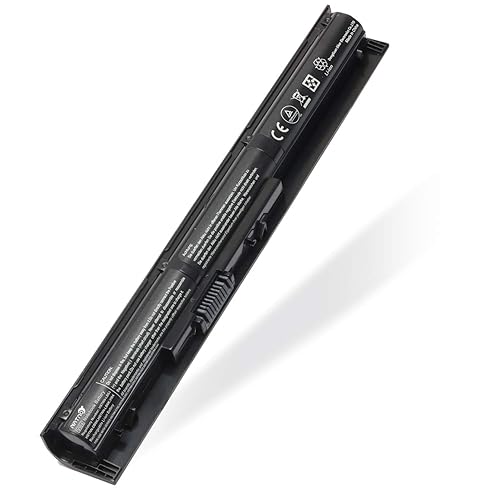
HP Spare 776622-001 Laptop Battery
776622-001 Laptop Battery for HP Spare 728460-001 752237-001 15-f233WM 15-1272WM 15-F272WM LA04 LA04DF HSTNN-DB5M HSTNN-YB5M F3B96AA HSTNN-UB5M
Best for: Older HP notebooks that use the 776622-001 battery design.
The 776622-001 part is common across several older HP laptops. If your battery is one of the HP “LA04” or “HSTNN-DB5M” types, this listing is worth comparing against your original.
Key specs
- Lists 776622-001, 728460-001 and 752237-001 part numbers
- Covers LA04 and LA04DF battery codes
- Compatible with several HP 15-series model numbers
Pros
- Clear part-number cross-reference
- Useful for legacy HP models that are harder to source
- Straightforward replacement when part numbers match
Cons
- Older battery chemistry may not hold capacity as long as newer packs
- Fit depends on the exact model variant
Bottom line: The right choice for someone maintaining an older HP laptop who needs a part-number match over a modern feature set.
HP 776622-001 Notebook Battery (High Performance)
Laptop / Notebook Battery Replacement for HP 776622-001 728460-001 TPN-Q130 752237-001 TPN-Q132 LA04 TPN-Q129 LA04DF HSTNN-DB5M HSTNN-YB5M F3B96AA HSTNN-UB5M – Black – High Performance
Best for: Anyone who wants a like-for-like HP replacement and is comfortable checking part numbers.
This listing uses the same 776622-001 family of part numbers as the previous pick, but is marketed as a high-performance build. It is aimed at users who want a direct swap for a worn original.
Key specs
- Lists TPN-Q130, TPN-Q132 and TPN-Q129 part numbers
- Covers HSTNN-DB5M, HSTNN-YB5M and HSTNN-UB5M codes
- Black casing, marketed as high performance
Pros
- Extensive list of HP part numbers for cross-checking
- Simple like-for-like replacement concept
- Covers several HP notebook generations
Cons
- “High performance” is a marketing term, so verify capacity claims yourself
- Owner experiences with third-party cells vary
Bottom line: A practical choice for HP owners who prioritize a matching part number and a standard black battery over extras.
HP Spare 919700-850 Laptop Battery (15-BS Series)
919700-850 Laptop Battery for HP Spare 919681-221 919682-121 919682-421 919682-831 919701-850 JC03 JC04 15-BS000 15-BW000 15-bs0xx 15-BS113DX 15-BS013DX 15-BS015DX 15-BS115DX 15-BS060WM 15-BS070WM
Best for: HP 15-BS and 15-BW owners replacing a worn pack.
The 919700-850 family is tied to the HP 15-BS line. If your laptop’s model number starts with 15-BS or 15-BW, this is one of the more relevant options in this list.
Key specs
- Lists 919700-850, 919681-221 and 919682-121 part numbers
- Covers JC03 and JC04 battery codes
- Compatible with multiple 15-BS and 15-BW model numbers
Pros
- Focused on a popular HP 15 series
- Many model variants listed explicitly
- Good match for the 919700-850 family
Cons
- Narrower compatibility than broader HP packs
- Requires an exact part-number match
Bottom line: The right pick for a 15-BS or 15-BW owner who has confirmed the JC03 or JC04 code on the original battery.
HP Spare 746641-001 38Wh Laptop Battery (OA04 Series)
38Wh Spare 746641-001 Laptop Battery for HP OA04 OA03 740715-001 746458-421 751906-541 HSTNN-LB5Y HSTNN-LB5S OA04041 J1U99AA HSTNN-PB5Y TPN-F113 TPN-F115
Best for: HP OA04 and OA03 systems that need a 38Wh replacement.
This pack is designed around the OA04 family of battery codes. It is a sensible option if your existing battery is labeled OA04 or HSTNN-LB5Y and you want a capacity-stated replacement.
Key specs
- 38Wh rated capacity (as stated in the listing)
- Lists 746641-001, 740715-001 and 746458-421 part numbers
- Covers OA04, OA03 and HSTNN-LB5S codes
Pros
- Clearly stated capacity figure
- Covers several OA-series codes
- Useful for HP systems using the 746641-001 family
Cons
- Capacity is lower than some newer packs, so runtime may be shorter
- Limited to a specific battery family
Bottom line: A budget-friendly option for OA04 owners who want a capacity-specified replacement without extra features.
Buying Guide
Part Number and Model Compatibility
The single most important step is matching the part number. Look for the label on the old battery or the service sticker under the laptop, then compare it against the listing’s cross-reference list. Many HP batteries share a part number across several models, but some sub-variants differ slightly in connector or size.
Good picks for this: HP Pavilion 15 replacement and ASUS VivoBook replacement
Rated Capacity (Wh)
Watt-hours show how much energy a battery can store. A higher figure generally means longer runtime, provided the laptop’s power draw stays the same. Compare the Wh on your original battery with the replacement. A large drop in capacity usually means shorter use between charges.
Good picks for this: HP Spare 746641-001 38Wh replacement and ASUS VivoBook replacement
Physical Fit and Connector Type
Measure the old battery’s length, width and thickness, and check the connector. Even when the part number matches, a small difference in the plug or latch can prevent a secure fit. Take a photo of the old pack’s connector before you order.
Good picks for this: HP Spare 919700-850 replacement and HP 776622-001 notebook battery
Cell Quality and Build
Replacement packs use lithium-ion cells, and build quality varies. Look for clearly stated cell and protection-circuit information, and read owner feedback about heat and charge behavior. Lithium-ion batteries can be a fire risk when damaged or poorly made, so avoid packs that are swollen or leaking.
Good picks for this: HP 776622-001 notebook battery and HP Spare 776622-001 replacement
Use Case and Power Demands
A student using a laptop for documents needs a different battery than a gamer or video editor. Heavier workloads drain packs faster, so a higher-capacity replacement may be worth it for demanding use. Light users can often choose a standard-capacity pack without a noticeable difference.
Good picks for this: ASUS VivoBook replacement and HP Spare 746641-001 38Wh replacement
Warranty and Return Policy
Check how long the seller guarantees the battery and what the return window looks like. Some replacement packs carry short warranties, so keep the order confirmation and note the date you installed the battery.
Good picks for this: HP Pavilion 15 replacement and HP Spare 919700-850 replacement
Safe Handling and Disposal
Power down the laptop, unplug it, and disconnect the battery according to your model’s service manual before removing it. Never puncture or heat a lithium-ion pack. Recycle the old battery at a certified e-waste or battery drop-off location rather than in household trash. If you are unsure about the procedure, a qualified repair technician can help.
Good picks for this: HP Spare 776622-001 replacement and ASUS VivoBook replacement
FAQ
How do I know which laptop battery I need?
Check the part number printed on the old battery or the service label on the laptop’s underside. Match that number against the compatibility list in the product listing. Model numbers alone are not always enough, because one laptop line can use several battery types.
How long should a replacement laptop battery last?
Lithium-ion batteries are usually rated for a set number of charge cycles, and lifespan depends on heat, charge habits and workload. Many owners find that a battery’s usable life falls noticeably over several years. Check the manufacturer’s stated cycle rating for your model if you need a precise figure.
Can I replace a laptop battery myself?
Many laptops, especially older models, have a removable or accessible battery held by a few screws or latches. Others require disassembling the case. Follow your model’s official service guide, and power off and unplug the laptop first. If the battery is soldered in or the process looks complicated, ask a professional repair service.
Will a higher Wh rating always last longer?
A higher watt-hour rating usually means more stored energy, but actual runtime also depends on the laptop’s screen brightness, processor load and power settings. A higher-capacity battery will help most when your workload stays the same.
Is it safe to use a third-party laptop battery?
Third-party packs can be safe when they match the correct specifications and come from a seller with clear documentation. Avoid any battery that is swollen, hot to the touch, or leaking. If something seems wrong, stop using it and dispose of it properly.
What should I do with my old laptop battery?
Do not throw a lithium-ion battery in regular trash. Take it to a certified battery recycling or e-waste drop-off point. Many electronics retailers and municipal programs accept used laptop batteries.
Why does my laptop still shut down after replacing the battery?
A new battery will not fix problems caused by a failing charger, a bad power adapter port or a software issue. Check that the charger outputs the correct voltage and that the battery is seated firmly. If the problem continues, the cause may be elsewhere in the system.
Conclusion
To replace a laptop battery successfully, start with the part number, then confirm the capacity and physical fit. For ASUS VivoBook owners, the E410 and E510 replacement is a practical first look. HP Pavilion 15 owners should consider the CS/DA/DB/DW pack, while older HP notebooks with the 776622-001 part fit the two 776622-001 listings. The 919700-850 pack suits 15-BS owners, and the 746641-001 38Wh pack is a sensible choice for OA04 systems. Whichever you pick, verify compatibility before ordering and handle the old battery safely.
For more troubleshooting help, see Why Won't My Lenovo Laptop Turn On? A Step-by-Step Troubleshooting Guide if the laptop will not start at all, or HP Hewlett Packard Laptop Charger: How to Identify, Test and Replace Yours if you suspect the charger is the real problem. If you are weighing a new machine instead, Lithium-Ion Battery Charging Explained: Cycles, Heat and Optimized Charging explains how cycles and heat affect battery life.
Sources
- Guidance on lithium-ion battery use, storage and recycling (energy.gov)
- Consumer safety information on lithium-ion battery hazards and recalls (cpsc.gov)
- Recycling and disposal guidance for batteries and electronics (epa.gov)
About Colin Foster
Colin Foster is part of our editorial team and reviews and edits our consumer tech how-to & troubleshooting guides, checking product details against manufacturer specifications and owner feedback.