As an Amazon Associate I earn from qualifying purchases. This page may contain affiliate links.
If you are looking for a sidetrak slide portable monitor, you are most likely trying to add a second screen to a laptop without carrying a bulky desktop display. The SideTrak line and similar attachable screens clip or swivel onto the lid of a laptop, draw power over USB-C or Mini HDMI, and give you extra workspace for email, documents, video calls or reference material. This guide compares nine models from the SideTrak range and a few close alternatives. Our selection criteria focus on panel size, connection options, swivel and kickstand design, resolution, weight and how well each model fits different laptop sizes. We also look at owner feedback patterns and manufacturer specifications rather than assuming any one model is best for everyone.
Our Top Picks
Quick Comparison
| Product | Best for | Key feature |
|---|---|---|
| SideTrak Swivel 12.5″ Portable Monitor for Laptop | Compact laptops and light travel | Patented swivel hinge with kickstand |
| SideTrak Swivel 15.6″ Attachable Portable Monitor for Laptop | Users who want a larger extra screen | USB-C connection with swivel hinge |
| KYYOne Cable USB-C Extended Monitor | Budget-conscious buyers wanting a 15.6″ panel | 360-degree rotation and kickstand |
| SideTrak Swivel 14″ Portable Monitor for Laptop | Everyday office and study use | Balanced 14″ size with dual USB-C and HDMI input |
| SideTrak Solo Pro 15.8″ Portable Monitor for Laptop | Media viewing and extended workspace | Anti-glare panel with speaker support |
| SideTrak Swivel 14″ Patented Attachable Portable Monitor for Laptop | Users with mixed laptop brands | Fits all laptops with USB-C or Mini HDMI power |
| SideTrak Swivel Pro 13.3″ Ultra Slim Attachable Portable Monitor | Minimal bags and frequent travelers | Ultra-slim profile with IPS panel |
| SideTrak Solo Pro 13″ Touchscreen Portable Monitor for Laptop | Touch input and light weight | Touchscreen with 1.6 lb body |
| Blackview Laptop Screen Extender 14″ Portable Monitor | Multi-platform use including Switch and Android | Plug-and-play USB-C with wide device compatibility |
SideTrak Swivel 12.5″ Portable Monitor for Laptop

SideTrak Swivel 12.5" Portable Monitor for Laptop, Patented Swivel Hinge, Laptop Screen Extender | FHD Dual Screen w/Kickstand, USB or HDMI, Mac, PC, Chromebook Compatible (Single Monitor)
This model suits people with compact laptops who want a small, lightweight second screen for notes, chat windows or reference documents. Its size keeps it easy to pack in a laptop sleeve.
Key specs
- 12.5-inch display
- Full HD (1920 x 1080) resolution
- Patented swivel hinge and kickstand
- USB or HDMI connection
Pros
- Light and compact for travel
- Swivel hinge lets you rotate the screen between portrait and landscape
- Works with Mac, PC and Chromebook
Cons
- Small panel can feel cramped for spreadsheets
- Cable management takes some attention when the screen is clipped on
SideTrak Swivel 15.6″ Attachable Portable Monitor for Laptop

SideTrak Swivel 15.6" Attachable Portable Monitor for Laptop | FDH TFT Laptop Dual Screen | Mac, PC & Chrome Compatible | Swivel Hinge Laptop Screen Extender | USB-C Port
Users who regularly work with multiple windows side by side and want more screen real estate than a 12- or 13-inch panel offers will find this size more comfortable. It suits desk-based work when you are away from a main monitor.
Key specs
- 15.6-inch FHD TFT display
- USB-C port connection
- Swivel hinge design
- Compatible with Mac, PC and Chrome
Pros
- Larger panel for side-by-side windows
- Single USB-C cable for power and video on supported laptops
- Swivel hinge adds positioning flexibility
Cons
- Heavier and bulkier than 12.5- or 13-inch models
- Requires a laptop with suitable USB-C video output
KYYOne Cable USB-C Extended Monitor

KYYOne Cable USB-C Extended Monitor, Dual Travel Screen for 12"-17'' Laptops, 360° Rotation & Kickstand,X90D (Driver Need) Laptop Screen Extender, 15.6" 1080P Triple Portable Monitor for Laptop
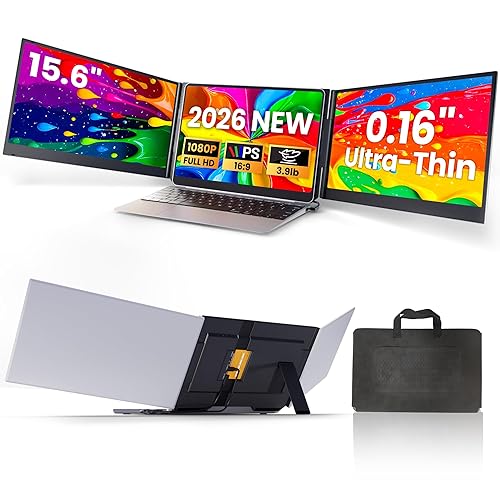
This option appeals to buyers who want a 15.6-inch panel with rotation and a built-in stand but do not need the SideTrak name. Owners often mention it as a practical alternative for typical office tasks. Note that the listing indicates a driver may be needed, so check compatibility before buying.
Key specs
- 15.6-inch 1080P display
- USB-C cable connection
- 360-degree rotation and kickstand
- Listed for 12″ to 17″ laptops
Pros
- Large panel with full rotation
- Covers a wide range of laptop sizes
- Useful as an alternative to brand-name options
Cons
- Driver installation may be required
- Build and support experience can differ from SideTrak’s
SideTrak Swivel 14″ Portable Monitor for Laptop

SideTrak Swivel 14" Portable Monitor for Laptop, Screen Extender with Patented Swivel Hinge, Attachable Travel Monitor, Dual Screen FHD Display, USB-C® & HDMI, (Dark Gray)
A 14-inch panel is a practical middle ground for students and office workers. It is large enough for document work and small enough to stay out of the way on most desks.
Key specs
- 14-inch FHD display
- USB-C and HDMI connectivity
- Patented swivel hinge
- Dark Gray finish
Pros
- Balanced size for everyday tasks
- Two input options for different laptops
- Patented hinge supports flexible placement
Cons
- Power draw from the host laptop can drain battery faster
- Not as large as 15-inch models for multi-window layouts
SideTrak Solo Pro 15.8″ Portable Monitor for Laptop

SideTrak Solo Pro 15.8" Portable Monitor for Laptop | FHD 1080P LED IPS Dual Display w/Anti-Glare Screen, USB & Mini HDMI, Laptop Monitor Extender for Mac, PC, Chrome, HDR & Speakers
This model fits users who watch video, review photos or want a larger secondary display with anti-glare coating. Its speaker support makes it a reasonable choice for casual media viewing away from a desk.
Key specs
- 15.8-inch FHD 1080P LED IPS display
- Anti-glare screen
- USB and Mini HDMI connection
- HDR and speaker support listed
Pros
- IPS panel with anti-glare coating
- Large format for media and reference work
- Works with Mac, PC and Chrome
Cons
- Bulkier and heavier than smaller SideTrak models
- Built-in speaker quality is modest compared with dedicated speakers
SideTrak Swivel 14″ Patented Attachable Portable Monitor for Laptop

SideTrak Swivel 14" Patented Attachable Portable Monitor for Laptop | FHD TFT Laptop Dual Screen | Mac, PC & Chrome Compatible | Fits All Laptops | Powered by USB-C® or Mini HDMI (Light Silver)
If you switch between different laptop brands or share a screen across devices, this variant’s broad compatibility claim is useful. It suits people who want one extra display that works with most machines.
Key specs
- 14-inch FHD TFT display
- Powered by USB-C or Mini HDMI
- Patented attachable design
- Light Silver finish
Pros
- Listed as fitting all laptops
- Two power and video options
- Good middle-size balance
Cons
- Compatibility still depends on your laptop’s port output
- Similar in size to other 14-inch options, so differences may be subtle
SideTrak Swivel Pro 13.3″ Ultra Slim Attachable Portable Monitor

SideTrak Swivel Pro 13.3" Ultra Slim Attachable Portable Monitor, FHD IPS 1080p Laptop Screens with Kickstand + Unique Patented Swivel Hinge, for Mac, PC, and Chromebook, USB-C® Port Connection
This is a strong pick for people who prioritize slim profile and low bulk. It works well for commuters and anyone who wants to keep a laptop bag light.
Key specs
- 13.3-inch FHD IPS display
- Ultra slim body with kickstand
- Patented swivel hinge
- USB-C port connection
Pros
- Very slim, easy to slip into a sleeve
- IPS panel offers wide viewing angles
- Single USB-C connection keeps cabling simple
Cons
- Requires a USB-C port with video output on the laptop
- Smaller panel than 14- or 15-inch alternatives
SideTrak Solo Pro 13″ Touchscreen Portable Monitor for Laptop

SideTrak Solo Pro 13” Touchscreen Portable Monitor for Laptop | 1080p LED Small Laptop Screen Extender | Kickstand | 10ms Response Time | 60Hz Refresh Rate | USb-C, Mini-HD | 1.6 lbs Travel Monitor
A touchscreen second display is useful for tasks like sketching, tapping through layouts or navigating presentations. The lightweight body makes it suitable for mobile setups.
Key specs
- 13-inch 1080p LED display with touchscreen
- Kickstand included
- 60Hz refresh rate
- USB-C and Mini HDMI inputs
- Listed weight of 1.6 lbs
Pros
- Touch input adds versatility
- Light weight for travel
- Two connection options
Cons
- Touch input may feel awkward if your laptop lid sits at a fixed angle
- 60Hz refresh rate is adequate for documents but not for fast-moving content
Blackview Laptop Screen Extender 14″ Portable Monitor

Blackview Laptop Screen Extender, 14" 1080P FHD IPS Portable Monitor, Ultra-Slim Travel Dual Monitor Fit for 13"-17.3" Laptops, USB-C Plug &Play Extended Screen for Windows/Mac/Android/Switch
Users who connect to a mix of Windows, Mac, Android and Nintendo Switch devices may find this model useful. It targets a wide range of laptop sizes, from 13 to 17.3 inches.
Key specs
- 14-inch 1080P FHD IPS display
- Ultra-slim body
- USB-C plug-and-play connection
- Listed for 13″ to 17.3″ laptops
Pros
- Broad device compatibility listed
- IPS panel with good viewing angles
- Covers many laptop sizes
Cons
- Less established brand footprint than SideTrak
- Owner support and documentation may vary
Buying Guide
Choosing the right portable screen comes down to how you plan to use it, what your laptop can output and how much you are willing to carry. The following points help narrow the field.
Selection Criteria
Start with your laptop. Check whether it has a USB-C port that supports video output (often labeled DisplayPort Alt Mode) or a Mini HDMI port. Some models draw power directly from the laptop, so confirm that your machine can supply enough current without draining the battery too quickly.
Important Features
- Panel size: 12.5 to 13.3 inches suits travel; 14 inches balances portability and workspace; 15.6 inches or larger suits desk use.
- Panel type: IPS panels generally offer wider viewing angles than basic TFT panels.
- Anti-glare coating: Helpful in bright rooms or outdoors.
- Hinge design: A swivel or rotating hinge lets you switch between landscape and portrait.
- Kickstand: Useful when the monitor sits on a desk rather than clipped to the laptop.
Specs to Check
- Resolution (1920 x 1080 is the common baseline)
- Refresh rate (60Hz is standard; higher rates matter for gaming or fast motion)
- Input types (USB-C, Mini HDMI, standard HDMI)
- Weight and thickness
- Compatibility notes for your operating system
Choosing by Need
- Travel and commuting: Prioritize weight and slim profile. A 12.5- to 13.3-inch model is often the most practical.
- Office and study: A 14-inch panel offers a good balance of size and portability.
- Desk-based multitasking: Consider 15.6-inch models for side-by-side windows.
- Media and reference: Look for anti-glare IPS panels and speaker support.
- Touch input: Only consider touchscreen models if you will use touch regularly.
Things to Watch Out For
- Power draw: Some portable monitors can drain laptop batteries faster. Plan to keep the charger nearby on long sessions.
- Cable clutter: A single USB-C cable is convenient, but check cable length and routing.
- Driver requirements: Some budget models may need a software driver, which can affect setup on locked-down work computers.
- Laptop lid clearance: Thick laptop cases or unusual lid shapes can interfere with clip-on designs.
For related background, see Portable Monitors Explained: Connections, Power and Who Needs One and 15 Best Portable Monitors. If you also need a stand or desk setup, How Monitor Arms Improve Desk Ergonomics covers positioning, and USB Hub vs Docking Station, Plus Keyboards, Mice and Monitor Arms explains how these accessories fit together. Travelers may also find Portable Gadgets and USB Accessories for Travel and Everyday Carry useful.
FAQ
Do sidetrak slide portable monitor models work with any laptop?
Most attachable models require a USB-C port with video output or a Mini HDMI port on the laptop. Check your laptop’s port specifications before buying. Some listings claim broad compatibility, but the actual result depends on your port and operating system.
Do portable monitors drain laptop battery?
Yes, they can. Many models draw power through the laptop’s USB-C port, which increases battery use. Owners often report that running the second screen at full brightness shortens runtime noticeably. Keeping the charger plugged in during long sessions avoids the issue.
What size is best for a portable second screen?
For travel, 12.5 to 13.3 inches is common. For everyday office work, 14 inches is a practical middle ground. For side-by-side document work at a desk, 15.6 inches or larger is more comfortable.
Is a touchscreen portable monitor worth it?
It depends on your workflow. Touch input helps with sketching, presentations and tapping through layouts. If you mainly type and read documents, a non-touch model is usually sufficient and may be simpler to set up.
Do I need a driver to use a portable monitor?
Many SideTrak-style models work as plug-and-play devices. Some budget alternatives list driver installation as a requirement. Check the product listing and manufacturer notes before purchase, especially if you use a managed work computer.
Can I use a portable monitor with a Mac or Chromebook?
Several listings state Mac, PC and Chrome compatibility. Confirm that your specific model supports your operating system version and port type, since support can differ between models and firmware updates.
How much does a portable monitor affect laptop performance?
Driving an extra display uses graphics resources. For standard office work, the effect is usually minor. Heavy video editing or gaming on the second screen may slow the laptop, so test your typical workload after setup.
Conclusion
A sidetrak slide portable monitor can add real workspace to a laptop, but the best choice depends on your port setup, how much you carry and what you use the screen for. For travel and light use, the smaller 12.5- and 13.3-inch SideTrak models are the most practical. For everyday office work, the 14-inch options strike a good balance. If you need a larger panel for side-by-side windows at a desk, the 15.6-inch models are the better fit. Media viewers may prefer the anti-glare Solo Pro 15.8-inch, while mixed-device users may find the Blackview extender or a Fits-All variant more flexible. Before you buy, confirm your laptop’s USB-C video output or Mini HDMI support, and plan around battery use on longer sessions.