Quick answer
Our overall pick is the Philips Hue Bridge Pro, whose listing centers on larger systems with support for 150+ lights and 50+ accessories, up to 500 scenes and MotionAware motion sensing. The standard Philips Hue Bridge suits smaller systems that want out-of-home control, listed Matter support or movie and music sync.
If you are shopping for the best Philips Hue bridges, the decision usually comes down to how many lights and accessories you plan to run and which features matter most to you. Here we compare the Hue Bridge Pro and the standard Hue Bridge using what their Amazon listings state, so you can see which one fits your setup. For background on how hubs fit into a lighting system, see our Smart Lighting Hubs category.
Quick picks
- Large or growing systems: Philips Hue Bridge Pro Smart Lighting Hub (see on Amazon)
- Matter and entertainment sync: Philips Hue Bridge (Matter-compatible) (see on Amazon)
Best Philips Hue Bridges compared
| # | Product | Best for | Color | Weight | Dimensions (H x L x W) |
|---|---|---|---|---|---|
| 1 | Philips Hue Bridge Pro Smart Lighting Hub | Best for large or growing Hue systems | White | 0.73 pounds | 1.06 x 3.68 x 3.68 inches |
| 2 | Philips Hue Bridge (Matter-compatible) | Best for Matter and entertainment sync | White Ambiance | 0.52 pounds | 2.91 x 6.26 x 5.79 inches |
How we chose
This roundup compares the best Philips Hue bridges listed on Amazon as of November 2026. We compared manufacturer listings and specifications only. We did not test either product hands-on, and we did not use customer ratings or sales data to rank them.
Our criteria were the light and accessory capacity stated in each listing, the features listed for scenes, motion sensing and data protection, connectivity such as Zigbee, Matter and voice assistant support, out-of-home control, and any entertainment sync requirements. Where a listing is silent on a feature, we say so rather than assume it. Browse the full Smart Lighting range for related categories.
Best Philips Hue Bridges: our picks in detail
1. Best for large or growing Hue systems: Philips Hue Bridge Pro Smart Lighting Hub

Pros
- Supports 150+ lights and 50+ accessories
- Stores up to 500 personalized scenes
- MotionAware uses 3 Hue devices, no separate motion sensors
- Zigbee Trust Center for data protection
Cons
- The listing does not mention Matter support
- The listing does not mention outdoor lights or surround-sync features
- Existing Hue devices must be migrated to the new bridge
The Hue Bridge Pro is built around the Hue Chip Pro, which the listing describes with ultra-fast processing speeds of 1.7 GHz and a quad-core Cortex-A35 CPU that can run algorithms and AI features. It has 4 GB DDR4 SDRAM and supports 150+ lights and 50+ accessories, with capacity to store up to 500 personalized scenes.
The listing highlights MotionAware, which lets you program Hue lights to switch on when movement is detected, using 3 Hue devices with no separate motion sensors required. Data protection relies on the Zigbee Trust Center, which the listing says prevents unauthorized access. The title also lists advanced encryption and support for Apple Home, Alexa and Google.
Best for: A good fit for larger or growing Hue systems that need high light and accessory capacity, stored scenes and motion-triggered lighting from MotionAware.
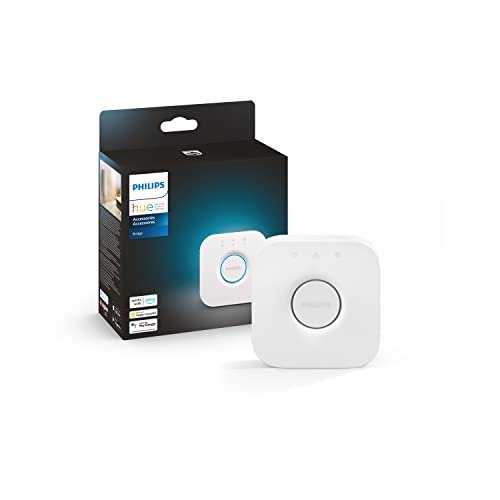
2. Best for Matter and entertainment sync: Philips Hue Bridge (Matter-compatible)
Pros
- Includes one Hue Bridge in the box
- Lights keep working when Wi-Fi is down
- Out-of-home control through the Hue app
- Matter support is listed
Cons
- Supports up to 50 lights and accessories, compared with 150+ on the Pro
- Surround sync requires an HDMI Sync Box, which the listing does not describe as included
- The listing does not mention MotionAware or scene storage limits
The Philips Hue Bridge listing says the package includes one Hue Bridge and uses Zigbee technology for a reliable connection that will not strain your Wi-Fi. Hue lights work when your Wi-Fi is down, and the Hue app lets you control lights from anywhere you have an internet connection, including with your home assistant. You can add up to 50 lights and accessories.
The listing notes that a Hue Bridge is required to control Hue outdoor lights and accessories. It also describes surround lighting that syncs with movies, TV shows, PC and music, which requires an HDMI Sync Box, and it highlights Matter for connecting to other smart home devices. The listed color is White Ambiance.
Best for: A good fit if you want out-of-home control, listed Matter support or movie and music light sync, and you do not need more than 50 lights and accessories.
How to choose the best Philips Hue bridges
When comparing the best Philips Hue bridges, start with the size of your system. Count the lights, plugs and accessories you already own and the ones you may add later. The listings state different capacity: the Hue Bridge Pro supports 150+ lights and 50+ accessories, while the standard Hue Bridge supports up to 50 lights and accessories. Our explainer on local control, scenes and automations covers how hubs handle these jobs.
Next, list the features you will actually use. MotionAware is listed only on the Pro, and it lets Hue lights respond to movement using 3 Hue devices instead of separate motion sensors. Out-of-home control and Matter support are listed on the standard bridge, and its listing says lights keep working when Wi-Fi is down. For movie, TV and music sync, the standard bridge’s listing says you will need an HDMI Sync Box, so plan for that accessory before you buy.
Check compatibility before you buy. Compare the voice assistants and Matter support in each listing with the devices already in your home. If you are still deciding between hubs and simpler gear, our guide to smart bulbs, smart switches and light strips explains where each fits. Matter is a smart home standard described by the Connectivity Standards Alliance.
Finally, follow the manufacturer’s manual for setup, especially if you plan to migrate existing Hue devices to a new bridge. The listings do not describe migration steps in detail, so the manual is the place to check them.
What to look for
- The light and accessory limit stated in the specs
- Whether motion sensing and scene storage are listed
- Matter support and voice assistant compatibility
- Out-of-home control and whether lights work when Wi-Fi is down
- Entertainment sync requirements, such as an HDMI Sync Box
FAQ
Do I need a Hue Bridge to control outdoor Hue lights?
The standard Philips Hue Bridge listing says a Hue Bridge is required to control Hue outdoor lights and accessories. The Hue Bridge Pro listing does not mention outdoor lights, so check the manufacturer documentation before you buy for outdoor use.
Can Hue lights keep working if my Wi-Fi goes down?
The standard Hue Bridge listing says Hue lights work when Wi-Fi is down, because the bridge uses Zigbee. The Hue Bridge Pro listing does not make the same statement.
Which bridge supports more lights?
The Hue Bridge Pro lists support for 150+ lights and 50+ accessories. The standard Hue Bridge lists support for up to 50 lights and accessories.
Does the Hue Bridge Pro support Matter?
The Pro listing does not mention Matter, while the standard Hue Bridge listing does. Check the current listing or manufacturer documentation to confirm compatibility before you buy.
References
- Amazon product listings and manufacturer specifications (accessed November 2026)
- Connectivity Standards Alliance, Matter