 By Colin Foster
Updated November 2026
A graphic tablet with screen lets you draw directly on the display instead of looking at a separate monitor, which makes line work and shading feel far more natural. This guide compares six models by screen size, pen pressure levels, color coverage, laminated glass construction, shortcut keys and compatibility with Windows, Mac and Android. The picks are based on product listings, brand reputation and common owner feedback patterns.
Our top picks at a glance
- 1
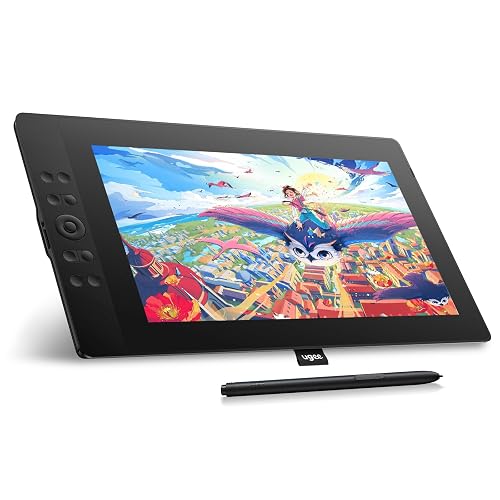 TOP CHOICEBest overallUGEE 15.4 inch Drawing Tablet with ScreenView on Amazon
- 2
 TOP CHOICEBest for beginnersUGEE UE12 11.6 inch Drawing Tablet with ScreenView on Amazon
- 3
 TOP CHOICEBest for portabilityXP-PEN Artist 13.3 Pro V2 Drawing Tablet with ScreenView on Amazon
- 4
 Best for color accuracyHUION Kamvas 13 (Gen 3) Drawing Tablet with ScreenView on Amazon
- 5
 Best for larger canvasXPPen Artist 16 3rd Drawing Tablet with ScreenView on Amazon
- 6
 Best standalone optionWacom MovinkPad 11View on Amazon
Our Top Picks
Quick Comparison
| Product | Best for | Key feature |
|---|---|---|
| UGEE 15.4 inch Drawing Tablet with Screen | Best overall | 143% sRGB, 16K pressure |
| UGEE UE12 11.6 inch Drawing Tablet with Screen | Best for beginners | 124% sRGB, 8 shortcut keys |
| XP-PEN Artist 13.3 Pro V2 Drawing Tablet with Screen | Best for portability | Fully laminated, foldable stand |
| HUION Kamvas 13 (Gen 3) Drawing Tablet with Screen | Best for color accuracy | 99% sRGB, dual dials |
| XPPen Artist 16 3rd Drawing Tablet with Screen | Best for larger canvas | 15.4-inch display, 2 scroll wheels |
| Wacom MovinkPad 11 | Best standalone option | Runs Android, no computer needed |
UGEE 15.4 inch Drawing Tablet with Screen
UGEE 15.4 inch Drawing Tablet with Screen,143% sRGB UE16 Computer Graphics Tablet with Full-Laminated Screen 8+1 Hot Keys 16K Level Pressure Battery-Free Stylus,Drawing Pad for PC/Windows/Mac/Android
Best for: Overall balance of screen size and color coverage.
This model suits illustrators who want a larger working area without moving into premium pricing territory. Owners often praise its 16K pressure levels and 143% sRGB coverage.
Pros
- Large 15.4-inch laminated display
- Eight plus one hot keys for quick shortcuts
Cons
- Needs a stable desk or stand for comfortable use
UGEE UE12 11.6 inch Drawing Tablet with Screen
UGEE UE12 11.6 inch Drawing Tablet with Screen, Graphic Tablet with Full-Laminated Screen, 124% sRGB Color Gamut, Battery-Free Stylus & 8 Shortcut Keys, Drawing Pad Compatible with Windows/Mac/Android
Best for: Beginners learning digital drawing.
A compact entry point for students and hobbyists. The battery-free stylus keeps the setup simple.
Pros
- Affordable-leaning budget pick with full lamination
- Eight shortcut keys for common commands
Cons
- Smaller canvas limits detailed work
XP-PEN Artist 13.3 Pro V2 Drawing Tablet with Screen
XP-PEN Artist 13.3 Pro V2 Drawing Tablet with Screen, 16K Pressure Sensitivity Digital Drawing Tablet for PC Mac Chromebook Android, Fully Laminated Graphic Tablet with Pen, Foldable Stand Included
Best for: Portability and travel sketching.
Works well for artists who move between desk and studio. The included foldable stand adds flexibility.
Pros
- Fully laminated glass reduces parallax
- Foldable stand included
Cons
- Smaller 13.3-inch surface than larger models
HUION Kamvas 13 (Gen 3) Drawing Tablet with Screen
13.3-inch Full-Laminated Art Tablet with Anti-Sparkle Canvas Glass, 99% sRGB, Dual Dials for Digital Art, Designing, Black HUION Kamvas 13 (Gen 3) Drawing Tablet with Screen 16K Pressure PenTech 4.0
Best for: Color-critical digital painting.
Suited to artists who care about accurate color reproduction for print or client delivery. Dual dials add control for brush adjustments.
Pros
- 99% sRGB color coverage
- Dual dials for quick adjustments
Cons
- Anti-sparkle glass can slightly soften fine detail
XPPen Artist 16 3rd Drawing Tablet with Screen
XPPen Artist 16 3rd Drawing Tablet with Screen, 15.4"Pen Display with 16K Pressure Stylus, Anti-Glare Etched Glass, 2 Scroll Wheels & 8 Hotkeys, Include Foldable Stand, Compatible with Mac/Win/Android
Best for: Larger canvas and extended sessions.
A good fit for illustrators and designers who want more workspace and comfortable hand positioning across the display.
Pros
- Anti-glare etched glass reduces reflections
- Two scroll wheels plus eight hotkeys
Cons
- Larger footprint requires more desk space
Wacom MovinkPad 11
No computer needed, 8GB RAM/128GB storage, anti-glare matte screen, All-In-One portable tablet with advanced pen precision Wacom MovinkPad 11, Android Mobile Drawing Tablet, with Pro Pen 3
Best for: Working without a computer.
An all-in-one device for artists who want to sketch away from a desktop. It runs its own Android environment.
Pros
- No computer required
- Anti-glare matte screen with Pro Pen 3
Cons
- App selection depends on Android compatibility
Buying Guide
Screen size and workspace
Larger displays give more room for detailed work but need more desk space. Eleven to thirteen inches suits most portable setups.
Related reading
- Top 5 Pen Tablets with Screen Options for Digital Drawing
- Split Screen Tablet Android: 5 Best Picks for Multitasking in 2026
- Samsung Tablet Home Screen Layout: How to Customize It in 6 Steps
- Samsung Galaxy Tablet Home Screen: How to Customize, Fix and Reset It
- How to Repair Tablet Screen: A Step-by-Step Guide for Beginners
About Colin Foster
Colin Foster is part of our editorial team and reviews and edits our consumer tech how-to & troubleshooting guides, checking product details against manufacturer specifications and owner feedback.