
 By Colin Foster
Updated November 2026
Looking for an art tablet with screen that lets you draw directly on the display? This guide compares four well-regarded options on the criteria that matter most: screen quality and color coverage, pen pressure levels, build and screen coating, and compatibility with your computer or Android device. Each pick is matched to a specific need so you can choose quickly.
Our top picks at a glance
- 1
 TOP CHOICEBest overallHUION Kamvas 13 (Gen 3)View on Amazon
- 2
 Best for budget-minded beginnersUGEE UE12View on Amazon
- 3
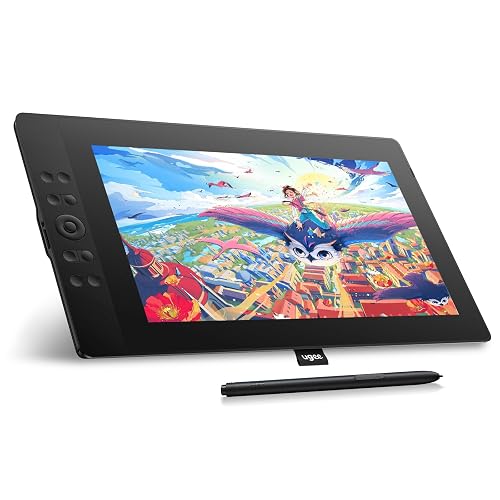 Best for a larger drawing areaUGEE UE16View on Amazon
- 4
 Best for portable sketchingXPPen Artist12 ProView on Amazon
Our Top Picks
Quick Comparison
| Product | Best for | Key feature |
|---|---|---|
| HUION Kamvas 13 (Gen 3) | Overall digital art | 99% sRGB, dual dials |
| UGEE UE12 | Beginners | 124% sRGB, 8 shortcut keys |
| UGEE UE16 | Larger canvas | 15.4-inch, 16K pressure |
| XPPen Artist12 Pro | Portable sketching | Tilt function, 8192 levels |
HUION Kamvas 13 (Gen 3)
13.3-inch Full-Laminated Art Tablet with Anti-Sparkle Canvas Glass, 99% sRGB, Dual Dials for Digital Art, Designing, Black HUION Kamvas 13 (Gen 3) Drawing Tablet with Screen 16K Pressure PenTech 4.0
Best for: Overall digital art with accurate color.
This 13.3-inch model suits illustrators who want a fully laminated screen with anti-sparkle canvas glass and a wide color gamut. Manufacturers list 99% sRGB coverage and 16K pen pressure levels.
Pros
- Full lamination reduces the gap between pen tip and display.
- Dual dials add quick control over brush size and zoom.
Cons
- Heavier than the smaller models on this list.
UGEE UE12
UGEE UE12 11.6 inch Drawing Tablet with Screen, Graphic Tablet with Full-Laminated Screen, 124% sRGB Color Gamut, Battery-Free Stylus & 8 Shortcut Keys, Drawing Pad Compatible with Windows/Mac/Android
Best for: Beginners on a tight budget.
At 11.6 inches, this is a compact entry point for students and hobbyists. Its listing cites 124% sRGB and a battery-free stylus.
Pros
- Battery-free pen keeps setup simple.
- Eight shortcut keys handle common tasks.
Cons
- Smaller work area can feel cramped for large projects.
UGEE UE16
UGEE 15.4 inch Drawing Tablet with Screen,143% sRGB UE16 Computer Graphics Tablet with Full-Laminated Screen 8+1 Hot Keys 16K Level Pressure Battery-Free Stylus,Drawing Pad for PC/Windows/Mac/Android
Best for: A larger drawing area.
The 15.4-inch screen gives more room for detailed linework and layouts. Listed specs include 143% sRGB and 16K pressure levels.
Pros
- Larger screen suits full-page compositions.
- Eight plus one hot keys offer flexible mapping.
Cons
- Bulkier footprint limits portability.
XPPen Artist12 Pro
XPPen Artist12 Pro 11.6" Drawing Tablet with Screen Pen Display Full-Laminated Graphics Tablet with Tilt Function Battery-Free Stylus and 8 Shortcut Keys(8192 Levels Pen Pressure and 72% NTSC)
Best for: Portable sketching on the go.
This 11.6-inch pen display is light enough to carry between locations. It includes a tilt function and 8192 pen pressure levels.
Pros
- Tilt function supports natural shading strokes.
- Compact size fits a backpack easily.
Cons
- Listed 72% NTSC coverage is narrower than some rivals.
Buying Guide
Screen Lamination and Glass
Fully laminated screens bond the glass to the display layer, which reduces the visible gap between pen tip and line. Anti-sparkle coatings reduce glare under room lighting.
Color Gamut
Check the sRGB percentage listed by the manufacturer. Coverage near 100% matters most for print or color-critical work.
Pen Pressure Levels
Higher pressure levels give finer control over line weight. Levels in the 8192 to 16K range are common on current models.
Size and Compatibility
Screen size determines both drawing area and portability. Confirm the device works with your operating system before buying.
Good picks for this: HUION Kamvas 13 (Gen 3), UGEE UE16
FAQ
Do I need a computer to use an art tablet with screen?
Most pen displays connect to a Windows or Mac computer, and some support Android devices. Check the listing for supported systems before purchase.
Is a battery-free stylus better?
Battery-free styluses use no charging, which simplifies setup. They are a common feature on the models in this guide.
What screen size should a beginner choose?
Smaller sizes around 11 to 13 inches are easier to learn on and take up less desk space.
Conclusion
The HUION Kamvas 13 (Gen 3) suits most digital artists who want strong color and quality construction. The UGEE UE12 fits beginners, the UGEE UE16 suits larger canvases, and the XPPen Artist12 Pro works best for portable sketching.
Sources
- Guidance on display measurement and color standards (nist.gov)
- Standards and research on input device performance
Related reading
- Split Screen Tablet Android: 5 Best Picks for Multitasking in 2026
- Samsung Tablet Home Screen Layout: How to Customize It in 6 Steps
- Samsung Galaxy Tablet Home Screen: How to Customize, Fix and Reset It
About Colin Foster
Colin Foster is part of our editorial team and reviews and edits our consumer tech how-to & troubleshooting guides, checking product details against manufacturer specifications and owner feedback.



