 By Lauren Holland
Updated November 2026
A halo power bank charger is a portable battery that uses a ring-shaped or halo-style design to charge a device, typically by pairing with a phone or accessory through magnets or a ring-like contact. This guide will help you figure out what a halo power bank charger actually does, how to choose one that fits your devices, how to use it without wasting power, and how to diagnose the most common problems. Think of it as a case file: we start with the symptoms, narrow down the causes, and finish with the fix.
What a Halo Power Bank Charger Actually Is
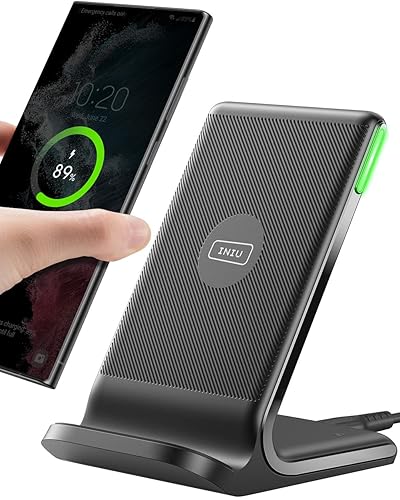
The term “halo” is used loosely in the consumer market, so the first step is pinning down what you are looking at. In most listings, a halo power bank charger refers to a compact battery pack with a circular or ring-shaped surround that either holds a phone in place, aligns a wireless coil, or doubles as a stand. Some use magnets to lock onto the back of a phone. Others use a ring that houses a charging coil for Qi-style wireless charging. A few are simply USB-C or Lightning power banks with a ring-shaped stand attached.
Shopping for one? See our guide: Dell Laptop Battery Charger Review: Is the JUOVI 65W Power Bank Worth It?.
Before you buy or troubleshoot, check the product page for three things: whether the charging is wired (USB-C or USB-A cable), wireless (Qi or MagSafe-compatible), or both; the battery capacity in mAh; and the maximum output in watts. Those three details determine nearly everything about how the unit behaves.
Step 1: Confirm Your Device Compatibility
Most charging problems start with a mismatch between the charger and the phone or accessory. Start by answering these questions:
- Does your phone support wireless charging at all? Check the manufacturer’s specifications. Many budget phones do not.
- If you plan to use magnetic alignment, does your phone case block the magnets? Thick cases, metal plates, and some card wallets can reduce or break the magnetic connection.
- What is the maximum wireless charging speed your phone accepts? Manufacturers usually list this as 7.5W, 15W, or higher.
- If the unit has a USB-C port, does your cable and phone support USB Power Delivery (PD)?
If you are unsure how these standards differ, the site’s guide on USB-C Chargers, Power Banks and Wireless Chargers Explained breaks down the terminology in plain language. If you want more background, see Phone Charger Safety Basics and USB Power Delivery.
Step 2: Choose the Right Capacity and Output
Capacity is listed in milliamp-hours (mAh), but what you actually get is lower than the printed number. Power is lost during voltage conversion, so a 10,000mAh battery typically delivers somewhere around 60 to 70 percent of its rated energy to a phone. The table below gives a practical starting point.
| Battery Capacity | Typical Use | Approximate Phone Charges | Best For |
|---|---|---|---|
| 5,000 mAh | Light daily top-ups | About 1 full charge | Commuting, pocket carry |
| 10,000 mAh | Everyday use | About 2 full charges | Full workday away from an outlet |
| 20,000 mAh | Travel and heavy use | About 4 full charges | Multi-day trips, tablets |
For wireless output, a 5W to 7.5W rating is common and slower than wired charging. If you want faster results, look for a unit that also supports wired PD at 18W or higher. Our breakdown of Understanding USB-C Charger Wattage and Power Delivery explains how wattage ratings translate into real charging speed.
Step 3: Use the Halo Power Bank Charger Correctly
Good habits make a noticeable difference in how long the battery lasts and how fast your phone charges.
- Fully charge the halo unit before its first use. Most manufacturers recommend this for initial calibration.
- Remove thick cases or metal accessories before placing the phone on a magnetic or wireless halo surface.
- Center the phone over the coil or ring. Off-center placement is the single most common cause of slow or intermittent charging.
- Keep the unit on a hard, flat surface while charging. Soft surfaces like bedding can trap heat.
- Unplug the power bank from its own input once it reaches full charge. Leaving it plugged in continuously is not recommended by most battery makers.
Step 4: Diagnose Common Problems
When a halo power bank charger stops working as expected, work through the symptoms in order rather than replacing parts at random.
The phone does not start charging
Check the indicator light on the power bank first. If it does not illuminate, the internal battery is likely depleted. Connect it to a known-good USB-C cable and a wall adapter rated at 18W or higher, then wait 10 to 15 minutes before testing again. If the phone still does not respond, remove the case and try again, since case material is the most frequent culprit with magnetic models.
Charging is slow or stops and starts
Slow wireless charging usually points to alignment, heat, or a phone that has entered thermal throttling. Move the phone to center, close any background apps, and avoid using it heavily during charging. Owners often report that removing a case improves speed noticeably, which suggests the case is adding distance between the coil and the phone’s receiver.
The power bank gets hot
Some warmth is normal during wireless charging, since energy transfer through a coil generates heat. Excessive heat, however, is a warning sign. If the unit is too hot to hold comfortably, stop using it, move it to a cooler area, and let it rest. Repeated overheating can degrade the battery over time.
The battery drains faster than expected
Check the rated capacity against what you are getting. A 10,000mAh unit delivering only one full phone charge is within the normal range, not necessarily a defect. Also check whether the unit is being used to power a device that draws more than its rated output. A high-draw tablet, for example, can deplete a small pack quickly.
Step 5: Store and Maintain the Battery
Lithium-based batteries last longest when stored at a partial charge, roughly 40 to 60 percent, in a cool, dry place. Avoid leaving the unit in a hot car or direct sunlight. If you do not use it for several months, top it up to around half charge and check it periodically. For more on battery health and product selection, see How to Choose a Power Bank: Capacity and Key Features.
Common Mistakes
- Assuming wireless equals fast. Wireless output is usually slower than a good wired connection.
- Ignoring the case. Thick or metal-backed cases are a leading cause of failed magnetic connections.
- Using a weak wall adapter. A 5W phone brick will bottleneck any power bank, regardless of its rating.
- Buying on capacity alone. A high mAh number with low output may charge your phone more slowly than a smaller, faster unit.
- Charging in a warm environment. Heat is the main enemy of battery lifespan.
Tips for Getting the Most Out of Your Halo Setup
- Use a cable and adapter that are both rated for the wattage you need.
- Keep the magnetic surface free of debris, sticky residue, and card stacks.
- Check the phone’s battery health settings. Some phones limit charging speed to protect the battery.
- If you use the unit daily, consider one with pass-through charging so the phone and pack can charge together efficiently.
Recommended gear
A few accessories can make a halo power bank charger noticeably more reliable.
- Anker MagGo Power Bank 5K Slim is a compact magnetic option that illustrates how slim magnetic packs keep the phone aligned. View on Amazon
- Anker Maggo Power Bank 10K Slim offers more capacity in a similar magnetic format, useful if you want a full workday of backup. View on Amazon
- Anker 511 Charger is a single-port USB-C wall adapter that supplies the wattage needed for faster input charging. View on Amazon
- Anker USB-C to USB-C Cable with PD support helps ensure the cable is not the bottleneck during wired charging. View on Amazon
FAQ
Is a halo power bank charger the same as a wireless charger?
Not always. Some halo units are wireless pads with a ring design, while others are standard battery packs with a ring-shaped stand. Check whether the product lists Qi or MagSafe-compatible wireless output.
Will a halo power bank charger work with any phone?
Only phones that support wireless charging will benefit from the wireless function. Wired charging works with any USB-C or compatible device, subject to the phone’s own charging standard.
Why does my phone charge slowly on a halo unit?
The most common causes are off-center placement, a thick or metal case, low wireless output, or the phone limiting its charge speed to protect the battery.
Is it safe to leave a halo power bank charger plugged in overnight?
Most battery makers advise against leaving any power bank plugged in continuously. Once full, unplug it. If you need to charge overnight, choose a unit with built-in charge management and place it on a hard surface.
How long does a halo power bank charger last?
Lithium batteries typically retain a useful share of their capacity for several hundred full charge cycles. Storing the unit at partial charge and avoiding heat extends its life.
Can I use a halo power bank charger in an airplane?
Power banks are generally allowed in carry-on luggage but must not be checked. Rules on capacity limits vary by airline and country, so confirm with your carrier before you fly.
Why does the unit get warm when charging?
Energy transfer through a wireless coil generates some heat. Mild warmth is normal. If it becomes too hot to hold, stop using it and let it cool down.
What should I do if my halo power bank charger stops working completely?
Try a different cable and wall adapter first. If the indicator light still does not respond after a charging rest, the unit may need to be replaced. For battery safety concerns such as swelling, stop using it immediately and consult the manufacturer or a qualified professional.
Conclusion
A halo power bank charger is only as good as its match to your phone, its capacity, and how you use it. Start by confirming compatibility, then choose a capacity that fits your routine. Use good placement habits, and when something goes wrong, work through the symptoms in order rather than guessing. With those steps, you should be able to get reliable, safe charging every day.
Ready to choose one?
About Lauren Holland
Lauren Holland is part of our editorial team and reviews and edits our consumer tech how-to & troubleshooting guides, checking product details against manufacturer specifications and owner feedback.